1Password Business Pricing 2026 — Cost Per Headcount and Teams Starter Pack Comparison
Breakdown of 1Password business plans (Teams Starter Pack, Business, Enterprise) with official per-seat pricing. Annual cost models for teams of 5, 20, 50, and 150, SSO/SCIM differences, and the hidden Families license perk explained with first-party sources.
This article contains affiliate links (advertising).
1Password's business lineup is structured in three tiers — Teams Starter Pack, Business, and Enterprise — and the right choice is driven less by feature checklists than by headcount and governance maturity. The price gap between tiers can look misleading on the surface, so this guide turns the official per-seat pricing into ready-to-paste numbers for teams of 5, 20, 50, and 150 employees. We then surface the hidden Families license perk packed into every Business seat, the operating cost savings from SCIM provisioning, and the practical signals that it is time to move from Business to Enterprise. Where possible, we also note the spots where finance and HR conversations tend to break down so your proposal arrives without surprises.
The Three Tiers of 1Password Business Plans
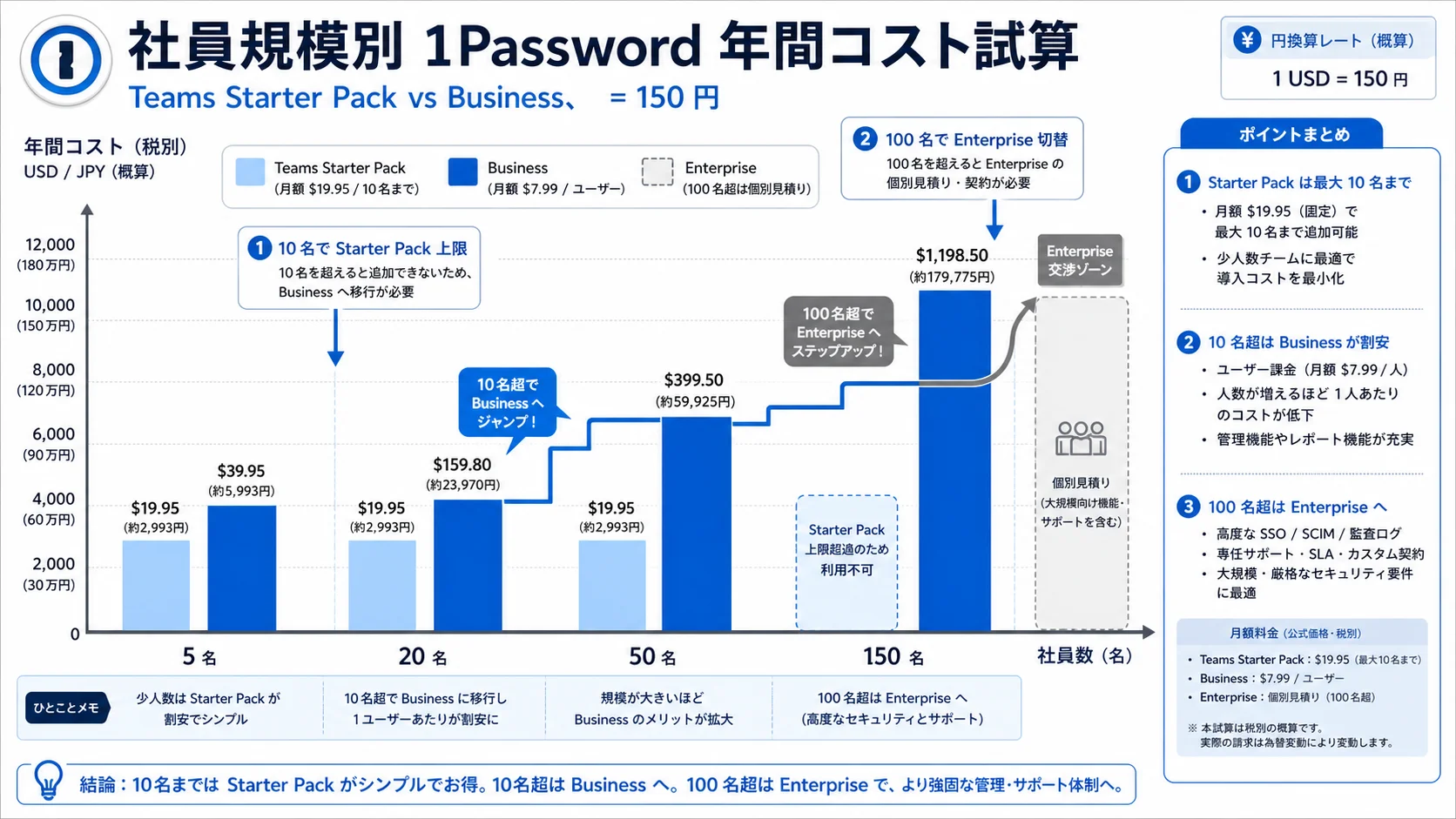
1Password offers three tiers for organizations: Teams Starter Pack, Business, and Enterprise. They live on a separate billing axis from the Individual and Families consumer plans, with tenant-level isolation, shared vaults, an admin console, and activity logs reserved for business-grade tiers.
Teams Starter Pack: Flat-rate for very small teams
- Price: $19.95/month for up to 10 users (annual billing, no further discount)1
- Core features: Unlimited shared vaults, guest seats, Slack and Microsoft Teams notifications, baseline admin console
- Fit: Early-stage startups, professional services firms, family-run retail chains with 5 to 10 staff
At ten users, the effective seat cost is $1.99/user/month — far cheaper than Business. The trade-off is governance maturity: SSO, SCIM provisioning, and detailed audit logs are not included. For founders or small partnerships who run their own identity management manually, that is usually acceptable; for any team aiming for ISO 27001 or SOC 2 readiness within the next 18 months, the absence of SCIM becomes a planning blocker.
Business: The standard for mid-sized organizations
- Price: $7.99/user/month with annual billing2
- Core features: SSO (Okta, Azure AD, Google Workspace, Microsoft Entra), SCIM provisioning, Activity Log, Domain Breach Report, free Families plan for every employee, recovery vault for departing seats
- Fit: 10 to 200 employees, at least one dedicated IT operations person, organizations approaching ISO 27001, SOC 2, or Japan's Privacy Mark certification
Business is not a "premium Starter Pack" — it is a governance bundle. CSV import, vault hand-off during offboarding, and organization-wide Watchtower (vulnerability monitoring) unlock at this tier. The Activity Log also feeds into audit evidence packages, which becomes a non-trivial advantage when compliance teams ask for "who accessed which credential and when" reports.
Enterprise: Large-scale and high-requirement deployments
- Price: Custom quote, typically with volume and multi-year discounts
- Core features: Dedicated Customer Success Manager, advanced SAML/OIDC tuning, SLA, red-team testing, custom onboarding, increased API rate limits
- Fit: 100+ employees, or finance, healthcare, and public-sector teams with strict external audit requirements
Mid-sized companies rarely jump straight to Enterprise. The usual path is to run on Business and renegotiate at renewal when scale and external audit needs justify the upgrade.
Annual Cost by Headcount
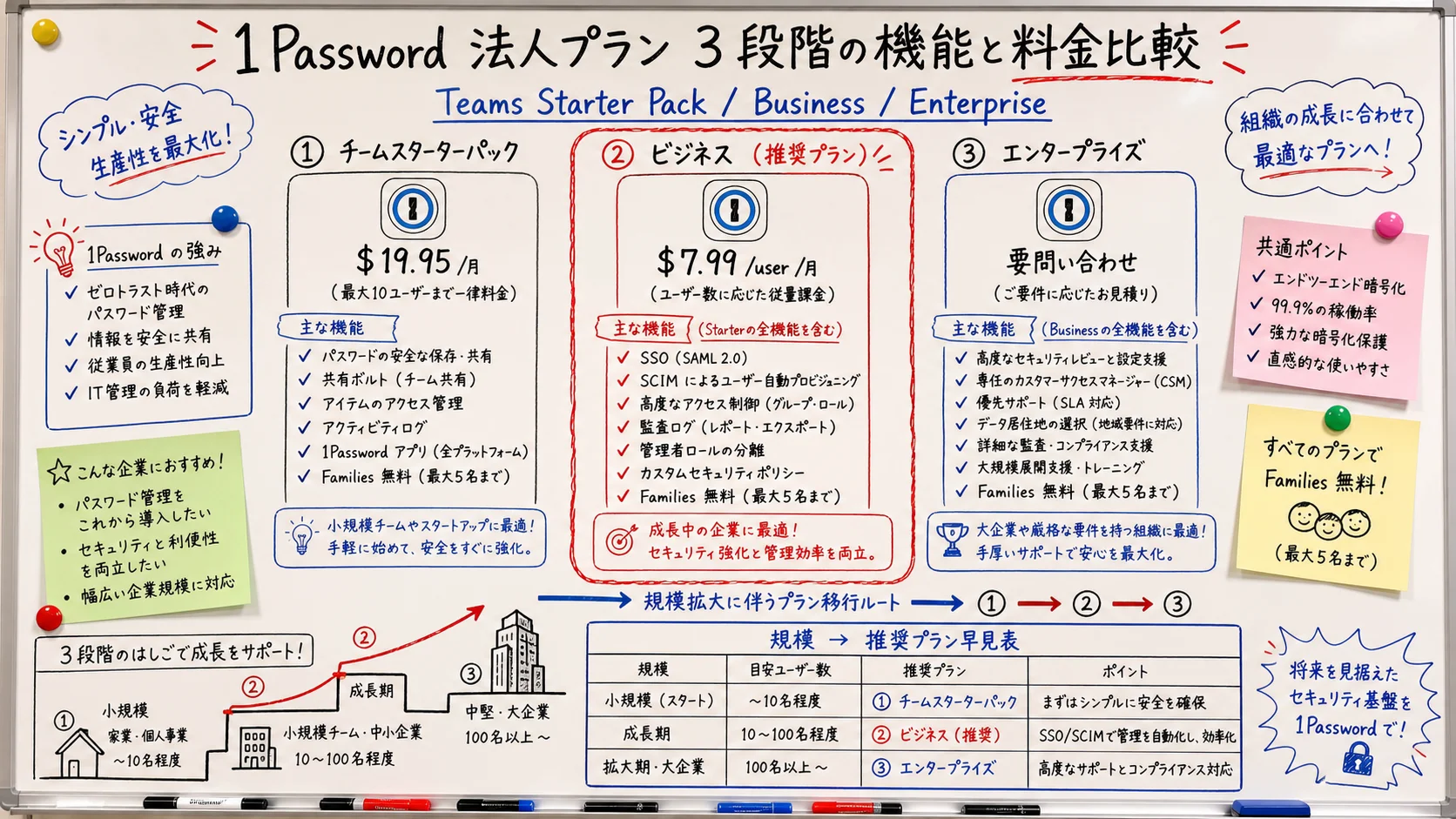
Now to the actual dollars. Below are four scenarios — 5, 20, 50, and 150 employees — using public per-seat pricing. JPY conversion uses an indicative ¥150/USD rate as of May 2026.
5 employees: Teams Starter Pack is the bargain
- Teams Starter Pack: $19.95 × 12 = $239.40/year (~¥35,910)
- Business: $7.99 × 5 × 12 = $479.40/year (~¥71,910)
A five-person team is the textbook case for Starter Pack. As long as SSO and SCIM are not needed and Google Workspace SSO add-ons cover identity sync, the gap of roughly $240/year is real cash saved. The only caveat: if you plan to grow past 10 users within 12 months, lock in the Business contract early to avoid a chaotic mid-year migration.
20 employees: Business is the only option
- Teams Starter Pack: Capped at 10 users, no longer eligible
- Business: $7.99 × 20 × 12 = $1,917.60/year (~¥287,640)
Once you cross 10 users, Business is mandatory. The free Families license per seat (~$59.88/year per employee) effectively offsets a chunk of the per-seat cost, so the apparent $7.99/month behaves more like $4.99/month after the family benefit is counted as employee compensation. For 20 employees that perk is worth roughly $1,200/year in total household coverage.
50 employees: Business plus selective Enterprise muscle
- Business: $7.99 × 50 × 12 = $4,794/year (~¥719,100)
- Annual contracts and Families perk communication compound the ROI
For teams approaching ISO 27001 or SOC 2 audits, or rotating staff with frequent on- and offboarding, SCIM provisioning alone tends to save dozens of IT-admin hours per year. At this scale it is also worth asking the 1Password sales team about volume packs or paid onboarding support; while the sticker price does not drop, you can sometimes negotiate added training credits to fold into the same line item.
150 employees: Time to negotiate Enterprise
- Stay on Business: $7.99 × 150 × 12 = $14,382/year (~¥2,157,300)
- Enterprise: No public pricing; volume discounts of 10 to 25% off Business are typical at this scale
Past 100 employees, having a direct Customer Success manager, custom SAML attribute mappings, and bespoke onboarding becomes meaningful. Going into the first sales meeting with current Business spend and a one- to three-year headcount plan dramatically improves quote quality. Bring two or three example use cases that have caused friction on Business (for example "we need an isolated vault that auto-deletes secrets after 30 days") so the sales engineer can demonstrate the Enterprise-only features that justify the upgrade.
1Password's official account regularly highlights how Business unifies SSO, SCIM, and Activity Log into a single password-and-secrets platform that mid-sized organizations rely on.
"Business customers get a free Families plan for personal and family use — a perk that is easy to overlook." (Paraphrased from the original X post.)
Three Hidden Reasons Business Pays Off
On paper Business looks more expensive than Starter Pack, but three quieter levers — a free Families license per employee, SCIM-driven lifecycle automation, and organization-wide Watchtower — usually tilt the math.
1. Free Families license per seat (~$59.88/year value)
1Password Business ships with the Linked Personal Account feature, granting each employee a Families plan covering up to five household members at no extra cost34.
From an HR perspective, this is recruiting collateral — you can list "1Password Families benefit included" alongside the standard health and learning perks. For a 50-person company, that is $59.88 × 50 = ~$2,994/year (≈¥450,000) of household-level security spending delivered at zero incremental cost. Another upside: when an employee leaves, they retain ownership of the Families instance and can convert it into a personal subscription, so there is no awkward conversation about cutting off a partner's saved passwords on the last day. For the underlying personal-versus-family math, our companion article 1Password Individual vs Families comparison walks through the break-even by household size.
2. SCIM provisioning: Identity sync that saves hours
- Onboarding: Adding a user in Azure AD / Google Workspace creates the 1Password Business account automatically
- Offboarding: Deactivating the user in HR systems suspends 1Password access in lockstep
- Mobility: Group changes flow through SCIM, so vault permissions follow the org chart
For a 50-person company with roughly 10 hires and 20 internal moves per year, manual provisioning at ~15 minutes per event totals 7.5 hours. The direct hourly savings are modest, but the avoided risk of leaving an offboarded user with active vault access is the bigger win — security incidents tied to dormant credentials regularly show up in industry breach reports, and the cost of one such incident dwarfs the entire Business contract.
3. Organization-wide Watchtower: Compromise monitoring as a default
Business unlocks org-wide Watchtower, so admins can see at a glance if any employee is reusing a credential surfaced in Have I Been Pwned. The dashboard also flags expiring two-factor secrets and weak vault passwords, which gives compliance teams a continuous heat map of credential hygiene without writing custom scripts. Pairing this with audit logs and least-privilege rollout becomes the foundation of zero-trust authentication for credential management.
Three Pitfalls to Resolve Before Sign-Off
Per-seat pricing is only part of the bill. To avoid surprise operational costs after rollout, smooth out the three items below at the proposal stage.
Pitfall 1: SSO licensing dependencies
Some identity providers require their own paid tier for SAML or SCIM. For example, Microsoft Entra ID Free does not include SCIM, so jumping to Entra ID P1 becomes a hidden line item in the 1Password Business business case. Make sure IT budget owners count both contracts when comparing total cost of ownership; this is one of the more common ways a sign-off gets unexpectedly delayed at the last minute.
Pitfall 2: Vault hand-off during offboarding
Business lets admins reclaim shared vaults, but the Linked Personal Account (the family's Families plan) is tied to the individual. Decide upfront whether departing employees keep that benefit, and write the policy into your offboarding runbook before launch — otherwise both HR and the leaving employee will hesitate at the worst possible moment. The default best practice is to let them keep it, since the cost to the company is zero and the goodwill benefit is real.
Pitfall 3: FX exposure on USD invoices
Monthly USD invoicing fluctuates with the spot rate. Annual prepayment locks the rate for the year, which is usually preferred by finance teams above 20 seats. Either way, plan it intentionally rather than letting the default catch you mid-budget cycle; finance teams also tend to appreciate having a single annual invoice they can attach to the audit trail instead of twelve monthly ones.
Summary: Treat Business as a Governance Insurance Premium
1Password Business looks expensive next to Teams Starter Pack on a sticker-price basis, but once you bundle SSO, SCIM, audit logs, and the free Families benefit into a single line item, it becomes the most efficient option for any team above 10 employees.
- ≤5 employees → Teams Starter Pack
- 10 to 100 employees → Business (with the hidden Families perk)
- 100+ employees → Plan the Enterprise negotiation at next renewal
In sign-off conversations, the most persuasive framing is to express Business as roughly $10,000/year of insurance against credential-related incidents, layered on top of measurable IT-admin time savings, rather than as a raw productivity SaaS line. The combination of a Families perk that doubles as an employee benefit, SCIM that removes manual provisioning toil, and Watchtower that surfaces credential reuse before it becomes a security event is hard to replicate with separately-purchased tools at any comparable price point.
1Password's official account also highlighted being named to the 2026 "Rising in Cyber" list, reinforcing enterprise trust signals when you escalate the conversation to executives.
Information current as of 2026-05-24. Please check the official site for the latest updates.
This article contains affiliate links.
Footnotes
-
1Password Official: "Pricing — Teams Starter Pack" https://1password.com/teams (as of May 2026) ↩
-
1Password Official: "Pricing — Business" https://1password.com/business (as of May 2026) ↩
-
1Password Official: "Business plan features — Linked Personal Account" https://1password.com/business (as of May 2026) ↩
-
1Password Support: "About Linked Personal Accounts" https://support.1password.com/linked-personal-accounts/ ↩
Frequently asked questions
Related articles
1Password Individual vs Families 2026 — Break-Even and SourceNext
SMB Password Management With 1Password: Vaults & Offboarding