SMB Password Management With 1Password: Vaults & Offboarding
How SMBs run password management with 1Password: three-tier vaults, same-day offboarding, Watchtower monitoring, and why forced rotation backfires.
This article contains affiliate links (advertising).
At companies of 10–50 people, running passwords out of spreadsheets, sticky notes, and browser storage quietly stacks up two risks: reuse and stale access from people who have left. This guide turns 1Password into a repeatable operating model even a small team can run — three-tier vault design, same-day offboarding, and breach monitoring with Watchtower — plus what to decide before you start and a quick troubleshooting table so you don't stall mid-rollout.
Where SMB Password Operations Break Down, and What to Settle First
What breaks SMB password operations is less about having a tool and more about how sharing is done.
The Limits of Sticky Notes, Spreadsheets, and Browser Storage
The common pattern: shared-account passwords live in a spreadsheet, a shared folder, or on sticky notes, and the same password is reused across services. One leak cascades to every account that reused it, and when someone leaves, passwords rarely get changed and simply linger for months.
It's worth naming why free browser storage or spreadsheets fall short. Browser storage is tied to a local device, so it's hard to share, inventory, or revoke, and a spreadsheet can't tell you who currently knows a value. Neither approach leaves an audit trail, so after an incident you can't answer "who had this credential and when." The result is that every departure or contract end leaves related passwords un-audited, and missed changes quietly become the norm.
A password manager like 1Password solves the sharing and revocation problem at the level of a "vault." 1Password pairs your master password with a device-only Secret Key in a two-layer design, and never sends the master password to its servers — a zero-knowledge model. Even if the server side is breached, stored data is hard to reconstruct, which is a different security posture from a shared spreadsheet.
Four Things to Settle Before You Roll Out
Before you touch the tool, deciding these four points up front prevents rework later:
- Inventory the accounts: list every credential multiple people touch — shared SaaS, social, Wi-Fi, servers, banking
- Name the admins (owners): at least two, so a single departure doesn't lock you out
- Rough-in the plan: Teams Starter Pack around 10 people, Business if you expect growth
- Define contractor sharing: who gets which vault, and until when
Large credential leaks prey on reuse. In a widely discussed ISP-related breach in June 2026, the repeated advice was to change passwords and stop reusing them across services.
"Massive ISP email and password leak (J:COM, Nifty, BIGLOBE and others, ~14.22M accounts). Change your passwords now and stop reusing them." (Translated from the Japanese original.)
Whether a leak like that hurts you depends on whether you've already killed reuse and kept one password per service. For an SMB, it's worth guaranteeing that with a system rather than relying on individual willpower.
A Rollout Checklist a 10-Person Team Can Run Fast
Here's how a team of about 10 gets to a running state quickly. The key is to lock in the three-tier vault design first, then do invitations and rule communication as a single motion so nothing is half-configured.
- Create the admin account and grant billing/owner rights to two people
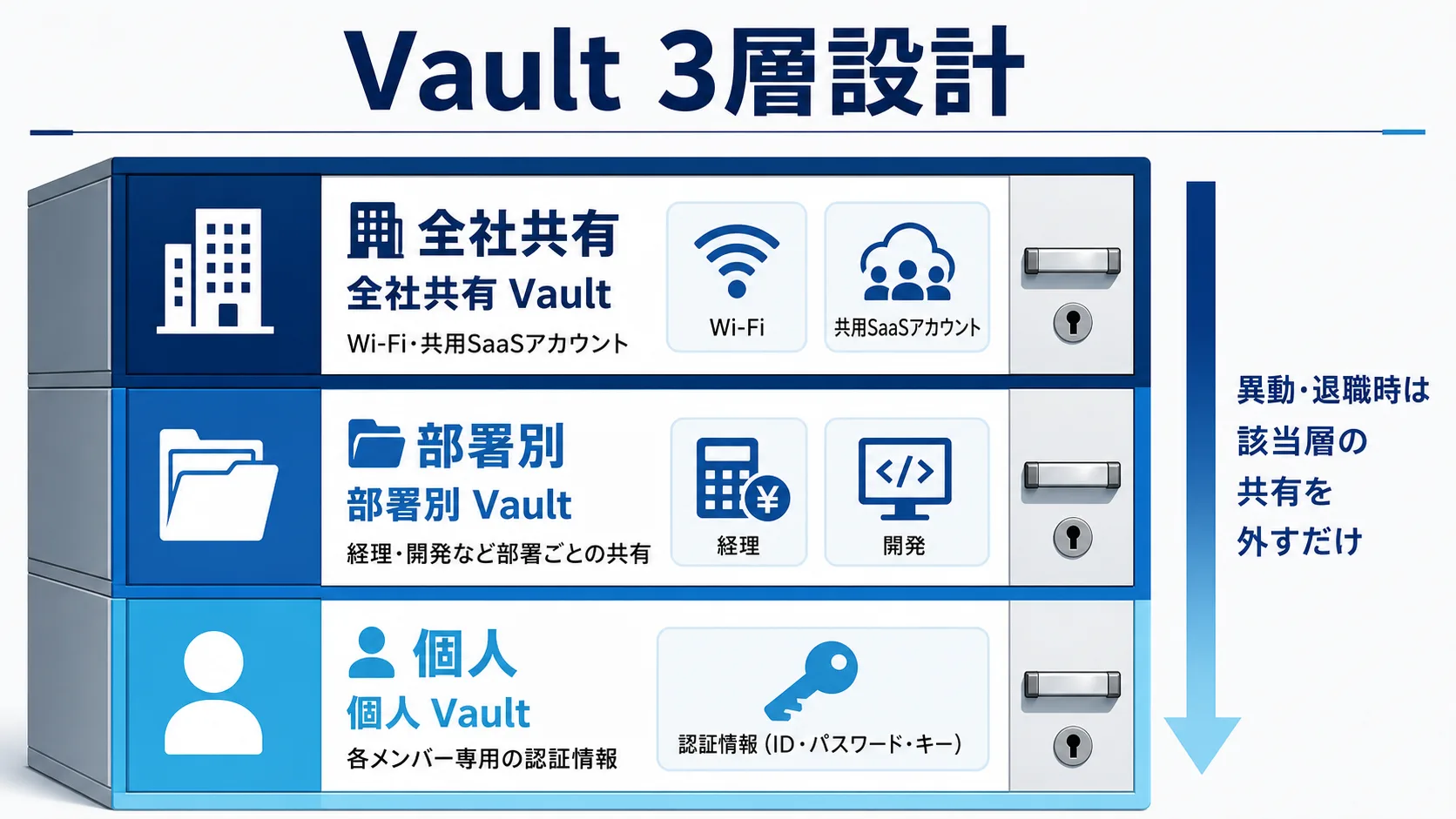
- Design vaults in three tiers: company-wide shared / department or team / individual
- Import credentials from existing spreadsheets and browser storage, then prune duplicates and dead entries
- Invite members and assign only the vaults for their team
- Communicate the rule: sharing happens only through 1Password — no personal notes
- Use Watchtower to surface weak, reused, and breached passwords, and replace them in priority order
The three-tier vault design is the foundation of access control. Put the SaaS everyone uses in the company-wide vault, job-specific credentials (finance, engineering) in department vaults, and each person's logins in their individual vault. Then a transfer or departure becomes a matter of "which vault sharing do I remove," which makes inventory far easier and leaves less room for a forgotten shared login.
Resist the urge to create a vault per project on day one; start with these three tiers and split further only when a real access boundary appears. Over-fragmented vaults are as hard to audit as a spreadsheet.
Once the team grows past 10 and you need SSO or audit logs, 1Password Business becomes the realistic answer. Business adds SSO, SCIM provisioning, and admin-facing audit logs, so you graduate from manual invitations and hand inventory to automated joiner/leaver flows tied to your identity provider.
Operating Rules and Why "Forced Rotation" Backfires
The trick to making operations stick is keeping the rules simple with no exceptions.
The Two Rules to Enforce First
Two rules matter most for an SMB. One: sharing happens only through 1Password — never paste raw passwords into chat or email. Two: review vault sharing at every hire, departure, and contract start or end. Those two alone sharply reduce reuse and abandoned access. Rules are more likely to hold if you add one line to your onboarding checklist than if you print a poster nobody reads.
Drop Rotation for Auto-Generation and Monitoring
Scheduled password changes — say, a company-wide reset every 90 days — are now considered counterproductive. NIST's guidelines (SP 800-63B) advise against periodic changes absent evidence of compromise1, because forced resets breed guessable variants and end up weaker.
For an SMB, it's safer to drop scheduled rotation and switch to "long, complex auto-generation plus breach monitoring." 1Password ships strong password generation and Watchtower breach monitoring by default, which suits an approach that doesn't lean on forced rotation to feel secure.
A Quick Table of Early-Rollout Pitfalls
Here's a quick table of the pitfalls that trip up early rollouts.
| Symptom | Cause | Fix |
|---|---|---|
| Members hoard logins in a private vault; nothing gets shared | Private vs. shared vault usage not communicated | Standardize on moving shared items into the right team vault |
| Invitation emails don't arrive; signups stall | Spam filtering / expired invite links | Resend from the admin console and pre-brief staff to expect it |
| Reuse isn't dropping | No clear priority for bulk replacement | Replace in Watchtower's warning order, starting with critical SaaS |
| Contractor sharing persists after they leave | Un-sharing left to individuals | Make un-sharing a rule anchored to the contract end date |
The rollout phase also demands care around phishing that impersonates official sites. SMB-focused IT providers have warned about fake sites and fake apps that mimic password managers (1Password included) to steal master passwords.
"Beware phishing that mimics password-manager sites (including 1Password) and fake apps to steal your master password — take care during rollout." (Translated from the Japanese original.)
How to spot AI-assisted phishing and build layered defenses is covered in detail in our guide to phishing defense in the age of generative AI — useful as onboarding training material too. Once you've internalized the fixes above, the fastest next step is validating your own vault design in a free trial.
Offboarding and Verifying "Did the Settings Actually Take?"
Departures and contract ends are when an SMB's leak risk peaks.
The Offboarding Sequence
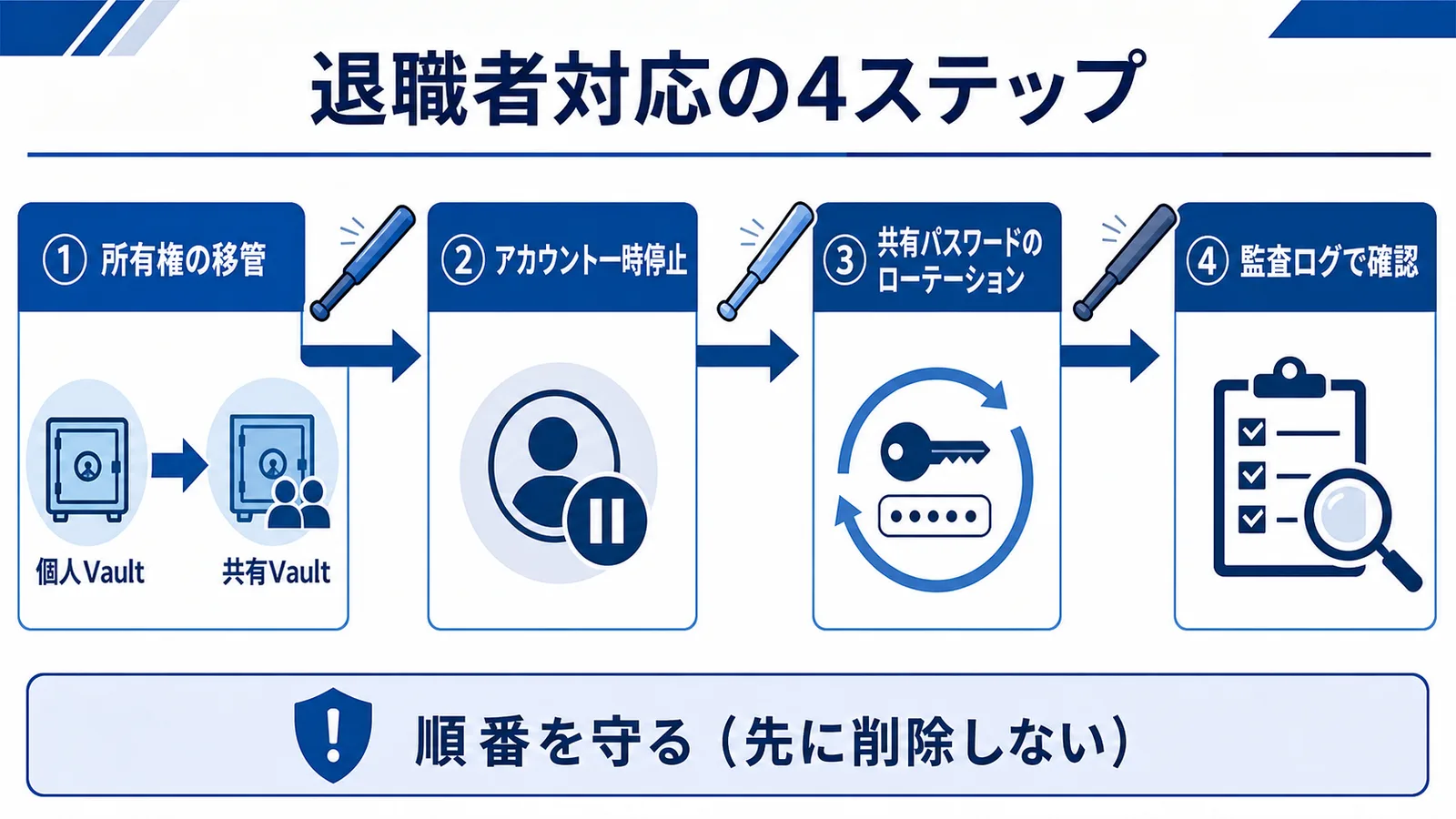
The core of safe handoff is "transfer ownership before you disable." The steps:
- Move work items the departing person kept in their private vault to a successor or shared vault
- Suspend the departing account to cut access the same day
- Rotate any shared-account passwords only that person knew
- Check the audit log for access history and any unexpected exfiltration
Verify With Watchtower and Audit Logs
You can verify the settings actually took using Watchtower. Watchtower lists weak, reused, and known-breached passwords (via Have I Been Pwned) — a monitoring feature standard in 1Password Business that helps you prioritize replacements2. Confirming that "reuse" has hit zero is a quick way to expose gaps in your operations before an attacker finds them.
When you reach the stage of keeping evidence, you'll need to design audit logs that record who accessed which item and when. How to capture logs and integrate a SIEM is covered in our 1Password audit log operations guide. And because 1Password never sends the master password to its servers, that design is also reassuring for offboarding.
"1Password never sends your master password to its servers (Secret Key + SRP-6a), unlike the LastPass breach — CSIRT teams should prioritize zero-knowledge designs." (Translated from the Japanese original.)
With this zero-knowledge design, even if the server side is compromised, the risk of stored data leaking outright is contained. For an SMB, that removes one assumption you have to defend with a thin IT team.
Which SMBs It Fits — and Which It Doesn't
Centralizing on 1Password fits organizations with many shared accounts and regular movement of employees or contractors. Conversely, a shop of a few people with almost no external sharing and a single, uniform device environment may get by on free built-in browser storage or an open-source option for now. Unlike free browser storage or single-purpose tools, though, 1Password bundles shared vaults, audit logs, and SSO/SCIM into one tool, so the value of not stitching several products together compounds as you grow. Judge by your count of shared accounts and how often people leave or contracts turn over, not by headcount alone.
Here are the concerns that come up before adoption, with answers:
- Can I try it free? Business and Teams offer a 14-day free trial, so you can validate your vault design at production fidelity before committing
- Is it usable in Japanese? Both the app and browser extensions support Japanese display
- Can I move existing data? It imports from spreadsheets/CSV, browsers, and other password managers
- Can I get my data out if I cancel? Export lets you write items out, so lock-in worries are modest
The payoff is easiest to see in the time you stop losing. When there's no forced-rotation churn, no "who has the Wi-Fi password" thread, and no manual audit of a spreadsheet at every departure, a small team gets those hours back. We won't promise a specific figure — the gain depends on how many shared accounts and departures you have — but for most SMBs the recovered admin time comfortably covers the license.
Keep the cost reference in mind too. The small-team Teams Starter Pack is a flat $24.95/mo for up to 10 users (¥3,700, billed annually), and Business is $8.99/user/mo (¥1,350, billed annually) as the official reference figures as of 2026 (annual-billing basis; monthly costs more — confirm the latest on the official pricing page)3. Break-even by headcount and choosing between Teams and Business are laid out in our 1Password Business pricing comparison.
Wrap-up: Start Small, Protect It With Operating Rules
For an SMB, password operations hinge less on adopting a feature-rich tool and more on settling the "operating model" first: three-tier vault design, sharing rules, and same-day disablement on departure. Even with 1Password, if you carve out company-wide, department, and individual tiers and start by killing reuse with Watchtower, a 10-person team can run it comfortably. Drop old habits like scheduled rotation and replace them with auto-generation and breach monitoring. When in doubt, trying your vault design in the 14-day free trial is the first step.
Information current as of 2026-07-14. Please check the official sites for the latest updates.
This article contains affiliate links.
Footnotes
-
NIST Special Publication 800-63B, "Digital Identity Guidelines." https://pages.nist.gov/800-63-3/sp800-63b.html ↩
-
1Password Watchtower (official support). https://support.1password.com/watchtower/ ↩
-
1Password pricing (official). https://1password.com/pricing ↩
Frequently asked questions
Related articles
1Password Business Pricing 2026 — Cost Per Headcount and Teams Starter Pack Comparison
1Password Audit Log Operations 2026 — Events API, SIEM Integration, and SOC 2 / ISO 27001 Evidence