1Password Teams vs Business: Pick by Headcount & Features
Compare 1Password Teams Starter Pack and Business by pricing break-even and feature gaps (SSO, SCIM, audit logs) to pick the right plan by headcount.
This article contains affiliate links (advertising).
1Password offers two business-facing plans, Teams Starter Pack and Business, and your choice changes both cost and available features. The short answer: if you have around 10 or fewer people and do not need SSO or audit logs, the flat-fee Teams plan wins on price; if you expect to keep growing or need SSO, SCIM, or org-wide Watchtower, Business is the baseline. This guide breaks down the pricing math and the feature gaps, then tells you which to pick by headcount and requirements.
When the Teams vs Business Choice Gets Hard
1Password's business lineup has two tiers: the Teams Starter Pack, a flat fee that covers up to 10 people, and 1Password Business, a per-user plan with unlimited seats. Both exist to manage passwords centrally so that credentials do not live in browsers, spreadsheets, or a single employee's head. Where they differ is the maturity of the organization they are built for: one assumes a handful of people who trust each other, the other assumes an admin who has to prove who can access what.
The decision usually gets hard when you sit at one of these thresholds:
- Your headcount is right around 10 and you cannot tell whether flat fee or per-user is cheaper.
- You just hired an IT admin and now want the "machinery" of SSO and audit logs.
- You are small today but expect to grow within six to twelve months.
- A customer, auditor, or security questionnaire has started asking how you control and log access.
The typical reader is an IT, operations, or executive decision-maker at a 10-to-300-person company evaluating SaaS. It helps to name the real cost of not deciding: teams that stall on this choice tend to keep sharing logins over chat, which is exactly the risk a password manager is supposed to remove. So the goal is not to find a "perfect" plan but to pick the tier that matches how you will actually run access control this year. The whole choice reduces to two axes: price (flat vs per-user) and admin features (especially SSO, SCIM, and audit). Once you know which axis is binding for you, the answer is usually obvious.
Pricing and the Break-Even Point
Start with the pricing model. Note that 1Password prices may have changed in 2026, so the figures below are estimates only. Always confirm the latest amount on the official pricing page1 before you buy. (In Japan, billing can also be shown in JPY, so the yen figures are approximate conversions.)
| Plan | Billing model | Reference price (as of 2026-07; verify) | Seats |
|---|---|---|---|
| Teams Starter Pack | Single flat fee for the whole team | Up to 10 | |
| Business | Per-user (metered) | Unlimited |
The break-even point is roughly flat fee divided by per-user price. If the flat fee is about $20 and the per-user price is about $8, then 20 ÷ 8 = 2.5 users. So from about 3 users up, the flat-fee Teams Starter Pack is cheaper per person, bottoming out at 10 users (roughly $2/person). The Starter Pack includes those 10 members, and you can add up to about 10 more seats at per-member pricing (verify the add-on rate officially); because those extra seats are metered, the per-user savings shrink as you go, and at some headcount Business's per-user plan becomes easier to reason about on both cost and administration. Even if the numbers change, re-running this "flat fee ÷ per-user" formula gives you the new break-even instantly, which is why it is worth memorizing the method rather than the exact dollar figure.
Worked examples at a few sizes
To make it concrete, apply the same ~$20 flat fee and ~$8 per-user assumptions:
- 3 people: Teams Starter Pack ~$20 flat vs Business ~$24. Teams edges ahead, and the gap widens as you add people up to 10.
- 10 people: Teams Starter Pack ~$20 flat (about $2/person) vs Business ~$80. Teams is dramatically cheaper here on price alone.
- 11-20 people: You can either add metered seats to the Starter Pack (up to ~20 total) or move to Business. Now there is a real comparison: flat fee plus per-member add-ons versus Business's per-user rate, so weigh the add-on seats against the per-user price (and any feature needs).
The pattern is clear: for the first 10 members the flat fee is hard to beat on pure cost, but once you add metered seats the savings taper, and the feature gaps are what actually push growing teams to Business.
Hidden costs and fine print to check
Price tags rarely tell the whole story, so confirm these before committing:
- Monthly vs annual billing. Per-user plans are often quoted at the annual rate; a month-to-month option can cost more per seat.
- How Teams seats scale. The Starter Pack includes 10 members and lets you add up to about 10 more at per-member pricing (verify the rate officially); those add-on seats are metered, so past 10 people compare the add-on cost against Business's per-user rate.
- Guest accounts and storage. If you routinely share with contractors or store documents in vaults, the guest allowance and per-user storage (covered below) can matter more than the base price.
If you are at the stage of stamping out password reuse company-wide, you can start small by trying 1Password and getting a feel for operations first. For a finer per-headcount cost model, our companion article on 1Password Business cost by employee size lays it out in tables.
The Feature Gaps That Actually Decide It
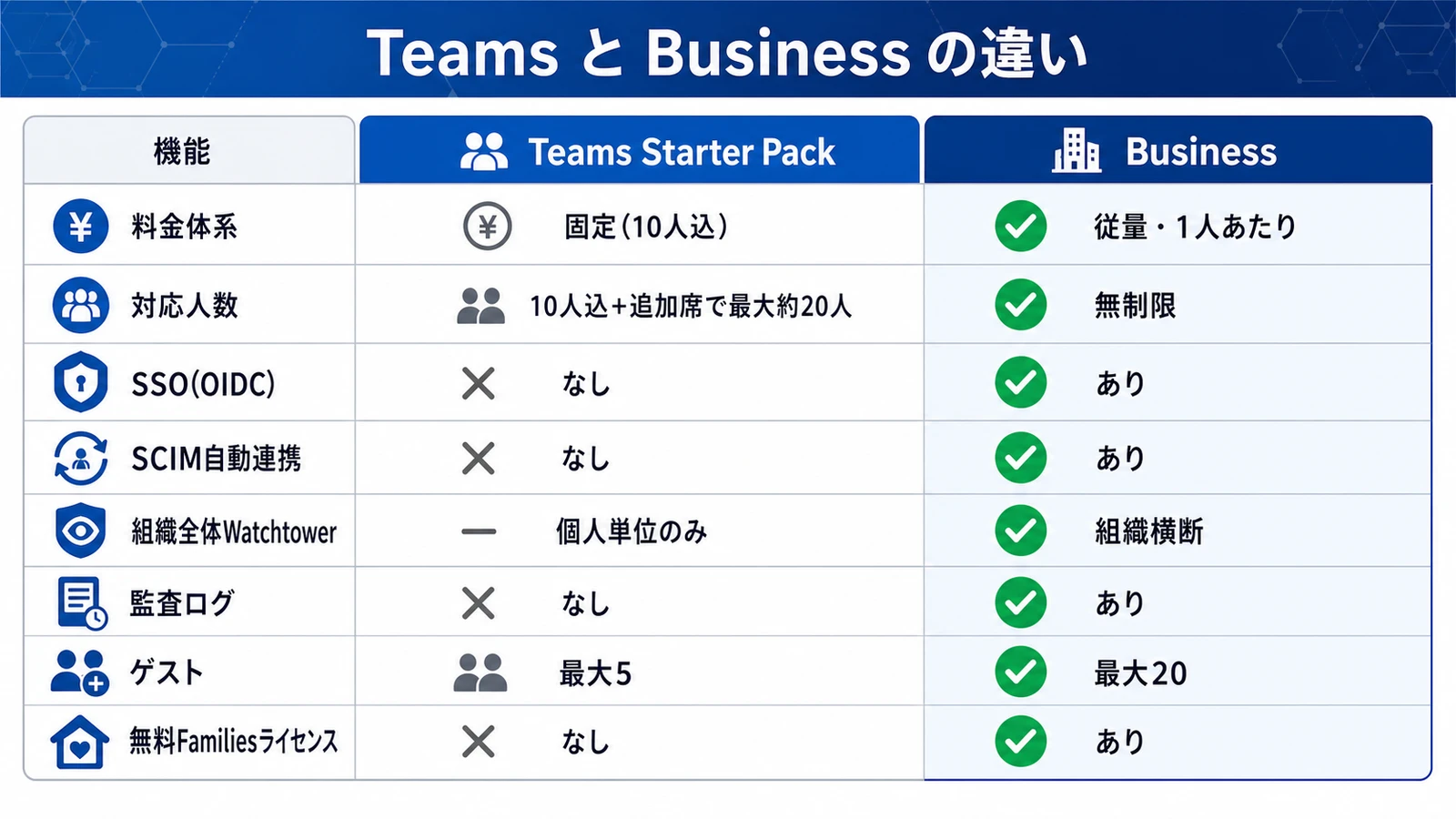
Features matter even more than price. SSO, SCIM, and audit tooling are available only on Business and higher, and that is the real dividing line. Here is each axis with a one-line rationale.
| Criterion | Teams Starter Pack | Business |
|---|---|---|
| Billing model | Flat (predictable for small teams) | Per-user (scales with headcount) |
| Seats | 10 included + up to ~10 add-on seats (~20 max) | Unlimited (grows with you) |
| SSO (OIDC) | No (no IdP integration) | Yes (Okta, Entra ID via OIDC) |
| SCIM auto-provisioning | No (manual joiner/leaver) | Yes (automated via SCIM Bridge) |
| Org-wide Watchtower | Per-user only | Org-wide risk visibility |
| Audit logs / activity | No (no accountability trail) | Yes (SIEM via Events API) |
| Custom groups / roles | Basic permissions only | Granular by team and role |
| Guest accounts | Up to 5 | Up to 20 (external sharing) |
| Document storage | 1GB/person | 5GB/person |
| Free Families license | No | Yes (an employee perk) |
| Support | Standard support + onboarding resources | Expert phone support (weekdays); dedicated CSM for 101+ |
The gaps above reflect 2026-07. Specs can change, so verify current support on the official plan comparison2 before rollout.
What each Business-only capability buys you
A table shows what exists; here is why each Business-only capability tends to be the deciding factor in practice:
- SSO (OIDC). Employees sign in with your existing identity provider (Okta, Microsoft Entra ID, and others) over OIDC instead of a separate 1Password credential. That removes one more password to phish and centralizes account control in the IdP you already govern.
- SCIM auto-provisioning. With the SCIM Bridge, joiners are created and leavers are deprovisioned automatically from your directory. For any team with regular hiring or offboarding, this turns access management from a manual checklist into an automated flow. For the concrete setup, see our SCIM Bridge setup guide.
- Audit logs and the Events API. You get an accountability trail of who did what, and you can stream events to a SIEM. This is frequently what unblocks a security questionnaire or an internal-controls requirement.
- Custom groups and roles. Instead of everyone sharing the same permissions, you grant access by department and role, which keeps sensitive vaults scoped to the people who need them.
- Org-wide Watchtower. On Teams, Watchtower reports are per user; on Business, admins see reused, weak, or breached credentials across the whole organization, so risk is visible centrally rather than one login at a time.
- Guest accounts and larger storage. Up to 20 guests support external sharing with contractors, and per-user storage rises from 1GB to 5GB for documents kept alongside logins.
Recommendations by Headcount and Requirement
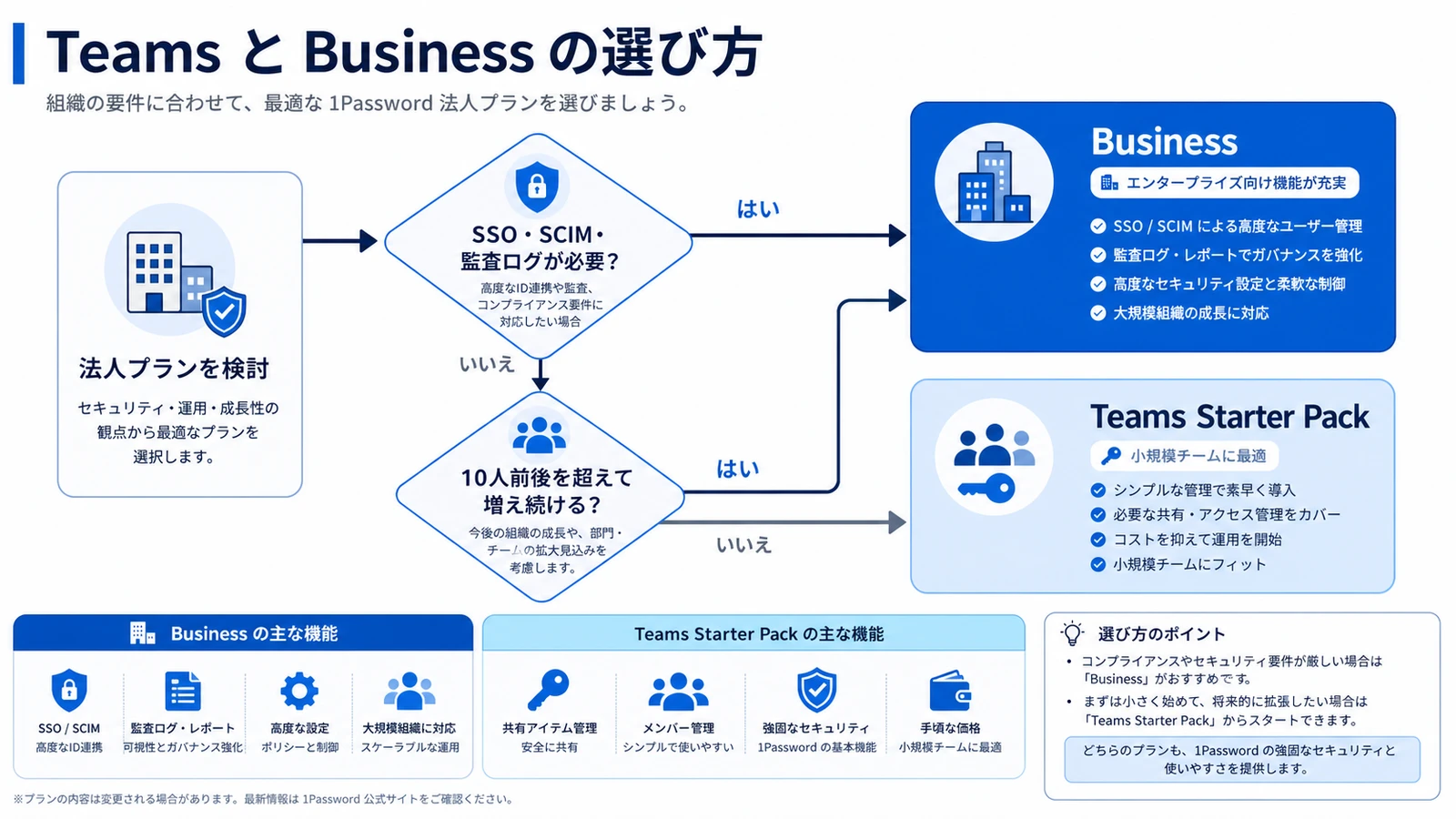
Putting price and features together, the choice falls into a few clear cases. Read it as "which one given which condition," not a simple win/lose.
- 10 or fewer people, no SSO or audit needs → Teams Starter Pack. The flat fee lowers per-person cost and is the best value for small teams that just need shared vaults done right.
- Expecting to keep growing → Business. Rather than buying add-on seats, the per-user plan tracks headcount changes directly on both cost and administration, so you are not forced into a later migration.
- Small team but need SSO / SCIM / audit logs → Business. IdP integration and evidence trails are impossible on Teams, and no amount of manual effort substitutes for them.
- Want to cover employees' families as a perk → Business. The free Families license pays off here and is easy to include in an HR benefits summary.
A useful heuristic: if any single one of the Business-only features is a hard requirement, headcount stops mattering and Business is the answer. Price only decides the choice when both teams could technically use either plan.
In practice, many teams report that "once you pass about 30 people, role-based access control and detailed audit logs become effectively mandatory," and that is when companies move from Teams to Business.
Comparison guide: past roughly 30 people, RBAC and detailed audit logs become effectively required for corporate use, which is why many companies move to Business or Enterprise. (Original in Japanese by @apptatsujin.)
The larger the deployment, the more "how do we systematize administration" outweighs raw price in the decision. Upgrading is not a one-way trap either: because you can move to Business while keeping existing vaults, items, and members, teams that start on Teams and outgrow it are not penalized. For the flow from invites through SSO/SCIM to steady-state operations, see our 1Password team onboarding guide.
Who Should and Should Not Choose Business
Who Business fits
- Organizations that want to link their identity provider via SSO/SCIM and automate joiner/leaver access
- Companies that need audit logs and activity reports for internal controls and security evidence
- Teams growing within the year, or needing permission control by team and role
- Regulated or customer-audited teams that must demonstrate access governance, not just claim it
If even one of these applies, choosing 1Password Business up front avoids a later rebuild, since retrofitting SSO and group structure after everyone has set up personal habits is more disruptive than starting with them. Before committing, you can use the free trial (confirm the length officially) to test whether it connects to your identity provider and whether your admins are comfortable with the console.
Who Business does not fit, and alternatives
- Teams of 10 or fewer with no near-term SSO or audit needs → the Teams Starter Pack is more cost-effective and simpler to administer
- Personal or family use as the main goal → Individual / Families, not a business plan
- Wanting to self-host password management → open-source options like Bitwarden are worth considering
The point of listing alternatives is that "bigger plan" is not automatically "better plan": paying for SSO and audit you will not configure is wasted spend, and a small team is often better served by keeping things lightweight.
One Business-only draw that users highlight is covering employees' families with a free Families license.
A real perk: with a 1Password Business (company) contract, employees can get Families for their own households too, which works as an employee benefit (Linked Personal Account). (Original in Japanese by @yositosi.)
That said, because this perk is tied to the company contract, be careful about how it is handled at cancellation.
Conclusion
To recap: if you have around 10 or fewer people and need neither SSO nor audit, the flat-fee Teams Starter Pack is the pick; if you expect to keep growing or need SSO, SCIM, audit logs, or org-wide Watchtower, the Business tier of 1Password is the baseline. The pricing break-even is simply "flat fee ÷ per-user price," and if even one feature requirement applies, choosing Business avoids backtracking. Because you can upgrade later without losing your vaults, a small team can start on Teams and move up when the time comes. Start with the free trial to confirm the fit for your operations, then use the related guides here to nail down the rollout steps.
Information current as of 2026-07-09. Please check the official sites for the latest updates.
This article contains affiliate links.
Footnotes
-
1Password official pricing: https://1password.com/pricing/password-manager (as of 2026-07; amounts may change, so verify) ↩
-
1Password official Teams / Business plans: https://1password.com/teams (as of 2026-07) ↩
Frequently asked questions
Related articles
1Password Business Pricing 2026 — Cost Per Headcount and Teams Starter Pack Comparison
1Password Team Onboarding Guide 2026: Invites to SSO/SCIM