How to Migrate from LastPass to 1Password in 2026 — Export, Import, and Passkey Caveats
A step-by-step playbook to move from LastPass to 1Password using the official 2026 importer. Covers pre-flight checks, desktop import, manual passkey/TOTP rebuild, and how to wind down LastPass safely after the 2022 breach.
This article contains affiliate links (advertising).
Many teams still ask us how to move off LastPass cleanly after the 2022 breach. This guide walks through migrating from LastPass to 1Password using the 2026 official importer, then covers what the importer cannot bring along — passkeys, TOTP, and folder structure — so you can plan the rebuild step in advance. We also flag the affiliate-friendly migration credit that 1Password offers when you switch from a competing vault.
Why People Move From LastPass to 1Password in 2026
1Password is built on a Secret Key plus master password architecture, so a server-side breach alone cannot decrypt your vault. On X, the recurring reasons for the switch are 2022-breach trust damage and the UX gap on Watchtower, passkeys, and the polished native apps. Most teams we work with also cite the lower long-term operational risk: even if 1Password's storage backend were somehow compromised tomorrow, the Secret Key never leaves user devices, so encrypted vault dumps are not directly decipherable from the master password alone.
What the 2022 LastPass Incident Means in 2026
LastPass officially disclosed an August 25, 2022 development-environment intrusion and a follow-up disclosure on November 30, 2022 (with a detailed write-up on December 22, 2022) describing access to a customer vault backup stored on a third-party cloud provider1. Encrypted fields are protected with 256-bit AES, but accounts with low PBKDF2 iteration counts (legacy accounts predating the 100,100-iteration default) carry residual brute-force exposure. By September 2023, researchers had already linked roughly 150 victims and more than $35 million in stolen cryptocurrency to seed phrases pulled from LastPass vaults2, which is why the breach still drives migration decisions in 2026.
What 1Password Has Built on Top of That Trust Gap
By 2026, 1Password ships strong passkey support, Watchtower breach monitoring, SSH key handling, and an SDK-driven Secrets Automation flow. If you're still deciding between Individual and Families tiers before migrating, the breakdown in 1Password Individual vs Families 2026 covers the break-even math.
Beyond the headline features, the migration experience itself has improved: the importer pulls data directly from the LastPass API instead of asking each user to wrangle CSVs, and the desktop app surfaces type mapping, shared folder permissions, and post-import cleanup in a single flow. Compared to the early 2023 importer, which assumed a CSV-only workflow, the 2026 version trims roughly half of the manual cleanup we used to see when supporting customer migrations.
"Switched from LastPass to 1Password after the fuckery of the breach — usability and Watchtower made the move worth it."
1Password Pays Part of Your Old Subscription
When you migrate from Bitwarden, LastPass, or Dashlane, 1Password's switch program reimburses part of your remaining subscription on the competing product. It removes the overlap cost most people quietly carry during a migration window.
Pre-Flight Checklist Before You Touch the Importer
Follow the prerequisites listed in 1Password's "Move from LastPass to 1Password" help article before you start3.
1. A 1Password Account and Desktop App
Spin up a paid 1Password account (Individual, Families, Teams, or Business) and install the desktop app on Mac, Windows, or Linux. The web flow can work as a fallback, but 1Password explicitly recommends the desktop path3. Decide upfront which device will run the importer — typically the workstation where you also keep your browser-stored credentials — and confirm the desktop client can sign in with your master password and Secret Key before starting the migration window.
2. Adjust LastPass Multi-Factor Authentication
If your LastPass account uses SMS 2FA, switch to an authenticator app for the duration of the import. The same applies if you're on Duo — review the LastPass-specific instructions in the official guide before starting3.
3. Add the SSO Redirect URI
For SSO-driven LastPass tenants, add http://127.0.0.1:18255/import/redirect as a redirect URI inside your identity provider3. If you don't admin the IdP yourself, file the change with IT before migration day so you don't stall mid-import.
Five-Step Migration Walkthrough
Here is the official five-step path, summarized in the flow below.
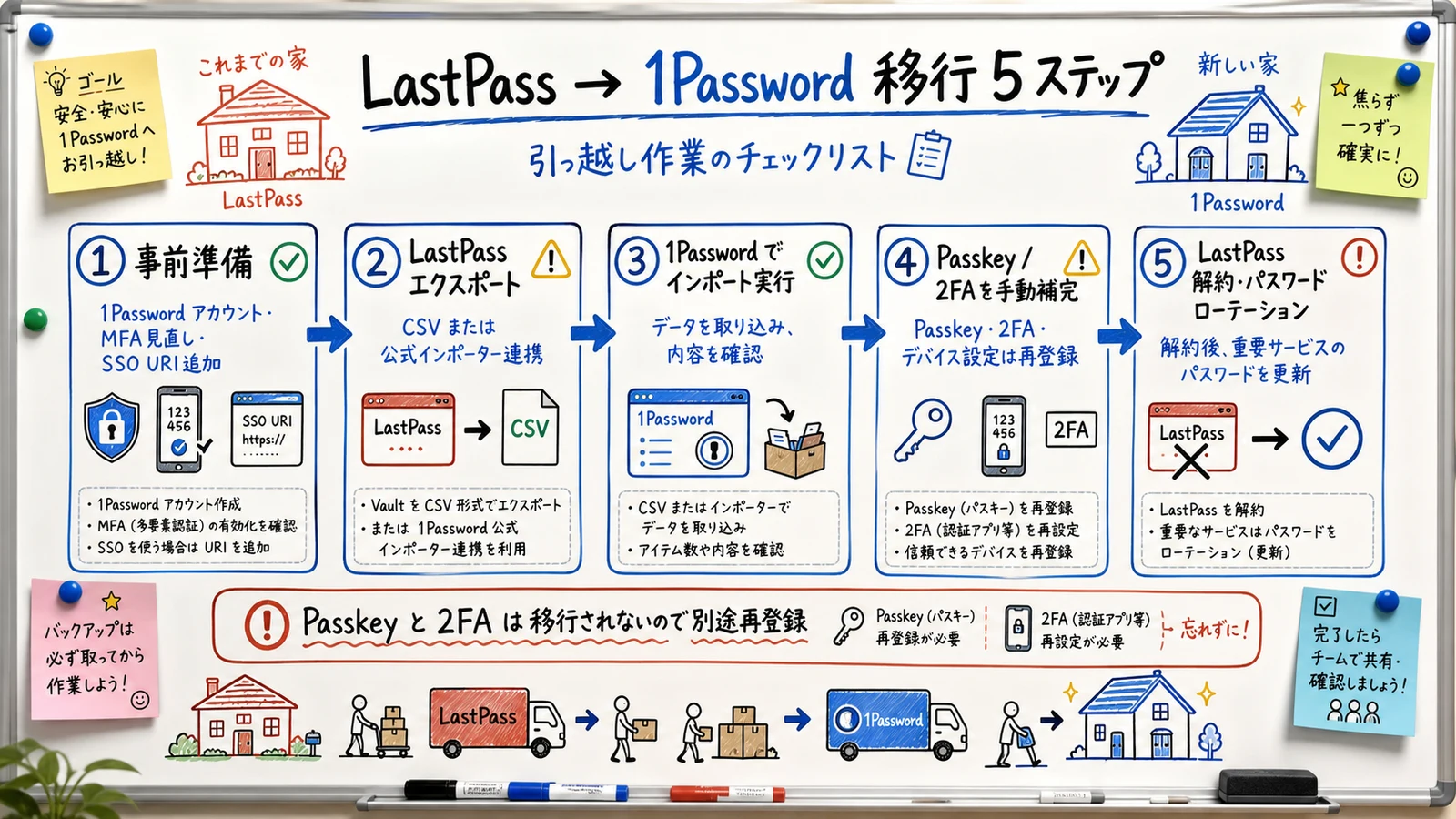
Step 1. Provision the 1Password Account
Sign in to the 1Password desktop app with your master password and Secret Key. If you're on Families or Business, decide upfront which Vault (Personal vs Shared) should receive the imported items so you don't have to reshuffle later.
Step 2. Launch the Importer Inside 1Password
Use File > Import > LastPass (Linux: ellipsis menu > Import > LastPass). Enter your LastPass email, master password, and MFA code, then pick the destination 1Password account3. The importer pulls data through LastPass's authenticated API, so you typically do not need to export a CSV by hand — though the CSV path remains a fallback3.
Step 3. Optionally Migrate Shared Folder Permissions
If you're a LastPass admin, the importer surfaces a shared-folder permissions step. Use it to map LastPass shared folders to 1Password Shared Vaults while you can still see both sides side by side3.
Step 4. Run the Import and Confirm Type Mapping
Press Import to start. LastPass items map to 1Password types like this3:
| LastPass type | 1Password type |
|---|---|
| Password | Login |
| Address | Identity |
| Application | Login |
| Custom item | Secure Note |
| Bank Account / Credit Card | Same-named type |
| File / attachment | Attached to the same item |
LastPass private folders are converted to tags on the 1Password side3. If you'd rather model them as separate Vaults, do that manually after the import — the auto-conversion is intentional but lossy in terms of access boundaries.
Step 5. Manually Fill In the Gaps
The official documentation lists items the importer cannot bring across3:
- Passkeys: "Passkeys won't be imported"
- TOTP from LastPass Authenticator: "Must be manually added to 1Password"
- Password history: Imported only for shared items, not for private items
Post-Migration Cleanup and What to Do With LastPass
Before you flip 1Password into daily use, lower the residual risk on the LastPass side.
1. Verify Critical Logins Open From 1Password
Walk through your highest-impact accounts (email, banking, IdP, GitHub, billing) inside 1Password. If the importer dropped a TOTP, you'll catch it here rather than in the middle of an outage. A useful drill is to sign out of each high-impact service on every device, then re-sign-in using only 1Password autofill — any account that fails this drill goes onto a manual remediation list before you touch the LastPass uninstall.
2. Rotate the LastPass Master Password
Because the leaked backup is in attacker hands1, treat your current master password as eventually crackable. Generate a long, unique master password and update LastPass first.
3. Rotate High-Value Account Passwords
Assume every password stored in LastPass is "potentially leaked" and rotate by impact: email and banking first, then IdP and SSO admins, then major SaaS, then long-tail logins. Use Watchtower in 1Password to highlight reused or breached passwords as you go.
A practical rotation cadence is to handle five to ten high-impact accounts per day rather than trying to brute-force the entire vault in one sitting. The work pairs naturally with normal usage — every time you sign in to a service for the first time after migration, take 30 seconds to generate a new password in 1Password, replace it at the source, and confirm autofill works on the next login. Within two to three weeks of focused effort, most teams complete rotation across the accounts that matter without ever scheduling a dedicated "password day."
4. Decommission the LastPass Account
After a stable week or two on 1Password, archive a local encrypted backup of your LastPass export, then delete the LastPass account. Removing the account also removes your data from LastPass's future incident blast radius.
Rebuilding Passkeys and 2FA Without LastPass
Because passkeys and TOTP cannot be imported, plan them as a separate workstream.
"Migrating passkeys between managers is still painful in 2026 — most are tied to the original device/provider."
Re-enrolling Passkeys
- Open the login item in 1Password and sign in to the service
- Optionally delete the existing passkey inside the service's security settings
- Create a new passkey and store it inside 1Password
- Verify the passkey works from a second device
Re-enrolling TOTP
- Open the service's 2FA settings and start the "Authenticator app" flow
- Open the matching 1Password login item and scan the QR code into 1Password
- Store the recovery codes alongside the same item in 1Password
- Remove the legacy entry from LastPass Authenticator
Security Differences Worth Knowing
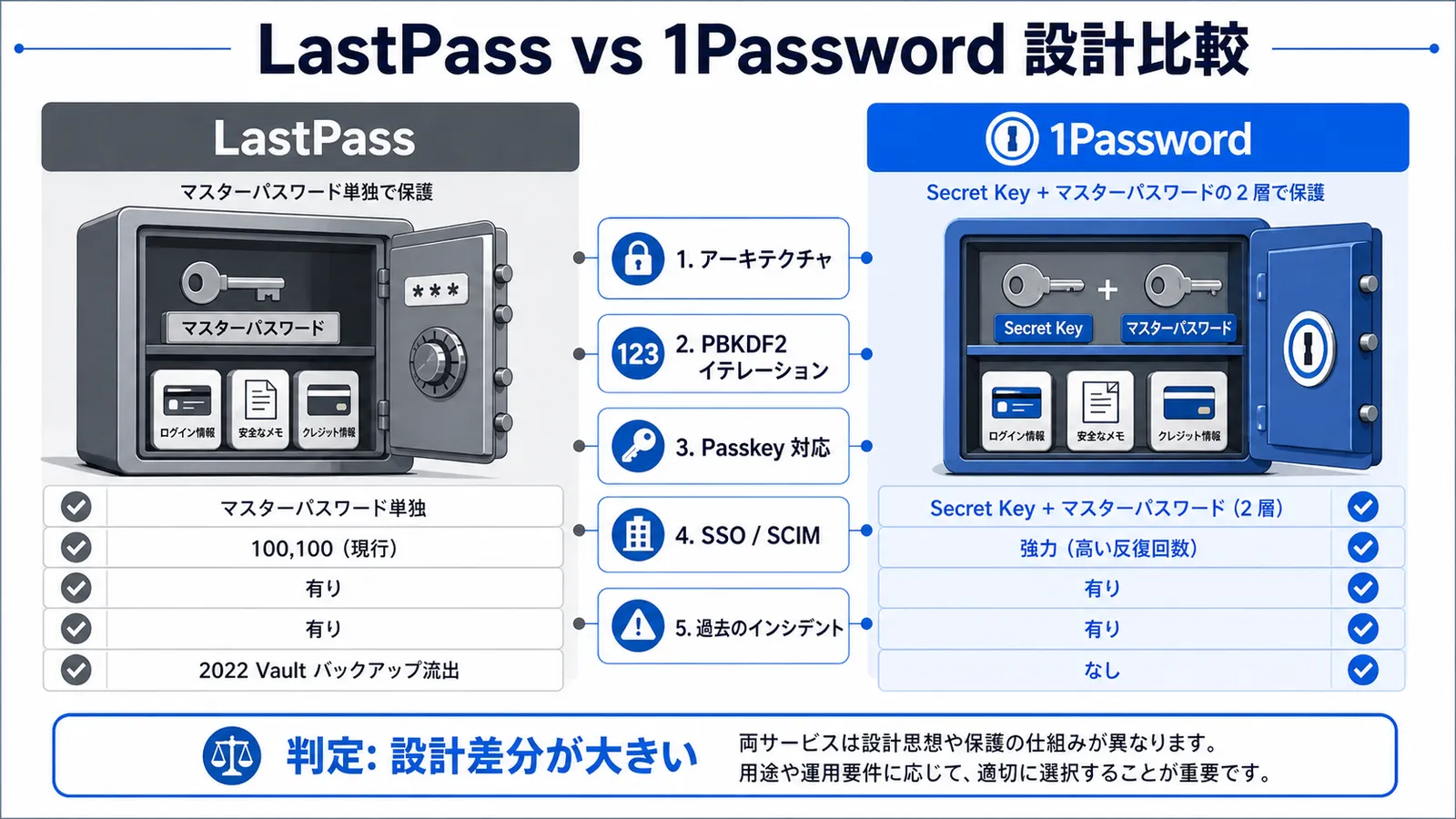
1Password keeps the Secret Key strictly on user devices, so even a server-side vault leak cannot be decrypted with the master password alone. LastPass's pre-2022 design relied on the master password as the sole vault key, which is what made low-PBKDF2 legacy accounts particularly exposed once the encrypted backups leaked1. Watchtower closes the loop on the operational side by surfacing reused passwords, services with known breaches, and accounts that should be moved to passkeys, so the post-migration workload is visible inside the same tool you just adopted.
Wrap-Up — Separate "Data Move" From "Passkey & 2FA Rebuild"
A LastPass-to-1Password migration is mostly an automated job: the official importer handles passwords, secure notes, and identity items in a single pass. What trips people up is treating it as one task — passkeys, TOTP, and high-value password rotations need their own time on the calendar.
Final decision frame:
- Data body → Use the official importer (Steps 1–4)
- Passkey rebuild → Manual re-enrollment per service (Step 5)
- TOTP rebuild → Scan each QR back into the matching 1Password item (Step 5)
- LastPass risk reduction → Rotate master password, rotate high-impact accounts, then delete the account
- Subscription overlap → Use the 1Password switch program to recover part of the LastPass spend
With the checklist and the five-step flow above, the bulk of the move usually fits inside a half-day to a day, leaving the passkey/TOTP rebuild to spread across the following week. The pattern we see across teams is that the technical migration is the easy part — the meaningful payoff comes from the password rotation and passkey re-enrollment that follow, because those are the steps that actually reduce exposure to the original 2022 breach data.
Information current as of 2026-05-24. Please check the official sites (https://support.1password.com/import-lastpass/) for the latest updates.
This article contains affiliate links.
Footnotes
-
LastPass official blog, "Notice of Recent Security Incident" (August–December 2022 disclosures): https://blog.lastpass.com/posts/notice-of-recent-security-incident ↩ ↩2 ↩3
-
Krebs on Security (2023), "Experts Fear Crooks are Cracking Keys Stolen in LastPass Breach": https://krebsonsecurity.com/2023/09/experts-fear-crooks-are-cracking-keys-stolen-in-lastpass-breach/ ↩
-
1Password official help, "Move from LastPass to 1Password": https://support.1password.com/import-lastpass/ ↩ ↩2 ↩3 ↩4 ↩5 ↩6 ↩7 ↩8 ↩9 ↩10 ↩11
Frequently asked questions
Related articles
1Password Individual vs Families 2026 — Break-Even and SourceNext
How to Migrate from Bitwarden to 1Password in 2026 — JSON Export, Passkey & TOTP Caveats