1Password Passkeys 2026: FIDO2/WebAuthn Storage, Sync, and Ops
A practical 2026 walkthrough of 1Password passkeys: FIDO2/WebAuthn mechanics, save/sync/autofill, iOS export, hardware-key pairing — with official sources.

This article contains affiliate links (advertising).
"Passkeys look great in theory — but where exactly do they live, how do they sync, and what happens if a laptop dies?" That's the practical question we keep hearing from operations leads in 2026. This guide unpacks how 1Password handles passkeys as of May 2026: the FIDO2/WebAuthn baseline, save/sync/autofill, pairing with hardware keys, and the friction points worth knowing before you switch defaults — with every claim backed by an official source1.
How Passkeys Work and Where 1Password Fits
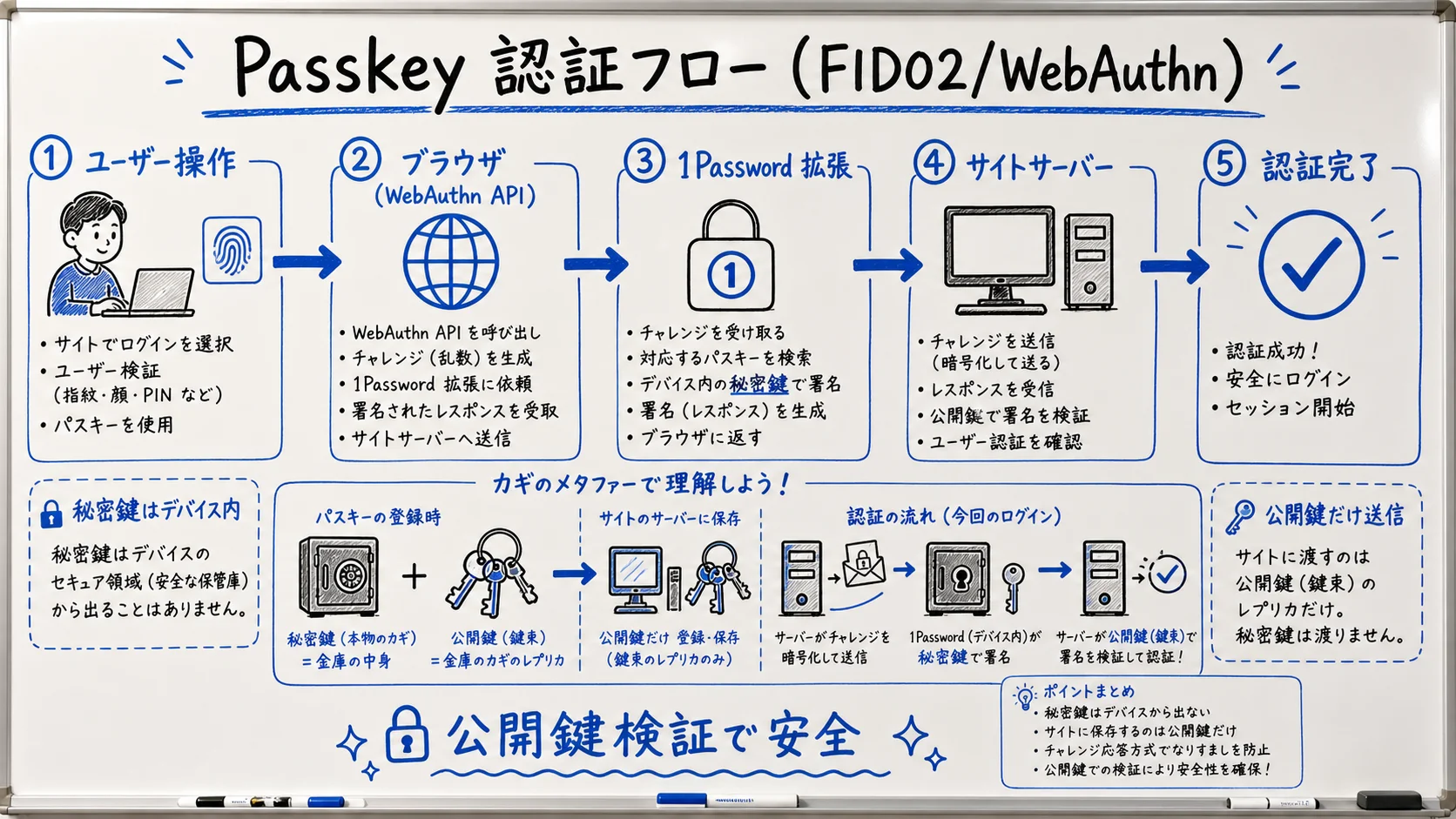
Passkeys are FIDO2 credentials. On the web they ride WebAuthn, and to talk to an authenticator they use CTAP2. They rely on public-key cryptography: the private key stays sealed inside your device or your passkey provider's secure storage, while only the public key is registered with the site. The single biggest win over passwords: a server-side breach can't leak your secret because the server never had it.
Phishing is the other long-standing failure mode passkeys neutralize. Because the authenticator binds the credential to the exact origin that created it, a fake login page on a look-alike domain never receives a usable signature. That's a structural defense — not "users should be careful" — and it's why every major identity provider, from Google to Microsoft to Apple, is steering enterprise customers toward passkeys as the new baseline.
1Password as a Cross-Platform Passkey Provider
Like iCloud Keychain or Google Password Manager, 1Password acts as a passkey provider — but it isn't tied to one ecosystem3. The same vault is readable and writable from Windows, macOS, iOS, Android, Linux, and the major browsers.
- The browser extension intercepts WebAuthn calls and offers save/fill dialogs
- OS integrations let the native passkey sheet pick 1Password (macOS 14+, iOS 17+, Android 14+, Windows 11)
- Vault sync propagates passkeys across devices while keeping them end-to-end encrypted
Per 1Password's own public statements, by 2026 the platform stores millions of passkeys across customer vaults, and the Windows build front-loads "Universal passkey management" as its theme — placing the product among the most mature cross-platform implementations available4.
This cross-platform stance matters in practice. A typical knowledge worker today opens a passkey on a Mac, refers back to it on an iPhone for two-factor approval, signs in again from a Windows laptop in a meeting room, and reads email on Android over the weekend. iCloud Keychain reaches three of those endpoints; Google Password Manager reaches a different three; only a vault that spans them all keeps the passkey one tap away regardless of where the user is. For households and small teams that haven't fully standardized on a single OS, that's the deciding factor more often than the underlying cryptography.
Passkey vs Traditional Password (Quick Comparison)
| Dimension | Password | Passkey (FIDO2) |
|---|---|---|
| Value stored server-side | Hashed password | Public key only |
| Risk on server breach | Crackable hash leaks | Private key never exposed |
| Phishing resistance | Weak (user judgment) | Strong (authenticator checks origin) |
| Device-loss recovery | Reset password | Restore via vault from another device |
| User action | Type + maybe MFA | One biometric tap |
Save, Sync, and Autofill With 1Password
Running 1Password for passkeys follows a "save → sync → autofill" loop. Each step trades off who's in the driver's seat — the OS or the browser extension — and that's where most friction shows up.
Step 1: Create and Save a Passkey
On a passkey-capable site (Google, GitHub, Amazon, Microsoft, Adobe, etc.), pick "Add a passkey" inside the account security settings. The browser fires a WebAuthn request, and the 1Password extension intercepts it and shows a "Save to 1Password?" dialog5.
- Click "create passkey" on the service
- The browser issues a WebAuthn call
- The 1Password extension intercepts and shows the save dialog
- Pick the destination vault and confirm
- Only the public key is registered on the service side
Step 2: Sync Across Devices via the Vault
Saved passkeys ride 1Password's vault sync and become available on every signed-in device. Sync is end-to-end encrypted: 1Password servers only hold opaque ciphertext, and without the user's Secret Key plus master password, server-side data cannot be decrypted6.
For households or pairs sharing 1Password, decide whether passkeys go in a shared vault or each person's private vault. Because passkeys are user-bound by design, the safer default is "private vault for individual accounts; shared vault only when the underlying service is truly shared." Examples that legitimately belong in a shared vault include the household streaming subscription, the family Wi-Fi router admin, or a service the partners co-own — anywhere the underlying account is intentionally a couple-or-family account. Everything tied to a single person's identity stays in their private vault. We cover plan-level vault structures in 1Password Individual vs Families.
Step 3: Autofill Reduces Login to One Tap
When you revisit a passkey-enabled site, the WebAuthn challenge fires and the 1Password extension surfaces matching passkeys. Approve with OS biometrics (Touch ID, Face ID, or Windows Hello), and the private key signs the challenge back to the server5.
1Password publicly frames the broader passkey push around the lingering risk of weak passwords (summary: weak passwords are still the leading risk; passkey adoption should be accelerated).
Synced Passkeys vs Hardware Keys (YubiKey)
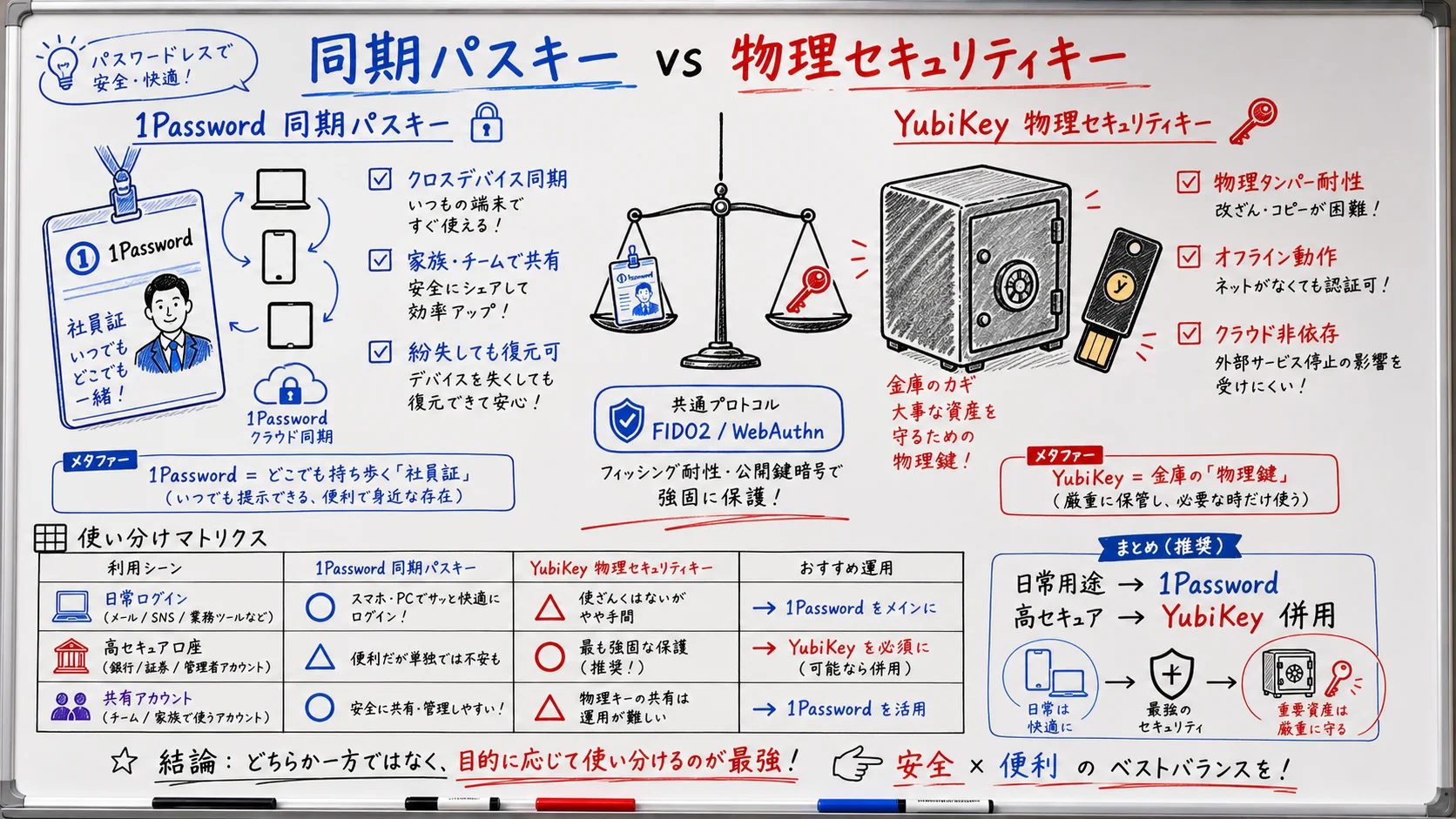
"Do I need a YubiKey if I have synced passkeys?" is a frequent question. Both run on the same FIDO2/WebAuthn spec — they aren't rivals so much as specialists with different jobs7.
What Synced Passkeys Are Good For
- Stored in 1Password (or iCloud / Google) and synced across devices
- Recoverable from another device if hardware is lost
- High convenience; ideal for everyday SaaS
- Security depends on vault integrity (master password + Secret Key)
What Hardware Keys Are Good For
- A physical device (e.g., YubiKey) holds the private key
- Strong tamper resistance against physical capture
- Loss = loss; operational practice requires a second backup key
- Best for accounts you don't want syncing — banking, identity, admin consoles
Recommended Pattern
| Account class | Synced passkey | YubiKey |
|---|---|---|
| Daily SaaS (Slack / Notion / Linear) | Best fit | Overkill |
| Developer infra (GitHub / AWS Console) | Good | Best (policy-dependent) |
| Banking & tax | Limited | Best |
| Primary Apple ID / Google account | Good | Best (recommend registering both) |
| 1Password account itself (second factor) | Avoid (circular) | Best |
Never put the 1Password account's own second factor inside 1Password. Storing it in the same vault you'd be trying to unlock creates a circular dependency on the worst possible day. Keep at least one hardware key registered as the second factor on the master account, and physically separate the backup key — a different room, a safe-deposit box, or a trusted family member's house. The same principle applies to the recovery code: print it, store it offline, and never type it into anything synced.
When pairing hardware keys with 1Password-stored passkeys at the service level, register both credentials on the high-risk account. GitHub, Google, Microsoft, and Apple all support multiple FIDO2 credentials per account, so you can register a YubiKey for "when I'm at my desk and want maximum assurance" and the 1Password-synced passkey for "when I'm traveling without the key." Neither blocks the other; the user simply picks the available credential when challenged.
Team Rollout and Operational Considerations
Deploying 1Password at the org level raises passkey questions you don't see on a single laptop.
Governing the Passkey Provider
Windows, macOS, and Android can all act as passkey providers alongside 1Password. Without a deliberate choice from the user, governance breaks down. Bake "set 1Password as the primary passkey provider" into the onboarding SOP, and audit it during periodic device-posture checks rather than trusting users to keep the setting current after an OS upgrade. The MDM hooks and admin controls available in Business-tier plans, plus their fit with passkey operations, are covered in 1Password Business pricing.
Export Capability and Vendor Lock-In
Passkeys naturally drift toward provider lock-in. In 2026, 1Password shipped passkey export from iOS / iPadOS and committed to expanding it to additional platforms8. That direction maps to the FIDO Alliance's CXP (Credential Exchange Protocol) / CXF (Credential Exchange Format) work, giving teams a future path to migrate to another provider when needed9.
Permissions Policy Gotchas
If browser-level Permissions-Policy headers restrict publickey-credentials-*, passkey registration and sign-in can fail. When you front internal portals or SaaS through a reverse proxy that rewrites response headers, double-check that the WebAuthn-related directives aren't being unintentionally blocked. Security researchers have documented edge cases where browser extensions and host-page permissions interact in ways that aren't obvious to ordinary administrators — they're nuanced implementation details, not widespread vulnerabilities, but they're a sign the ecosystem is still maturing and that response-header reviews belong in any zero-trust rollout.
"There are edge cases in the WebAuthn flow where browser extensions and Permissions Policy interact in subtle ways." — Scott Helme
Wrap-Up: Standing Up Passkeys With 1Password in 2026
In 2026, 1Password is one of the most mature cross-platform passkey providers on the market. The spec-compliant save/sync/autofill loop is now complemented by export tooling and the "Universal passkey management" positioning — meaning you can plan an entry strategy and an exit strategy at the same time. Pair synced passkeys for daily SaaS with a YubiKey-class hardware key for banking and admin accounts, and switch the OS default passkey provider to 1Password from day one. For team rollouts, bake the provider choice into your SOP so the governance line stays clear.
The roadmap is also worth watching. As CXP and CXF mature, expect import/export across providers to feel as routine as .csv exchange feels today — and expect 1Password to keep adding governance affordances for organizations that need them. The right move now is to start migrating high-value accounts to passkeys, write down the OS-default-provider step in your onboarding doc, and revisit the hardware-key policy at least once per quarter.
Information current as of 2026-05-24. Please check the official sites for the latest updates.
This article contains affiliate links.
Footnotes
-
1Password — Features | https://1password.com/features ↩
-
FIDO Alliance — Specifications Overview | https://fidoalliance.org/specifications/ ↩
-
1Password — Passkeys | https://1password.com/passkeys ↩
-
1Password Official X | https://x.com/1Password ↩
-
1Password Support — Save and sign in with passkeys | https://support.1password.com/save-use-passkeys/ ↩ ↩2
-
1Password Security Design White Paper | https://1passwordstatic.com/files/security/1password-white-paper.pdf ↩
-
1Password Support — Use 1Password with a security key | https://support.1password.com/security-key/ ↩
-
1Password Blog — Securely import and export passkeys (FIDO Alliance draft specs) | https://blog.1password.com/fido-alliance-import-export-passkeys-draft-specs/ ↩
-
FIDO Alliance — Credential Exchange Protocol (CXP) | https://fidoalliance.org/specifications-credential-exchange-specifications/ ↩
Frequently asked questions
Related articles
1Password Individual vs Families 2026 — Break-Even and SourceNext
1Password Business Pricing 2026 — Cost Per Headcount and Teams Starter Pack Comparison