1Password vs Bitwarden 2026 — Pricing, Security, and Operations Compared
1Password vs Bitwarden in May 2026 across pricing, security architecture, features, and operational load. A neutral comparison with use-case picks, sourced from the official pages.
This article contains affiliate links (advertising).
"1Password or Bitwarden — which should we actually pick?" is one of the most common password-manager questions we get. This article compares 1Password and Bitwarden as of May 2026 across four axes — pricing, security, features, and operational load — and then picks a winner per scenario (solo, family, small team, enterprise). The aim is neutrality, with footnoted sources for every claim12.
Where 1Password and Bitwarden Stand in May 2026
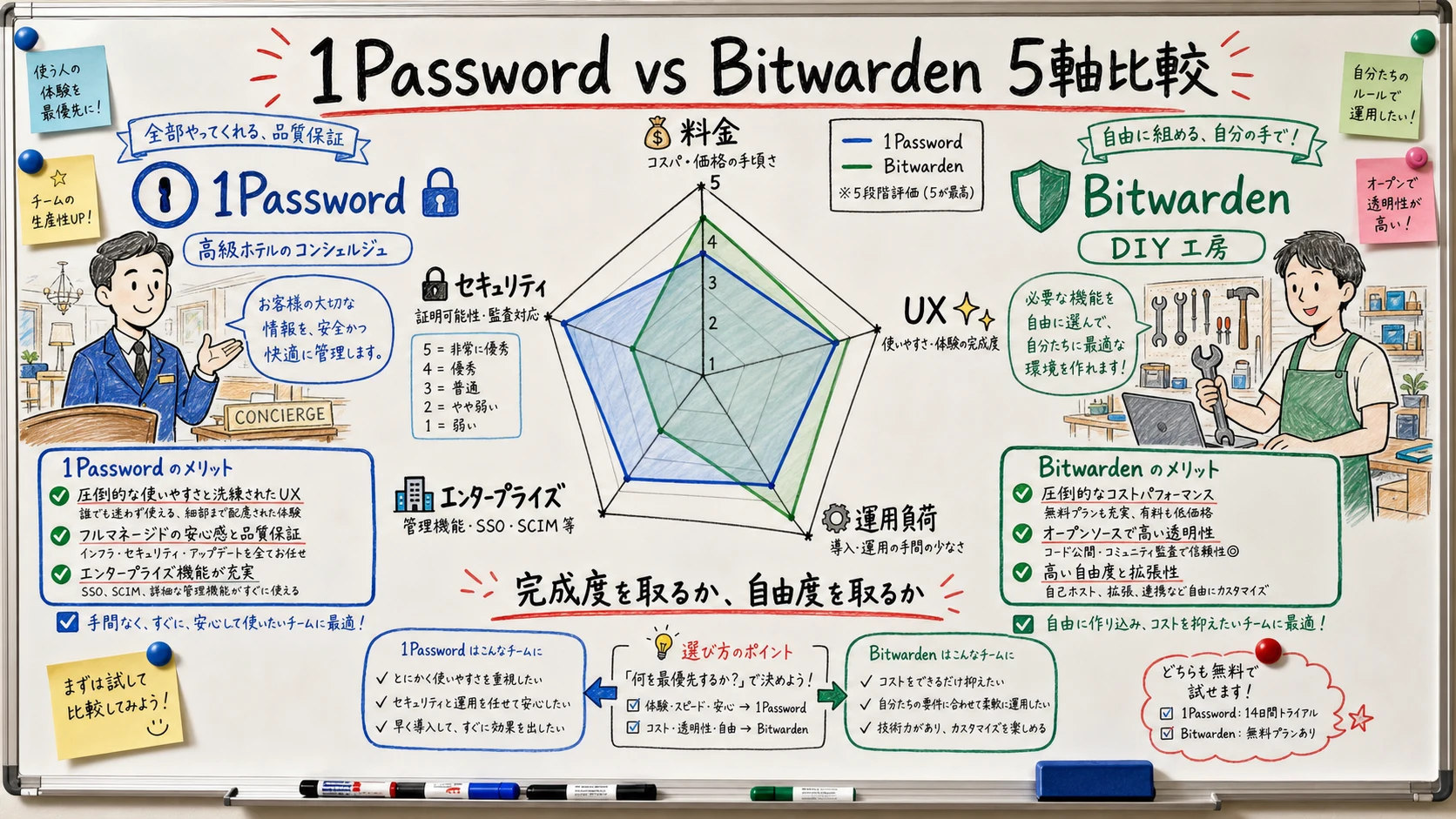
Both products use zero-knowledge encryption (the server cannot decrypt your data), AES-256, support Passkeys, autofill, secure notes, and ship native clients on every major OS12. Raw safety is close to a tie. The real difference is a design-philosophy split between polished commercial SaaS and open-source freedom.
Where 1Password Lives
- The commercial SaaS leader: A polished UI/UX with mature extras like Watchtower (breach monitoring), Travel Mode (hide vaults at borders), and Item Sharing with revocable links1
- Enterprise-heavy feature set: SSO (Okta / Azure AD / Google Workspace), SCIM provisioning, and Secrets Automation (CLI + CI/CD with native integrations for GitHub Actions, Terraform, and Kubernetes) are standard3
- Two-factor encryption design: The Secret Key is a 128-bit value held only on your device, layered on top of your master password — a server-side breach alone cannot decrypt your data3
- Closed source, but publishes ongoing third-party audits (SOC 2 Type II, ISO 27001)4
- HQ: Toronto, Canada. English-first support; Japanese help docs are limited
Where Bitwarden Lives
- The OSS standard-bearer: Client and server are both AGPL v3, so anyone can audit the code2
- A genuinely strong free plan: Unlimited passwords and devices on Free; that alone covers most solo users2
- Self-hostable: Official Docker image; the community Vaultwarden (Rust) makes it even lighter to run5
- HQ: Florida, USA. Simple Free → Premium ($10/year) → Families ($40/year) ladder
The Mood on X
2026 price hikes on both sides — 1Password added roughly $12/year, Bitwarden Premium drifted upward — have reignited open-source and self-hosting discussions on social media.
"Both are safe. The difference is paying for UX and support versus paying with your own time and operational effort. Pick the trade-off that matches your team."
Pricing Compared — Solo, Family, and Team
Stacking the official annual-billing prices side by side12:
| Plan | 1Password | Bitwarden | Notes |
|---|---|---|---|
| Free | None | Free (unlimited passwords + devices) | Bitwarden Free is effectively the headline tier |
| Solo | Individual $47.88/yr ($3.99/mo) | Premium $19.80/yr ($1.65/mo) | 1Password bundles Watchtower |
| Family | Families $71.88/yr ($5.99/mo, up to 5) | Families $47.88/yr ($3.99/mo, up to 6) | Bitwarden is the cheaper family plan |
| Small team | Teams Starter Pack $19.95/mo flat (up to 10) | Teams $4/mo/user | Flat vs per-user pricing |
| Business | Business $7.99/mo/user | Enterprise $6/mo/user | At scale Bitwarden is a few dollars cheaper |
For a deeper breakdown of 1Password's Individual vs Families economics (including monthly vs annual and the SourceNext 3-year option) see 1Password Individual vs Families 2026.
Don't Read Headline Prices Literally
Bitwarden Free is genuinely free, but TOTP storage, emergency access, file attachments, and advanced reports all require Premium2. For households, two Premium seats already cost $39.60/year, and Families ($47.88/year for 6 seats) drives per-person cost down further, so multi-person homes scale into the Families plan very quickly.
"Bitwarden Premium climbed from $10/year over time, but it's still much cheaper than 1Password and the feature delta is acceptable."
Real Business Cost
For a 10–100 person company, the absolute license-fee gap shrinks to a few dollars per user per year. On 100 seats that's around $1,000/year. The honest comparison isn't sticker price — it's whether SSO integration effort, on-call support response, and audit log workflows can absorb that delta. If your IT team already runs at capacity, paying for polish is often the right answer.
Security and Compliance
Encryption Architecture
| Property | 1Password | Bitwarden |
|---|---|---|
| Cipher | AES-256-GCM | AES-256-CBC |
| Key derivation | PBKDF2-HMAC-SHA256 (650,000 iterations) | PBKDF2 or Argon2id (recommended) |
| Beyond master password | Secret Key (128-bit), device-local, prevents decryption even with server breach | Master password only (relies on Argon2id strength) |
| Zero knowledge | Yes | Yes |
| Source disclosure | Closed (independent audit reports published)4 | Client + server AGPL v3 (fully open)2 |
1Password layers a Secret Key on top of the master password — if a server breach happens, the data on the server alone cannot be decrypted because the Secret Key never leaves your device3. Bitwarden's strength is the opposite kind of assurance: anyone can audit the code. If your threat model is "don't trust the server operator," Bitwarden + Argon2id is more attractive; if it's "block credential-theft scenarios," 1Password's Secret Key is structurally stronger.
Audits and Compliance
Both publish, on an ongoing basis34:
- SOC 2 Type II
- ISO 27001 / 27017 / 27018
- GDPR / CCPA / HIPAA operational compliance
- Annual third-party penetration test reports
There's no meaningful gap. Either product clears the standard compliance bar required by enterprise procurement. The interesting nuance: 1Password's design choice to never ship the Secret Key to the server gives you a structural defense even if an attacker steals the master password and intercepts the encrypted vault; Bitwarden's design instead invites you to verify that very assumption by reading the server source code. Both are reasonable answers to "how do I trust the vault?" — they just answer different questions.
Features and Day-to-Day Operations
What Both Do
Feature parity covers everything most users need12:
- Password generation (length, symbols, memorability)
- TOTP (2FA code) storage
- Passkey (FIDO2 / WebAuthn) support
- Autofill (browser and mobile)
- Secure notes, credit cards, identity records
- Clients across macOS, Windows, Linux, iOS, Android, and every major browser
- CLI (
opfor 1Password,bwfor Bitwarden)
Where They Differ
| Feature | 1Password | Bitwarden |
|---|---|---|
| Watchtower (breach monitoring) | Built-in | Partial (HIBP integration on Premium) |
| Travel Mode (hide vaults at borders) | Yes | No |
| SSH key management + Git signing | Yes (op CLI) | No |
| Secrets Automation (CI/CD secrets) | Built-in | Separate product (Bitwarden Secrets Manager) |
| Self-hosting | No | Yes (official + Vaultwarden) |
| OSS clients | No | Yes (every OS) |
| Send (ephemeral sharing) | Item Sharing (partial) | Send (text + file) |
The differentiators that matter day-to-day are Watchtower (proactively flags compromised passwords against the Have I Been Pwned dataset), Travel Mode (hides selected vaults before crossing a border), and the op CLI's ability to sign Git commits and serve SSH agent requests — all features that 1Password ships in the box. Bitwarden answers with the strongest deployment flexibility: an officially supported self-host, an OSS reference implementation, and Send for ephemeral file/text sharing without seats. For a deeper look at Passkey, SSH keys, and Watchtower-style features within 1Password, see The 1Password Passkey Guide.
"1Password's UX is in a class of its own. Running a shared family vault with five people, nothing else is as low-friction."
Operational Load
- 1Password: SaaS only. No server operations. Heavier dependence on the vendor's support team, but no TLS renewal, downtime, or patching to worry about. The polished onboarding (Secret Key auto-provisioning, guided imports, an in-app Watchtower dashboard) saves the kind of small-but-cumulative time that's easy to underestimate
- Bitwarden (official SaaS): Same shape as 1Password's hosted experience, with the Free plan as a frictionless on-ramp. Premium features (TOTP, file attachments, emergency access) are gated behind the paid tier but available with one click
- Vaultwarden (self-hosted): $5–23/month VPS unlocks Premium-equivalent features, but backups, TLS, OS patching, and intrusion detection now sit on your team. Without an SRE/IT function in-house, we don't recommend it5. The Bitwarden-compatible API means every official client (mobile, browser extension, CLI) works against your server with zero modification, which is technically elegant but operationally heavy
Picks by Scenario
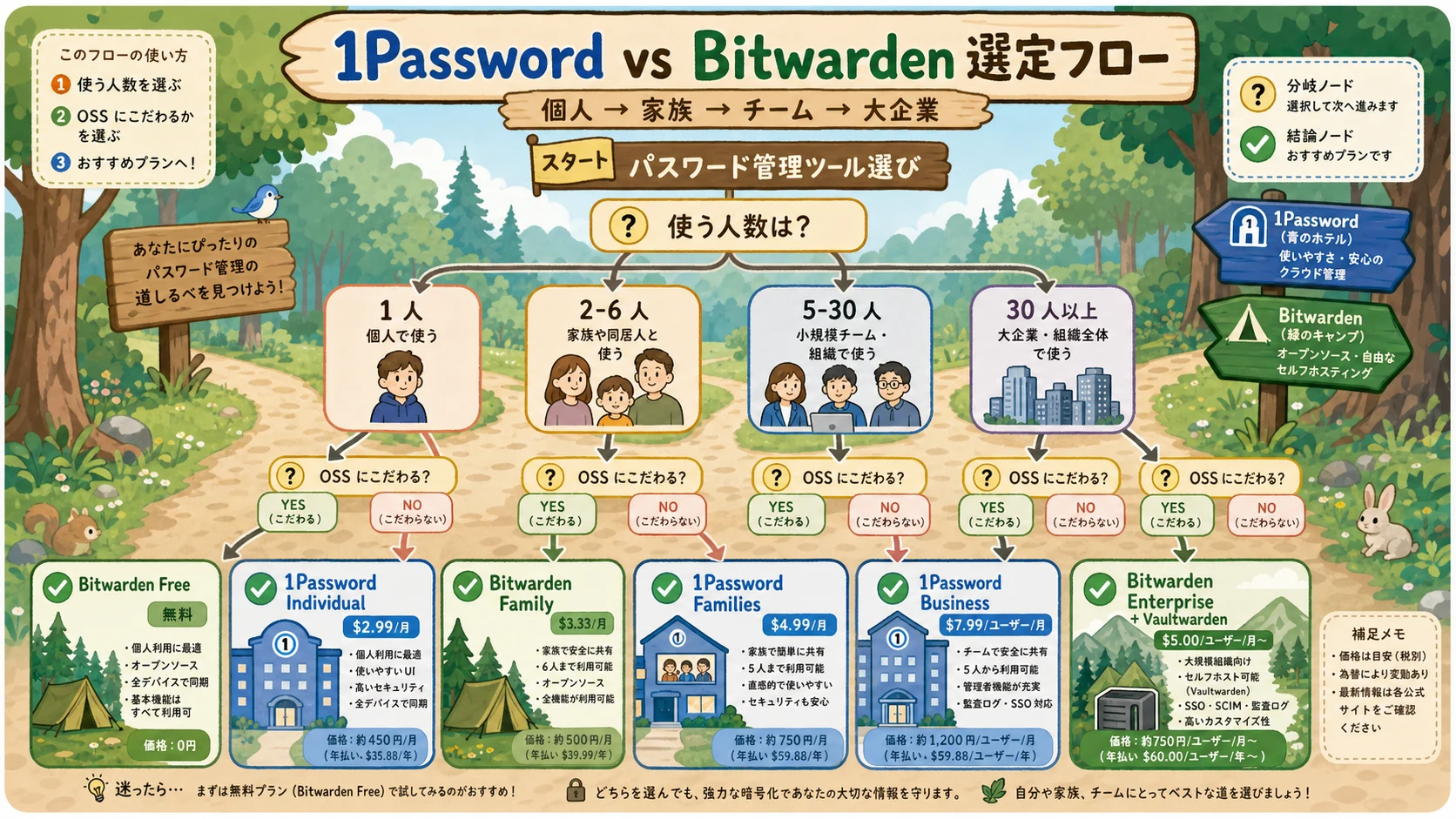
Solo (One User)
- Cheapest possible, minimum features fine → Bitwarden Free
- Need TOTP, emergency access, attachments → Bitwarden Premium ($19.80/year)
- Want Watchtower, Travel Mode, and the polished UX → 1Password Individual ($47.88/year)
- Want a 3-year lock-in in JPY (Japan) → 1Password via SourceNext 3-year license
Family or Partner (2–6 People)
- Cost first, already comfortable with Bitwarden's UI → Bitwarden Families ($47.88/year, up to 6)
- UX, support, and Passkey adoption across everyone → 1Password Families ($71.88/year, up to 5)
Small Team (5–30 People)
- OSS, headcount fluctuates, no SCIM needed → Bitwarden Teams ($4/month/user)
- Predictable flat fee, SSO later → 1Password Teams Starter Pack ($19.95/month flat, up to 10)
Mid-to-Large Org (30+ People)
- Want SSO, SCIM, audit logs, Secrets Automation in one → 1Password Business. Rollout choices are covered in Choosing the Right 1Password Business Plan
- OSS, self-hosting, full code auditability → Bitwarden Enterprise + Vaultwarden hybrid
Migrating Either Direction
Bitwarden → 1Password
- From Bitwarden Web Vault, export JSON (passwords + TOTP + custom fields)
- In 1Password's Importer, select "Bitwarden" and upload the JSON
- Verify TOTP seed compatibility (some TOTP codes need re-enrollment in 1Password's authenticator)
- Download attachments individually and re-attach in 1Password
- Set up Watchtower right away to inherit breach monitoring on your imported items
The 1Password Switch Program can offset some of the remaining Bitwarden subscription cost when you migrate, so you don't pay twice during the overlap6. The credit equals what you still owe your previous provider, up to one year of your selected 1Password plan, which makes the timing of the switch much more forgiving. Worth checking before you commit.
1Password → Bitwarden
- Export from 1Password as 1PUX (Unified Export)
- Use Bitwarden's "1Password 1PUX" importer
- If you have multiple vaults, remap into Bitwarden Organizations / Collections
- Rebuild shared vaults as Organization Owner
Either direction is a 30-minute to 2-hour exercise. Tidy the source first to keep the import clean.
Closing — How to Decide
To make this concrete:
- Pay with money — buy polish and support → 1Password (Individual / Families / Business)
- Pay with operational effort — OSS and cost-optimized → Bitwarden (Free / Premium / Enterprise + Vaultwarden)
- Solo and unsure: Start with Bitwarden Free for a month; if you hit limits, step up to 1Password Individual
- Family or team and unsure: UX and Passkey adoption → 1Password; cost and OSS verifiability → Bitwarden
- Considering a switch: 1Password's Switch Program can offset some of your existing subscription cost6
Both products are safe. The right answer comes down to whether your team can absorb server-side operations. If you're undecided, run the 30-day trial of 1Password, and if it doesn't click, drop to Bitwarden Free without losing sleep.
Information current as of 2026-05-24. Please check the official sites (https://1password.com/pricing, https://bitwarden.com/pricing) for the latest updates.
This article contains affiliate links.
Footnotes
-
1Password official pricing page: https://1password.com/pricing ↩ ↩2 ↩3 ↩4 ↩5
-
Bitwarden official pricing page: https://bitwarden.com/pricing ↩ ↩2 ↩3 ↩4 ↩5 ↩6 ↩7 ↩8
-
1Password Security Design (white paper): https://1passwordstatic.com/files/security/1password-white-paper.pdf ↩ ↩2 ↩3 ↩4
-
1Password security audit reports: https://support.1password.com/security-assessments/ ↩ ↩2 ↩3
-
Vaultwarden official repository (Rust reimplementation of the Bitwarden API): https://github.com/dani-garcia/vaultwarden ↩ ↩2
-
1Password Switch Program (offsets the cost of switching from another password manager): https://1password.com/switch ↩ ↩2
Frequently asked questions
Related articles
1Password Individual vs Families 2026 — Break-Even and SourceNext

1Password Passkeys 2026: FIDO2/WebAuthn Storage, Sync, and Ops