1Password vs Dashlane 2026: Bundled VPN or Developer Tooling?
A fair 1Password vs Dashlane comparison for 2026 across pricing, features, security design, platform support, and business capabilities — with a data-backed recommendation.
This article contains affiliate links (advertising).
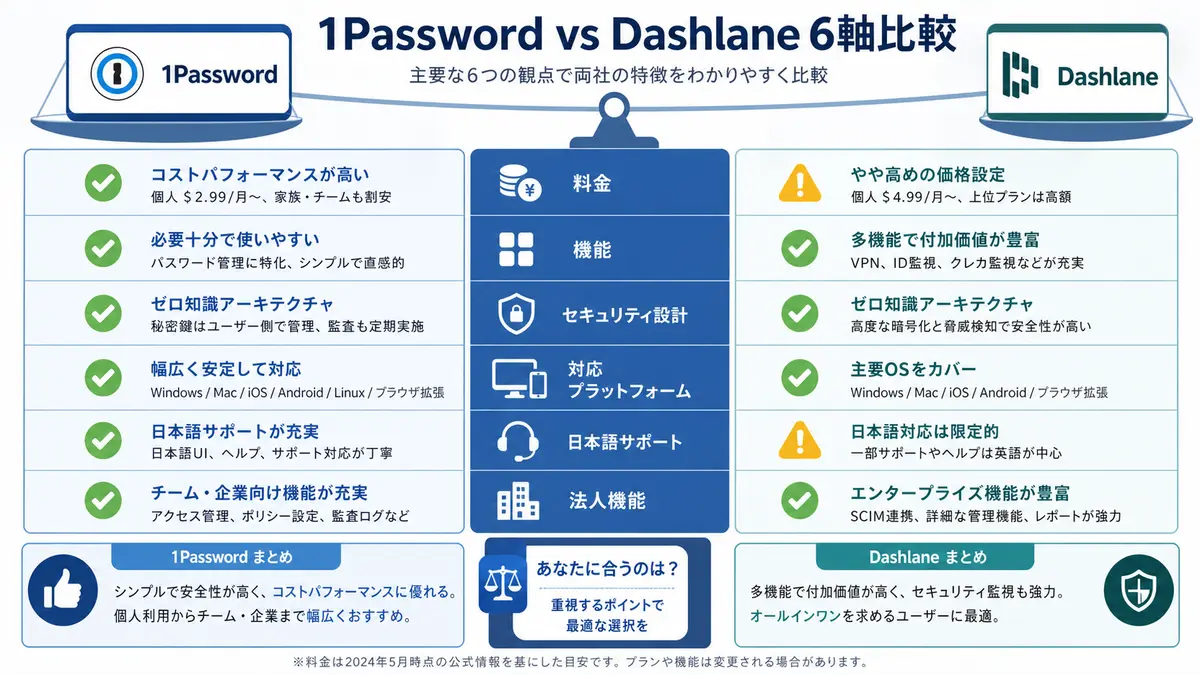
"Which password manager should I choose — 1Password or Dashlane?" is a question we hear often. This article compares 1Password and Dashlane fairly across six axes — pricing, features, security design, platform support, Japanese-language support, and business capabilities — using official sources as of May 2026. Both are excellent tools, but a clear set of decision criteria makes the right fit obvious. No hype, just footnoted facts12.
Where 1Password and Dashlane stand (as of May 2026)
Both are zero-knowledge password managers (data cannot be decrypted server-side) offering AES-256, passkeys, autofill, dark web monitoring, browser extensions, and clients for every major OS12. There is no large gap in the security foundation; the difference comes down to "a polished platform for developers and teams" vs. "all-in-one convenience with a bundled VPN."
Where 1Password stands
- Leader in polish and ecosystem: A reputation for refined UI/UX, with mature details like Watchtower (breach monitoring) and Travel Mode (hiding vaults at border crossings)1
- Deep developer/enterprise tooling: SSH key management, the
opCLI, Secrets Automation (CI/CD integration), SSO (Okta / Azure AD / Google Workspace), and SCIM provisioning are standard3 - Investing in AI-era access: In March 2026 it launched Unified Access (visibility and auditing for credentials used by humans, machines, and AI agents), and its SaaS Manager covers inventory for AI tools like Claude, Cursor, and ChatGPT Enterprise4
- HQ: Toronto, Canada. Support is English-first (Japanese help is limited)
Where Dashlane stands
- All-in-one convenience: Premium bundles a Hotspot Shield-based VPN, covering password management and VPN in one subscription2
- Simple UI and automation: An intuitive dashboard and automatic password changing (Password Changer) make it easy to recommend to non-technical family members2
- Focus on passkeys and credential intelligence: It runs "World Passkey Day" campaigns to drive passkey adoption, and for business it leans hard into the Omnix™ platform to surface credentials for apps outside SSO5
- HQ: Massachusetts, USA (originally founded in Paris). A simple Premium → Friends & Family lineup (the permanent free plan was discontinued; 14-day trial only)6
Sentiment on X
1Password is pushing zero-knowledge beyond the vault — into browsers, dev environments, and AI agents — framing its master password plus Secret Key two-layer model as non-negotiable for modern credential security1.
"Zero-knowledge is no longer just about the vault. It must extend to browsers, dev environments, and AI agents acting on your behalf — non-negotiable."
Dashlane, meanwhile, runs aggressive passkey campaigns, foregrounding the move to phishing-resistant authentication.
"Passkeys are structurally phishing-proof. On World Passkey Day, move beyond shared secrets."
For a different axis — "commercial SaaS vs. open source" — when stacking 1Password against Bitwarden, see 1Password vs Bitwarden compared if you also want to weigh OSS or free plans.
Pricing comparison — individual, family, team
Lined up on official annual billing, the picture looks like this12. Rates are in USD as of writing (May 2026); local-currency conversions vary with exchange rates.
| Plan | 1Password | Dashlane | Notes |
|---|---|---|---|
| Free | None (30-day trial) | None (Free plan discontinued; 14-day trial only)6 | Neither offers a permanent free plan |
| Individual | Individual $2.99/mo (annual, Watchtower included / $3.99 month-to-month) | Premium ~$4.99/mo (annual, VPN included) | 1Password is cheaper annually; Dashlane bundles a VPN |
| Family | Families $4.49/mo (annual, up to 5 / $5.99 month-to-month) | Friends & Family ~$7.49/mo (up to 10) | Dashlane is cheaper per person at large sizes |
| Small team | Teams Starter Pack $19.95/mo flat (up to 10) | Business per-user pricing | 1Password wins for small fixed teams |
| Business | Business $7.99/user/mo (SSO + SCIM) | Business per-user (incl. Omnix) | Compare on feature set |
For 1Password pricing details (annual vs. monthly, or the Japan SourceNext edition), see 1Password Individual vs Family plan comparison.
Do not take "cheaper" at face value
On a standalone monthly basis, 1Password Individual on annual billing ($2.99/mo) is cheaper than Dashlane Premium (~$4.99/mo). That said, because Dashlane Premium bundles a VPN, it can recoup the difference if you currently pay separately for a standalone VPN ($40–60/year). If you already have a VPN or do not need one, 1Password Individual wins on both price and included features. 1Password also includes Watchtower by default and delivers value beyond price through its overall polish, including developer-grade features1.
Pricing changes hit both vendors in 2025–2026. 1Password applied new rates to customers who signed up after November 2025, while some pre-existing subscribers received increase notices early1. Dashlane also adjusted pricing, so checking the current price on each official page is a prerequisite.
Real cost for businesses
For small-to-midsize companies (10–100 seats), the annual license gap shifts with the feature set. 1Password Business includes SSO, SCIM, and Secrets Automation as standard, making fixed-cost estimates easy. Dashlane Business leads on "visibility for apps outside SSO" via Omnix, which resonates with organizations that value shadow-IT inventory. TCO depends less on headline price and more on whether the features you need are included by default.
Security and compliance compared
Encryption architecture
| Item | 1Password | Dashlane |
|---|---|---|
| Encryption | AES-256-GCM | AES-256 |
| Key derivation | PBKDF2-HMAC-SHA256 (high iterations) | Argon2d |
| Protection beyond master password | Secret Key (128-bit) kept on device; undecryptable from server leak alone | Device registration key (new-device approval required) |
| Zero-knowledge | Yes | Yes |
| Dark web monitoring | Yes (Watchtower / Have I Been Pwned) | Yes (real-time alerts + remediation) |
1Password's Secret Key means that even if your master password leaks, server-side data alone cannot be decrypted — one extra attack vector that makes the design more robust3. Dashlane also maintains zero-knowledge, securing practical strength through new-device approval flows and Argon2d key derivation. If defending against credential-theft scenarios is your top priority, 1Password's Secret Key model is a step more robust; if you value a simple UX and real-time monitoring, Dashlane fits.
Audits and compliance
Both continuously obtain and publish the following37.
- SOC 2 Type II
- ISO 27001 family
- GDPR / CCPA (operational compliance)
- Annual third-party penetration test reports
There is little difference; both meet the standard compliance requirements expected for business deployment.
Features and operations compared
Shared features (on par)
Both offer the following, so feature presence rarely decides the choice12.
- Password generation (length, symbols, readability)
- TOTP (2FA code) storage
- Passkey (FIDO2 / WebAuthn) support
- Autofill (browser and mobile)
- Dark web / breach monitoring
- Secure notes, credit cards, and personal info storage
- Clients for every major OS (macOS / Windows / iOS / Android / major browsers)
Differentiators (one side is stronger)
| Feature | 1Password | Dashlane |
|---|---|---|
| Bundled VPN | No | Yes (Hotspot Shield-based in Premium) |
| Automatic password change | No | Yes (Password Changer) |
| SSH key management + Git signing | Yes (op CLI) | No |
| Secrets Automation (CI/CD) | Yes | No |
| Travel Mode (hide vaults) | Yes | No |
| Native Linux app | Yes | Partial (web/extension-centric) |
| Visibility for apps outside SSO | Partial (SaaS Manager) | Yes (Omnix™) |
We cover 1Password's passkey and SSH key operations elsewhere too, but for developer-leaning features (CLI, SSH, CI integration) 1Password has a clear edge. Conversely, for the convenience of bundling password management with a VPN and changing passwords automatically, Dashlane pulls ahead.
Dashlane leans into surfacing apps "outside SSO" for business, with Omnix™ aiming to centrally manage credentials for the roughly 37% of enterprise apps (legacy systems, partner portals) said to sit outside SSO/MFA oversight.
"About 37% of enterprise apps sit outside SSO/MFA. Omnix closes that visibility gap, protecting credentials inside and outside the vault."
Operations and support (including Japanese)
- 1Password: SaaS only, no server ops. Documentation is thorough, but first-line support is English-first and Japanese help is limited; in Japan, buying via SourceNext adds a Japanese-language channel
- Dashlane: Likewise SaaS only. The UI is approachable, with strong onboarding aids like automatic password changing. Japanese UI is supported, but support is ticket-centric
- Common: Both are cloud-based, so you never manage TLS certificates or OS patches yourself
How to choose by use case
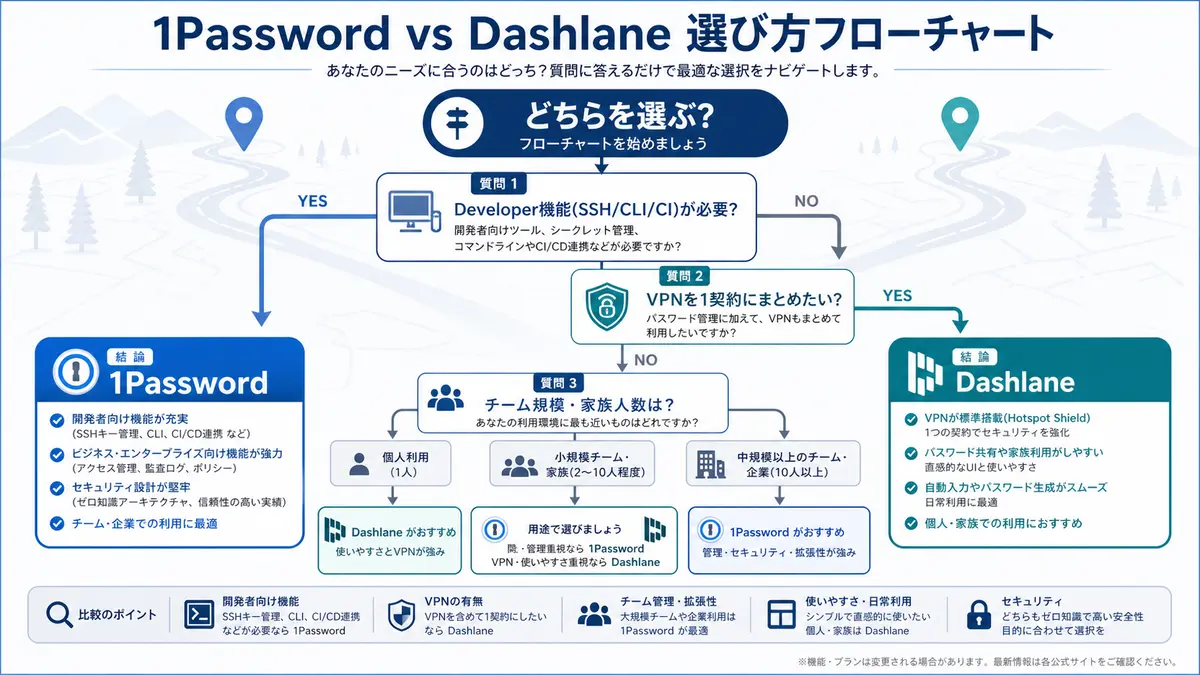
Individual use (solo)
- Want a VPN bundled in one subscription / automatic password changing → Dashlane Premium
- Value UX and ecosystem polish, plus Watchtower → 1Password Individual
- Want a 3-year fixed term and to cut FX risk (Japan) → 1Password 3-year edition via SourceNext
Family / partner sharing (2–10 people)
- Large group (6–10) wanting the lowest per-person cost → Dashlane Friends & Family (up to 10)
- Up to 5 people investing in UX, passkeys, and support → 1Password Families (up to 5)
Developers / technical teams
- SSH key management, CLI, CI/CD secret integration are must-haves → effectively 1Password only; the
opCLI and Secrets Automation maturity stand apart3 - Want to bundle a VPN with password management for a team → Dashlane Business is an option
Mid-size and larger deployments (30+ seats)
- Want SSO, SCIM, and Secrets Automation, with predictable fixed costs → 1Password Business. We also cover plan selection in How to choose a 1Password Business plan
- Prioritize visibility for apps outside SSO and shadow-IT inventory → Dashlane Business (Omnix)
Migrating from Dashlane to 1Password
Switching after you decide is straightforward. The Dashlane → 1Password steps are:
- Export a CSV from the Dashlane web app (passwords + secure notes)
- In 1Password's importer, choose "Dashlane" or generic CSV and upload
- Verify TOTP seed-key fidelity (re-enroll TOTP that cannot be exported)
- Download attachments individually → re-attach in 1Password
When switching from another manager, 1Password's switch support may cover part of your remaining Dashlane subscription period8. That lets you migrate without worrying about overlapping contract costs, so it is worth applying if you are considering the move. The reverse direction (1Password → Dashlane) also works via CSV export/import, and either way takes roughly 30 minutes to 2 hours.
Summary — the decision criteria
To wrap up the criteria: if you are choosing on overall strength and ecosystem polish, 1Password remains a solid first choice in 2026.
- Developers / technical teams → 1Password (SSH, CLI, and Secrets Automation maturity are the clincher)
- Individuals/families who want a bundled VPN or automatic password changing → Dashlane (all-in-one convenience)
- Large families (6–10) → Dashlane Friends & Family is cheaper per person
- Small teams or businesses wanting fixed-cost estimates → 1Password (Teams Starter Pack / Business)
- Businesses prioritizing visibility for apps outside SSO → Dashlane Business (Omnix)
- Considering a switch → 1Password's switch support may cover part of your existing license cost8
The security foundation is equivalent on both sides. It comes down to "all-in-one VPN and automation vs. developer/team polish." If you are unsure, confirm the UX and ecosystem with a free 1Password trial first, then try Dashlane if the bundled VPN or automatic password changing is the deciding factor — a two-step way to test the real feel.
Information is current as of 2026-05-31. Please check the official sites (https://1password.com/pricing, https://www.dashlane.com/pricing) for the latest.
This article contains PR.
Footnotes
-
1Password official pricing page: https://1password.com/pricing ↩ ↩2 ↩3 ↩4 ↩5 ↩6 ↩7 ↩8
-
Dashlane official pricing page: https://www.dashlane.com/pricing ↩ ↩2 ↩3 ↩4 ↩5 ↩6
-
1Password Security Design (white paper): https://1passwordstatic.com/files/security/1password-white-paper.pdf ↩ ↩2 ↩3 ↩4
-
1Password Unified Access (access management for humans, machines, and AI agents): https://1password.com/product/unified-access ↩
-
Dashlane security / Omnix platform: https://www.dashlane.com/security ↩
-
Dashlane FAQ on Free plan discontinuation (official support): https://support.dashlane.com/hc/en-us/articles/28150025262098-FAQ-about-the-Dashlane-Free-plan-discontinuation ↩ ↩2
-
1Password security assessments: https://support.1password.com/security-assessments/ ↩
-
1Password Switch Program (covers part of existing license cost when switching): https://1password.com/switch ↩ ↩2
Frequently asked questions
Related articles
1Password vs Bitwarden 2026 — Pricing, Security, and Operations Compared
1Password Individual vs Families 2026 — Break-Even and SourceNext