Bright Data Pay-As-You-Go vs Subscription: When to Commit
Should you stay on Bright Data pay-as-you-go or commit monthly? Compare unit prices, minimums, and the break-even point by usage tier to decide.

This article contains affiliate links (advertising).
The first Bright Data pricing decision most teams face is whether to stay on pay-as-you-go (PAYG) or move to a monthly commitment. The short answer: if your monthly spend reliably exceeds $500 (~¥79,000), commit monthly; below that, or while usage is still unpredictable, PAYG is cheaper. This guide breaks down the unit-price gap, the minimums, and the break-even point by usage tier, plus the hidden costs to watch — drawn from how we run Bright Data in production.
Pay-As-You-Go vs Monthly Commitment: What Actually Differs
Bright Data does not bill like a flat-rate SaaS with one price table. Your total is the product of a per-product unit price and a contract type, and that contract type is the fork between PAYG and a monthly commitment.1 That is exactly why two teams with the same monthly bill can sit on very different unit prices: the contract you signed, not just the volume you moved, sets your effective rate. Start with the three contract types.
Three Contract Types
- Pay-as-you-go (PAYG): Usage-based billing with no upfront contract. You pay by credit card for what you use, there is no minimum spend, and the unit price is the highest since no commitment discount applies (list $8/GB for Residential; a 50% off promo brings it to $4/GB as of 2026-07-14) — but you can stop anytime.
- Monthly commitment: You agree to a minimum monthly spend (from about $499/mo for Residential) in exchange for a lower unit price — higher tiers drop from the list $8/GB PAYG rate to roughly list $7-$5/GB (or $3.5-$2.5/GB with the 50% promo). Built for steady, ongoing usage.
- Enterprise: An annual commitment with a dedicated account manager and a 99.99% SLA. For large-scale, availability-critical workloads.
Put simply, PAYG buys agility, a monthly commitment buys a lower unit price, and Enterprise buys availability and negotiating leverage. For small and mid-size operations, the real choice is PAYG versus a monthly commitment.
In day-to-day terms, PAYG is the mode you validate on: no procurement, no minimum, and a bill that tracks exactly what you consumed. A monthly commitment is the mode you scale on, trading a little flexibility for a materially lower unit price once your volume is predictable. Enterprise is a separate conversation you enter only when uptime guarantees and legal review are already on the table — for most teams reading this, it is premature.
Quick Unit-Price Reference (Indicative, July 2026)
Before choosing a contract type, anchor on the PAYG unit price of the four main products. Billing units differ by product.2
| Product | Billing unit | Indicative PAYG rate | On monthly commitment |
|---|---|---|---|
| Residential Proxy | GB (traffic) | list $8/GB ( | list $7-$5/GB ($3.5-$2.5/GB on promo) |
| Datacenter Proxy | IP (dedicated IP) | $0.9-$1.3/IP + $0.6/GB usage | discounted |
| Web Unlocker | per 1,000 successful requests | ~$1.5/1k | discounted |
| SERP API | per 1,000 successful requests | ~$1.5/1k | discounted |
As of 2026-07-14, Bright Data's list Residential PAYG rate is $8/GB, and a 50% off promo (code RESIGB50) brings it to $4/GB. Because promos can expire, this guide anchors on the list $8/GB rate. Commitment tiers run Starter $499/mo (141 GB included) at list $7/GB, Professional $999/mo (332 GB) at $6/GB, and Enterprise $1,999/mo (798 GB) at $5/GB — each halved to $3.5 / $3.0 / $2.5/GB under the 50% promo. Note that Datacenter bills per IP ($0.9-$1.3/IP), not per GB, with a separate $0.6/GB usage-based option. Rates also vary by target country, volume, and concurrency. Prices here are as of 2026-07-14 based on the list rate, so always confirm the current numbers on the official pricing page.1 Yen figures use 1 USD ≈ ¥158 (July 2026) as a reference.
Two points are worth stressing. First, the list $8/GB Residential figure is the PAYG rate before any commitment discount (a 50% promo currently brings it to $4/GB, but promos expire) — it is not a floor. Second, the billing unit is not uniform: Residential bills by transferred gigabytes, Datacenter bills primarily per IP, while Web Unlocker and SERP API bill per thousand successful requests. Mixing up those units is the single most common reason a cost forecast comes in wildly off, because a GB-based estimate, an IP-based estimate, and a request-based estimate scale on completely different curves.
For market context, retail (PAYG) residential rates are often quoted at $4-$8.40/GB. The list rate of $8/GB sits toward the upper end of that band, while the current 50% off promo ($4/GB) lands near the bottom — so budget for the list rate becoming your effective cost once a promo ends (the tweet below is a market observation; the article's headline figures use the official list rate).
Decision Table: PAYG vs Monthly Commitment
Unit price alone should not decide this. Factor in the barrier to start, contract lock-in, and support level, and Bright Data's three modes line up as follows. Instead of bare check marks, each cell carries the reasoning.
| Criterion | Pay-as-you-go | Monthly commitment | Enterprise |
|---|---|---|---|
| Barrier to start | Low: card sign-up, start instantly | Medium: agree a minimum spend | High: annual contract, review |
| Unit price | High: list $8/GB ($4/GB on promo) | Lower: list $7-$5/GB ($3.5-$2.5/GB on promo) | Lowest: negotiated |
| Minimum spend | None | Yes (e.g. $499/mo+) | Annual commitment |
| Lock-in | Stop anytime | Bound to monthly minimum | Bound annually |
| Support | Mostly self-serve | Standard support | Dedicated AM, 99.99% SLA |
| Best fit | PoC, sporadic, small | Steady ongoing runs | Large scale, availability |
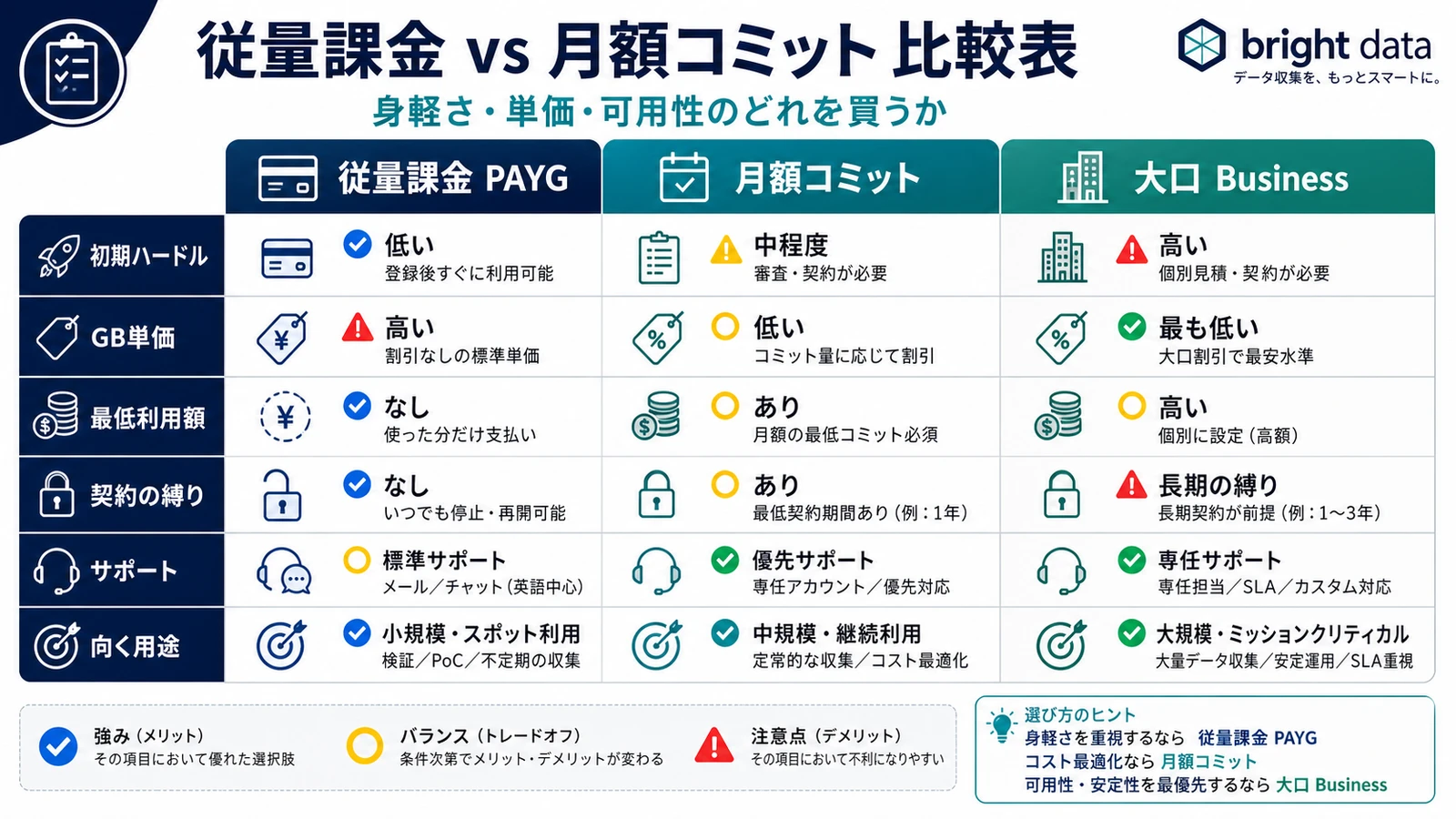
Read the table top to bottom and a pattern emerges. PAYG minimizes commitment risk at the cost of the highest unit price; a monthly commitment inverts that trade, and Enterprise only earns its lock-in when uptime guarantees and a named account manager change the economics. For most small and mid-size teams, the honest decision sits entirely between the first two columns. The gray zone is the line between PAYG and a monthly commitment, and the next section puts numbers on exactly how many GB or dollars should trigger the switch.
Where Is the Break-Even Point? A Usage-Tier Simulation
Using Residential Proxy as the example, here are rough monthly totals by usage tier (rates from the reference above, ¥158 conversion). Find the row closest to your monthly volume to see which mode wins.
| Monthly usage (Residential) | PAYG estimate (list $8/GB) | Monthly commitment estimate | Winner |
|---|---|---|---|
| 10 GB | below the ~$499 floor — overpay | Pay-as-you-go | |
| 62 GB | ~$499 (lower unit price) | Break-even band | |
| 200 GB | drops to list $5/GB ($2.5/GB on promo) on commit | Commitment / Enterprise |
Estimates use a PAYG rate of list $8/GB (as of 2026-07-14) and 1 USD ≈ ¥158; confirm current unit prices on the official pricing page. By scale:
- Small (10-20 GB/mo): You never reach the monthly minimum (~$499), so committing means overpaying. PAYG only.
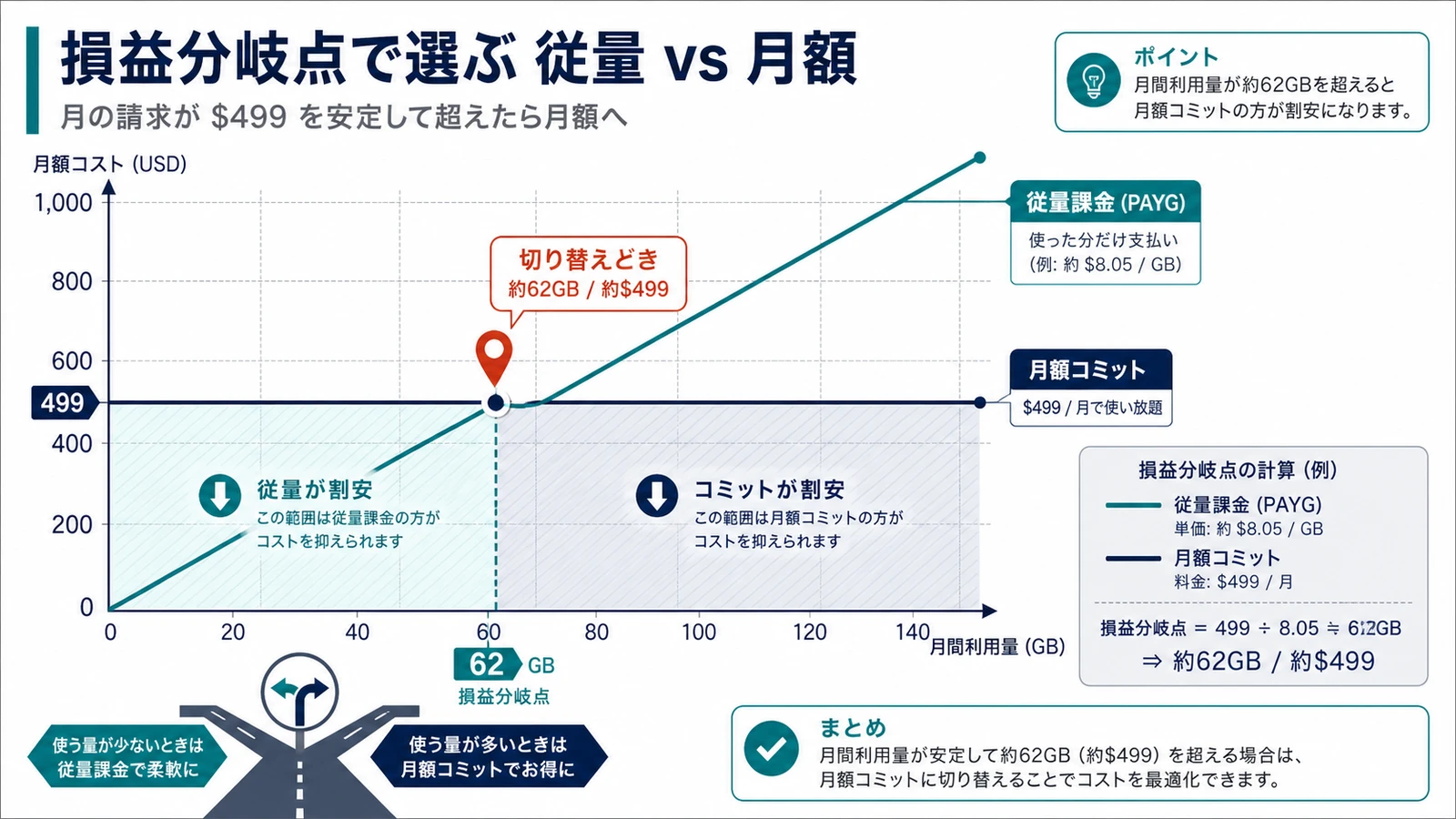
- Mid (50-70 GB/mo): Your PAYG invoice approaches $499 — the break-even band (at list $8/GB, roughly 62 GB hits $499). If usage is stable and predictable, the same $499 buys more on a commitment at a lower unit price, making it a switch candidate.
- Large (200 GB/mo+): Go straight to a monthly commitment or Enterprise. Tell sales your "X GB/month" estimate and higher tiers often reach list $5/GB ($2.5/GB on promo).
To make the math concrete, take the 62 GB row. On PAYG at list $8/GB you spend about $499 — right at the monthly minimum. Move that same workload onto a commitment and the discounted unit price means the identical spend buys meaningfully more traffic, or the same traffic costs less. That is the crossover: below it you pay a premium for flexibility you may not need; above it you leave a discount on the table by staying on PAYG.
One caveat on the simulation: it assumes clean, mostly successful requests. Real workloads waste bandwidth on retries and blocked responses, which pushes your effective GB above the pages you actually parsed. Build a buffer into whichever tier you land in. A handy rule: once your PAYG invoice reliably clears the commitment minimum (about $499/mo for Residential, roughly 62 GB), it is time to switch.
Some real users find the $499/mo commitment floor simply too high. If you are small and want to avoid a minimum, staying on PAYG rather than forcing a commitment is the right call.
Hidden Costs and Add-On Fees to Watch
A monthly commitment lowers your unit price, but deciding on the headline plan rate alone can surprise you later. Fold these into any estimate.
- FX exposure: Invoices are in USD. If the yen weakens, your effective cost in yen rises even when the unit price is unchanged.
- Failed-request bandwidth: GB-billed products like Residential charge for the traffic of blocked requests too. Sloppy retry logic inflates usage.
- No rollover on unused commitment: A monthly commitment generally does not carry unused volume into the next month (it resets). An oversized commitment is simply wasted.
- Minimum floor still bills: If real usage falls below the minimum, you are still billed the minimum.
- Premium add-ons: Dedicated IPs, priority bandwidth, and extra support are billed separately.
None of these are hidden in a dishonest sense — they simply do not appear on the headline plan card. The teams that get surprised are the ones that budget off the sticker unit price and forget that FX, retries, and an unused minimum all land on the same invoice.
PAYG's credit / per-GB billing can be hard to predict, and some developers say it makes them anxious. That is exactly why you should wire up usage alerts and spending caps first, so billing swings stay visible before they hit the invoice.
Once usage is steady, moving Bright Data to a monthly commitment to cut the unit price is the standard play. That said, cutting bandwidth itself often saves more; we lay out tactics across proxy type, bandwidth, and contract in Bright Data cost optimization techniques.
Which Should You Choose? Case-by-Case Winners and Fit
Case-by-Case Winners
Split your situation into four patterns and the right mode becomes obvious.
- PoC, testing, sporadic collection → PAYG. Easy to stop, no wasted minimum.
- Steady monthly collection (price monitoring, etc.) → Monthly commitment. Higher tiers drop the unit price to roughly list $5/GB ($2.5/GB on promo) and you clear break-even.
- Large scale, shifting load to Datacenter to cut cost → Monthly commitment plus proxy-type optimization. The design details are in our Datacenter Proxy high-concurrency guide.
- Unpredictable, spiky usage → Run PAYG for two or three months first, then commit once your average clears the minimum.
The through-line across these cases is direction of travel. Almost everyone should start on PAYG, because it is the only mode that tells you your real usage before you are asked to commit to a number. The mistake to avoid is committing early on an optimistic forecast and then paying a minimum you never reach — an oversized commitment costs you the same as usage you never got.
Who It Fits — and Who It Doesn't
A monthly commitment fits you if
- Your monthly usage is stable and clears the commitment minimum
- You want to compress total cost by lowering the unit price
It does not fit (and the alternative) if
- Usage stays under ~$499/mo or swings widely month to month → stay on PAYG. Keeping Bright Data on pay-as-you-go is the rational choice.
- Maintaining your own scraper is the real cost sink → consider buying ready-made data instead of scraping. If the use case fits, the Dataset Marketplace guide is a useful reference.
Easing Common Worries
- Can you try it free? PAYG lets you validate from a small amount with no minimum contract. A few-GB PoC often stays under a few tens of dollars, so you can measure real usage before committing.
- Can you stop mid-way? PAYG stops anytime. A monthly commitment has a monthly lock-in, and since unused volume does not roll over, avoiding an oversized commitment is the safe move.
- Budgeting for FX: Invoices are in USD, so build in the extra yen-side cost during a weak-yen period ahead of time.
At Smile Comfort we run Tra-bell, a hotel price-tracking service, on Bright Data's Residential Proxy combined with Web Unlocker. Switching proxy type and contract mode by use case is how we balance cost efficiency against block avoidance. We can help with the same break-even simulation and PoC-to-production migration, depending on requirements.
Summary
Bright Data pay-as-you-go and monthly commitment are not opposing choices — they are different phases of usage. Start small on PAYG, then switch to a monthly commitment once monthly usage reliably clears the minimum (about $499, or roughly 62 GB of Residential at the list $8/GB PAYG rate). That path keeps both a low unit price and agility. When in doubt, measure your trailing three months and check whether you are in the break-even band.
One more thing: Bright Data's PAYG starts instantly with no minimum and runs on the same billing base as managed services like Web Unlocker and SERP API. Unlike providers that are merely cheap per GB, judge it on total cost — KYC-vetted IP compliance review, IP quality, and unified billing across products included — not the sticker rate alone. (Prices as of 2026-07-14 based on the list rate of $8/GB; a 50% off promo brings it to $4/GB. Check the official pricing page for the latest.)
Information current as of 2026-07-14. Please check the official sites for the latest updates.
This article contains affiliate links.
Footnotes
-
Bright Data official pricing page https://brightdata.com/pricing (as of July 2026) ↩ ↩2
-
Bright Data proxy product comparison https://brightdata.com/proxy-types ↩
Frequently asked questions
Related articles

Bright Data Cost Optimization 2026: Cut Monthly Bills 30-70% With Proxy, Bandwidth, and Contract Tactics
Bright Data Datacenter Proxy 2026: Design for 10K Scraping