Bright Data Cost Optimization 2026: Cut Monthly Bills 30-70% With Proxy, Bandwidth, and Contract Tactics
Practical tactics to slash a runaway Bright Data invoice. Four levers (proxy type, bandwidth, commitment, monitoring) drive 30-70% savings, with Tra-bell operational notes from Smile Comfort.

This article contains affiliate links (advertising).
Every month we hear the same story: "Our Bright Data invoice tripled overnight" or "Residential proxies alone burn hundreds of dollars a week." The good news is that Bright Data cost is almost always compressible by 30-70% using four levers: proxy type selection, bandwidth reduction, contract restructuring, and monitoring. This guide distills the playbook we use to run Tra-bell on Bright Data, ordered by impact so you can execute top-down.1
Understand Your Bright Data Cost Drivers
Most runaway Bright Data invoices trace back to one root cause: residential proxy bandwidth (GB) usage. Before optimizing, get a clear picture of what each product line is charging you.2 We break the full pricing table down by product and contract type in Bright Data Pricing Cheat Sheet 2026; start there if your cost structure feels opaque.
The four cost drivers we triage in priority order are simple: which proxy product you use, how many bytes leave the wire per request, the contract tier you sit on, and how quickly you notice when those three drift out of bounds. Treat them as a stack; you cannot price-negotiate your way out of a wasteful design, but you also cannot optimize bandwidth into double-digit savings if your contract is wrong.
Unit Pricing Snapshot (May 2026)
- Residential Proxy: $8.4-10/GB on small-scale PAYG, $4-6/GB on commitment
- Datacenter Proxy: $0.5-1/GB, weaker detection resistance but dramatically cheaper
- ISP Proxy: $11/IP/month, Residential-grade resistance plus speed
- Mobile Proxy: $40/GB+, reserved for last-resort cases
- Web Unlocker: $3/1k req (success-based)
- SERP API: $3/1k req (success-based)
The success-billed products (Web Unlocker, SERP API) are particularly interesting because they cap how much a single failed request can cost you. We will revisit them later when discussing retry economics.
Cut Volume Before Negotiating Unit Price
Negotiating unit price and contract type matters, but cutting consumption in half lands a much bigger blow on the invoice than shaving 30% off the price per GB. A 50% volume drop translates one-to-one to the bill; a 30% unit-price drop is gated by procurement timelines, minimum commitments, and your willingness to forecast usage. On X, operators routinely share stories of trimming monthly spend from $200+ down to about $30 by rethinking design.
The pattern we see in client engagements: moving from "Residential for everything" to "Datacenter / ISP / Residential mixed by target" alone drops the invoice 40-60%. We see this so consistently that we now refuse to discuss commitment contracts until a team has spent at least two weeks doing target-level proxy classification. The contract conversation is far more productive when you know the actual baseline.
Mix Proxy Types to Halve Bandwidth Cost
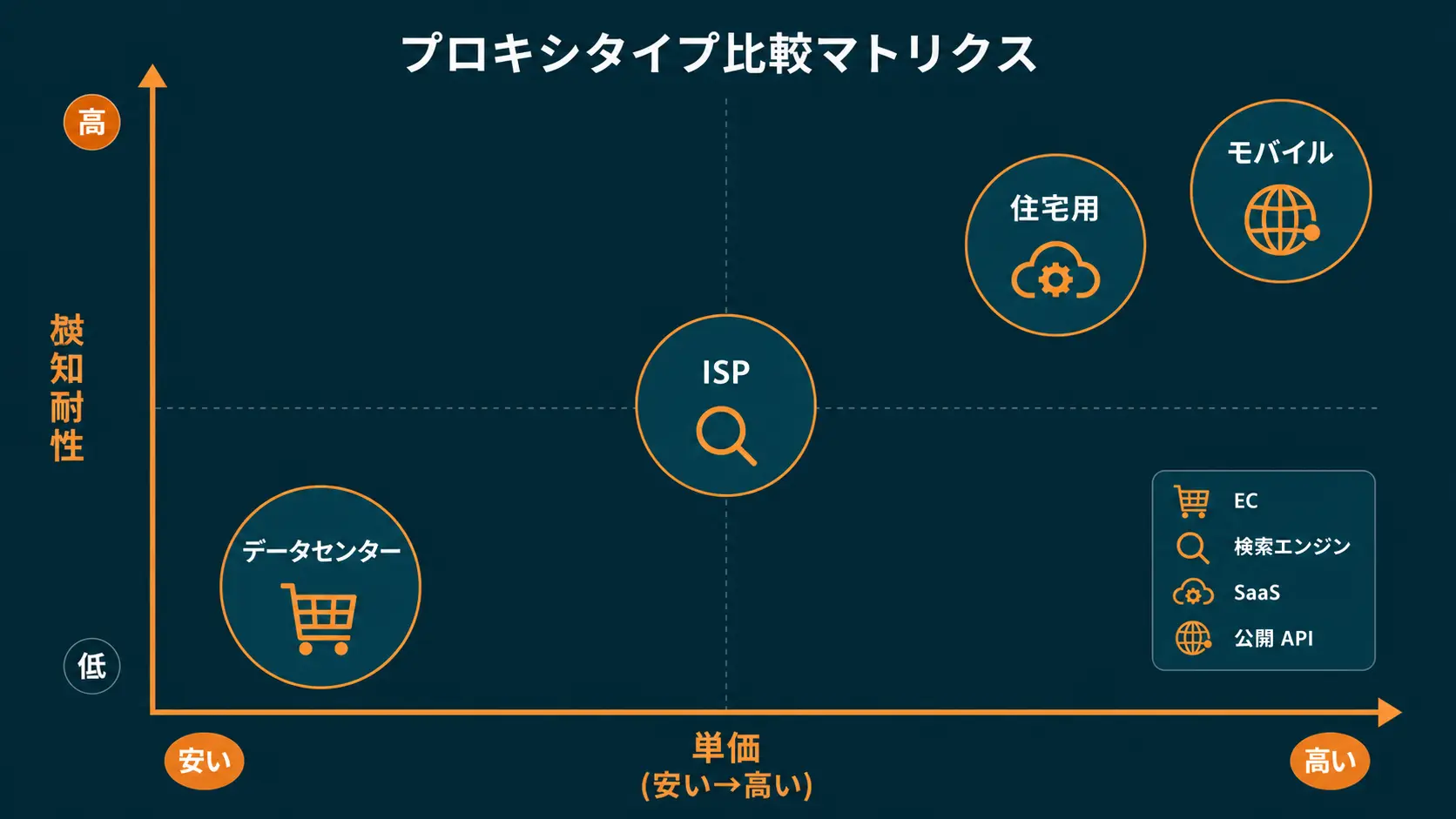
The single highest-impact change is picking the right proxy type per target. Residential is 10-20x more expensive than Datacenter. Putting every request through Residential is like running every delivery in an 18-wheeler, even for envelope-sized payloads.
Target-Based Selection Matrix
- Large e-commerce (Amazon, Rakuten, large Shopify stores) -> Residential
- Search engines (Google, Bing) -> SERP API is cheapest
- Large SaaS (LinkedIn, Twitter / X, Instagram) -> Residential + Web Unlocker
- Mid-size e-commerce, public APIs, open datasets -> Datacenter or ISP is enough
- Strong CAPTCHA / Cloudflare defenses -> Web Unlocker (success-billed, retry-friendly)
Document this matrix as a config file in your scraper repo, with one row per target domain and the chosen proxy product. This becomes the source of truth when costs spike: you can quickly see whether a particular target got accidentally promoted to a more expensive tier.
Datacenter-First, Step Up Only as Needed
When you onboard a new scraping target, always test in this order:
- Send 100 requests through Datacenter and measure success rate
- Above 90% success? Stay on Datacenter in production
- Between 70-90%? Upgrade to ISP Proxy
- Below 70%? Move to Residential or Web Unlocker
This sequence keeps expensive Residential bandwidth focused on targets that truly need it. Re-run the benchmark every quarter; bot defenses evolve, and a target that previously needed Residential can sometimes downgrade back to ISP after a defensive update on the target's end relaxes. For a deeper benchmark workflow comparing Residential and ISP, see Bright Data Residential vs ISP Proxy 2026.
Bandwidth Reduction Tactics (High Impact, Quick to Ship)
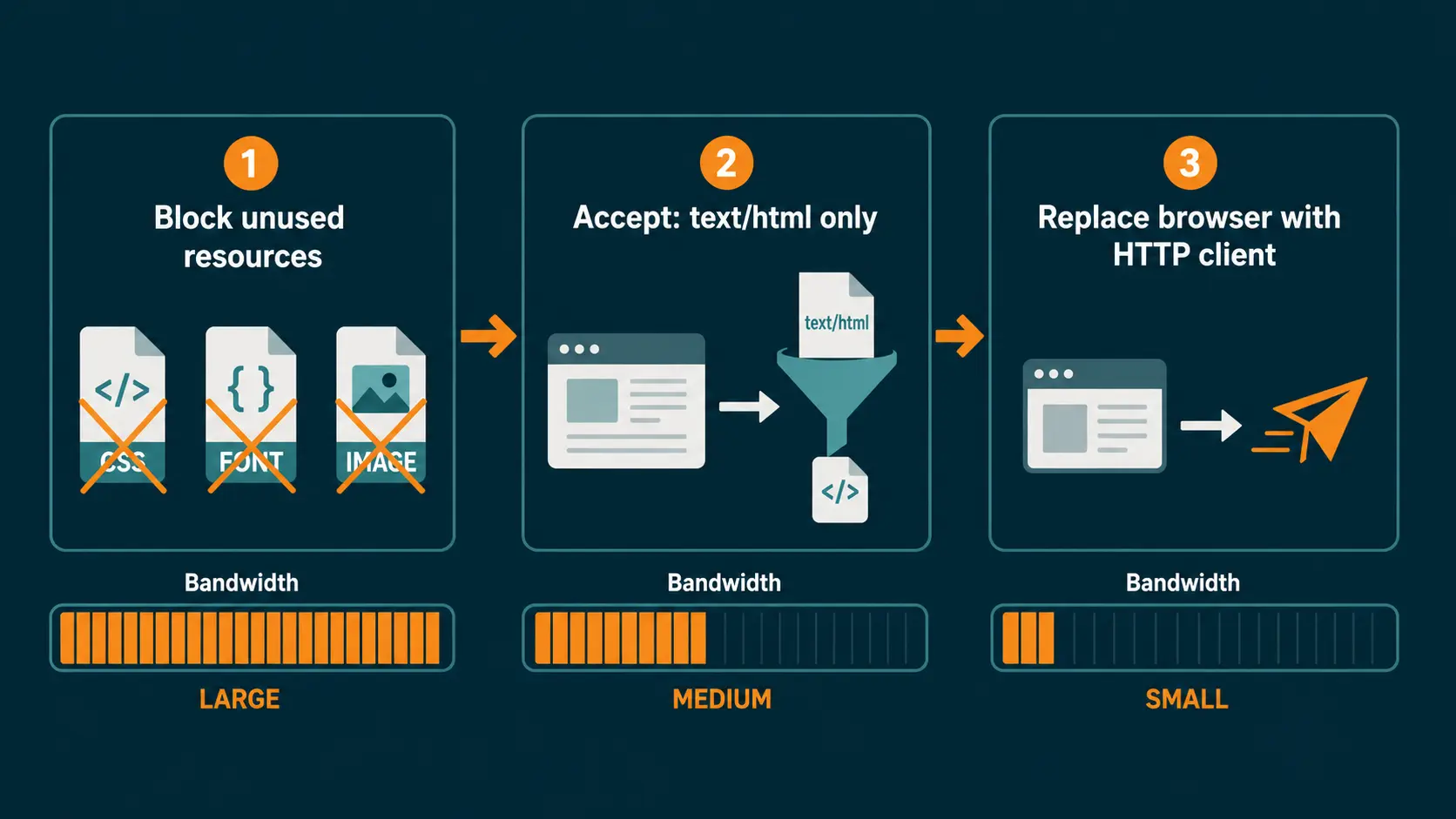
Once proxy types are right-sized, the next lever is cutting bytes per request. With browser automation (Playwright / Selenium / Puppeteer), unused assets often account for 70-90% of the wire payload. Trimming those wasted bytes is overwhelmingly the highest-leverage code change available to an existing scraping team, because the work happens entirely on your side without touching contracts or vendor relationships.
Browser Automation Cleanup
- Block unused resources: Images (
*.jpg,*.png,*.webp), CSS, video, fonts, and tracking scripts viapage.route()returning 403 / abort - Restrict Accept header to HTML: Set
Accept: text/htmlto suppress auto-fetched assets - Headless plus minimum surface area: When font load and CSS parsing are not required, flags like
--disable-imagesfurther shrink the payload - Skip the browser entirely: If targets are static HTML or JSON APIs, switching to a lightweight HTTP client like
httpxorrequestsreduces bandwidth by 5-10x
Smarter Data Handling
Beyond browser settings, the way you persist data matters:
- Extract only the fields you need: Skip the full HTML dump; store price, stock, title, and similar essentials only
- Store results compressed: gzip into S3 or R2 to cut downstream egress
- Add a cache layer: Frequently accessed records belong in Redis or Memcached so you do not re-fetch them
- Keep concurrency moderate: Over-parallel requests trigger bans, which cause retries that burn bandwidth. Find the break-even between success rate and concurrency before pushing harder
A common pitfall we see: teams chase raw throughput, push concurrency from 20 to 200, and the resulting ban rate spikes their retries to 4x normal. Net effect on bandwidth is negative even though peak rate looks impressive in the dashboard. Always benchmark concurrency against success rate, not against requests-per-second alone.
Lean on Sticky Sessions
By default, Bright Data rotates IPs on every request. For workloads such as authenticated scraping or multi-page crawls, sticky sessions (reusing the same IP for a defined window) lift success rate and indirectly cut bandwidth, because fewer retries mean fewer bytes burned. The trade-off is that a single IP getting flagged can block a longer string of requests; balance the session TTL against the target's typical block window. We default to 1-5 minute TTLs for multi-page browsing and 30-second TTLs for high-throughput product crawls.
Drop Unit Price With Contracts and Monitoring
In parallel with bandwidth work, contract restructuring is the second-best dial. Operators on X regularly share PAYG-to-commitment moves that drop unit price by 30-70%.
That said, a commitment contract locks you into a minimum spend. Jumping in before usage stabilizes can backfire.
When to Move From PAYG to Commitment
- Trigger the conversation once monthly spend crosses $500 (~¥75,000)
- Bring 3-6 months of usage history to the simulation
- Anchor the minimum commitment around 70% of projected usage (buffer for slow months)
- Account for FX exposure (consider local resellers if JPY-billed invoices reduce risk)
Once you sign a commitment, treat the overage tier as the actual "elastic" capacity rather than your committed base. Configure your alerting so that anything trending toward the upper end of your tier fires a warning a week before the bill closes, giving you time to throttle non-critical workloads.
Set Up Tight Monitoring
To prevent surprise spikes, visualize per-project and daily usage on the dashboard and add threshold alerts:
- Segment usage by Bright Data Zone (one per project)
- Track daily bandwidth and dollar spend in a spreadsheet or BI tool
- Auto-alert (Slack / PagerDuty) when actual exceeds 120% of forecast
- Monthly, compare target cost-per-GB versus actual, and prioritize Zones with the largest gap
Anomaly detection deserves a sentence too. Even a basic three-sigma alert on daily bandwidth catches most "we left a debug loop running" incidents before they cost more than a few dollars. Pair the alert with a runbook entry that lists the suspected Zones in priority order. Connecting Bright Data with a BI pipeline pairs well with success-billed products. We touch on that in Bright Data Web Unlocker Practical Guide 2026, where success billing makes budget management even more predictable.
At Smile Comfort, we run Bright Data optimization engagements that include mix-design across Residential / Web Unlocker / SERP API and PAYG-versus-commitment break-even modeling. For deployments spending thousands of dollars per month, simply re-mapping Zone-level usage often surfaces $1,000-$2,000 of recurring monthly savings.
Case in Point: Cost Optimization on Tra-bell
We operate Tra-bell, a hotel price tracking service, on Bright Data using Residential proxies plus Web Unlocker. For Tra-bell we route each OTA (Booking.com, Agoda, Rakuten Travel, etc.) through a different proxy mix, pushing every target that tolerates Datacenter onto Datacenter to keep cost in check. The bulk of our Residential bandwidth budget is reserved for OTAs with strict bot defenses, where degradation in proxy quality would slash data freshness. We can advise on similar scraping infrastructure design, PoCs, and operations as needed.
Cost Optimization Checklist and Wrap-Up
To recap, here is the priority order we use when triaging a runaway invoice. Work top to bottom for the best cost-cut per hour invested:
- Match proxy type to target; default to Datacenter / ISP whenever possible
- Block non-essential resources in browser automation (
page.route()) - Replace the browser with an HTTP client when feasible
- Enable sticky sessions to lift success rate and shrink retries
- Add Zone-level usage dashboards and alerts
- Once spend passes $500/month, simulate a commitment contract
- Leverage Web Unlocker / SERP API success billing to cap retry cost
A realistic timeline: items 1-4 are engineering work, typically completed within one to two sprints. Items 5-7 are operational and procurement work that runs in parallel; you can have a commitment proposal in hand within a week or two if you bring usage data to the call. The combined effort, in our experience, returns its investment within a single billing cycle once the changes ship.
Bright Data invoices balloon not because the pricing is high but because the deployment is unoptimized. Walk the checklist above and most teams can compress monthly spend by half or more. If you would rather skip the trial-and-error phase, the team at Smile Comfort can sit alongside your engineers, classify each target, model the commitment break-even, and stand up the monitoring dashboards in a single engagement.
Information current as of 2026-05-21. Please check the official sites for the latest updates.
This article contains affiliate links.
Footnotes
-
Bright Data Official Pricing Page. https://brightdata.com/pricing ↩
-
Bright Data Proxy Types Comparison. https://brightdata.com/proxy-types ↩
Frequently asked questions
Related articles

Bright Data Pricing Cheat Sheet 2026: Product-by-Product Cost Guide

Bright Data Residential vs ISP Proxy 2026: A Practical Selection Guide