Bright Data Datacenter Proxy 2026: Design for 10K Scraping
How to design Zones, tune concurrency, and control cost when running 10K-concurrent scraping on Bright Data Datacenter Proxy, from a production operator's perspective.
This article contains affiliate links (advertising).
Bright Data Datacenter Proxy is the default lane when you need raw speed, deep concurrency, and the lowest per-GB price. This guide walks through Zone design, concurrency tuning, and cost control needed to run 10K-concurrent scraping in production on Datacenter Proxy. It also covers how to backstop weaker stealth with a fallback ladder so you extract more value than the price tag suggests. By the end you will have a concrete playbook for sizing IP pools, splitting Zones by target, and escalating to Residential or Web Unlocker only when the data demands it.
Why Datacenter Proxy Is Built for High Concurrency
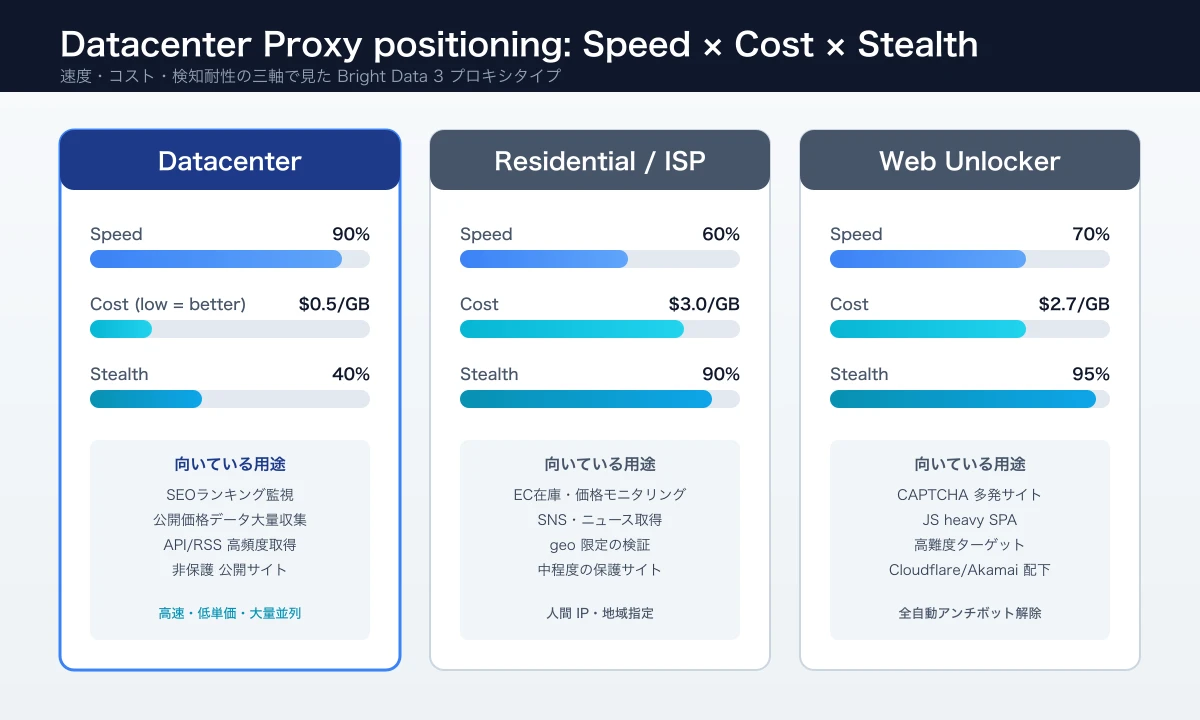
Datacenter Proxy routes traffic through IPs hosted inside cloud-provider and colocation data centers. Because the exit IP lives on a server rather than a home circuit, you avoid Residential's residential-link instability and get gigabit bandwidth with millisecond-grade latency1. For workloads that prize raw throughput over absolute stealth, this is the most cost-effective lane in Bright Data's portfolio.
Throughput and Stability Are Best in Class
Without a home connection in the loop, each IP can sustain hundreds of Mbps to a full 1 Gbps reliably. Bursty spikes and long-running crawls rarely drop a session, which is a frequent issue with Residential pools where peer devices can go offline at any moment. This stability lets operators commit to throughput targets per worker, which translates directly into capacity-planning confidence. In our own benchmarks, Datacenter consistently delivers two to four times the per-worker throughput of Residential when measured against the same Cloudflare-light targets.
Bright Data's Datacenter plan offers both shared and dedicated IP pools, so you can match IP freshness, isolation, and throughput to your workload. Shared pools cost less and refresh on Bright Data's rotation schedule, while dedicated IPs let you isolate traffic by client or by target so a single block event does not cascade across your portfolio.
Concurrent Connection Limits Are Loose
Residential pools implicitly cap concurrency at the number of active peers, which depletes quickly when you scale aggressively. Datacenter Proxy keeps its IPs running 24/7 on Bright Data infrastructure, so a single Zone can sustain well over 10,000 concurrent connections. The hard ceilings come from your account-wide bandwidth and IP count, which means you can derive a target concurrency budget directly from those two numbers during design. Many subscription tiers also bundle a per-account RPS budget that you can split across Zones, so you can plan whether to concentrate traffic in fewer Zones or spread it across more. A related X discussion summarized by Datakazkn suggests that enterprise-grade scraping can handle 1M+ items per month with predictable SLAs and dedicated support, which lines up with what we see in production: once Zone sizing matches the IP-and-bandwidth math, even the 1M+ items/month workloads run on a predictable SLA.
In production, 500-2,000 RPS per Zone is a realistic operating range. Pushing more concurrency into one Zone often triggers rate limits or bot detection at the target side, so the safer scaling strategy is to add more Zones rather than push one Zone harder. Most teams we have worked with end up with 5 to 15 Zones organized by target category, with a small ops dashboard showing per-Zone success rate and RPS so operators can spot regressions early.
Per-GB Cost Sits at the Bottom of the Stack
Datacenter Proxy starts around $0.5/GB (~¥75/GB), roughly 1/6 to 1/9 the per-GB price of Residential2. For workloads with large payloads and looser detection — internal data, lighter ecommerce, content harvesting from media properties — the cost performance is hard to match elsewhere. Annual commitments and volume tiers compress the unit price further, often dropping effective per-GB cost into the cents range for production workloads sustained over months.
The flip side is that GB consumption can be larger than it looks. JavaScript bundles, images, and font assets are often the silent majority of payload weight on modern ecommerce pages, so the same number of URLs can consume two to five times more GB than a naive estimate. Filter response types at the request layer or block static assets via a headless-browser intercept to keep your GB curve flat. For the breakdown of plan tiers, contract structures, and volume discounts, our Bright Data Pricing Cheat Sheet 2026 walks through each product line so you can model spend before committing.
Designing Zones for 10K Concurrency
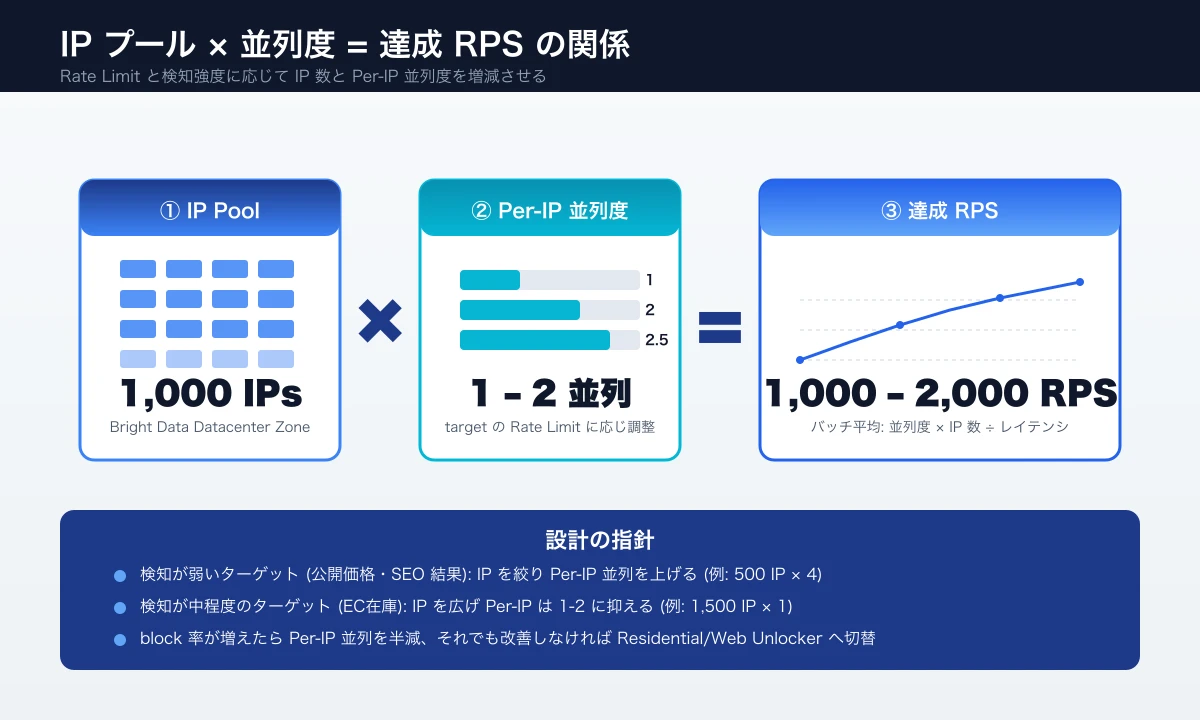
To scale concurrency, segment Zones along three dimensions: target-site category, proxy type, and IP pool size. Dumping every target into a single Zone causes block events and rate limits to ripple across all your traffic at once.
Zone Segmentation Patterns
| Zone Role | Recommended Proxy Type | IP Pool Size | Target RPS |
|---|---|---|---|
| Low-detection targets (internal / light EC) | Datacenter (shared) | 100-500 | 1,000-2,000 |
| Mid-detection targets (general EC / news) | Datacenter (dedicated) | 500-2,000 | 500-1,000 |
| High-detection targets (large EC / SaaS) | Residential / Web Unlocker | Dynamic | 100-500 |
| Logged-in session traffic | ISP / Sticky Residential | 100-300 | 50-200 |
Run low-detection targets through shared Datacenter IPs, switch to dedicated IPs as detection rises, and fall back to Residential or Web Unlocker when even dedicated IPs fail. For details on Residential vs ISP selection thresholds, see our Bright Data Residential vs ISP Proxy Selection Guide 2026, which lays out the switching criteria for the fallback ladder.
IP Pool Size and Concurrency
When targeting "1,000 IPs, 2,000 RPS", that averages two concurrent connections per IP. In practice, stay within 0.5-2 concurrent connections per IP to avoid hitting site-side rate limits (commonly 60 RPS per IP). To grow concurrency, the right move is to enlarge the IP pool rather than push per-IP concurrency, which spikes block risk on hardened sites.
Centralize Control With Proxy Manager
Bright Data's Proxy Manager gives a single control plane for per-Zone max-concurrency, retries, timeouts, and IP rotation cadence. Compared with hand-rolling these controls in your HTTP client, you gain consistent error handling and unified logging with much less effort.
For the step-by-step Zone setup itself, our Bright Data Proxy Zone Design and Setup Guide 2026 covers Zone creation, authentication, and per-Zone log separation.
Operational Techniques to Lift Concurrency
Once Zone design is solid, additional concurrency comes from how you build the request layer.
Step 1. Make the Request Layer Async
Use asyncio + httpx in Python or Promise.all + axios in Node.js to parallelize. Synchronous I/O explodes thread counts at 10K concurrency, so consolidate parallel jobs into async I/O within a single process. A single async process commonly drives 500-2,000 concurrent requests on a mid-tier worker node, which keeps your runtime footprint small even at high concurrency.
- Always set retry and timeout via
asyncio.timeoutorhttpx.AsyncClient(timeout=...) - Pass proxy credentials through environment variables and separate
session-idvalues by use case - On failure (HTTP 403/429, CAPTCHA HTML), fall back automatically to a Residential Zone
Make sure each request carries a clear correlation ID so you can trace failures end to end across the proxy layer and your downstream parser. When 10K requests are in flight, ad-hoc logs become useless within minutes; structured logs with proxy session ID, target URL, and result code are the only sustainable observability path.
Step 2. Separate Queue and Worker Layers
Decouple Workers that issue requests from Consumers that parse and persist results. With Redis, SQS, or Cloud Tasks in the middle, Workers pull from the queue and stay busy without waiting on I/O. This split also lets you scale Workers and Consumers independently, which matters because Consumers often spend more time on parsing and database writes than on the request itself.
- Enqueue URLs with metadata
- Workers (e.g., 200 concurrent) pull, request, and push results back to the queue
- Consumers parse results and write to BigQuery, Snowflake, or S3
This pattern also drops naturally into Kubernetes HPA for elastic Worker scaling. Pair it with a dead-letter queue so failed requests get a second attempt later without blocking the main pipeline, and you have a robust foundation for steady multi-million-request workloads.
Step 3. Backoff Retries and SLO Management
Track error rate as an SLO (e.g., success rate above 95%) and build a feedback loop that throttles concurrency automatically when the SLO breaches. With Datacenter Proxy, blocklists can hit subsets of an IP pool temporarily, so rapid error-rate spikes manifest at the Zone level rather than per IP. A circuit breaker that pauses the offending Zone for several minutes when the error rate exceeds a threshold gives the pool time to recover and prevents you from burning bandwidth on requests that will almost certainly fail.
Couple this with exponential backoff (e.g., 1s, 2s, 4s, 8s) for individual request retries, capping at three attempts before escalating to the Residential lane. Two layers of resilience — per-request retries plus per-Zone circuit breaking — keep success rates stable even when individual targets temporarily harden their detection.
When Datacenter Fits, and AI-Agent Cost Control
On X, some operators argue that Datacenter Proxy is overkill for small projects. The judgment shifts with scale, and a new class of AI-agent use cases is making Datacenter's low cost matter even more. We cover both here.
Picking the Right Stack by Scale
"Bright Data is overkill and expensive for small projects like 10k pages. Open-source tools like Crawlee, Stagehand, Camoufox, FlareSolverr, or Scrapling are popular alternatives." (Japanese summary: 小規模では Bright Data は過剰投資。OSS とライト級プロキシの組合せで十分なケースが多い。)
| Project Scale | Monthly Pages | Recommended Stack |
|---|---|---|
| Small (PoC, indie) | up to 100K | OSS + lightweight proxy (Smartproxy / Decodo, etc.) |
| Mid (internal tools, startup) | 100K-1M | Datacenter Proxy + Residential fallback |
| Large (enterprise) | 1M+ | Bright Data integrated (Datacenter + Residential + Web Unlocker + MCP) |
At mid scale and above, IP pool size, KYC compliance, and SLA still tilt the math toward making Bright Data's Datacenter Proxy the workhorse of the stack.
Scraping Triggered Dynamically by LLM Agents
In 2026, LLM agents (AutoGen, LangGraph, Claude Code, etc.) increasingly fire scraping calls on demand. Cost predictability is critical here, and using Datacenter as the primary lane is the realistic choice.
"Bright Data's MCP server automatically rotates proxies and handles challenges for LLM-powered agents." (Japanese summary: Bright Data の MCP サーバーは LLM エージェントに対してプロキシ自動切替・検知・CAPTCHA 処理を提供する。)
Bright Data's MCP server inspects each target's detection strength internally and is designed to use the appropriate proxy type — Datacenter, Residential, or Web Unlocker — based on each target's detection profile. Most low-detection traffic routes through Datacenter, which sharpens cost forecasting. For step-by-step integration, see our MCP Server for AI Agents Practical Guide 2026.
How We Operate and What We Help With
We operate production scraping stacks built on combinations of Bright Data Datacenter, Residential, and Web Unlocker across multiple client engagements. Our own product Tra-bell puts Datacenter at the core to run hotel-price monitoring at tens of millions of requests per month.
We help with Zone design, concurrency tuning, cost optimization, and the PoC-to-production handoff. We can also set up scalable scraping stacks on AWS or GCP and wire them into BigQuery or Snowflake pipelines. For specific cost-down playbooks, our Cost Optimization Techniques 2026 lays out concrete reduction steps.
Wrap-Up
Bright Data's Datacenter Proxy is the lead actor when raw speed, deep concurrency, and per-GB cost drive your scraping. Segment Zones by target, size IP pools to your concurrency target, and lean on Residential or Web Unlocker only when detection rises. With this layout you keep monthly cost in check while sustaining 10K-concurrent operations. Measure RPS and success rate against a small set of targets first, lock in the Zone design, and only then promote it to the production load.
Information current as of 2026-05-24. Please check the official sites for the latest updates.
This article contains affiliate links.
Footnotes
-
Bright Data Official - Datacenter Proxy: https://brightdata.com/proxy-types/datacenter-proxies ↩
-
Bright Data Official - Pricing (Datacenter $0.42-$0.60/GB vs Residential $2.50-$4.00/GB at best entry tiers): https://brightdata.com/pricing ↩
Frequently asked questions
Related articles
Bright Data Residential vs ISP Proxy 2026: A Practical Selection Guide

Bright Data Cost Optimization 2026: Cut Monthly Bills 30-70% With Proxy, Bandwidth, and Contract Tactics