Next Engine Initial Setup Guide 2026: Account to Inventory Sync
A step-by-step Next Engine initial setup guide: account signup, marketplace integration, inventory and product-master configuration, and operational workflow design—with a readiness checklist and hands-on tips.

This article contains affiliate links (advertising).
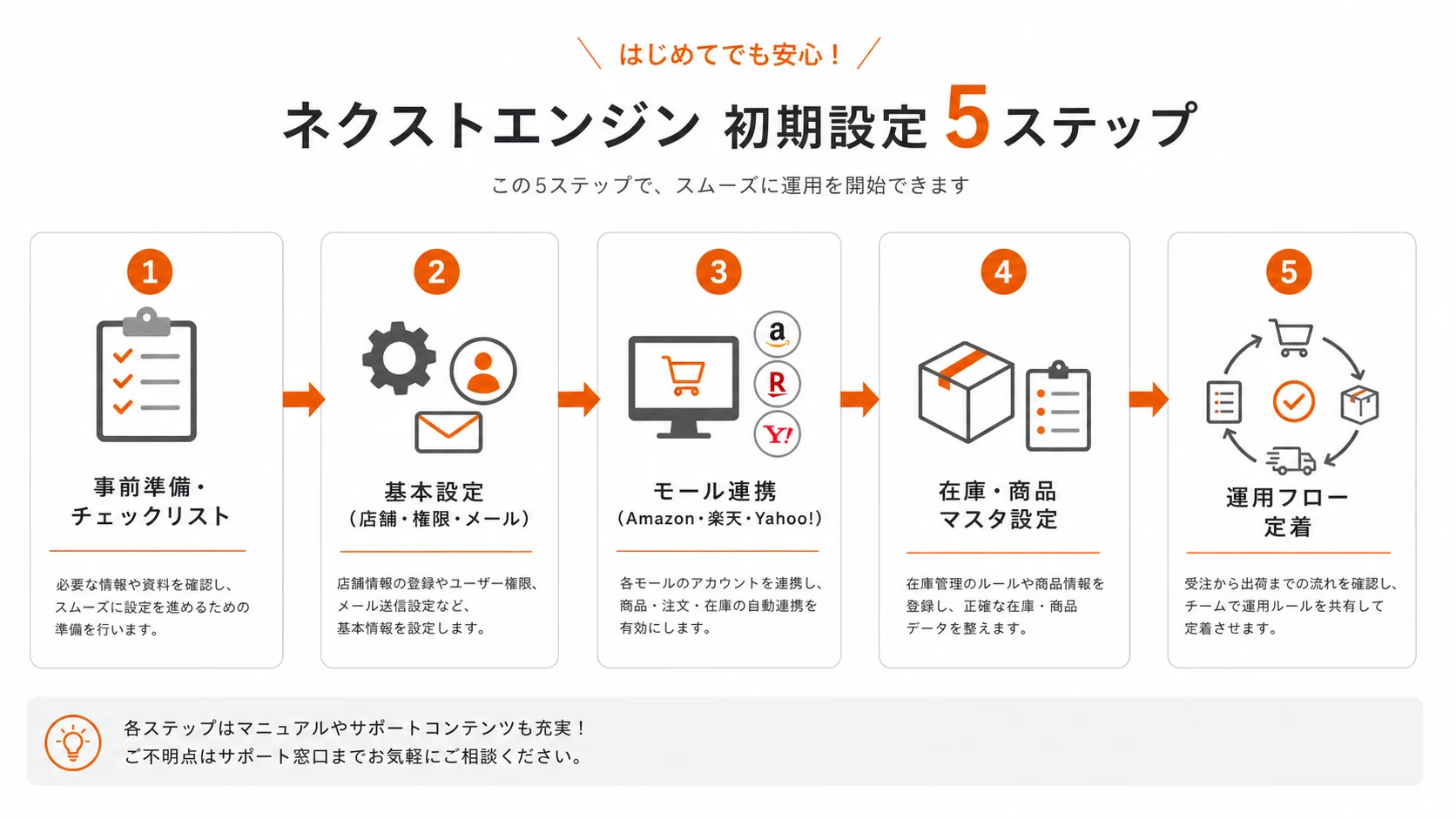
Next Engine initial setup is not just creating an account—it is a design exercise that decides how you unify orders, inventory, and shipping across multiple marketplaces. Cut corners here and you will hit inventory drift and dropped orders later. This guide walks through account signup, marketplace integration, inventory and product-master configuration, and workflow adoption, in order, from our hands-on implementation-support perspective.
The Big Picture and Pre-Setup Preparation
Next Engine is an e-commerce order management SaaS (OMS) that consolidates orders from Amazon, Rakuten, Yahoo! Shopping, Shopify, and more, and syncs inventory automatically. Initial setup is the process of deciding which marketplaces connect, on which product codes, and under which inventory rules—and that foundation determines your operational quality.
Three Things Setup Locks In
The goal of setup is to nail down these three points cleanly.
- Order consolidation: bring every marketplace order into one screen to prevent double-shipping and missed imports. Once orders arrive in a single queue, your team stops switching between five marketplace back offices and works from one source of truth.
- Inventory sync rules: how a single physical stock is allocated across marketplaces, and when it updates. Decide up front whether you expose full quantity everywhere or reserve a safety buffer for your best-selling channel, because that choice directly shapes your oversell risk.
- Product-master consistency: reconciling the different product codes each marketplace uses against your internal reference code. This is the join key that makes every downstream automation—stock updates, picking lists, shipping labels—reliable.
Turn on integration while any of these three is fuzzy, and it comes back as inventory drift or mis-shipments without fail. The cost of fixing it after go-live is far higher than the hour it takes to settle the rules beforehand, because you are then untangling live orders and unhappy customers at the same time.
What to Prepare (Readiness Checklist)
Assembling the following before you touch the settings screen sharply reduces rework.
- Admin logins and API permissions for each marketplace (Amazon, Rakuten, Yahoo!, etc.)
- A full product-code list (a mapping of per-marketplace codes to your internal reference code)
- Stocktake data (the correct on-hand quantities at the moment integration begins)
- Carrier contract details for label printing (Yamato B2, Sagawa e-Hiden, etc.)
- Named owners and role splits for order handling, shipping, and inventory management
Account Signup and Basic Configuration
First, open the account and lock in the basics—stores, user permissions, and email templates. This stage is relatively mechanical.
From Signup to Login
Register through the Next Engine signup form and your admin credentials are issued. A free trial period is available, so exercising it as a test environment before production integration lets your staff get comfortable before the real configuration.
Store, Permission, and Email Setup
After login, configure these three first.
- Store (marketplace) registration: register each marketplace you sell on as a store.
- User permissions: separate scopes for order staff, shipping staff, and admins to prevent mis-operations.
- Automated emails: prepare templates for order-confirmation and shipping-notification messages.
Permission design is often deferred, but splitting roles from the start reduces accidents when several people operate the system.
The official account continually announces features that assist setup and operations, such as an AI help bot and the ability to query order and inventory data in natural language.
Translation: The official Next Engine account announced upgraded self-service tools—an AI help bot with roughly 10x faster manual search and an MCP server that lets you query order and inventory data in natural language.
More self-service paths help, but the integration design itself still has to be decided around your own operations.
Marketplace Integration, Inventory, and Product Master
This is the heart of initial setup. Configure the three pieces—marketplace connection, product master, and inventory sync—in the right order.
Connecting Marketplaces (Amazon / Rakuten / Yahoo!)
Authorize API integration in each marketplace admin, then link the store on the Next Engine side. Because Rakuten and Yahoo! Shopping model fields and categories differently, run one test order right after connecting and confirm that amount, shipping, and options import correctly. Pay particular attention to how each marketplace represents shipping fees, coupons, and point discounts, since these are the fields most likely to import as an unexpected value and throw off your accounting later. Connect marketplaces one at a time rather than all at once; if an import looks wrong, you want to know exactly which connection produced it.
Product Master and Inventory Sync
In the product master, reconcile each marketplace's product code against your internal reference code. If this mapping is loose, order imports produce rows where "the product can't be identified," and manual work piles up—someone has to open each order, guess the SKU, and correct it by hand, which defeats the point of an OMS. Build the mapping table as a spreadsheet first, confirm there are no duplicate or missing codes, and only then import it.
For inventory sync, define how physical stock is allocated to each marketplace (full quantity, or holding a buffer) before enabling it. A common pattern is to show full stock on your highest-margin channel and hold a small buffer on channels where oversell penalties are harsh. Decide the update cadence too: near-real-time sync minimizes oversell but generates more API traffic, while batched updates are lighter but widen the window where two marketplaces can sell the last unit at once.
For Rakuten / Yahoo! Shopping listings where "mapping categories and product attributes is tedious," our AI product CataMap—which we operate in-house—can help with the pre-work of organizing the product master.
Workflow Design and Internal Adoption
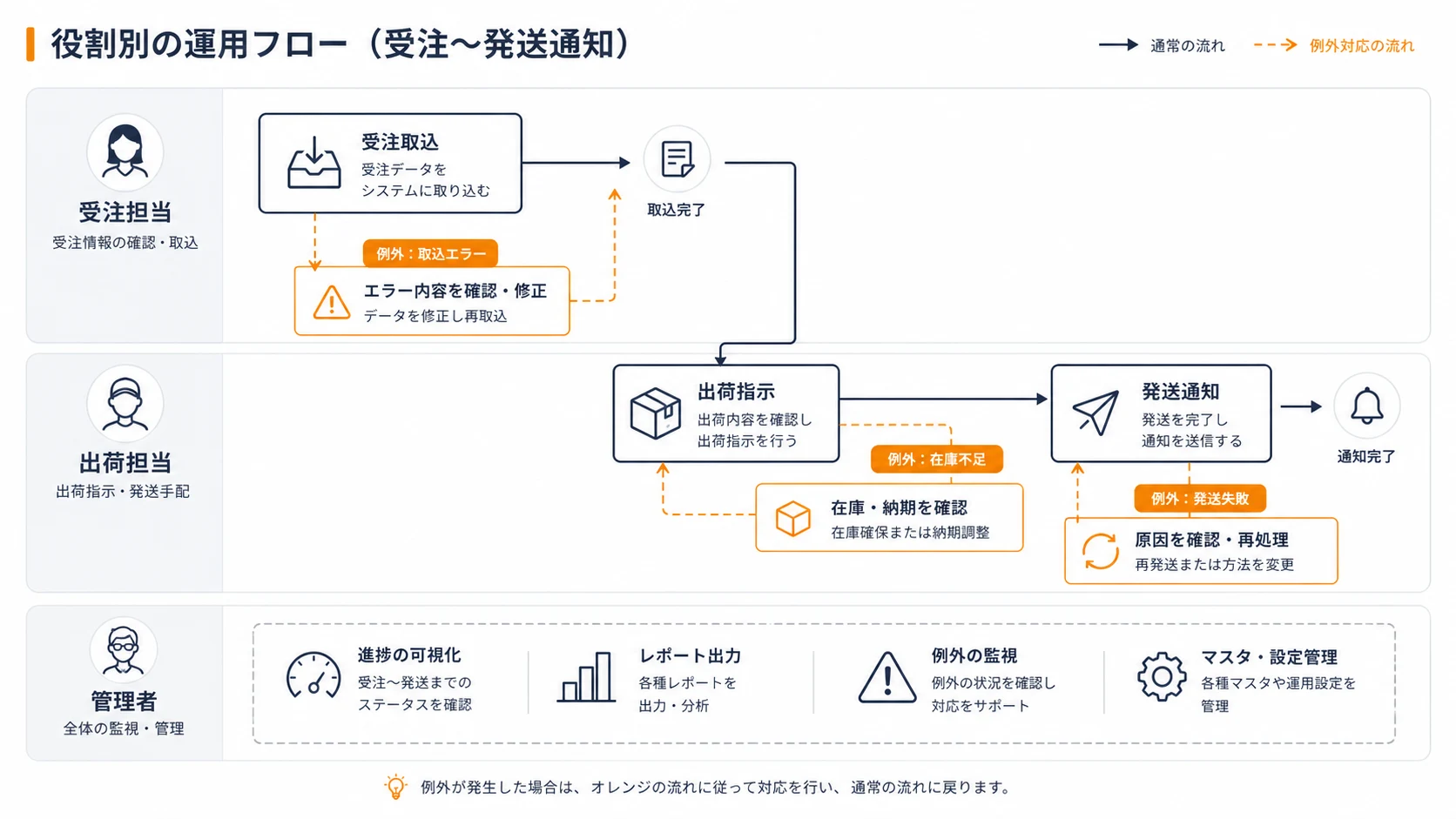
Installing the tool alone produces no results. Redesigning existing operations to fit the system's strengths is what separates successful rollouts from stalled ones.
- Visualize the post-order flow: diagram order → shipping instruction → shipping notice.
- Verify from each role's viewpoint: have order, shipping, and admin staff run it on the real screens.
- Audit existing tasks: cut work you have always done but no longer need.
- A short operating rulebook for adoption: put exception-handling steps on a single page.
Implementation specialists likewise point out that a system rollout succeeds or fails on business redesign and operational adoption.
Translation: An implementation-support specialist notes that whether a system rollout succeeds hinges on redesigning the business process and driving day-to-day adoption—not on the tool itself.
Rather than trying to use every feature, enabling only the ones your order patterns need, in stages, sticks better. A realistic sequence is: first get order import and shipping notifications stable on one marketplace, then layer in inventory sync, then add automated emails and label integration, and only later reach for API customization or app-store extensions. Each stage should run cleanly for a week before you add the next, so that when something breaks you know exactly which change caused it.
Common Pitfalls and Fixes
The trouble in initial setup is, in most cases, around inventory and product codes. Two failure modes dominate: a mapping gap where a marketplace SKU has no matching internal code, and a timing gap where inventory updates lag far enough behind sales that two channels both sell the last unit. A third, quieter issue is test coverage—teams verify the happy path but never test a partial cancellation, a bundled item, or a gift-wrap option, then discover the gap on a real order during a busy sale.
Smile Comfort has hands-on Next Engine implementation experience and can support the whole path—initial setup, marketplace integration, inventory mapping, API customization, and operational design. Having handled everything from a few orders a month to EC operations in the tens of millions of dollars in annual revenue, we propose operations your team can actually sustain.
Note that after setup, the per-order surcharge starts affecting your monthly bill. Modeling the relationship between expected volume and monthly cost in our Next Engine pricing breakdown keeps your post-launch budget from wandering.
Conclusion
With Next Engine, initial setup is decided less by the "entrance" of account signup than by the quality of the "design"—order consolidation, inventory sync, and product-master consistency. Line up your prerequisites with the readiness checklist, validate each marketplace connection with a single test order, and visualize the workflow by role. Follow that order and launch-phase mistakes drop sharply. Treat the first two weeks after go-live as a monitored period: watch inventory counts daily, reconcile a sample of imported orders against the source marketplace, and keep the exception rulebook close. At a scale involving multiple marketplaces or core-system integration, combining the setup service or implementation support to limit internal workload is the pragmatic move—the goal is not to configure every feature on day one, but to reach a stable, sustainable operation your team can run without firefighting.
Information current as of 2026-07-05. Please check the official sites for the latest updates.
This article contains affiliate links.
Frequently asked questions
Related articles

Next Engine Pricing 2026 — Official ¥3,000 Base Fee, Tiered Per-Order Surcharge, and Annual Maintenance Explained
1Password Team Onboarding Guide 2026: Invites to SSO/SCIM