AI Agent Secrets Management 2026 — 1Password Service Accounts × MCP Practical Guide
How to hand API keys to AI coding agents like OpenAI Codex and Claude Code safely with 1Password Service Accounts and the MCP server, written from a real-world ops perspective.
This article contains affiliate links (advertising).
When OpenAI Codex or Claude Code starts asking for API keys and database credentials, handing them a .env file inevitably leads to log leaks and accidental commits. The combination of Service Accounts and the MCP server that 1Password has reinforced in 2026 is a practical answer: it injects credentials into AI agents with least-privilege scope while keeping the raw values out of the LLM context window. This guide walks through the design principles, Codex and Claude Code integration steps, and operational pitfalls, drawing on what we learned running this stack in our AI consulting work.
Why Traditional Secret Management Breaks in the AI Agent Era
AI coding agents differ from human developers in three uncomfortable ways: (a) they summarize and quote any string in their context, (b) they happily run shell commands and call web APIs, and (c) their chat logs are stored for long-term recall.
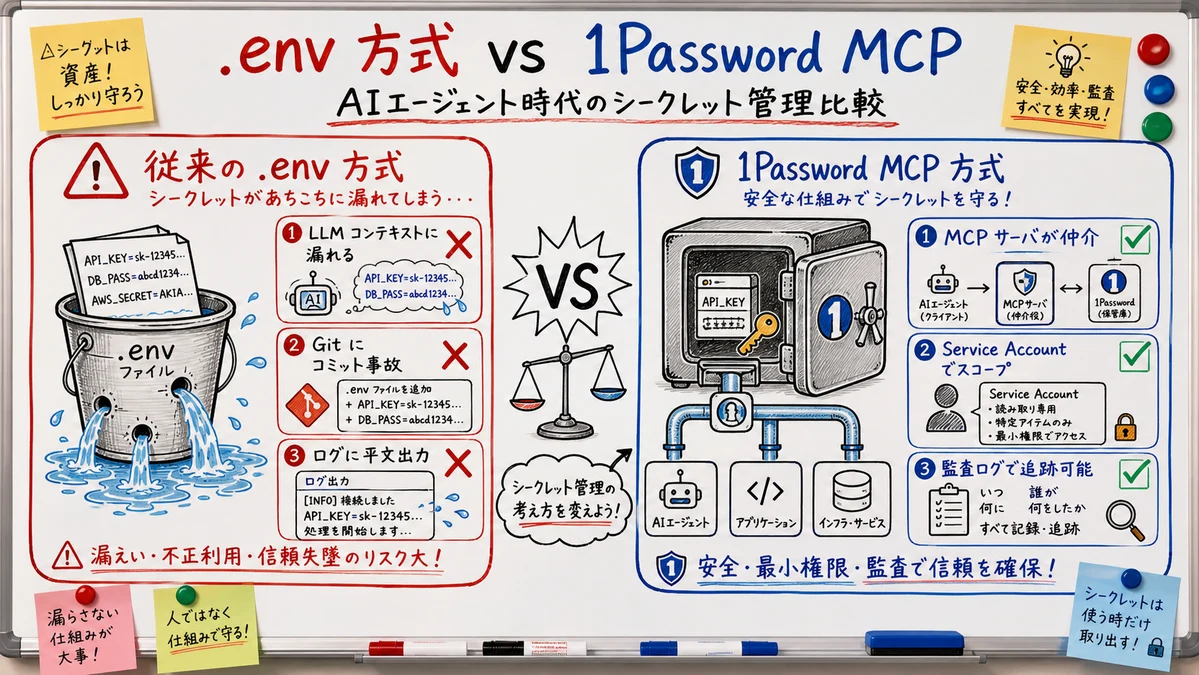
Three Failure Modes of Plain .env Files
- Context contamination — when an agent runs
cat .env, the full output enters the LLM context and can be quoted in later messages - Accidental commits — even with
.gitignorein place, agents often pull in auxiliary files via a casualgit add . - Scope collapse — bundling Stripe, Slack, and OpenAI keys in one
.envlets the agent reach services that have no business in the current task
1Password addresses this with what it calls the Trusted Access Layer: the architecture detaches credentials from the agent's memory by injecting them at runtime via the MCP protocol, so values never appear in responses or stdout in normal flows.
Human-Centric IAM Cannot Govern Non-Human Identities
Traditional SSO, SAML, and OAuth assume a human opens a browser and signs in. Headless agents do not fit that model. 1Password Service Accounts were designed from the start as non-human identities that issue scoped access with a single token. The operational logic mirrors what we cover in 1Password Secrets Automation in CI 2026 for CI/CD pipelines, and AI agents are best treated as an extension of that same pattern.
1Password's official position is that AI agents break legacy IAM assumptions across three axes — Intent, Identity, and Interaction — and that the access layer needs to be rebuilt for non-human principals.
How the 1Password MCP Server Relates to Service Accounts
Let us map the stack on a single chart. MCP (Model Context Protocol) is the common protocol that AI clients use to connect to external tools, and 1Password ships a server implementation that conforms to it.
Role Separation Across the Stack
| Layer | Role | Where it runs |
|---|---|---|
| AI client | Writes code, runs shells | Codex / Claude Code / Cursor |
| MCP server (by 1Password) | Mediates credential requests from the client | Local resident process |
| Service Account token | How the MCP server authenticates to 1Password | Env var OP_SERVICE_ACCOUNT_TOKEN |
| 1Password Vault | Actual storage of API keys and certificates | Cloud side (zero-knowledge) |
Compared with calling the op CLI directly, the MCP server approach standardizes the interface that AI tools use to fetch credentials, consolidates configuration in one place, and produces audit logs on the 1Password side.
Designing Service Account Scope
When you issue a Service Account token, you pick the Vaults it can access and the permission level (read/write). In practice, splitting Vaults along these lines pays off.
Dev-AI-AgentsVault — readable by Codex and Claude Code; only development API keysCI-ProductionVault — readable by GitHub Actions and CircleCI; production deployment credentialsPersonal-TokensVault — for individual use; never exposed to Service Accounts
Combine this with the group functionality in 1Password Business to assign different Vaults per dev team and prevent cross-team leakage. For mid-size or larger organizations rolling out AI agents company-wide, this design is the lifeline of the entire operation.
Token Hygiene Rules
Treat Service Account tokens with three principles: short-lived, minimally scoped, and rotatable.
- Rotate tokens every 90 days — reissue from the 1Password admin console and revoke the old one
- Never write tokens to
.env— keep them in theopCLI store or your OS keychain - Review audit logs weekly (1Password Business / Enterprise) to spot anomalous access
Concrete Integration Steps for Codex and Claude Code
Here is a minimal configuration that we have validated on both OpenAI Codex environments and Claude Code.
Configuring Codex Environments
OpenAI Codex lets you switch MCP servers per environment. In the MCP tab of the environment settings, drop in this JSON:
{
  "mcpServers": {
    "1password": {
      "command": "op",
      "args": ["plugin", "run", "--", "mcp-server"],
      "env": {
        "OP_SERVICE_ACCOUNT_TOKEN": "ops_eyJzaWdu..."
      }
    }
  }
}
Codex stores the token encrypted on its side; the agent itself never sees the raw value. Requests use resource URIs like 1password://get/Dev-AI-Agents/openai-api-key.
Configuring Claude Code
Claude Code reads a .mcp.json at the project root:
{
  "mcpServers": {
    "1password": {
      "command": "op-mcp",
      "args": ["serve"],
      "env": {
        "OP_SERVICE_ACCOUNT_TOKEN": "${OP_SERVICE_ACCOUNT_TOKEN}"
      }
    }
  }
}
Inheriting the token from the host environment variable keeps the value out of the repository when the file is committed. For team sharing, commit only the .mcp.json itself and have each member manage the token locally.
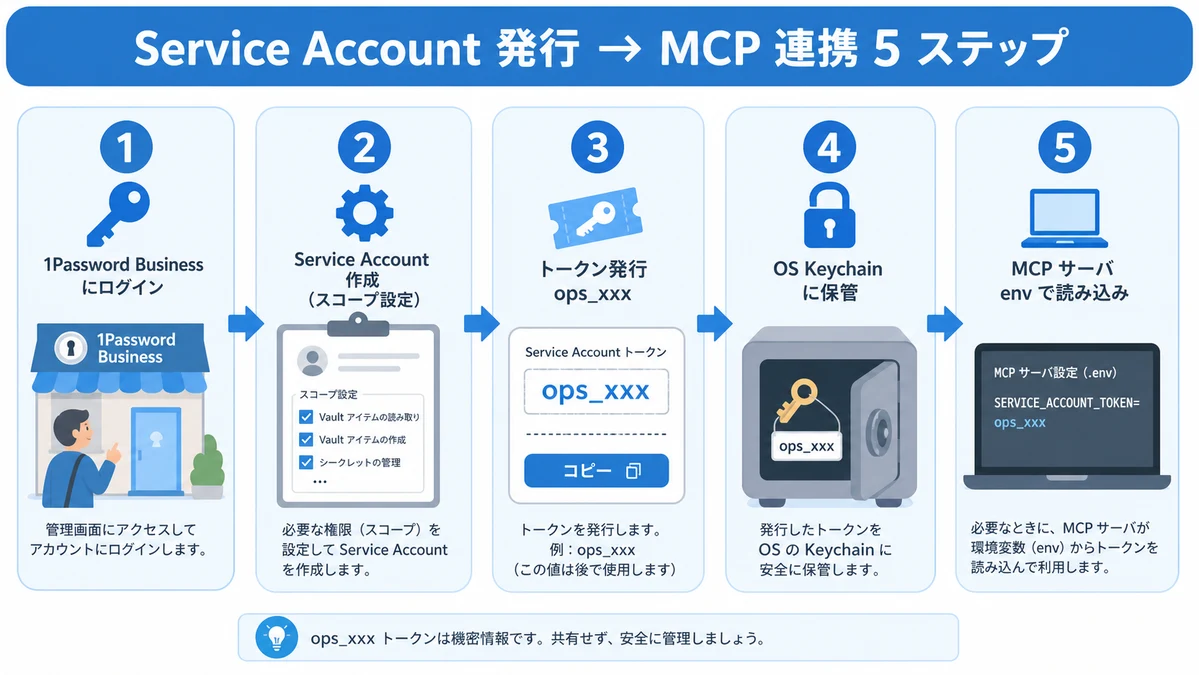
Issuing a Service Account
- Sign in to the 1Password Business or Enterprise admin console
- Go to "Developer Tools" → "Service Accounts" → "Create Service Account"
- Set a name (for example,
codex-dev-agent), expiration (90 days recommended), and accessible Vaults - Issue the token (
ops_...) — this is the only screen where the value is shown, so copy it immediately - Save it in the OS keychain (Keychain on macOS,
secret-toolon Linux) - Load it at MCP startup with something like
OP_SERVICE_ACCOUNT_TOKEN=$(op read 'op://...' )
Developer @ken5scal notes that switching from
.env-based access to 1Password MCP with Service Accounts eliminates credential traces from logs, and that the minimum hygiene is to assign a separate Service Account per Codex environment.
Operational Pitfalls and Watch-Outs
Deploying MCP and Service Accounts does not erase every leakage vector. Here are the mines we have stepped on in real deployments.
Tool Call Outputs Sneak Into Logs
MCP delivers credentials via environment variables or stdin, but if the agent runs echo $OPENAI_API_KEY or printenv, the stdout of that command lands right back in the LLM context.
Permission Creep on Service Accounts
It is tempting to give "read access to every Vault" early on, but three months in you no longer know what each Service Account can see. Make this monthly inventory a habit:
- List items each Service Account touched in the last 30 days (audit logs)
- Revoke Vault permissions that are not used
- Force rotation on tokens that have not been rotated in 90+ days
Two-Way Sync With AWS Secrets Manager
Mirroring 1Password to AWS Secrets Manager is convenient, but current syncs are largely one-way (1Password → AWS). Values edited directly on AWS are overwritten on the next sync, so enforce a rule that all edits happen in 1Password.
Governance for Team-Wide Rollout
Once an AI-enabled team exceeds ten developers, the hard part shifts from configuration to governance.
Connecting SSO and SCIM
1Password Business integrates with Okta, Microsoft Entra, and Google Workspace via SSO and SCIM provisioning, so you can automate Service Account issuance and revocation around onboarding and offboarding. Plan-by-headcount pricing is broken down in 1Password Business Pricing 2026.
Assign an Owner to Every Service Account
Mark a clear maintainer for every Service Account. A Service Account created under a now-departed employee's name that keeps running post-departure is a classic incident pattern.
| Recommended practice | Implementation |
|---|---|
| Owner required | Use prefixes such as team-platform- in the Service Account name |
| Inventory cadence | Run a monthly cron that flags Service Accounts unused for 30+ days |
| Emergency kill switch | Maintain a runbook for instant disable on owner departure or incidents |
In our own AI consulting work we use 1Password Service Accounts to centrally manage LLM provider API keys (OpenAI / Anthropic / xAI) and client SaaS credentials, with MCP as the single injection path into agents. Pair that with the SSH-side workflow in 1Password SSH Key Management 2026 and the Developer Tools picture becomes coherent end to end.
Summary
In the AI agent era, secret management is shifting from .env-based to Service Accounts + MCP server-based architectures. 1Password leads here with the Trusted Access Layer, plugging into Codex, Claude Code, and Cursor through a standard protocol. The technical setup takes only tens of minutes, but the real value emerges when you commit to Service Account scope design, token rotation, and agent output masking. Layer audit logs and SSO / SCIM from the Business or Enterprise tier on top, and you have a credible roadmap for putting both humans and machines on one access plane through 2026.
Information current as of 2026-05-26. Please check the official sites for the latest updates.
This article contains affiliate links.
Frequently asked questions
Related articles
1Password Secrets Automation in CI 2026 — Service Accounts, Connect, and the New MCP Server
1Password SSH Key Management 2026 — Developer Tools Complete Guide