
1Password SSH Key Management 2026 — Developer Tools Complete Guide
Centralize SSH key management with 1Password's SSH agent: handle ~/.ssh secrets, Git commit signing, team sharing, and Watchtower auditing. Step-by-step 2026 guide for Developer Tools, op CLI, and remote dev workflows.
This article contains affiliate links (advertising).
Developers face recurring SSH pain: a chaotic ~/.ssh folder, lost private keys when a laptop dies, and risky one-off key handoffs when onboarding a teammate. The 1Password SSH agent solves all of these by routing every key through a hardware-backed secure store with biometric unlock. This guide covers the 2026 workflow end to end: enabling Developer Tools, pairing op CLI with Git, auditing with Watchtower, and forwarding the agent into remote dev environments. We pull in official 1Password updates—including the March 2026 Unified Access announcement—and lessons from the developer community to show why 1Password has matured from a passkey vault into a full-blown authentication hub for engineering teams.
Three Reasons 1Password Fits SSH Key Management
Long-time OpenSSH users may wonder whether switching toolchains is worth it. The short answer: 1Password isolates your private keys in a hardware security layer and unlocks them with biometrics, which is fundamentally safer than leaving ~/.ssh/id_ed25519 as a plaintext file on disk.
1. Secure Enclave / TPM Integration
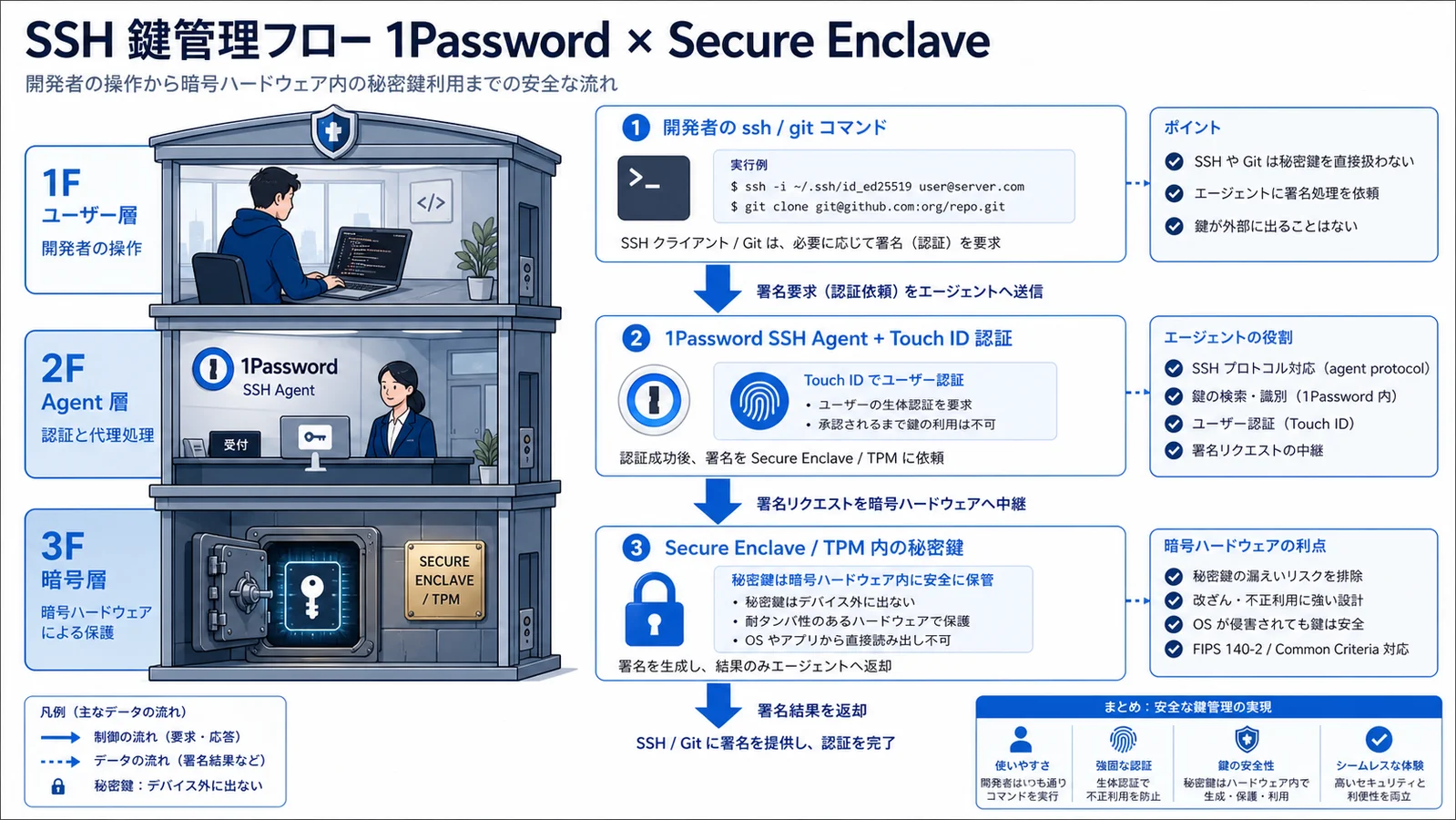
On macOS, keys live in Apple's Secure Enclave; on Windows, in the TPM; on Linux, in 1Password's encrypted store. No private key file ever lands in ~/.ssh, eliminating theft and accidental .zsh_history leaks1. Touch ID, Face ID, or Windows Hello unlocks the agent without you typing a passphrase per session. This matters in practice: if a stolen laptop's disk is decrypted by an attacker, the SSH private key is still inaccessible because it never existed as a file on the filesystem. Compare this to the typical OpenSSH setup where id_ed25519 and a passphrase-protected key live in plaintext-decryptable form.
2. A Drop-In Replacement for ssh-agent
1Password speaks the standard Unix-domain-socket ssh-agent protocol. Point SSH_AUTH_SOCK at the 1Password socket and tools such as ssh, git, rsync, and scp start using 1Password transparently. Ansible and Terraform pipelines need zero changes. The same is true for Docker SSH builds, VS Code Remote-SSH, and IntelliJ's deployment tools: they all read SSH_AUTH_SOCK at process start. This drop-in compatibility is why the migration cost is so low: you do not rewrite scripts, you do not change CI/CD pipelines, and you do not even need to inform your team. The change is invisible at the command line.
3. Watchtower Visibility for Key Rotation
Watchtower originally tracked breached passwords, but it now also reports weak SSH key lengths (RSA 1024), stale keys that have not rotated in 180+ days, and reuse across hosts. Instead of building a custom audit script, you get a prioritized dashboard out of the box—a clear win for 1Password over rolling your own key inventory. For larger organizations, exporting Watchtower findings to a SIEM or sending them to a Slack channel via webhook turns the dashboard into a continuous-monitoring signal that the security team can act on without logging into 1Password directly.
Enabling Developer Tools and the SSH Agent
The following walkthrough reflects the May 2026 UI on macOS, but Windows and Linux share the same labels under Settings → Developer.
Four-Step Setup
- Enable Developer Tools: open 1Password, go to
Settings→Developer, and toggle onUse the SSH agent. - Generate or import a key: create a new item of type
SSH Key, choose Ed25519, or useImport private keyfor an existing~/.ssh/id_ed25519. - Distribute the public key: click
Copy public keyand paste it into GitHub / GitLab, or your server's~/.ssh/authorized_keys. - Update your shell: append the agent socket to
~/.zshrcor~/.bashrcand reopen the terminal:
# 1Password SSH agent (macOS)
export SSH_AUTH_SOCK=~/Library/Group\ Containers/2BUA8C4S2C.com.1password/t/agent.sock
The Linux socket lives at ~/.1password/agent.sock; Windows uses a named pipe. Refer to the 1Password Developer docs for the exact path on your OS.
Lessons from the Developer Community
Beyond the official guide, real-world setups surface common pitfalls. The most useful insights come from developers who use the agent daily and have built their workflows around it.
"Once I turned on 1Password Developer Tools, ssh-add is gone and the VS Code extension pulls secrets inline." (Original: 1Password の Developer Tools を有効化したら ssh-add の手間が消え、VS Code 拡張からも直接秘密情報を呼べる。)
The most common error after setup is Agent admitted failure to sign, usually because SSH_AUTH_SOCK is overridden later in your shell config and falls back to the OpenSSH agent. Run echo $SSH_AUTH_SOCK to confirm the 1Password socket is active.
Team Deployment: Vault Design, SSO, and Audit
Personal use is one configuration, but organization-wide rollout demands three things: Vault topology, SSO integration, and audit logs. Mid-sized and larger organizations needing SSO, SCIM provisioning, or Okta / Azure AD integration should look at 1Password Business as the practical baseline.
Vault Topology Basics
- Shared Team Vault: production server keys, IaC deploy keys
- Personal Developer Vaults: GitHub Personal Access Tokens, local dev keys
- Audit Vault: archived ex-employee keys, rotation history
Set permissions as Read / Write / Manage. A common pattern: new hires only get Read on the shared Vault until they have demonstrated good ops hygiene. After six months, promote them to Write so they can add new server keys themselves, but Manage permissions stay with the platform team to keep ownership clear. This three-tier approach mirrors the principle of least privilege without creating bottlenecks for everyday operations.
Git Commit Signing with op CLI
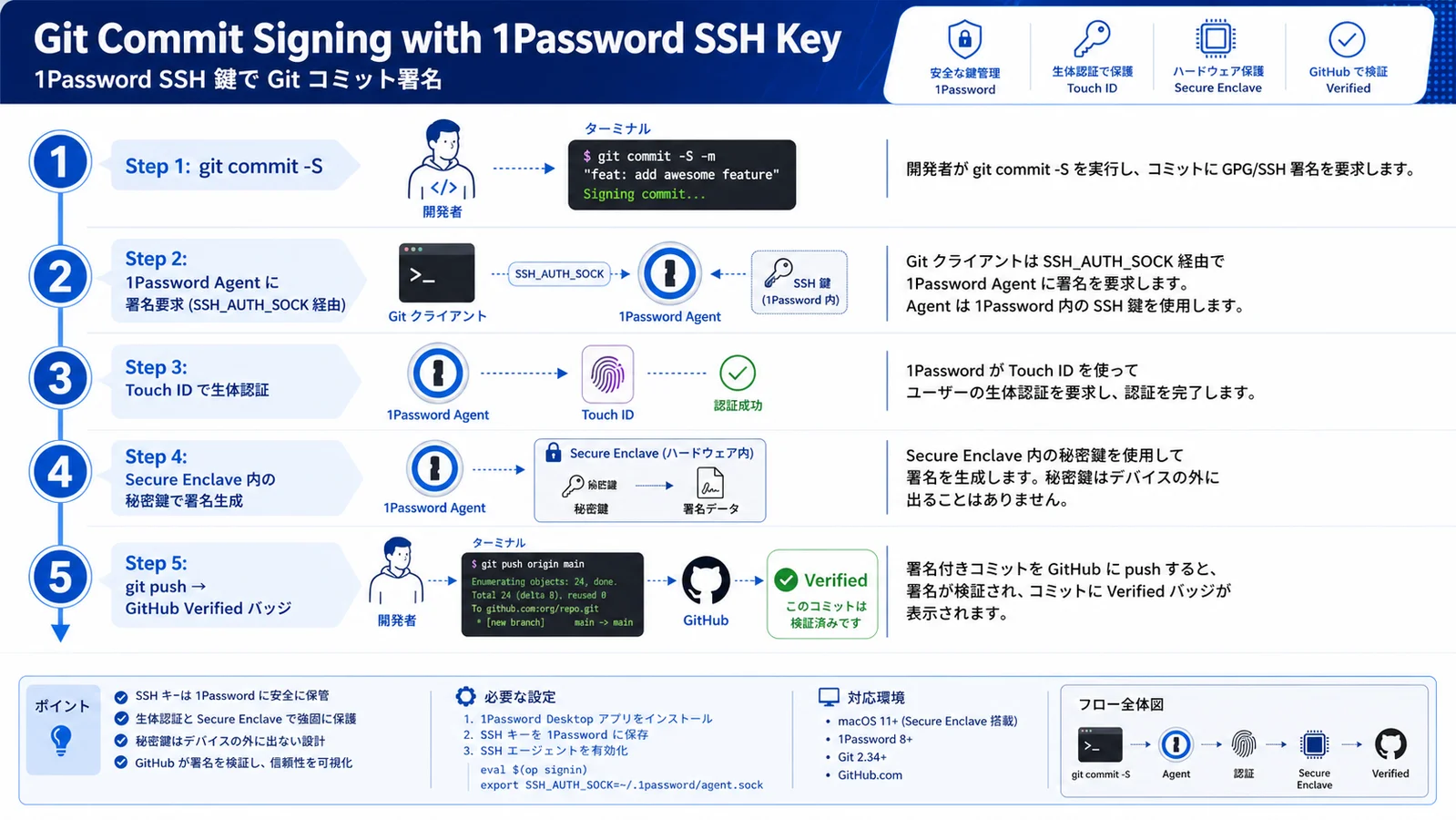
The Verified badge on GitHub commits has become the de facto standard for engineering teams since 2025. Pairing the SSH agent with op CLI removes the need to remember where the key file lives.
- Install op CLI:
brew install 1password-clion macOS, or the official.deb/.msion other platforms. - Configure signing key:
git config --global user.signingkey "key::ssh-ed25519 AAAA..." - Enable gpgsign:
git config --global commit.gpgsign trueandgit config --global gpg.format ssh - Register Signing Key on GitHub: in
Settings → SSH and GPG keys, set Key type to Signing Key.
As the official 1Password account highlights, Developer Tools has matured from a key vault into an authentication hub.
"Unified Access lets organizations broker credentials for humans, machines, and AI agents under one policy plane." (Original: 2026 年 3 月発表の Unified Access は、AI エージェントやサービスアカウントへの just-in-time 認証を一元管理する新コントロールプレーン。)
Migrating from OpenSSH and Operational Tips
Migrating every key overnight is unrealistic. A three-phase rollout avoids outages.
Phase 1: New Projects on 1Password Only
Generate new project keys in 1Password and leave the legacy setup untouched. Instead of switching SSH_AUTH_SOCK globally, pick the agent per host with ~/.ssh/config:
Host github-personal
  HostName github.com
  User git
  IdentityAgent ~/Library/Group\ Containers/2BUA8C4S2C.com.1password/t/agent.sock

Host legacy-bastion
  IdentityAgent SSH_AUTH_SOCK
Phase 2: Import Existing Keys
After three months of trouble-free use, import the legacy keys into 1Password and move ~/.ssh files into an archive directory. Keep them for at least six months as a fallback before deletion. During this phase, watch for two issues: (1) keys that were originally generated as RSA 2048 may still work but should be re-generated as Ed25519 for better forward security, and (2) any key that lives in a shared script, build artifact, or AMI snapshot needs to be tracked down—1Password cannot help you rotate keys that are baked into an immutable image without you knowing.
Phase 3: Team-Wide Rollout and Audit
Lock in your Vault topology, rotate keys for former employees, and review Watchtower monthly. Once 180-day rotation windows show up in dashboards, SSH operations stop being "tribal knowledge" and become a documented company asset. Many teams also run a quarterly "key amnesty" event where engineers volunteer keys they forgot about; combined with Watchtower's reuse-detection, this is usually the fastest way to clean up the long tail of forgotten credentials accumulated over years of organic growth.
The 1Password SSH agent pays off within minutes for individuals and far more once a team adopts Vault-based key sharing. If you need help with SSO connection, SCIM provisioning, or rolling out 1Password company-wide, our deployment support covers the same scope.
Remote Dev and CI/CD Patterns
The hybrid pattern dominating 2026 is "biometric unlock on the laptop, heavy lifting on a remote Linux box." Forwarding the 1Password agent correctly preserves laptop-grade biometrics in remote sessions.
Dev Containers and GitHub Codespaces
For Codespaces or VS Code Remote-SSH, forward the local 1Password agent via .devcontainer.json's remoteEnv. The remote container never stores a private key file, and credentials disappear when the session ends, dramatically reducing sandbox-environment risk. The same approach works for JetBrains Gateway and Dev Containers in any IDE that respects the SSH_AUTH_SOCK environment variable, which is now the de facto standard for cloud-native dev environments. Note that you should still pin the 1Password CLI version inside the container so behavior is reproducible.
CI/CD with Secrets Automation
In GitHub Actions, 1Password Secrets Automation injects SSH keys, API tokens, and signing certificates at runtime using op://Vault/Item/field references. Values never appear in CI logs, and Vault permission changes rotate credentials across every project in one step. Teams adopting 1Password Secrets Automation for AI agent stacks—rotating LLM API keys and service tokens—are following the same playbook for non-AI projects.
Related Reading
For pricing across personal plans, see 1Password Individual vs Families 2026. For team-deployment decisions, 1Password Business Pricing Deep Dive compares Teams Starter Pack against Business and Enterprise. Round out the authentication picture with 1Password Passkeys Complete Guide and check 1Password vs Bitwarden Feature Comparison if you are evaluating alternatives.
Conclusion — Move SSH Operations from Tribal Knowledge to Company Asset
1Password consolidates SSH key storage, Git commit signing, team sharing, and audit logging into a single control plane. Setup takes under 30 minutes, and pricing starts at $2.99/mo (¥450) for Individual or $7.99/user/mo (¥1,200) for Business—often less than the patchwork of tools it replaces. Tame the ~/.ssh chaos, let Watchtower catch stale keys, and turn SSH operations into a documented company asset rather than a private folder no one else can read. Start with a personal account, enable Developer Tools, and migrate new projects first.
Information current as of 2026-05-24. Please check the official sites for the latest updates.
This article contains affiliate links.
Footnotes
-
1Password Developer Docs — SSH agent overview: https://developer.1password.com/docs/ssh ↩
Frequently asked questions
Related articles
1Password Individual vs Families 2026 — Break-Even and SourceNext
1Password Business Pricing 2026 — Cost Per Headcount and Teams Starter Pack Comparison


