1Password AI Phishing Defense 2026 — Passkeys + Watchtower
Combine 1Password passkeys, phishing protection, and Watchtower into a three-layer defense against AI-generated phishing, with FBI IC3 + DBIR data.
This article contains affiliate links (advertising).
Generative AI changed the quality and volume of phishing overnight. The FBI IC3 2024 report tallied 193,407 phishing/spoofing complaints with a per-incident average loss of roughly $361 and annual aggregate losses exceeding $70M1, and most of the campaigns now start with AI-written messages indistinguishable from a colleague's tone. This guide shows how to combine domain-bound passkeys from 1Password, the phishing-protection feature shipped in January 2026, and Watchtower into a three-layer defense for individuals, families, and small teams. By the end you will have a concrete diagram and an operating cadence you can apply the same week23.
What Generative AI Changed — Phishing Quality and Volume
Traditional phishing left obvious tells: stilted phrasing, oddly spelled domains, or templated layouts. Generative AI has erased nearly all of those. The 1Password security team reports that AI now lets attackers spin up convincing phishing emails and lookalike sites in minutes — to the point that visual inspection alone is no longer a reliable defense4. Verizon DBIR 2025 confirms that credential abuse remains one of the top initial-access vectors (about 22% of breaches), with the overlap between social engineering and credential theft continuing to expand5.
Copy Is Now Indistinguishable from Real Email
ChatGPT or Claude can produce a phishing email in seconds that mirrors a target company's tone, slang, and internal references. The misspellings and awkward grammar people were trained to look for are gone. Spear-phishing — historically a labor-intensive attack reserved for high-value targets — is now achievable at scale because each message can be customized to the recipient's role, recent activity, and corporate vocabulary.
Cloned Login Pages Take Half a Day
LLMs paired with no-code stacks can spin up a pixel-perfect login clone in under a day. Typosquatting (examp1e.com, microsofL.com), IDN homographs (Cyrillic а in аpple.com), and authority-style subdomains (auth-microsoft.attacker.com) all evade a quick eyeball check. Attackers can also auto-translate clones into multiple languages, so the same campaign reaches global audiences without quality loss.
Multi-Stage Attacks With Deepfake Voice
The FBI and industry reports warn that an AI-written email followed by a deepfake voice call routing the victim to a fake site is now common51. When the "HR director" or "client controller" calls in a familiar voice, social trust kicks in before skepticism can. Some campaigns even chain a Slack or Teams message together with the call to make the whole sequence feel routine.
Why Passkeys Are Structurally Resistant
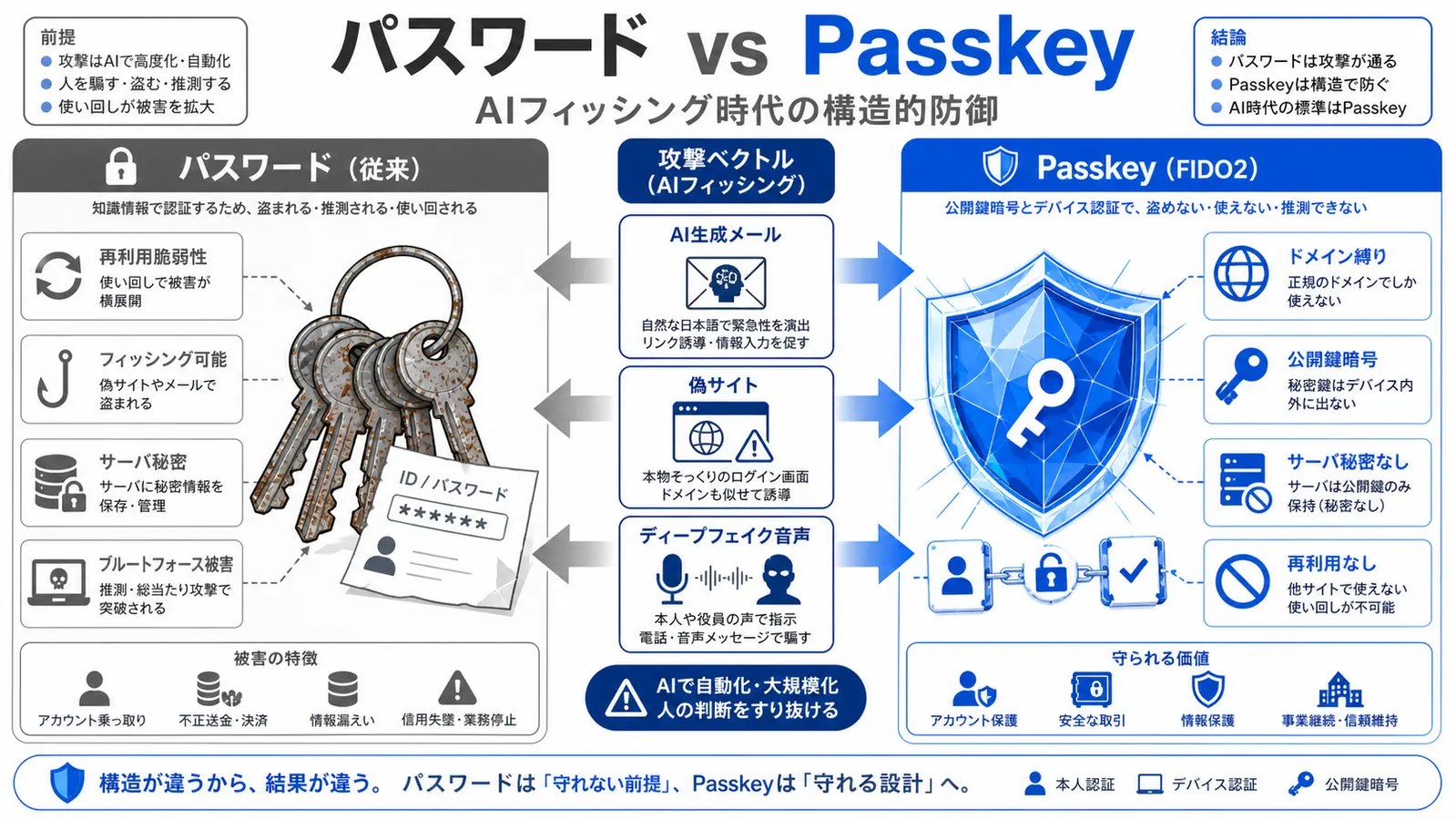
Passkeys (FIDO2 / WebAuthn) are not just "convenient passwordless login." They neutralize AI phishing by construction.
Domain-Bound Public-Key Cryptography
A passkey is a keypair bound to the exact domain that issued it. The passkey for example.com cannot be presented to examp1e.com, аpple.com, or auth-microsoft.attacker.com. Even a perfect AI-generated clone fails because the browser refuses to sign for the wrong origin. Unlike passwords, there is nothing to "steal and reuse."
Servers Never Hold the Secret
At signup, a public/private keypair is generated. The private key stays on the device (or in the 1Password vault) and never reaches the relying party. Unlike the LastPass 2022 breach, where website URLs were exfiltrated unencrypted while other sensitive fields — including usernames, passwords, secure notes, and form-filled data — remained fully encrypted6, a passkey-only world would have left attackers with only public keys, unrecoverable in theory. The implication for AI-era defense is significant: even if attackers exfiltrate a target service's user database, passkey credentials they obtain cannot be replayed against authentic logins, because the cryptographic challenge requires the on-device private key.
1Password is contributing to the FIDO Alliance's Agentic Authentication working group, extending the same domain-binding to AI agents that act on a user's behalf2. As AI agents become first-class actors, "who authorized what, on which domain" needs to remain cryptographically verifiable. That direction matters as we plan defenses for the next two to three years.
Know the Limits
Synced passkeys (including those in 1Password) can be exported when the vault is unlocked, so hardware-bound keys (YubiKey, device TPM) remain stronger against extraction7. Still, the gap to passwords is orders of magnitude. In practice, combining synced passkeys, a strong master password, and Watchtower is the right balance for most teams. Hardware keys make sense as a second factor on high-value accounts — root cloud accounts, payments dashboards, signing keys — but they introduce operational friction that few organizations sustain across hundreds of services. The pragmatic split is synced passkeys for the long tail and hardware keys for a handful of admin-tier identities.
Designing the 1Password Three-Layer Defense
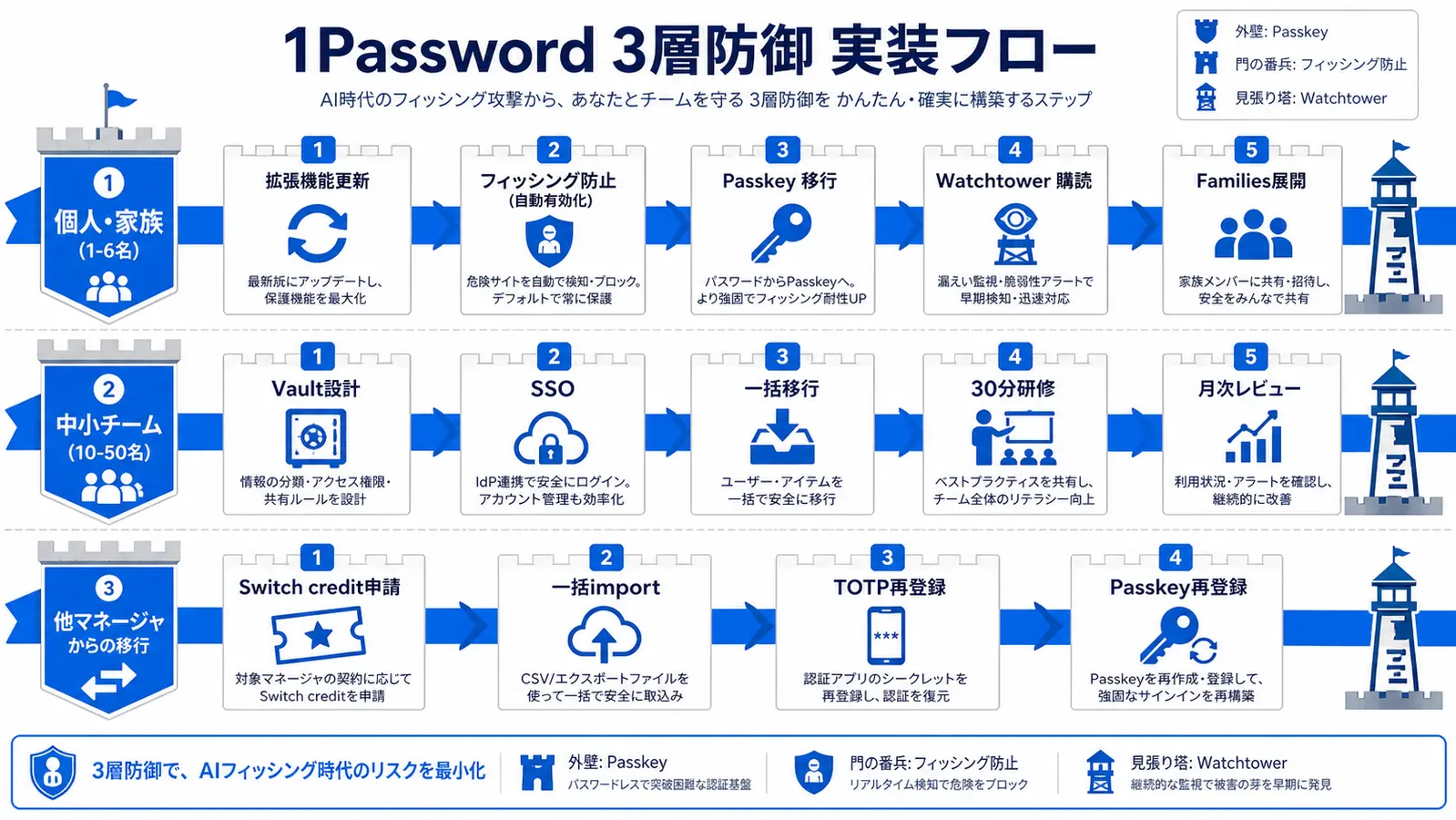
Talking about each 1Password feature in isolation undersells the strategy. The point is to layer passkeys, phishing-aware autofill, and Watchtower so each catches a different attack stage.
Layer 1 — Passkeys for Domain-Binding
Prioritize migration as follows:
- Identity providers: Google, Apple, Microsoft
- Developer accounts: GitHub, GitLab (lost credentials cascade into AI-generated code attacks)
- Banking, brokerage, crypto exchanges
- Social: X, Instagram, LinkedIn (account takeover blast radius is large)
- Cloud: AWS, GCP, Azure
- Business SaaS: Notion, Slack, Salesforce, etc.
For the migration mechanics, see our 1Password Passkeys Complete Guide with screenshots. The reason this order matters is recovery dependency: an identity provider takeover lets the attacker reset every downstream account, so the first thirty minutes of passkey rollout should always go to Google, Apple, or Microsoft accounts before moving to lower-tier services. Developer accounts come next because a compromised GitHub token can lead to supply-chain attacks against codebases that ship to thousands of users.
Layer 2 — Phishing-Aware Autofill
In January 2026, 1Password shipped a phishing protection feature in the browser extension3. The logic is two-layered:
- If the URL of the current page does not exactly match the saved login URL, the extension blocks autofill.
- It also surfaces a warning when the user attempts to paste credentials manually from the vault3.
Both routes a victim might take on an AI-generated clone are now interrupted at the same checkpoint.
Early rollouts hit some false positives on localhost and internal hosts, which 1Password resolved within weeks8.
Against a perfect AI-generated clone, the value is precisely the moment of friction: "Why isn't my password autofilling like usual?" That hesitation is what blocks the attack.
Layer 3 — Watchtower for Continuous Exposure Monitoring
Watchtower integrates with Have I Been Pwned and surfaces:
- Passwords found in known breach datasets
- Reused passwords across multiple items
- Items where 2FA (TOTP) is supported but not yet enabled
- Stale passwords (90+ days)
- Items on services where passkeys are now available but the account is still password-only
Organizations running generative-AI workloads increasingly centralize every LLM API key and SaaS account in 1Password Secrets Automation Service Accounts. Distributing credentials across personal stores almost guarantees that contractor or ex-employee revocation is missed. A monthly Watchtower review for "still-password-only" items is a sensible default operating cadence.
Watchtower's signal-to-noise also matters: in our experience, a 50-person team typically surfaces 5-15 actionable items per month after the initial cleanup. That volume is small enough to triage in a 30-minute meeting yet meaningful enough to keep the exposure surface tight as employees create new accounts.
Implementation by Scale — Individual, Family, Team
Here is what you can do this week, by size. Start by locating your scale in the table below and following the matching row.
| Scenario | Key steps | Recommended plan | Monthly (as of 2026-05) |
|---|---|---|---|
| Individual / Family (1-6) | Update extension → enable phishing protection → migrate top 20 accounts to passkeys → subscribe to Watchtower | Families | $4.49 (annual, ~¥670) |
| Mid-size team (10-50) | Vault design → SSO → bulk migrate → 30-min training → monthly review | Business | $7.99/user (annual, ~¥1,190) |
| Migrating from another manager | Apply for switch credit → bulk import → re-enroll TOTP → re-register passkeys | (depends on source) | — |
Individuals (1 person or family of 5)
- Update the extension to 8.10+ on Chrome / Edge / Safari / Firefox. Individual and Families plans get phishing protection enabled automatically with the update3
- (Business / Teams only) Have your admin enable phishing protection via Authentication Policies in the admin console
- Migrate the top 20 accounts to passkeys using the priority list above
- Subscribe to Watchtower alerts (email or app push)
- Roll out to family with the Families plan (up to 6 users)
The Families plan list price is $4.49/month (annual, ~¥670, up to 6 users, current as of 2026-059) or $5.99/month on the monthly cadence. 1Password occasionally runs promotional discounts for new annual subscribers, so confirm the exact figure at checkout. Compared with the aggregate household exposure to AI-era phishing — where a single takeover can cascade through banking, email, and identity providers — under five dollars a month buys household-scale insurance.
Mid-Sized Teams (10–50)
Mid-sized organizations that need SSO, SCIM, and Okta / Azure AD federation should look at 1Password Business at $7.99/user/month (annual, ~¥1,190)9. Up to 10 users, the Teams Starter Pack at $19.95/month (flat, ~¥2,990) is enough to evaluate the workflow9.
- Admin sets up Vaults (department / project / shared)
- Configure SSO (Business and above)
- Bulk migrate from LastPass / Bitwarden / spreadsheets
- Run a 30-minute training (passkey concepts, phishing-protection UI, Watchtower)
- Monthly review meeting (Watchtower alerts, fresh breaches, newly passkey-eligible services)
Smile Comfort has supported small-business rollouts (policy authoring, SSO wiring, employee onboarding sessions). For customers rolling out AI tooling, we often plan Secrets Automation in the same engagement. The biggest pitfall we see is treating the deployment as a one-shot project; without a recurring monthly review the configuration drifts within a quarter as new SaaS subscriptions accumulate. Make the review part of the operational calendar from day one, and assign a named owner — usually whoever runs IT or security — so the cadence does not slip.
Switching from Another Password Manager
If you are moving from Bitwarden or LastPass to 1Password, the 1Password switch credit program reimburses part of your existing subscription so you do not have to wait for renewal10. That makes it practical to accelerate the AI-phishing defense without contract overlap. For the head-to-head, see our 1Password vs Bitwarden comparison.
In practice, the migration project itself becomes an opportunity to audit how many shadow accounts exist in the organization. We routinely see 20-40% more items in the source vault than what the security team expected, and a meaningful share of those items were never assigned an owner. Cleaning that backlog during the move means the phishing-protection layer applies to the full attack surface, not just the documented one.
If You Suspect You Were Phished
Immediate actions when you think you may have submitted credentials to an AI-generated phishing site:
- Rotate the password immediately (use 1Password to generate 20+ characters)
- Force logout on all sessions ("revoke all sessions" in the service)
- Re-issue 2FA (rotate TOTP seed; re-enroll passkey if applicable)
- Audit 30 days of inbox / SMS (look for added forwarding or filter rules)
- Review OAuth grants (remove any unknown apps)
- Scan Watchtower for related alerts
- File a report if needed (IC3 in the U.S., local cybercrime unit elsewhere)
For families or teams, temporarily reduce shared-vault permissions and quarantine the affected items. Document what happened in a brief post-incident note so the same vector is recognized next time, especially if AI-generated copy fooled multiple people.
Conclusion — Single-Layer Defense Loses to AI Phishing
Single-layer defenses do not hold up against AI-generated phishing at industrial scale. The pragmatic answer is three layers: passkeys for domain-binding, the phishing-protection extension for autofill verification, and Watchtower for early detection of breaches. The FBI IC3 2024 report puts the per-incident average loss for phishing/spoofing complaints at roughly $361, but business-email-compromise cases routinely cost tens of thousands per incident and the aggregate annual loss exceeded $70M1. A few dollars a month is rational insurance against an attack class that compounds quickly. Updating the extension and triaging passkey-eligible accounts is a same-day move worth making. As generative AI continues to lower the marginal cost of high-quality attacks through 2026 and beyond, the defenders who win will be the ones who automated their controls rather than relying on user vigilance.
Information current as of 2026-05-27. Please check the official sites for the latest updates.
This article contains affiliate links.
Footnotes
-
FBI Internet Crime Report 2024 (IC3) https://www.ic3.gov/Media/PDF/AnnualReport/2024_IC3Report.pdf ↩ ↩2 ↩3
-
FIDO Alliance, "FIDO Alliance to Develop Standards for Trusted AI Agent Interactions" https://fidoalliance.org/fido-alliance-to-develop-standards-for-trusted-ai-agent-interactions/ ↩ ↩2
-
1Password Blog, "As AI Supercharges Phishing Scams, 1Password Introduces Built-In Protection" (2026-01-22) https://1password.com/blog/as-ai-supercharges-phishing-scams-1password-introduces-built-in-protection ↩ ↩2 ↩3 ↩4
-
1Password Blog, "As AI Supercharges Phishing Scams, 1Password Introduces Built-In Protection" (2026-01-22) https://1password.com/blog/as-ai-supercharges-phishing-scams-1password-introduces-built-in-protection ↩
-
Verizon Data Breach Investigations Report 2025 (Release) https://www.verizon.com/about/news/2025-data-breach-investigations-report ↩ ↩2
-
LastPass Security Incident Update https://blog.lastpass.com/posts/notice-of-recent-security-incident ↩
-
FIDO Alliance Passkey Specifications https://fidoalliance.org/passkeys/ ↩
-
1Password Support Documentation https://support.1password.com/ ↩
-
1Password official features and pricing https://1password.com/pricing ↩ ↩2 ↩3
-
1Password Switch Credit Program https://1password.com/switch ↩
Frequently asked questions
Related articles

1Password Passkeys 2026: FIDO2/WebAuthn Storage, Sync, and Ops
1Password vs Bitwarden 2026 — Pricing, Security, and Operations Compared