1Password Audit Log Operations 2026 — Events API, SIEM Integration, and SOC 2 / ISO 27001 Evidence
A practical guide to 1Password Business audit logs: recorded fields, Admin Console viewing, Events API SIEM integration, and SOC 2 / ISO 27001 evidence.
This article contains affiliate links (advertising).
1Password Business audit logs often end up in a "we bought it but never look at it" state — yet once you stream sign-in attempts, vault access, and permission changes to a SIEM via the Events API and tie them to a regular review and SOC 2 / ISO 27001 evidence, they become the backbone of IT and security operations.
This article walks through 1Password Business audit logs from a practical operations angle: what gets recorded, how to view it in the Admin Console, streaming structured JSON via the Events API, integrating with Splunk, Datadog, and Elastic, designing detection rules, and turning it all into compliance evidence. For plan selection context, see 1Password Business Pricing 2026 as well.
What 1Password Audit Logs Record
The audit log (Activity Log) is the record of who did what, when, and to which credential inside your organization. It is available on 1Password Business and Enterprise plans and is the starting point for IT and security teams to gain visibility1.
The first thing to understand is the granularity of what is captured. In the Admin Console audit log (Activity Log), each event carries these fields:
- actor: the email or ID of the user who performed the action
- action: view, edit, share, delete, sign-in, policy change, and more
- target: the item, vault, or group acted upon
- timestamp / IP: when it happened and the source IP address
When you need client info such as the user agent, or the sign-in outcome (success / failure), use the Events API (covered below). For sign-in attempts in particular, it returns IP, client/user-agent info, and the success/failure outcome as structured JSON.
Three Key Event Categories
Many event types are recorded, but three streams matter most operationally:
- Sign-in and authentication events: successful and failed sign-ins, logins from new devices or locations, recorded alongside SSO (SAML/OIDC) and MFA policies
- Vault and item access: which items in which vaults were viewed, edited, shared, or deleted — directly tied to tracking access to sensitive vaults
- Permission and policy changes: group management, granting and revoking vault permissions, admin actions — the change history of access rights, which internal controls prioritize most
Business Plan or Higher Is Required
These audit logs are a feature of 1Password Business and Enterprise plans. Individual and Families plans do not offer an admin-level view of organization-wide access. We break down the feature differences and per-headcount cost in 1Password Business Pricing 2026, so use that to size your rollout.
Viewing and Exporting Audit Logs in the Admin Console
Day-to-day checks start in the Admin Console audit log / reports view. Much investigation can be done with browser-side filters and CSV export alone — no code required.
Viewing from the Audit Log Screen
Admins can review organization-wide activity chronologically from the audit log screen (Reports → Activity equivalent) in the Admin Console. You can filter by actor, action, target vault, and time range — for example, "a specific user's item access over the last 30 days" or "failed sign-ins only."
The resulting list is well suited to first-pass incident investigation. The advantage is that you can immediately trace "which vaults a departing employee opened recently" or "which account generated late-night access" even before you build a logging pipeline.
Export and Retention
Audit log contents export primarily to CSV (when you need structured JSON, that is via the Events API below). Many teams first run periodic exports as a backup and feed them into the quarterly review, as a precursor to real-time integration1. Retention periods vary by plan and contract, so when long-term retention is required, streaming to external storage via the Events API is the practical answer.
Events API and SIEM Integration (Splunk / Datadog / Elastic)
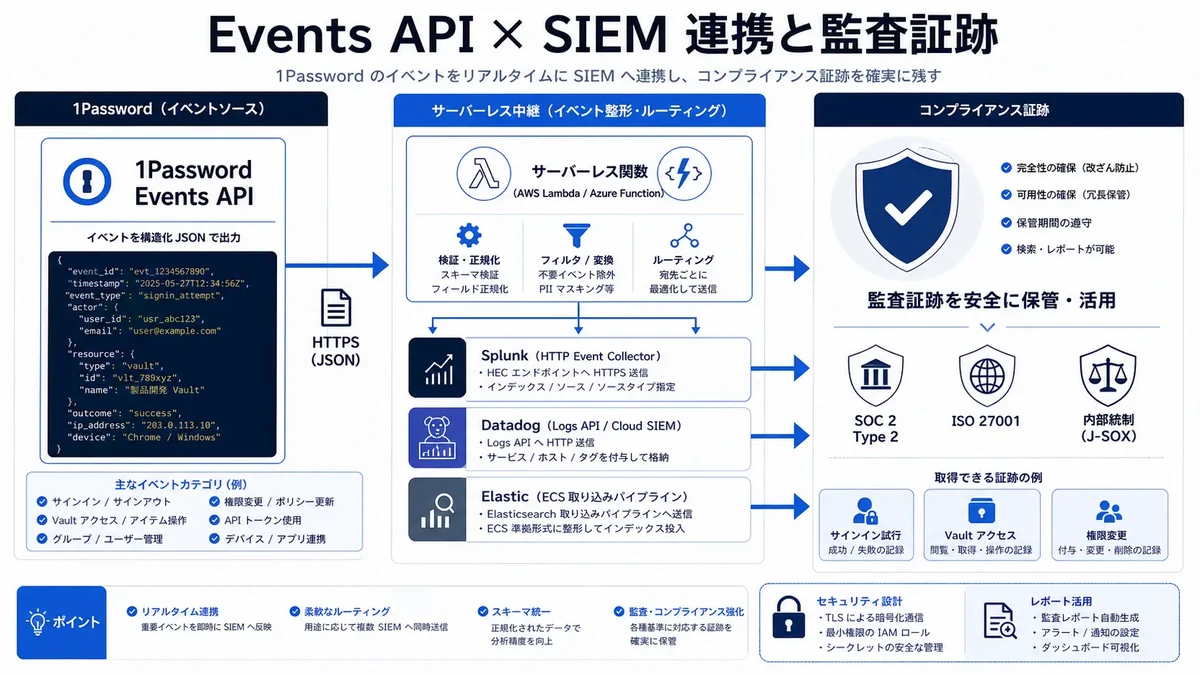
Manual export is fine for spot checks, but for continuous monitoring, streaming to a SIEM via the Events API is the right path. The Events API gives near-real-time or batched access to audit events beyond the console UI and returns events as structured JSON2.
Events API Basics
You issue a token (a bearer token, sent in the Authorization: Bearer header) from Integrations → Events Reporting in the Admin Console and pull data by category, such as sign in attempts, item usage, and audit events2. The token is scoped for retrieval only and does not access vault contents themselves.
The returned JSON includes actor, action, target, timestamp, IP, user agent, and outcome, so once you normalize it on the receiving side, you can correlate it with other logs (IdP, endpoint, cloud).
Through 2025–2026, 1Password has emphasized "agent-level audit logs" (who acted, under what authority, and which secrets were used) for machine identities and AI agents — not just human users — under its Unified Access framework, extending the reach of audit logs into secrets management and AI governance.
For context, 1Password's Unified Access launch positions audit logging across humans, machine identities, and AI agents — including audit logs at the agent level.
How to design secret distribution to AI agents and audit it is something we explore from the SSO/SCIM and Unified Access angle in Shadow AI Governance With 1Password Business 2026. This article focuses on the side that reads and operates the logs recorded there.
Integration Patterns for Major SIEMs
1Password publishes official integration steps for Splunk, Datadog, and Elastic2. Even without a dedicated connector, the structured JSON keeps implementation straightforward.
| SIEM | Ingest Point | Implementation Notes |
|---|---|---|
| Splunk | Official add-on or HEC | Primarily via the "1Password Events Reporting for Splunk" add-on. As a generic alternative, poll the Events API and forward to the HTTP Event Collector (HEC). Extract action, actor, ip, and outcome as fields for dashboards |
| Datadog | Cloud SIEM direct ingest or Logs API | Datadog Cloud SIEM ingests the Events API directly. As a generic alternative, stream to the Logs API. Create a "Sign-in Failures" monitor |
| Elastic | Ingest Pipeline / Elastic Agent | Map JSON to ECS (Elastic Common Schema) fields. Wire into Elastic Security detection rules |
A reliable PoC follows three steps:
- Issue a retrieval-only token: create category tokens (such as
sign in attempts) from Events Reporting - Pull and normalize in an intermediary: poll periodically with a serverless function (AWS Lambda / Azure Functions) and normalize timestamp / actor_email / action_type / target_type / ip_address / user_agent / success into a common schema
- Visualize and detect in the SIEM: build "Overview," "Sign-in Activity," "Admin Actions," and "High-Risk Events" dashboards and detection rules
Designing Sign-in Monitoring and Detection Rules
Collecting logs alone accomplishes nothing. Build in, from the start, a design that automatically detects high-risk patterns from the events ingested into your SIEM.
Detection Rules to Build First
The highest-impact sign-in monitoring rules tend to come down to these four:
- Many failed sign-ins from the same IP: a brute-force signal. Alert on a threshold (e.g., 10 failures in 5 minutes)
- Logins from unusual geographies (impossible travel): sign-ins from two physically unreachable locations within a short window
- Suspicious admin sign-ins: admin account use from an unusual time, location, or device
- Privilege escalation / bulk access: a run of vault permission grants in a short time, or a departing employee's surge in access
You can build these from the outcome (success / failure), ip, actor, and timestamp the Events API returns. They are commonly implemented as Elastic Security or Datadog monitors, or Splunk correlation searches.
Avoiding Alert Fatigue
More rules is not better; too many false positives lead to alert fatigue and missed real anomalies. Early on, set thresholds a bit loosely, learn normal patterns (travel, remote work, nightly batch operators) as a baseline, then tighten in stages — that is the practical approach.
Regular Review and Compliance Evidence (SOC 2 / ISO 27001 / J-SOX)
Running a human review alongside real-time detection is where audit logs deliver their greatest value as compliance evidence.
The Quarterly Review Cycle
Run the review quarterly as a baseline, taking stock of the following:
- Sign-in attempts: failed sign-in trends over the last 90 days, and the emergence of new devices and regions
- Vault access: who accesses high-sensitivity vaults and how often, and whether any access was unexpected
- Permission changes: whether the history of granting, changing, and revoking access rights matches the reality of transfers and departures
The key is to retain the review date, reviewer, and outcome as a record. In SOC 2 Type 2 and ISO 27001 access-review controls, the record of regular review is itself the audit evidence.
Using It as Compliance Evidence
1Password itself maintains SOC 2 Type 2 and ISO 27001 certifications3, and on top of that customers can use audit logs as evidence for their own controls. Concrete examples:
- Logical access control (SOC 2 / ISO 27001): records of sign-in attempts and vault access serve as evidence of access-control effectiveness
- Change management (SOC 2 / ISO 27001): the history of permission and policy changes backs up that only approved changes were made
- IT general controls (J-SOX): granting, changing, and revoking access rights is traceable, meeting internal-control reporting evaluation points
If you stream logs to long-term storage (BigQuery / S3 / Elastic, etc.) via the 1Password Business Events API, you can answer auditor requests like "submit all admin actions from the last 12 months" with a single query. The biggest operational win is escaping audit responses that bury you in manual screenshot collection.
[Translation] With 1Password's audit logs and Events API, SOC 2 reporting and audit response get dramatically simpler — even in complex environments with many SaaS services, you can pull out the access evidence from one place. (a customer's perspective)
We, too, manage the LLM provider API keys and SaaS credentials handled in our AI development and data-platform projects with 1Password-based mechanisms, building access history into operations. We can also help implement so that audit logs don't end at "we bought it" — from Events-API-to-SIEM ingestion design and initial detection-rule setup to defining the quarterly review workflow.
Conclusion: "Operate" Audit Logs Rather Than Just "Collect" Them
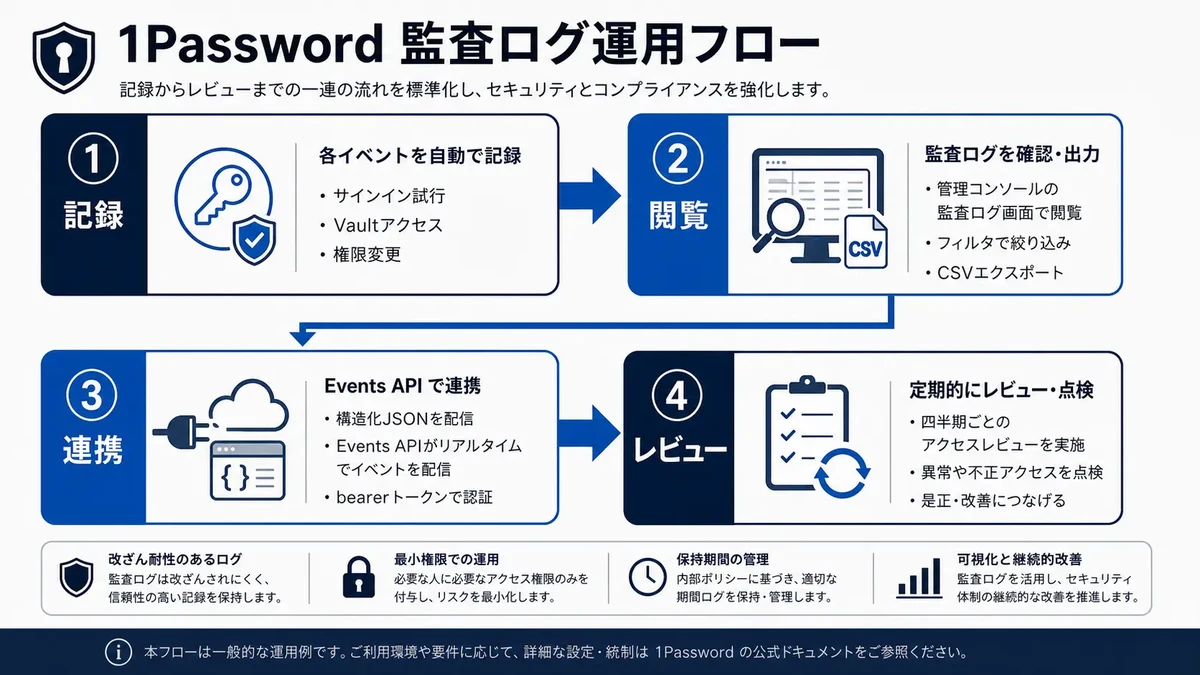
1Password Business audit logs become a core IT and security asset once you operationalize them in four steps: record, view, stream, and review.
- Record: capture sign-ins, vault access, and permission changes in the Activity Log at actor / action / target / timestamp / IP granularity (outcome and client info come via the Events API)
- View: filter and export to CSV from the audit log screen (Reports → Activity equivalent) in the Admin Console
- Stream: integrate the Events API's structured JSON with Splunk (HEC) / Datadog (Logs API) / Elastic (ECS)
- Detect: turn failed-sign-in bursts, impossible travel, and suspicious admin actions into rules
- Review and evidence: retain the quarterly review as a record and use it as SOC 2 Type 2 / ISO 27001 / J-SOX control evidence
The value of audit logs is not in collecting them but in reading and operating them. Build a design that streams to a SIEM via the Events API and runs both detection and regular review from the start, and both incident investigation and compliance audits shift from ad hoc to steady-state operations.
Information current as of 2026-05-31. Please check the official sites for the latest updates.
This article contains affiliate links.
Footnotes
-
1Password Support: "View activity in 1Password Business" https://support.1password.com/activity-log/ (notes that audit logs are a Business / Enterprise feature recording actor, action, target, timestamp, IP, and more; as of May 2026) ↩ ↩2
-
1Password Support: "1Password Events Reporting" https://support.1password.com/events-reporting/ (documents Events API token (bearer token) issuance, Splunk / Datadog / Elastic integration, and retrieving sign-in attempts / item usage / audit events; as of May 2026) ↩ ↩2 ↩3
-
1Password Support: "Security assessments and certifications" https://support.1password.com/security-assessments/ (explicitly lists ISO 27001:2022 and SOC 2 Type 2 certifications maintained; as of May 2026) ↩
Frequently asked questions
Related articles
1Password Business Pricing 2026 — Cost Per Headcount and Teams Starter Pack Comparison
Shadow AI Governance With 1Password Business 2026: SSO/SCIM + Unified Access