Shadow AI Governance With 1Password Business 2026: SSO/SCIM + Unified Access
27% of employees use unsanctioned AI at work. Here is how 1Password Business, SSO/SCIM, and the new Unified Access deliver visibility and audit trails.
This article contains affiliate links (advertising).
The fact that 27% of employees admitted to using unsanctioned generative AI in the 2025 1Password Access-Trust Gap report means Shadow AI is no longer hypothetical — it is the working state of every mid-sized organization1.
This guide walks through how 1Password Business, SSO/SCIM, and the newly launched Unified Access product combine to deliver visibility, least privilege, and end-to-end audit trails for generative AI governance.
The aim is a practical implementation path that an IT lead can ship in a quarter rather than another policy document that sits unread in the wiki.
What Shadow AI Means and Why Shadow IT Playbooks Fall Short
Shadow AI describes employees using ChatGPT, Claude, Gemini, Cursor, and custom AI agents without IT approval.
The 2025 Access-Trust Gap report puts the share at 27%, and the trajectory is upward — productivity gains create strong incentives to keep using AI even when policy says otherwise.
The hidden-use dynamic is what makes Shadow AI strategically different from earlier Shadow IT cycles. With Shadow IT, the unsanctioned tool was usually a file-sharing service or a project management app that lived alongside the official stack.
With Shadow AI, the unsanctioned tool is consuming and possibly memorizing the very data your compliance team has spent years classifying — once that data enters a training corpus or an inference cache, recall is effectively impossible.
Four Structural Risks
The risk profile is qualitatively different from Shadow IT episodes like rogue Dropbox accounts, and our editorial team groups the typical exposures into the four categories below based on field implementations.
- Data exfiltration and training-set contamination: Pasting sales proposals, source code, or customer PII into a prompt sends the payload to the provider's servers, and some services may reuse customer data for model improvement. Once the data has flowed into a training corpus, recall is effectively impossible
- Compliance violations: Without a Data Processing Agreement (DPA) or a Business Associate Agreement (BAA) in place, use of a generative AI service can breach GDPR, APPI, HIPAA, and SOC 2 controls. A single screenshot of a regulated record in a prompt can be the trigger for a reportable incident
- Supply-chain malware: Unvetted AI tools and browser extensions provide a fresh attack surface, with multiple threat-research reports documenting editor-extension malware throughout 2025. Browser-based AI assistants in particular receive broad page-content permissions that bypass conventional endpoint defenses
- Agent attribution gaps: When an autonomous AI agent calls a SaaS API, no one can later say which human's intent drove the action, which breaks the chain-of-custody that audit frameworks now require. Identity attribution is what separates an authorized employee using an agent from an unmonitored automation acting on company resources, and the difference matters every time a regulator or an internal investigator pulls the audit trail
Why "Just Ban It" Does Not Work
Lessons from 2024 and 2025 are unambiguous: outright AI bans collide with day-to-day productivity and push usage to personal devices and home browsers, removing it from IT's visibility entirely.
Employees confronted with a wall on legitimate tasks will reach for whatever gets the work done, and once they have a working personal-account workflow, official approval matters less to them than throughput. The cost of pulling that workflow back into official channels grows quickly the longer the parallel system runs.
After watching this play out, the security industry is moving toward Enable-and-Govern: approve specific tools, walk users toward them when they reach for an alternative, and keep every interaction inside an audit boundary so that incidents can be investigated and contained.
"1Password officially unveils Unified Access — a new product category that gives organizations visibility and control across humans, machines, and AI agents to close the gap left by SaaS sprawl and unsanctioned AI." (1Password, official account)
Why SSO/SCIM Alone Fails and Where Unified Access Fits
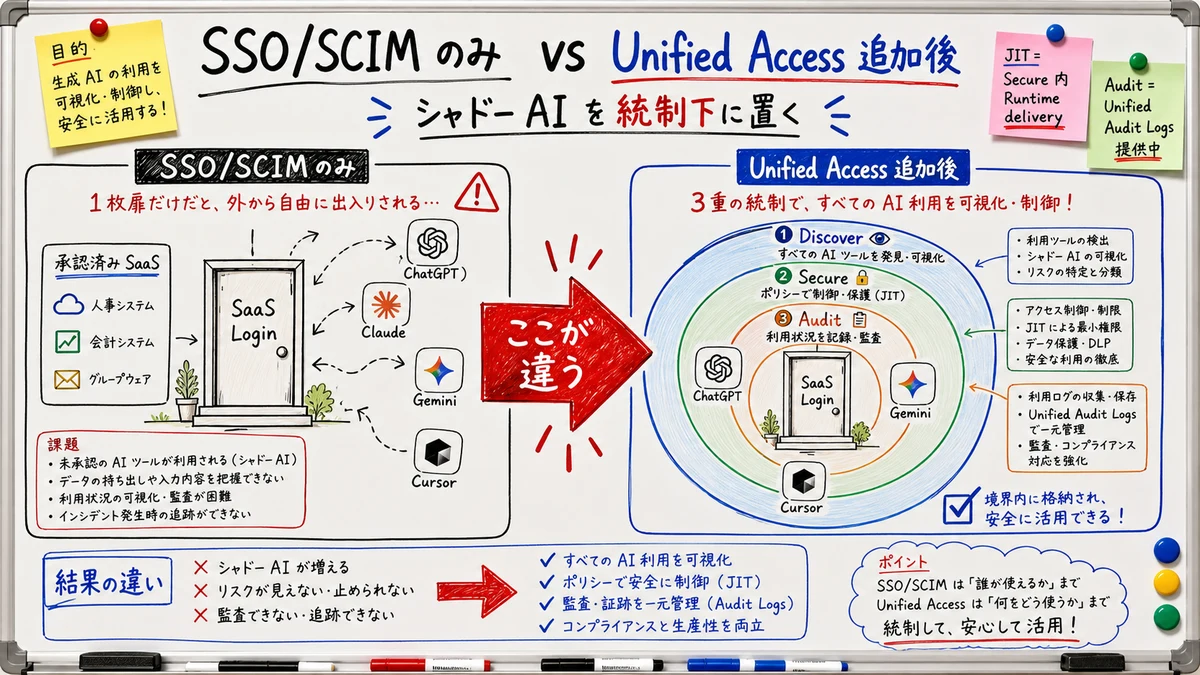
Most teams considering 1Password Business already have SSO (SAML/OIDC) and SCIM (automated provisioning) in place — and they often assume that this baseline is enough. It is not. SSO and SCIM solve the front-door problem of "who can log into the corporate apps we have already approved," which is a necessary control but a narrow one in the context of generative AI usage. The hard cases sit outside the approved app catalog by definition.
What SSO/SCIM Covers Versus What It Misses
| Control surface | SSO/SCIM | Unified Access |
|---|---|---|
| Login control for approved SaaS | Yes | Yes |
| One-click access revocation when an employee leaves | Yes | Yes |
| Discovery of unsanctioned AI services and local agents | No | Yes (Discover) |
| Visibility into exposed credentials and API keys | No | Yes (Discover) |
| Runtime credential brokering and Just-in-Time delivery | No | Yes (Secure) |
| Per-employee risk assessment and Guided risk remediation | No | Yes (Secure) |
| End-to-end credential access audit | No | Yes (Audit, Unified Audit Logs available) |
SSO and SCIM serve as the identity baseline; Unified Access layers a three-stage model — Discover, Secure, and Audit — on top of that base, which is the practical division of labor for any organization shipping Shadow AI controls in 2026.
The Three-Stage Model of Unified Access
1Password describes Unified Access as a Discover → Secure → Audit progression, with Just-in-Time access positioned as the Runtime delivery sub-capability inside Secure rather than as a standalone pillar2.
- Discover (available now): Browser extensions and endpoint agents catalog which AI tools, local AI agents, and exposed credentials are present in the environment, then classify each as approved or unsanctioned so the security team can prioritize the long tail
- Secure (available now): One-click vaulting, credential governance, and runtime credential brokering. Just-in-Time access lives here as Runtime delivery — secrets are mounted into the runtime only at the moment of use and discarded immediately after, never written to LLM prompts, repositories, or local files where they would persist
- Audit (available now): End-to-end auditability of credential access via Unified Audit Logs, providing the attribution chain that compliance frameworks now expect when autonomous AI agents act on company data or APIs
For the response side, once Discover surfaces an unsanctioned AI tool, the team uses Guided risk remediation — an interactive flow that helps the employee remove the tool or migrate to the approved catalog. It is a conversation, not a hard block or an automatic redirect, which is what allows the program to coexist with day-to-day productivity.
Implementation Path on 1Password Business
1Password Business is the enterprise tier that includes SSO/SCIM, and most teams adopt Unified Access alongside it as their AI surface area grows. The initial Shadow AI rollout breaks down into six steps.
Six Steps From SSO Connection to Guided Risk Remediation
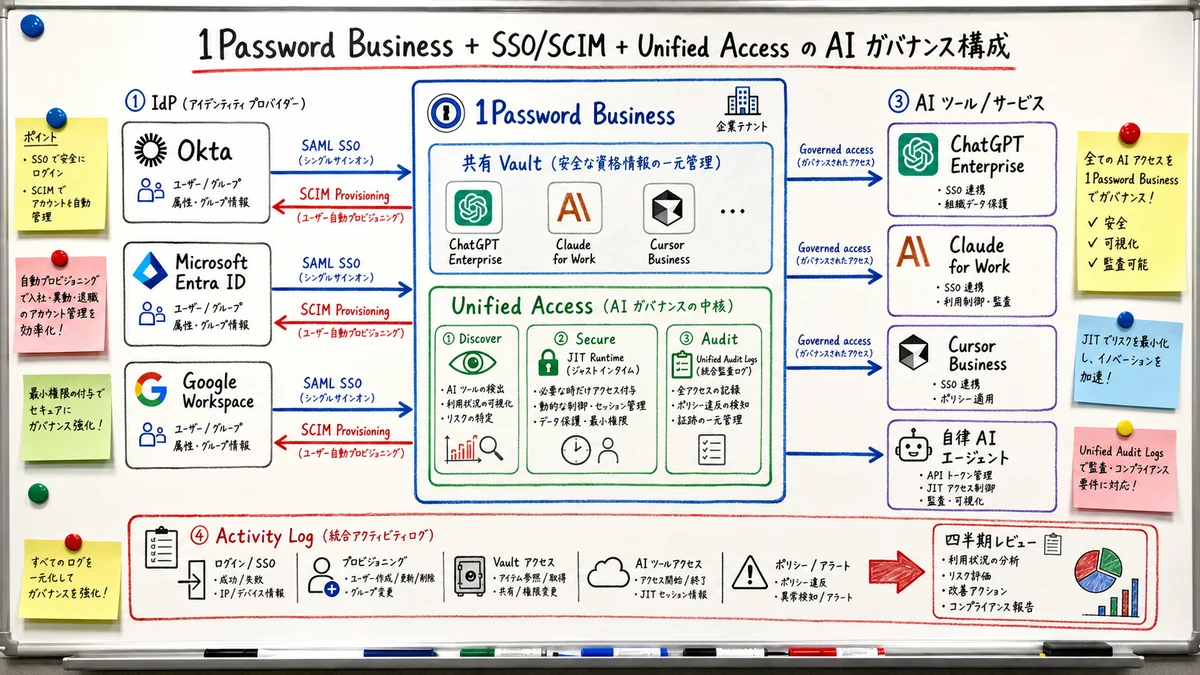
- Complete the SSO connection: SAML to Okta, Azure AD (Microsoft Entra), or Google Workspace consolidates login routes and gives you a single revocation pane
- Enable SCIM provisioning: Departures trigger instant access revocation, and team transfers automatically flip vault permissions, removing the manual hygiene that historically caused leaks
- Register approved AI tools in 1Password vaults: Centralize credentials for ChatGPT Enterprise, Claude for Work, Cursor Business, and similar contracted services so employees have a single trusted destination for AI access — this is the entry point into the Secure stage
- Turn on Activity Log: Admin console → Activity captures every secret access event, providing the foundation for quarterly review cycles and the evidence stream you will need during compliance audits
- Distribute the Discover browser extension: 1Password's Business extension catalogs AI service URLs employees visit along with local AI agents and exposed credentials, surfacing the Shadow AI population and ranking it by frequency
- Operationalize Guided risk remediation: For unsanctioned tools surfaced by Discover, generate per-employee risk assessments quarterly and run an interactive conversation with each employee to either remove the tool or migrate to the approved catalog — converting discovery signal into resolved cases rather than open tickets
Initial Cost Reference by Headcount
| Headcount | Recommended plan | Monthly cost (USD) | Monthly cost (JPY approx.) |
|---|---|---|---|
| Up to 10 | Teams Starter Pack | $19.95 flat | ~¥3,000 |
| 10–50 | Business | $7.99 × users | ~¥1,200 × users |
| 50–200 | Business | $7.99 × users | ~¥1,200 × users |
| 200+ | Enterprise | Contact sales | Contact sales |
A 50-person team pays roughly $399.50 per month (¥60,000), and 200 employees come in around $1,598 (¥240,000). These are list prices; annual contracts and volume bands may provide discounts on these list prices, and for Enterprise quotes you will need to contact 1Password Sales for the actual numbers. For a detailed break-even analysis across 5, 20, 50, and 150-person scenarios, see 1Password Business Pricing 2026.
Least Privilege, Secret Management, and Just-in-Time Design for AI Agents
A subtle but important part of Shadow AI control is what happens when AI agents — autonomous coding tools like Cursor, Cline, and Devin, plus workflow agents in the AutoGPT lineage — need API keys to operate.
Agents differ from human users in two ways that matter for security design.
First, they read environment variables and configuration files indiscriminately, so any plaintext credential within reach becomes part of their working state.
Second, they pass any data they touch into their reasoning context, where it can resurface in completions, logs, and even cached traces consulted on a subsequent turn. Getting secret management wrong in the initial design is effectively irreversible — pulling credentials back out of a model provider's logs and an agent's memory is not a practical option.
Three Common Failure Modes With Agent Secrets
The typical mistakes when handing credentials to agents recur across organizations regardless of platform.
- Plaintext
.envfiles: StoringOPENAI_API_KEYorAWS_SECRET_ACCESS_KEYin a local.envfile that an agent can read pulls the value into its context and on into logs or model output, and the value will outlive both the agent session and frequently the local machine itself - Prompts containing secret values: Telling an agent "use the API key xxx to access S3" places the value in the provider's logs in perpetuity, and even if the provider rotates retention, downstream caches and analytics pipelines may keep an indefinite copy
- Repository secrets reused across developers: Exporting GitHub Actions secrets to share among engineers gradually defeats rotation hygiene and audit trails because the secret has now propagated to local shells, dotfiles, and personal scripts well beyond the central store
The Just-in-Time Resolution Pattern
Combining 1Password Secrets Automation with Unified Access lets agents hold only op://vault/item/field references and resolve real values seconds before execution. The full implementation, including the MCP server for Codex-style agents, is covered in 1Password Secrets Automation in CI 2026.
"1Password for Builders focuses on giving developers and AI builders secure credential discovery, runtime access for agents, and governance — without slowing engineering velocity." (1Password Build, official account)
Five Operating Rules for Governance Maturity
Shadow AI controls are not a one-time deployment; quarterly tightening is required to keep up with the velocity of the AI tool market. The five rules below are an editorial framework drawn from our own AI consulting and data platform engagements.
Recommended Operating Cadence
- Refresh the approved AI tool catalog quarterly: New entrants emerge every few months, so survey internal usage at least four times a year and re-rank the catalog by adoption and risk
- Quarterly review of the Activity Log: Look for anomaly patterns — late-night bulk reads, departing employees increasing access, sudden spikes in agent-driven calls — over the last 90 days and document the findings
- Twice-yearly employee training: Cover what tools are permitted and what operations remain prohibited (PII in prompts, confidential designs pasted into chats), and revise the training when the tool catalog changes meaningfully
- Incident-response SOP: Document the vault-revocation procedure so an on-call IT engineer can execute it at 2 AM without escalation, and run a tabletop exercise once a year to keep the muscle memory current
- Monthly board-level metrics: Track three KPIs — Shadow AI detections, approved tool adoption rate, and incident count — to give leadership a continuous read on whether the program is converging or diverging
"At RSAC 2026, 1Password is fielding three panels on Shadow AI, AI identity, and why basic identity controls must evolve to handle agentic workflows." (1Password, official account)
At Smile Comfort, we run our own LLM provider API keys and SaaS credentials inside 1Password Secrets Automation, accumulating practical operating know-how from our AI consulting and data platform engagements. We are happy to advise on SSO connection, SCIM provisioning, vault topology, Discover rollout, Guided risk remediation cadence design, and employee training as a single package — and we are particularly experienced with the discovery phase that decides which AI tools are worth approving in the first place. PoC scoping discussions are welcome.
Summary: Place Shadow AI Under Control Rather Than Banning It
1Password Business combined with SSO/SCIM and the 2026 Unified Access release lets you replace "ban Shadow AI" with the more durable triad of visibility, approved alternatives, and audit trails.
- SSO and SCIM remain the identity prerequisite — they cover the front door but not Shadow AI itself
- Unified Access is a three-stage model — Discover, Secure (including Just-in-Time delivery), and Audit (available now via Unified Audit Logs)
- Response to unsanctioned tools uses Guided risk remediation — an interactive flow for tool removal or migration to the approved catalog, not hard blocks
- AI agents receive secrets just-in-time, so real values never enter prompts or logs
- Quarterly reviews keep the approved tool catalog and access logs current as the market evolves
A 50-person organization can begin with roughly $400 per month of 1Password Business spend — about $8 per employee per month — and materially reduce the chance of a Shadow AI–driven incident. The strategic question has shifted from "can we stop AI?" to "can we make AI usage visible and accountable?" The organizations that answer the second question well in 2026 will move faster on AI adoption than those still relitigating the first, because they will not be carrying the same volume of latent compliance risk.
Information current as of 2026-05-26. Please check the official sites for the latest updates.
This article contains affiliate links.
Footnotes
-
1Password Blog: "The enterprise AI crisis: Unsanctioned tools and unenforced policies" https://1password.com/blog/the-enterprise-ai-crisis-unsanctioned-tools-and-unenforced-policies (2025 Annual Report: The Access-Trust Gap) ↩
-
1Password Blog: "Introducing 1Password® Unified Access: Identity Security for Humans and Their AI Agents" https://1password.com/blog/introducing-1password-unified-access (2026) ↩
Frequently asked questions
Related articles
1Password Business Pricing 2026 — Cost Per Headcount and Teams Starter Pack Comparison
1Password Secrets Automation in CI 2026 — Service Accounts, Connect, and the New MCP Server