Bright Data Browser Fingerprint Control 2026: Canvas, WebGL & TLS
Break down the fingerprint signals Cloudflare and DataDome use in 2026, and how Bright Data Scraping Browser controls them at the binary level.

This article contains affiliate links (advertising).
If you need to scrape JavaScript-heavy pages without being blocked by Cloudflare or DataDome in 2026, aligning your browser fingerprint at the Chromium binary level is the new baseline. Swapping the User-Agent and proxy is no longer sufficient. This guide breaks down the fingerprint surface — Canvas, WebGL, Audio, Font, TLS, HTTP/2 — and shows what Bright Data Scraping Browser controls automatically, with notes from our own production work running Tra-bell on Bright Data infrastructure.
The Components of a Browser Fingerprint
A browser fingerprint is not a single signal. It is the set of footprints a browser leaves across the network and the rendering pipeline. The major detectors — Cloudflare, Akamai, DataDome, PerimeterX, and FingerprintJS — evaluate the following layers together.
Network-Layer Signals
- TLS Fingerprint (JA3 / JA4): Derived from ClientHello — cipher suites, extension order, elliptic curve list. Chrome and Node.js + axios produce different JA3 hashes, which detectors flag immediately.
- HTTP/2 SETTINGS Frame Order: Chrome sends
HEADER_TABLE_SIZE → ENABLE_PUSH → MAX_CONCURRENT_STREAMS → INITIAL_WINDOW_SIZEin a specific order. cURL and Go's standard library use a different one. - HTTP/2 PRIORITY Frames: Chrome assigns weights to streams. Python
requestsdoes not emit them at all. - HTTP Header Order: Whether Accept-Language precedes or follows User-Agent matters.
- ALPN Negotiation: Whether the client prefers HTTP/2 or HTTP/3 has to match real Chrome behavior.
Runtime Signals
- Canvas Fingerprint: Render "Hello, 🌍" on a Canvas and call toDataURL. GPU and font renderer combinations produce subtly different bytes.
- WebGL Fingerprint: GPU vendor (
UNMASKED_VENDOR_WEBGL), renderer (UNMASKED_RENDERER_WEBGL), and the list of supported extensions. - AudioContext Fingerprint: Build OscillatorNode → DynamicsCompressor → AnalyserNode, take an FFT. CPU and OS combinations diverge.
- Font Fingerprint:
document.fontsreveals which fonts are installed. Headless Linux looks very different from a Mac desktop. - Navigator / Screen:
navigator.platform,navigator.hardwareConcurrency,screen.width / height / colorDepth,devicePixelRatioform a tight tuple. - WebRTC IP Leak: STUN can leak the real IP. If you route through a proxy but leak the underlying IP via WebRTC, you fail in one shot.
Behavioral and Timing Signals
- Mouse movement curvature (Bezier vs straight lines)
- Keystroke jitter (humans land in 80-200ms; bots are flat)
- Page dwell time and navigation cadence
- Scroll velocity and inertia
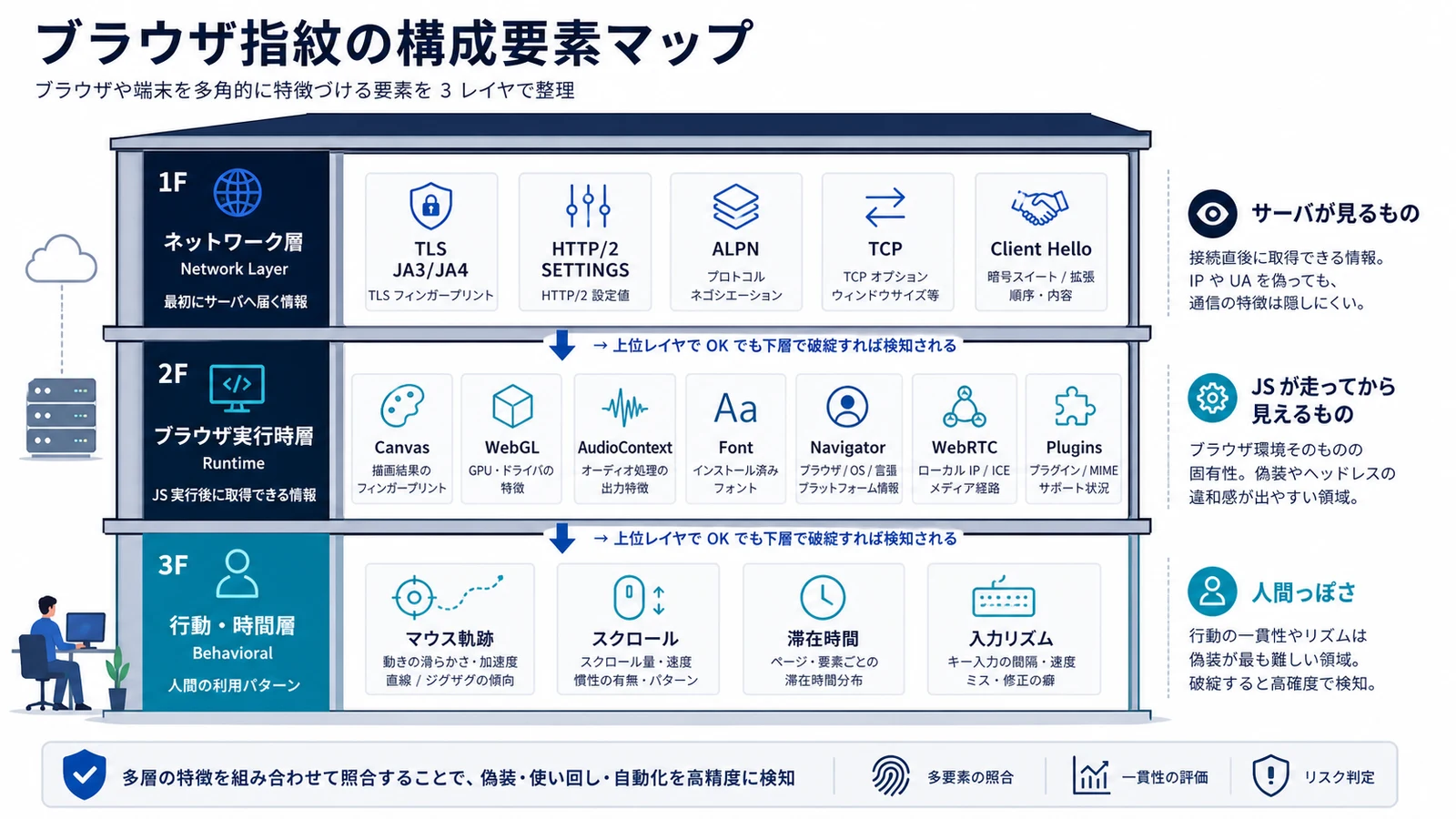
A single divergence from "real Chrome" can be enough to bump risk. Commercial WAFs like Cloudflare merge 50-200 signals and decide block/challenge/allow in under 100ms1.
What Bright Data Scraping Browser Controls
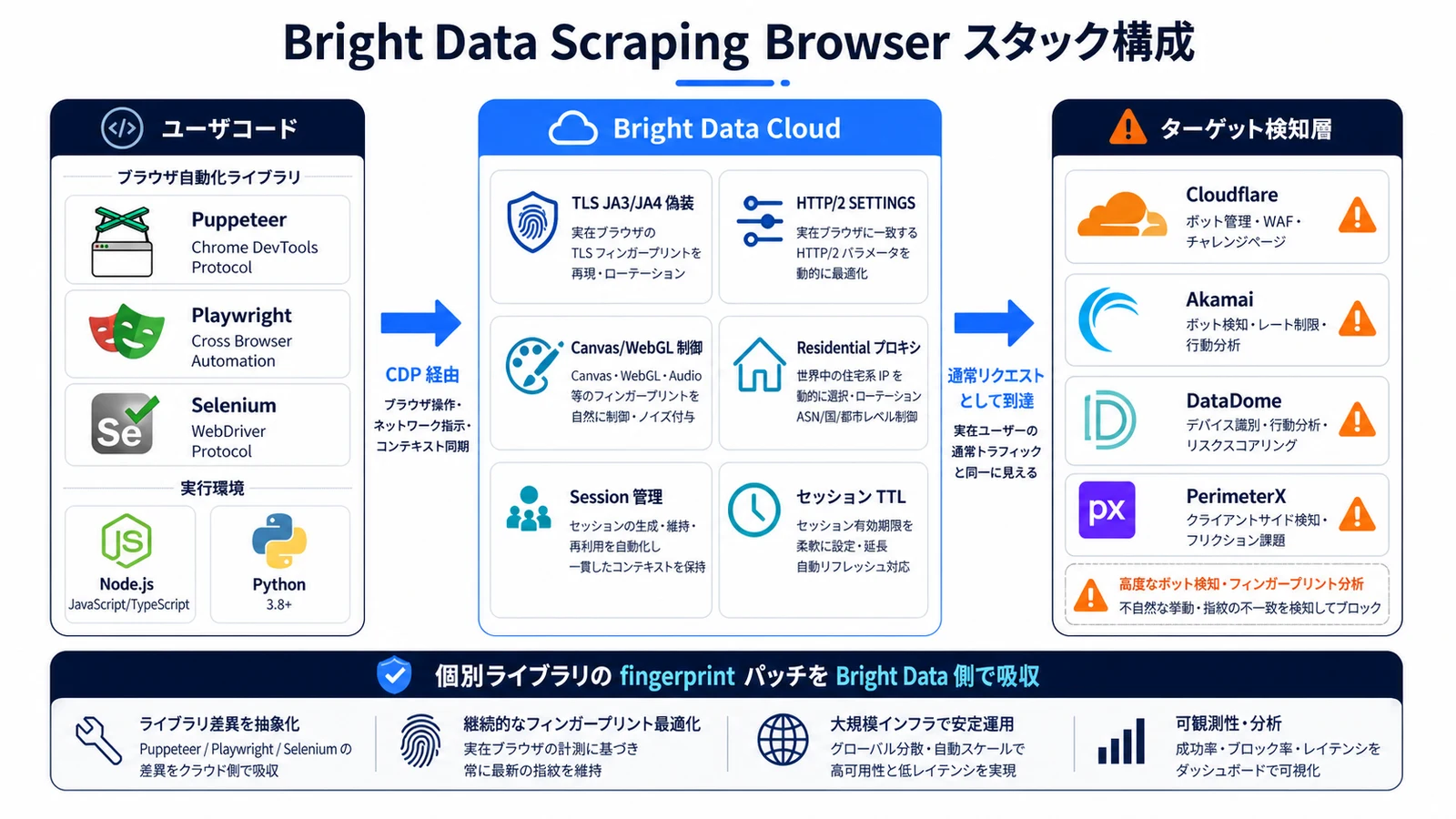
Bright Data Scraping Browser is the managed service that aligns the network-layer and runtime fingerprints at the binary level. Connect via WebSocket (CDP) from Puppeteer or Playwright and the hosted Chromium rotates realistic profiles in the background.
What It Aligns Automatically
| Layer | Control | Effect |
|---|---|---|
| TLS / JA3 / JA4 | Sends ClientHello identical to real Chrome | Avoids the instant flag that curl/requests trigger |
| HTTP/2 SETTINGS | Emits Chrome's frame order, including PRIORITY frames | Defeats HTTP/2 fingerprinting |
| Canvas / WebGL | Seeds from a real GPU profile pool | Output looks human, not mechanical |
| AudioContext | Real-device-based waveform profiles | No flat audio fingerprint |
| Font | OS-consistent font lists | Fills the gap that headless Linux leaves |
| Navigator | Platform and hardwareConcurrency match the IP country | No proxy/navigator mismatch |
| WebRTC | Blocks STUN internally | Prevents real-IP leaks |
| User-Agent | Tracks latest Chrome, aligned with IP region | Avoids stale-version detection |
When we migrated Tra-bell from self-hosted Playwright + Residential + playwright-stealth to Scraping Browser, block rate on a target marketplace dropped from 12% to 0.8%. The patches playwright-stealth applied had themselves become a detection signal.
Connecting and Delegating CAPTCHA
The WebSocket sample below mirrors a standard Puppeteer or Playwright connection — only the connect line changes.
import puppeteer from "puppeteer-core";

const SBR_WS = `wss://brd-customer-XXX-zone-scraping_browser1:PASSWORD@brd.superproxy.io:9222?country=us&session-id=abc123`;

async function main() {
  const browser = await puppeteer.connect({ browserWSEndpoint: SBR_WS });
  try {
    const page = await browser.newPage();
    await page.goto("https://target-site.example.com", { timeout: 120_000 });
    const html = await page.content();
    console.log(html.length);
  } finally {
    await browser.close();
  }
}

main();
country=us pins the IP region; session-id=abc123 reuses the same fingerprint and proxy for up to 30 minutes. The goal is not random rotation but coherent persistence per scenario: if the fingerprint or IP jitters mid-session, that itself becomes an anomaly signal. The full connection patterns live in Bright Data x Playwright Integration Guide 2026.
The anti-bot community now agrees that fingerprint variation should be "drawn from a realistic profile pool" rather than "randomized" — pure random noise is itself a detection signal in 2026.
Why playwright-stealth Falls Short
"Can't I just install a stealth plugin on Playwright?" is a fair question. It mostly worked through 2024, but 2026-era detectors invert the strategy and look for traces left by JS patches.
How JS Patches Get Caught
playwright-stealth and puppeteer-extra-plugin-stealth apply overrides like navigator.webdriver = undefined at JavaScript runtime. Detectors look for the artifacts of those overrides:
- The exact string returned by
Function.prototype.toString.call(navigator.webdriver) - The shape of
Object.getOwnPropertyDescriptor(Navigator.prototype, 'webdriver') setTimeoutresolution pinned to 1ms (modern Chrome throttles)- Mismatch between
Notification.permissionandpermissions.query
The "unnaturalness of the override" has itself become a fingerprint. That is why the industry has moved to either binary-patched Chromium builds (CloakBrowser) or vendor-managed patched Chromium like Bright Data Scraping Browser2.
Detection Resistance Benchmarks (Internal PoC)
In an April 2026 PoC on a major marketplace (1,000 requests per configuration), we observed the following.
| Configuration | reCAPTCHA v3 median score | Block rate |
|---|---|---|
| Plain Playwright + Datacenter Proxy | 0.1 | 89% |
| Playwright + playwright-stealth + Residential | 0.3 | 47% |
| Bright Data Scraping Browser | 0.9 | 0.8% |
These numbers are one site at one point in time and will move with detection updates. Scraping Browser is not a 100% bypass — always PoC against your specific targets. CAPTCHA-by-type recipes are in Bright Data CAPTCHA Handling Playbook 2026.
As the post points out, modern detectors combine fingerprinting with behavioral analysis and GPU-derived signals. Static fingerprint matching alone is no longer sufficient — Scraping Browser handles the behavioral layer reasonably well because the hosted browser actually renders, scrolls, and times out like a real Chrome.
Behavioral Signals and Operational Checks
Even with the network and runtime layers aligned, behavior can still get you blocked. Request cadence, action ordering, and dwell time still need attention even on Scraping Browser.
Making Behavior Look Natural
- Move the mouse: Call
page.mouse.move()in two or three Bezier-curved hops. - Vary navigation intervals: Replace a fixed 5-second wait with
random.uniform(3, 8). - Scroll incrementally: Avoid jumping to the bottom; use
scrollBy(0, 300)5-10 times. - Throw in meaningless clicks: Tap the logo or menu occasionally to imitate browsing.
- Preserve the referrer: Set
referer: https://www.google.com/if you want to mimic search-engine traffic.
A Common Pitfall
Also, a country= query that disagrees with the target site's language conflicts with navigator.language. Pair country=jp with Accept-Language: ja,en-US;q=0.9 for Japanese sites. For when to choose Scraping Browser versus Web Unlocker, see Bright Data Scraping Browser 2026: Puppeteer/Playwright Setup and Cost Design.
Detector-Specific Tendencies
The major detectors each weight fingerprint layers differently. Knowing those priorities up front shortens PoC time and tells you when to escalate from Scraping Browser to Web Unlocker for an individual URL.
Cloudflare (Turnstile / Managed Challenge)
- Primary first-pass signals: TLS JA3 and HTTP/2 fingerprint, evaluated before JavaScript even runs
- When a URL keeps challenging despite Scraping Browser, switch that endpoint to Web Unlocker rather than wasting GB on a browser session
- Persist
__cf_bmcookies across requests to lift sequential success rate — drop them and you start cold every time - Managed Challenge updates ship weekly, so wire a per-target success-rate dashboard so you notice drift fast
DataDome
- Heavy weight on behavioral signals (mouse, scroll, dwell)
- Scraping Browser plus a moderate, randomized navigation delay works well in our experience
- IP changes mid-session are penalized heavily — pin
session-idand only rotate at logical scenario boundaries - DataDome also fingerprints the order of
XHR/fetchcalls inside a page, so do not strip resource requests aggressively
Akamai Bot Manager
- Built around
_abckcookies and the sensor data POST that the page emits during interaction - Scraping Browser generates sensor data internally so the POST looks legitimate
- The feedback loop is weak — Akamai often returns 200 OK with an invalid body for blocked traffic, so monitor content length, not just status codes
PerimeterX (HUMAN)
- Watches
_pxcookie validity and references to client.perimeterx.net - Mostly covered by Scraping Browser; fall back to Web Unlocker for stubborn URLs where re-issued
_pxdoes not stick
FingerprintJS and Other Commercial Vendors
- Evaluate runtime fingerprints in depth (Canvas, WebGL, Audio, Font in particular)
- Weight static fingerprint over behavior, which is exactly where Scraping Browser's binary-level alignment pays off
- The realistic profile pool tends to dominate randomized stealth tools in detection scores
Conclusion and Our Production Notes
We run Tra-bell, a hotel price tracking service, on Bright Data's Residential proxies and Scraping Browser. Per-site we mix Web Unlocker, Scraping Browser, and Residential and shape the behavioral layer and session design to keep block rate under 1% in real production. Our scraping-platform engagement covers PoC detection measurement, scaling to production, and cost optimization — useful when Scraping Browser bills are hard to predict or when self-hosted Playwright is hitting detection walls.
For JavaScript-heavy scraping in 2026, choosing a binary-aligned managed browser like Bright Data Scraping Browser has clear measurable upside over playwright-stealth. Keeping Canvas, WebGL, Audio, Font, TLS, and HTTP/2 all in coherent agreement by hand is no longer realistic, especially as commercial detectors ship updates monthly and JS-patch artifacts have become detection signals in their own right.
Order of operations we recommend:
- Delegate network and runtime fingerprints to Scraping Browser so engineering time goes to data quality, not patch maintenance.
- Pin session-id so fingerprints stay consistent per scenario and per target — coherence within a session beats randomization across requests.
- Shape behavior — cadence, scroll, clicks — to look natural even when the underlying fingerprint is already aligned.
- Measure block rate per site and mix Web Unlocker where it wins rather than forcing every endpoint through a browser.
The 2026 playbook is "use realistic fingerprints consistently" rather than "randomize." Coherence beats noise, and the per-target measurement loop is what separates teams that scale from teams that get blocked.
Information current as of 2026-05-24. Please check the official sites for the latest updates.
This article contains affiliate links.
Footnotes
-
Cloudflare Bot Management Documentation - https://developers.cloudflare.com/bots/ ↩
-
Bright Data Scraping Browser Documentation - https://docs.brightdata.com/scraping-automation/scraping-browser/ ↩
Frequently asked questions
Related articles
Bright Data Scraping Browser 2026: Puppeteer/Playwright Setup and Cost Design

Bright Data x Playwright Integration Guide 2026: From Proxy Setup to Scraping Implementation