Bright Data x Playwright Integration Guide 2026: From Proxy Setup to Scraping Implementation
Combine Playwright with Bright Data Residential proxies and Scraping Browser. Includes working Node.js and Python code, plus cost-design and operations tips.

This article contains affiliate links (advertising).
Pairing Playwright with Bright Data gives you a scraping stack that survives Cloudflare, DataDome, and similar defenses. This guide walks through the Residential proxy setup, then escalates to the Scraping Browser via CDP. You get working Node.js and Python code, plus the cost levers and operational pitfalls we have seen in production.
When to Choose Bright Data x Playwright
Playwright is Microsoft's browser automation framework. It drives Chromium, Firefox, and WebKit through a single API. Bright Data brings a 150-million IP residential network plus managed services like Scraping Browser and Web Unlocker. You reach for the combination when two needs land at the same time: full browser automation, and tight control over where the request comes from.
Good Fit for Bright Data Plus Playwright
- Geo-dependent content (regional pricing, country-specific campaigns)
- Logged-in flows that need to keep the same IP across a session
- JavaScript-heavy pages where
fetchorhttpxalone do not work - Large-scale parallel scraping while dodging Cloudflare, DataDome, or PerimeterX
If the target HTML is static and robots.txt allows your traffic, Playwright is overkill. Bright Data Web Unlocker or SERP API alone may be enough. Start lean and escalate. For a deeper proxy-type comparison, see our Residential vs ISP Proxy 2026 selection guide.
Recommended Stack (2026)
| Layer | Recommended | Notes |
|---|---|---|
| Runtime | Node.js 20 LTS or Python 3.12 | Playwright supports both |
| Browser | Playwright + Chromium | --no-sandbox for Linux containers |
| Proxy | Bright Data Residential or Scraping Browser | Pick by detection difficulty |
| Concurrency | playwright-cluster or asyncio.gather | Start with 5-10 in parallel |
| Queue | SQS or Redis Queue | Persistent retries |
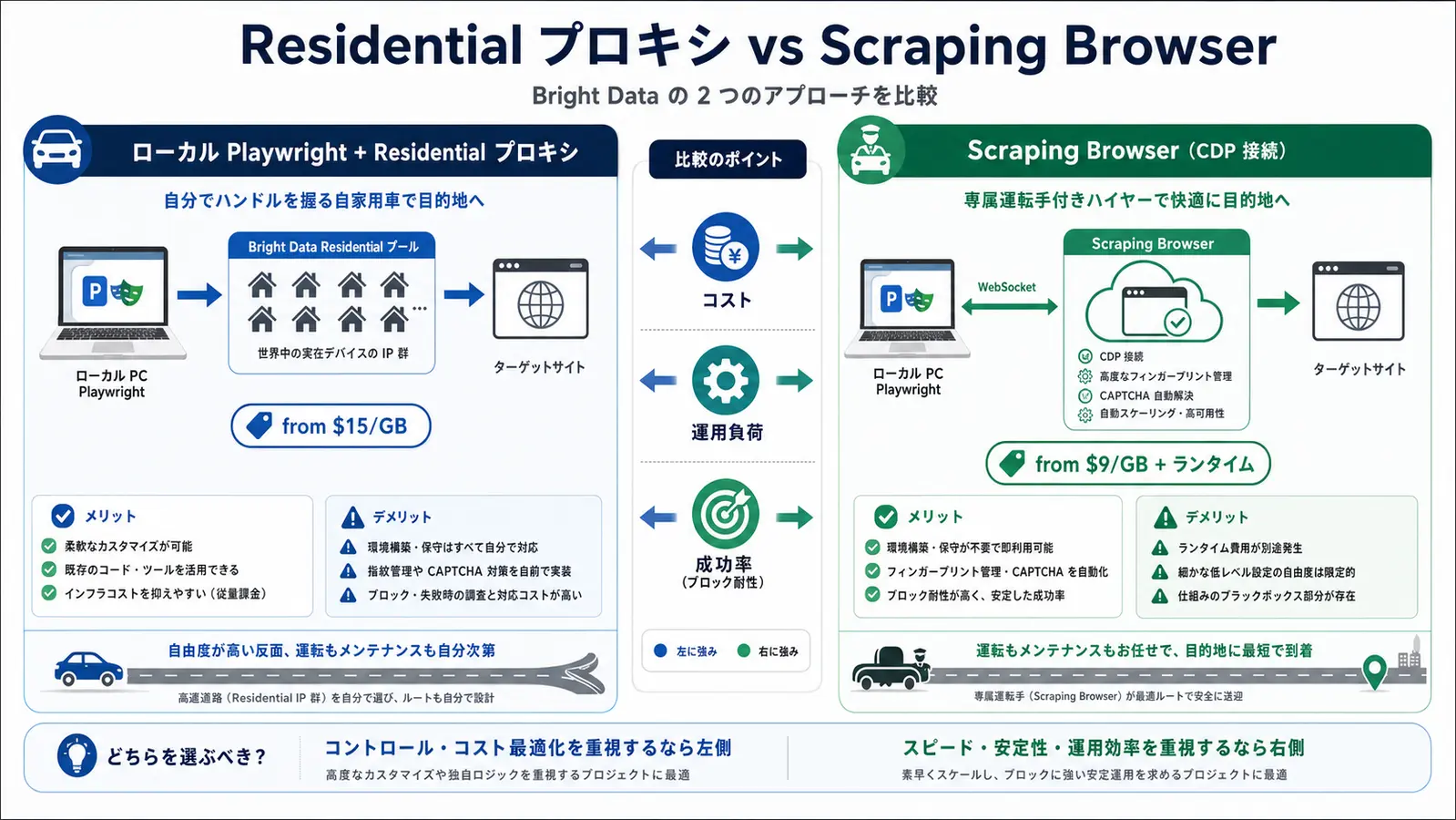
Residential Proxy + Playwright Implementation
The most basic pattern: pass Bright Data Residential credentials to the proxy option in Playwright. From the code side it looks like a plain HTTP proxy, while Bright Data handles IP rotation, geo-targeting, and session control behind the scenes.
Node.js (Residential + Sticky Session)
const { chromium } = require('playwright');

const CUSTOMER_ID = process.env.BRD_CUSTOMER_ID;
const ZONE_NAME = process.env.BRD_ZONE; // e.g. residential_zone_1
const ZONE_PASSWORD = process.env.BRD_PASSWORD;

async function scrapeWithStickySession(url, sessionId) {
  // Same session-<id> keeps the same IP assigned by Bright Data
  const username = `brd-customer-${CUSTOMER_ID}-zone-${ZONE_NAME}-country-jp-session-${sessionId}`;

  const browser = await chromium.launch({
    headless: true,
    proxy: {
      server: 'http://brd.superproxy.io:22225',
      username,
      password: ZONE_PASSWORD,
    },
  });

  const context = await browser.newContext({
    userAgent:
      'Mozilla/5.0 (Macintosh; Intel Mac OS X 10_15_7) AppleWebKit/537.36 ' +
      '(KHTML, like Gecko) Chrome/134.0.0.0 Safari/537.36',
    viewport: { width: 1440, height: 900 },
    locale: 'ja-JP',
    timezoneId: 'Asia/Tokyo',
  });

  // Block media to keep bandwidth low
  await context.route('**/*.{png,jpg,jpeg,webp,gif,woff,woff2}', (route) => route.abort());

  const page = await context.newPage();
  try {
    await page.goto(url, { waitUntil: 'domcontentloaded', timeout: 45_000 });
    return await page.content();
  } finally {
    await browser.close();
  }
}

scrapeWithStickySession('https://example.com/products/123', 'cart-flow-001')
  .then((html) => console.log(html.length))
  .catch((err) => console.error(err));
Three things matter here.
- Adding
country-jporcity-tokyoto the username locks the IP to that geography - Reusing the same
session-<id>keeps Bright Data routing you through the same IP (typically up to tens of minutes) - Blocking images and fonts at the route level usually cuts Residential proxy GB usage by 60-80%
Python (Residential + IP Rotation)
import asyncio
import os
import uuid
from playwright.async_api import async_playwright

CUSTOMER_ID = os.environ["BRD_CUSTOMER_ID"]
ZONE_NAME = os.environ["BRD_ZONE"]
ZONE_PASSWORD = os.environ["BRD_PASSWORD"]


async def fetch_with_rotation(urls: list[str]) -> list[str]:
    async with async_playwright() as p:
        results: list[str] = []
        for url in urls:
            # New session ID per URL forces a new IP
            session_id = uuid.uuid4().hex[:12]
            username = (
                f"brd-customer-{CUSTOMER_ID}-zone-{ZONE_NAME}"
                f"-country-jp-session-{session_id}"
            )

            browser = await p.chromium.launch(
                headless=True,
                proxy={
                    "server": "http://brd.superproxy.io:22225",
                    "username": username,
                    "password": ZONE_PASSWORD,
                },
            )
            context = await browser.new_context(
                locale="ja-JP",
                timezone_id="Asia/Tokyo",
                viewport={"width": 1440, "height": 900},
            )
            page = await context.new_page()
            try:
                await page.goto(url, wait_until="domcontentloaded", timeout=45_000)
                results.append(await page.content())
            finally:
                await browser.close()
        return results


if __name__ == "__main__":
    asyncio.run(fetch_with_rotation([
        "https://example.com/products/100",
        "https://example.com/products/200",
    ]))
This rotates the IP per request. Good for paginated catalogs, price comparison crawls, or SERP rank checks where each request stands on its own.
"Playwright with Bright Data residential proxies holds up on sites where plain fetch fails." (Summary of Daniel Miessler's X post about the Personal AI Infrastructure repo and its tiered scraping design.)
Scraping Browser via CDP for Higher Detection Resistance
Residential proxies are powerful, but Cloudflare Turnstile and the harder DataDome variants can still detect Playwright via fingerprints: webdriver flags, headless Chrome signals, and automation-style behavior. Bright Data Scraping Browser solves this by giving you a real Chrome instance running in Bright Data's cloud. You connect via CDP (Chrome DevTools Protocol), and Bright Data takes care of fingerprint randomization, automatic CAPTCHA solving, and browser-level resilience.
Node.js (Scraping Browser CDP)
const { chromium } = require('playwright');

const USERNAME = process.env.BRD_SB_USERNAME;
const PASSWORD = process.env.BRD_SB_PASSWORD;

async function scrapeWithBrowser(targetUrl) {
  const sessionId = `session-${Date.now()}`;
  const params = new URLSearchParams({
    'session-id': sessionId,
    country: 'jp',
    // 'unblock': 'true', // High-difficulty sites (extra cost)
  });

  const wsEndpoint =
    `wss://${USERNAME}:${PASSWORD}@brd.superproxy.io:9222?${params.toString()}`;

  const browser = await chromium.connect(wsEndpoint);
  try {
    const page = await browser.newPage();
    await page.setViewportSize({ width: 1920, height: 1080 });
    await page.goto(targetUrl, { waitUntil: 'networkidle', timeout: 60_000 });

    const data = await page.evaluate(() => ({
      title: document.title,
      itemCount: document.querySelectorAll('.product-card').length,
    }));
    return data;
  } finally {
    await browser.close();
  }
}

scrapeWithBrowser('https://example.com/listing').then(console.log);
chromium.connect() attaches Playwright to the remote browser. No local headless Chrome to manage. Because the page is returned after Bright Data resolves CAPTCHA challenges, you can drop the "detect CAPTCHA, wait, retry" branches from your code.
Residential Proxy vs Scraping Browser
| Dimension | Residential proxy + local Playwright | Scraping Browser (CDP) |
|---|---|---|
| Pricing | from $15/GB (~Y=2,400/GB) | from $9/GB (~Y=1,440/GB) including browser runtime |
| Browser ops | You run headless Chrome | Bright Data runs the browser |
| Fingerprinting | DIY (Patchright, Stealth, etc.) | Managed by Bright Data |
| CAPTCHA | You handle it | Resolved automatically |
| Best for | Medium scale (up to ~100 GB / month) | Large scale or high-difficulty targets |
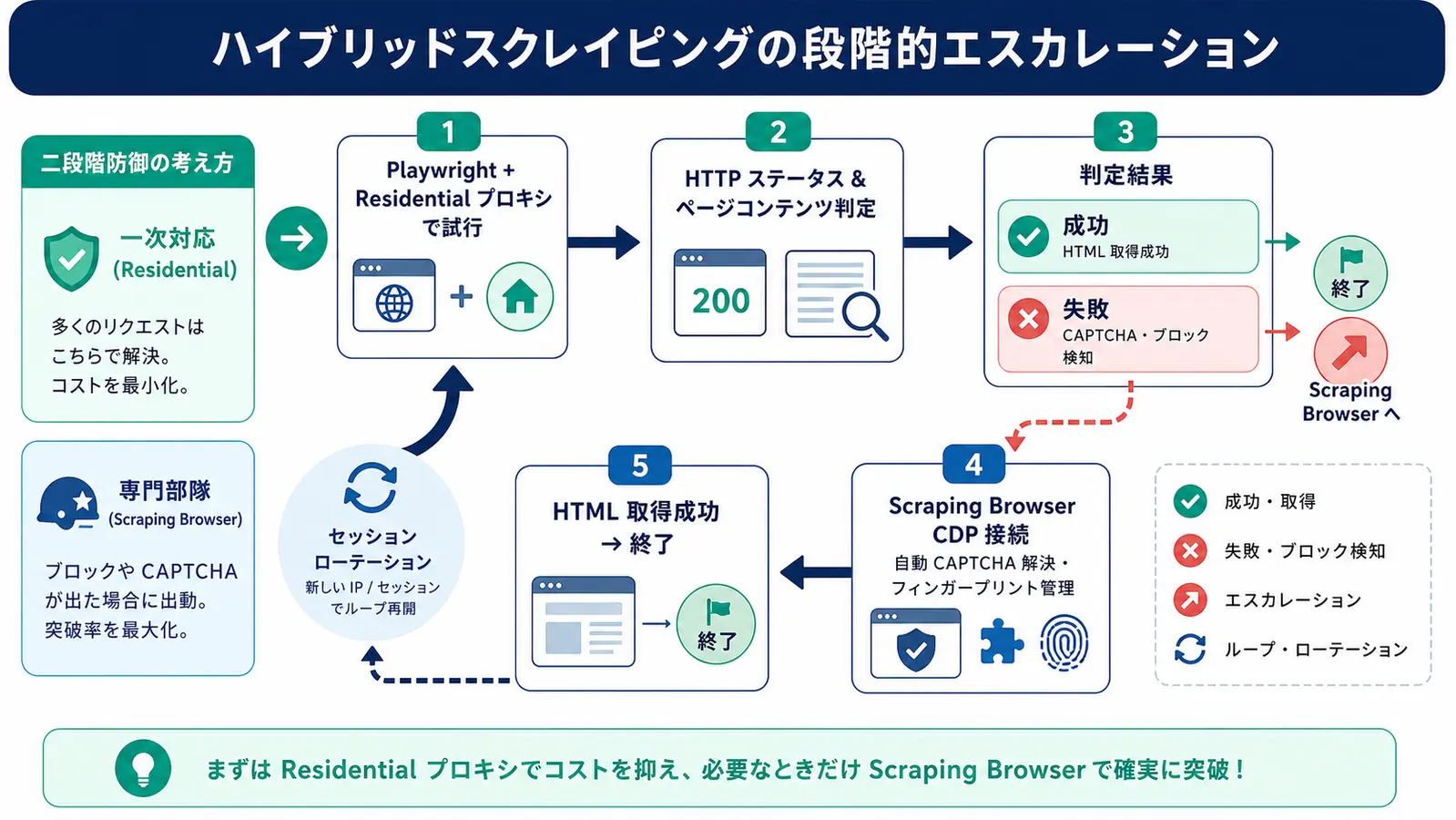
In production we usually go hybrid: sites that work over Residential stay on Residential, and only sites that hit CAPTCHA repeatedly fall back to Scraping Browser. For Web Unlocker, the proxy-only alternative, see our Bright Data Web Unlocker practical guide.
"Kubernetes plus Playwright plus the Bright Data Browser API is the standard pattern for scalable pipelines; fingerprint management on their side is what makes it scale." (Summary of an X post by Aleksei.)
Five Operational Pitfalls We Have Seen
These are the patterns we have hit in production. Knowing them in advance shortens the PoC-to-production gap.
1. 407 Proxy Authentication Required
Nine times out of ten this is a username format bug. The correct shape is brd-customer-<id>-zone-<zone> with the <zone> matching exactly what the Bright Data dashboard shows. The legacy lum-customer-... format still works, but new contracts should standardize on brd- for forward compatibility.
2. Bandwidth Spend 3-5x Above the Estimate
Playwright fetches images, CSS, fonts, and tracker JS by default. Block image, font, and media resources via context.route() and you usually cut transfer 60-80%. The block pattern in the Node.js example above transfers cleanly to most general-purpose scraping jobs.
3. Sessions Break Mid-Flow
Bright Data sticky sessions persist while you keep sending the same session-<id> in the username. The maximum session lifetime depends on the Zone config (default 1-10 minutes). Build retry-and-relogin paths for long flows so an IP change in the middle does not crash the run.
4. Playwright Fingerprint Leaks
navigator.webdriver = true and the Chrome-headless-specific permissions.query response can give you away to Cloudflare. The realistic options are switching to Patchright or Camoufox, or moving to Scraping Browser. Stacking add_init_script patches yourself becomes high-maintenance.
5. No Retry Strategy
Scraping fails. Logging the failure to Sentry or CloudWatch does not recover the job. Wrap the run with exponential backoff plus jitter using tenacity (Python) or p-retry (Node.js), with 3-5 retries. Rotate the session-<id> on each retry so blocked IPs do not come back to bite you.
Taking Your Scraping Stack to the Next Level
Bright Data plus Playwright is powerful, but production-ready means more than "the script runs once". You also need concurrency throttling, persistent failure logs, cost monitoring, and pipelines that normalize and load data into Snowflake or BigQuery. For pure cost levers, see our Bright Data cost optimization guide for 2026.
We run Tra-bell, a hotel price tracker, on Bright Data Residential and Web Unlocker. We have moved the same scraper through every stage from PoC to production, including Playwright concurrency, session management, error handling, and the Snowflake load. If you need a hand designing or migrating a scraping stack (including Web Unlocker or Scraping Browser migration of existing scrapers), we can help.
"For AI agents driving the web, residential IPs plus real browser fingerprints dramatically reduce blocks." (Summary of an X post by kevntz.)
Wrap-Up
Bright Data x Playwright covers geo-targeting, session control, and bot-detection avoidance in one stack. Two patterns dominate: a Residential proxy attached directly to Playwright, or a Scraping Browser connection over CDP. Start lean with Residential, then move just the CAPTCHA-heavy targets to Scraping Browser. The code above is production-grade enough to fork, so clone it locally and try it on your own target.
Information current as of 2026-05-22. Please check the official sites for the latest updates.
This article contains affiliate links.
Frequently asked questions
Related articles

Bright Data Scraping Browser 2026: Puppeteer/Playwright Setup and Cost Design
Bright Data Web Unlocker Practical Guide 2026: CAPTCHA Bypass and Cost Design