Bright Data Scraping Browser 2026: Puppeteer/Playwright Setup and Cost Design
Hook Bright Data Scraping Browser into Puppeteer or Playwright, bypass Cloudflare and CAPTCHAs, and tune monthly GB costs based on real production experience.
This article contains affiliate links (advertising).
Bright Data Scraping Browser bundles a Chromium-compatible headless browser, residential proxies, and bot-detection bypass into one cloud service. Swap a single line in your Puppeteer or Playwright script and Bright Data handles Cloudflare, DataDome, and CAPTCHA on its side. This guide walks through the connection code, cost tuning, and the gotchas we see in real production setups.
What Is Scraping Browser
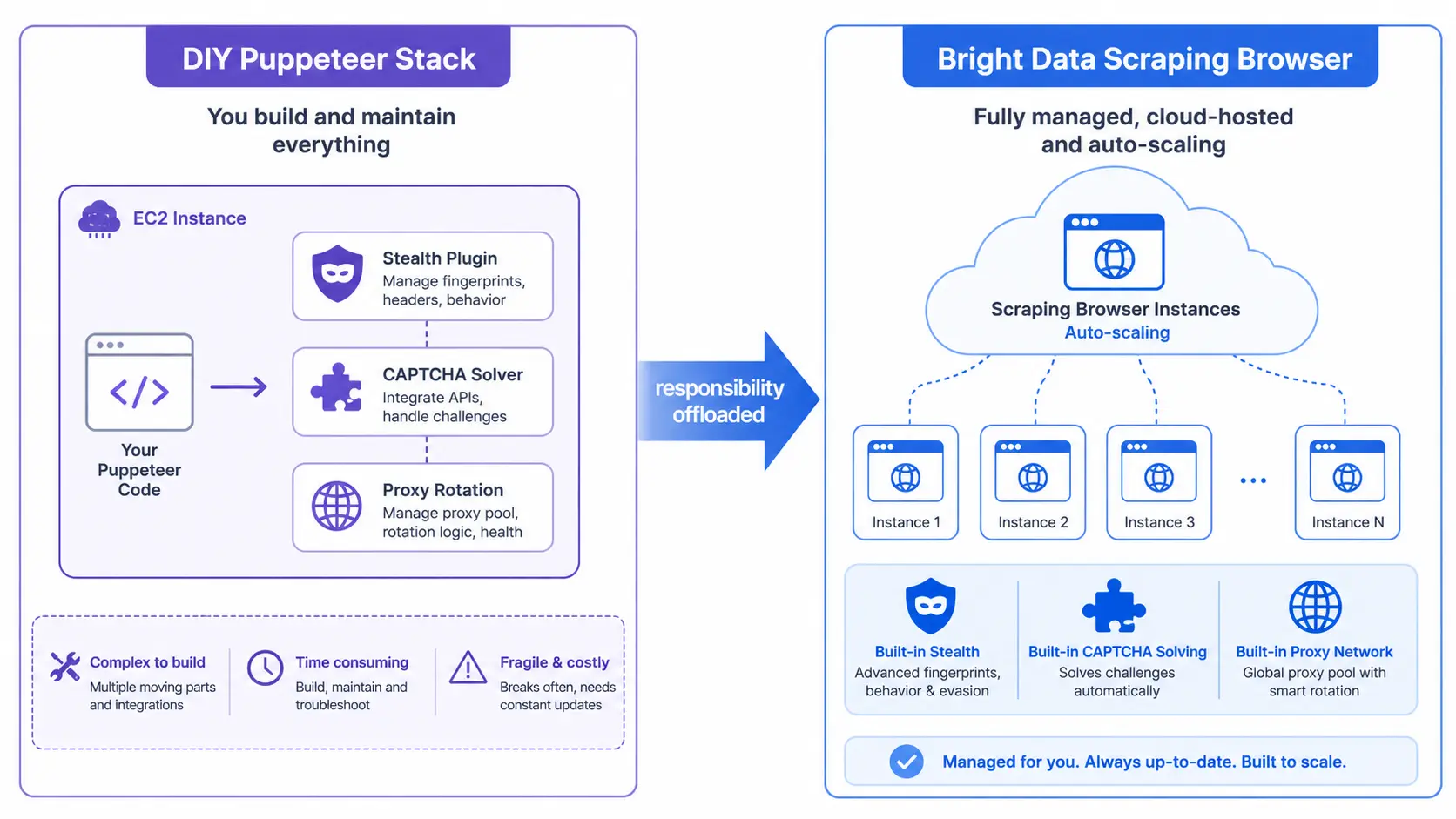
Scraping Browser is a Chromium-based remote browser operated by Bright Data and driven over WebSocket (CDP) from Puppeteer, Playwright, or Selenium. Instead of stacking your own headless Chromium, residential proxies, stealth plugins, and CAPTCHA solvers, you delegate fingerprint rotation, automated CAPTCHA solving, and session pinning to the vendor. The trade-off is straightforward: you stop owning the cat-and-mouse maintenance, and you start paying per GB of transferred traffic.
Versus DIY Puppeteer
| Axis | DIY Puppeteer + Proxy | Scraping Browser |
|---|---|---|
| Browser runtime | Your servers (EC2 / Lambda) | Bright Data cloud |
| Stealth plugin | You install and maintain | Built in, continuously updated |
| CAPTCHA solving | Integrate 2Captcha or similar | Automatic (additional usage cost) |
| IP rotation | Implemented at proxy layer | Transparent on the same WebSocket |
| Pricing | Servers + proxy bandwidth | Usage-based at $9/GB (~¥1,350) as of May 2026 |
DIY Puppeteer looks cheaper on paper, but once you fold in the maintenance load and the constant cat-and-mouse with new detection signals, our experience is that Scraping Browser often wins on TCO. The hidden cost is engineering time spent chasing fingerprint changes whenever Cloudflare or DataDome ships an update — a recurring tax that does not show up in your AWS bill but absolutely shows up in shipped features.
Where It Pays Off
Scraping Browser is most cost-effective for JavaScript-heavy SPAs that also defend hard against bots, such as marketplaces, social networks, and dynamic job boards. For static, API-like targets you can usually run cheaper with the HTTP-based Web Unlocker discussed in Bright Data Web Unlocker Practical Guide. Picking the right tool per target is what keeps GB consumption under control. A common anti-pattern we see is teams defaulting to Scraping Browser for every endpoint, including ones that respond perfectly to a plain HTTP call — that single decision often inflates bills by 2-3x.
Connecting Puppeteer and Playwright
Once you create a Scraping Browser zone in the Bright Data dashboard, you get a WebSocket endpoint that looks like brd-customer-<id>-zone-<name>:<password>@brd.superproxy.io:9222. Plug that URL into your existing scripts.
Puppeteer Example
import puppeteer from "puppeteer-core";

const SBR_WS = `wss://brd-customer-XXX-zone-scraping_browser1:PASSWORD@brd.superproxy.io:9222`;

async function main() {
  const browser = await puppeteer.connect({ browserWSEndpoint: SBR_WS });
  try {
    const page = await browser.newPage();
    await page.goto("https://target-site.example.com", { timeout: 2 * 60_000 });
    const html = await page.content();
    console.log(html.length);
  } finally {
    await browser.close();
  }
}

main();
Playwright Example
import { chromium } from "playwright";

const SBR_WS = `wss://brd-customer-XXX-zone-scraping_browser1:PASSWORD@brd.superproxy.io:9222`;

const browser = await chromium.connectOverCDP(SBR_WS);
const context = browser.contexts()[0];
const page = await context.newPage();
await page.goto("https://target-site.example.com", { timeout: 120_000 });
console.log(await page.title());
await browser.close();
Useful Query Parameters
Behavior is tuned through query parameters on the WebSocket URL.
country=jp— pin to Japanese IPs (andcity=tokyoif needed)session-id=<value>— reuse the same IP, cookies, and fingerprint for up to 30 minuteslock-session=true— prevent another concurrent request from stealing the same session
We use the same pattern at Tra-bell, our own hotel price tracker running on Bright Data, when we need to compare prices across Japan, the US, and Europe by toggling the country parameter. In a typical run we pin city=tokyo for booking sites and rotate between US and EU IPs for global aggregators, all from the same Node.js worker pool.
The Puppeteer + Scraping Browser pattern above is now the de facto template in developer communities, and most internal tooling we have seen at client sites converges on this same shape. The only meaningful variations are around credential management — most teams pull customer ID and password from a secret manager such as AWS Secrets Manager or HashiCorp Vault rather than hardcoding them — and around concurrency control with a queue like SQS or BullMQ in front of the worker pool.
Implementation Steps and Common Pitfalls
The usual path from PoC to production looks like this, and each step typically takes a day or less if you have a reference scraper ready.
- Create a zone: spin up a Scraping Browser zone in the dashboard and finish KYC. Note that KYC review can take up to two business days, so kick it off early.
- Smoke test: hit a known URL such as
https://geo.brdtest.com/welcome.txtwith the connection code above. If you see TLS or certificate errors, double-check that your client supports modern TLS 1.3. - Analyze the target: open the network tab to see if XHR / GraphQL responses already contain what you need. Half the time you can skip the browser layer entirely and just call an internal API.
- Record a baseline flow with Playwright Codegen: capture a manual run as a script first, then prune away the noise (hover events, accidental clicks).
- Set timeouts and retries: 60 - 120 seconds for
page.goto, and preferwaitUntil: "domcontentloaded"for predictability. Wrap the call in an exponential backoff with at most three retries to keep cost predictable. - Persist failure screenshots: ship
page.screenshot()output to S3 / R2 on every error for post-mortem. Include the page URL and a request ID in the filename for fast triage. - Measure traffic: after a few days of running, aggregate the real GB cost and decide whether to swap parts of the workload to Web Unlocker or Datacenter proxies. We usually do this at the end of week one.
Even with Scraping Browser, low-score reCAPTCHA v3 challenges still appear sometimes, so design explicit retry handling. See Bright Data CAPTCHA Handling Playbook for branching logic by CAPTCHA type.
Legal and Operational Notes
Before turning on Scraping Browser, confirm the target site's terms of service and robots.txt. Just because something is technically reachable does not mean it is legally fair game. Run through this checklist before kicking off any PoC.
- Respect robots.txt Disallow rules and stay under Crawl-Delay
- Scraping pages with personal data falls under GDPR, CCPA, and APPI
- Logged-in areas usually violate the platform's ToS (especially BtoB SaaS admin panels)
- Bright Data KYC verifies IP origin, but it does not guarantee legal compliance on your behalf
- Track ongoing case law such as hiQ vs LinkedIn and Meta vs Bright Data
- Keep an internal review cadence (legal + engineering) at least every quarter
See Bright Data and GDPR / APPI Compliance 2026 for the legal design details, including data minimization patterns and how to document your processing basis.
Cost Design Essentials
Scraping Browser is billed at $9/GB (~¥1,350) as of May 2026, and a full browser pulls more bytes per page than raw proxies. Three patterns we rely on to control monthly bills:
1. Block Unneeded Resources
Drop images, video, fonts, and ad tags via request interception. For a typical product page this alone cuts transfer by 40-60%, and it also speeds the page up because fewer bytes have to flow through the proxy network.
await page.route("**/*", (route) => {
  const type = route.request().resourceType();
  if (["image", "media", "font"].includes(type)) return route.abort();
  return route.continue();
});
2. Limit Render Depth
Waiting on networkidle fires every trailing XHR, including analytics beacons and lazy-loaded chunks you do not need. Switching to domcontentloaded plus a targeted waitForSelector typically saves 20-30% of time and bandwidth per page. Pair that with a hard navigation timeout so a single slow page does not blow the budget on its own.
3. Combine Web Unlocker and Datacenter
We split target sites into three buckets — JS-required, HTTP-friendly, lightly defended — and route each bucket to Scraping Browser, Web Unlocker, or Datacenter respectively. The router lives in front of the scraping workers and is just a lookup table keyed by domain; it took an afternoon to build and pays back every month. This three-tier split has cut proxy spend by 40-60% in our client engagements. Full breakdowns live in Bright Data Cost Optimization 2026.
In practice many teams settle on Scraping Browser as the primary tool with Web Unlocker as the cheaper fallback, which matches what we see in production. A useful guardrail is to dashboard the per-domain GB usage in your data warehouse and trigger an alert when a single target exceeds a budget cap — that single Looker or Metabase chart prevents most billing surprises.
How We (Smile Comfort) Run It
At Smile Comfort we operate Tra-bell, a hotel price tracker built on Bright Data Residential proxies and Scraping Browser. We mix JS-required booking sites with API-like endpoints and tune the GB-based cost month over month. The full stack ranges from Node.js workers on AWS Lambda or ECS through to data warehouses on BigQuery or Snowflake, with dbt models on top for downstream analytics. If you want to spin up a similar stack — from a one-week PoC all the way to production with monitoring and alerting — we can stand the whole thing up with you.
The same architecture works beyond hotels: e-commerce price monitoring, job board comparison, SEO surveillance, and more. If you want to peek at a production system running on Bright Data, the Tra-bell site is a working example.
Summary
Bright Data Scraping Browser replaces a DIY stack of Puppeteer, proxies, and stealth plugins with a single cloud service. Point your WebSocket endpoint at Bright Data and you hand off Cloudflare, CAPTCHA, and fingerprint defenses to the vendor. It pays off most clearly on JS-required, heavily defended SPAs, and you can shave 30-60% of cost by blocking unused resources and routing simpler targets to Web Unlocker. Run a one- to two-week PoC to land on the real GB cost and detection rate, then move to production with confidence. Once the architecture is stable, the maintenance cost flattens out and your engineering team can focus on the data layer rather than chasing fingerprint updates.
Information current as of 2026-05-21. Please check the official sites for the latest updates.
This article contains affiliate links.
Frequently asked questions
Related articles
Bright Data CAPTCHA Handling Playbook 2026: Recipes by Challenge Type

Bright Data Cost Optimization 2026: Cut Monthly Bills 30-70% With Proxy, Bandwidth, and Contract Tactics