Bright Data CAPTCHA Handling Playbook 2026: Recipes by Challenge Type
How to handle reCAPTCHA, hCaptcha, and Cloudflare Turnstile when scraping with Bright Data. Covers Zone configuration, Web Unlocker, Scraping Browser, and 3rd-party solver fallbacks for production workloads.
This article contains affiliate links (advertising).
Bright Data scraping pipelines tend to hit a wall the day reCAPTCHA or Cloudflare suddenly start returning challenges instead of HTML. This article walks through how to diagnose the CAPTCHA you are seeing, pick the right Bright Data product per challenge type (reCAPTCHA v2/v3, hCaptcha, Cloudflare Turnstile), tune Zone parameters, and decide when to fall back to a third-party solver — based on patterns we use to keep our own Tra-bell scraping stack stable. The short answer: anchor the design on Scraping Browser or Web Unlocker, and route only the URLs that still fail to a dedicated solver such as 2Captcha or Capsolver as a fallback tier1.
First Triage: What Exactly Are You Looking At?
When a CAPTCHA appears, do not start swapping products immediately. Identify which challenge is firing and at which layer; otherwise you will switch to Scraping Browser and run into a different challenge instead.
Skipping triage and reaching for the most expensive product (usually Scraping Browser) almost always increases cost without improving success rate, because the underlying issue is rarely "we picked the wrong product". It is usually a misaligned country, a stale session, or a Reject rule that lets junk responses through and inflates the success metric.
Identify the CAPTCHA Type
You can almost always tell from the response HTML or headers. Fingerprints to look for:
- reCAPTCHA v2:
<script src="https://www.google.com/recaptcha/api.js">,g-recaptchaclass, click-to-select images - reCAPTCHA v3: same
recaptcha/api.jsbut only the badge in the lower-right, no UI interaction required (risk score based) - hCaptcha:
hcaptcha.com/captchadomain,h-captchaclass - Cloudflare Turnstile / Managed Challenge:
challenge-platformpath,cdn-cgi/challenge-platform,__cf_bmcookie - Akamai Bot Manager:
_abckcookie, scripts starting withbm-, Sensor Data POST requests - PerimeterX (HUMAN):
_pxcookie, references toclient.perimeterx.net
Identify the Trigger
CAPTCHAs fire in two patterns: "always-on at access" and "fires when a risk score exceeds a threshold". If Residential proxies hit a challenge on the very first request, you are dealing with always-on (often Cloudflare or Akamai). If you only see them after hundreds of requests, it is risk-score driven (reCAPTCHA v3, hCaptcha Enterprise, PerimeterX). The former needs IP and TLS fingerprint adjustments; the latter needs session continuity and more human-like behavior2.
A quick rule of thumb we use during triage: if curl with a clean user agent hits the challenge immediately, it is always-on; if your existing scraper ran fine for weeks and started getting blocked, it is risk-score based. The remediation work is very different, so confirming this in the first 30 minutes saves days of misaligned debugging.
As the X post above highlights, Bright Data's Scraping Browser bundles both prevention (avoiding triggers) and resolution (handling triggers after they fire) under a single API, which is the main differentiator versus standalone proxy products. If you are still picking between products, the Bright Data Web Unlocker Practical Guide 2026 walks through the feature-by-feature comparison.
Per-Type Recipes: What to Pick and What to Skip
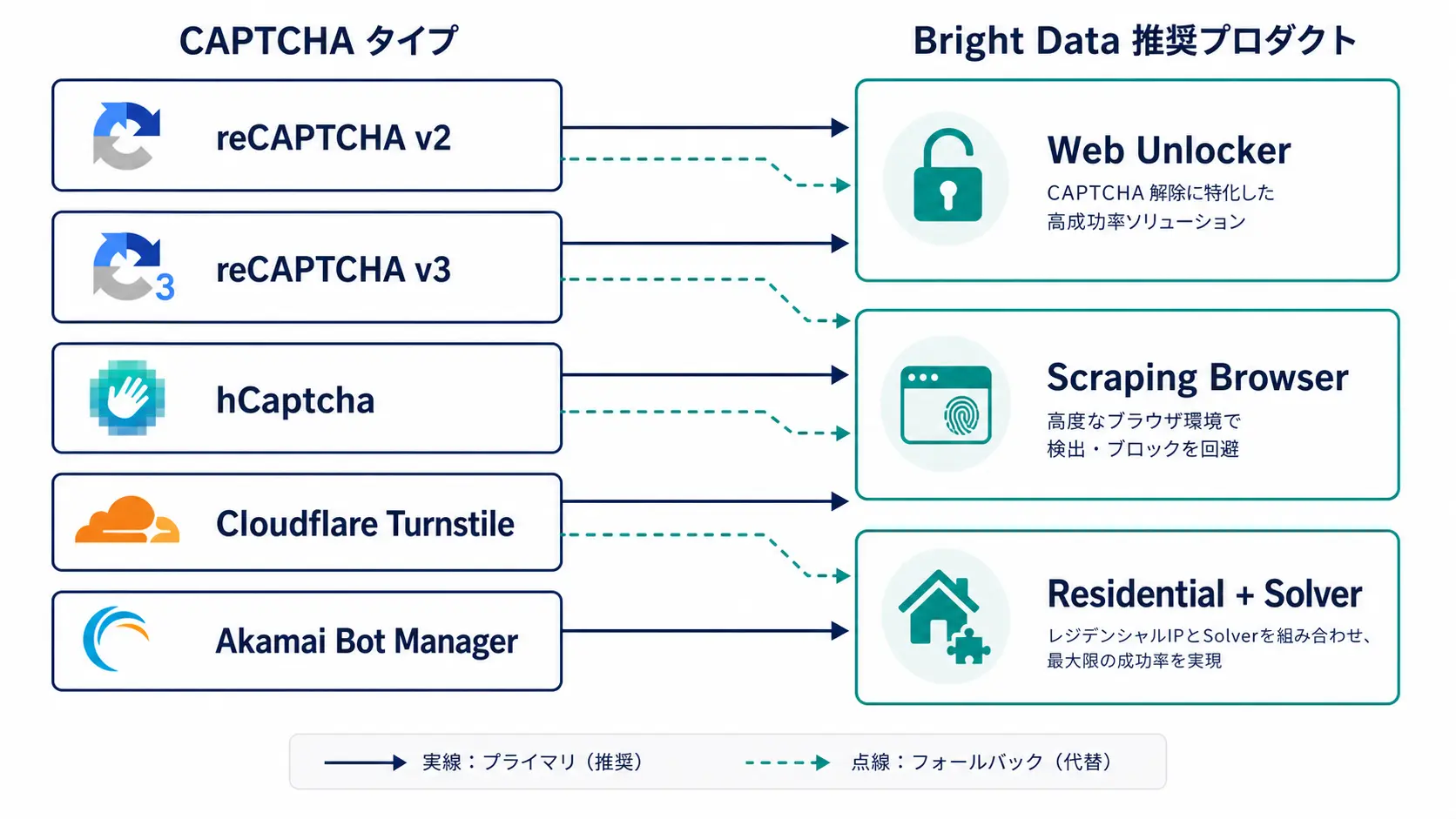
Once you know the type, decide which Bright Data product receives the request. Throwing Scraping Browser at every URL works but burns budget, so allocate by URL priority and traffic volume.
reCAPTCHA v2 (Image-Click Variant)
You need a real DOM to simulate interaction, so HTTP-only proxies will not cut it. The two viable paths are: render the page in Scraping Browser and let it process the reCAPTCHA frame in the DOM, or fetch a token from a solver such as 2Captcha and inject it into the g-recaptcha-response field. Bright Data's Scraping Browser tries to solve the challenge internally; when it cannot, a hybrid pattern that hooks the 2Captcha API on the solve event tends to be the most stable.
reCAPTCHA v3 (Risk-Score Variant)
v3 returns a score (0.0 to 1.0) rather than a challenge, so the goal is to earn a high score, not to bypass anything. In practice, you need all three of the following:
- Use Residential proxies with natural ASN and country: data center IPs lose points
- Randomize navigation gaps to 800ms–3,000ms: instant transitions read as machine behavior
- Persist cookies and visit history in the same session: a first-visit → return-visit → action sequence raises trust
Either pin the Scraping Browser userDataDir per user, or use Bright Data's session-keeping feature for 30-minute to multi-hour sessions.
hCaptcha
Like reCAPTCHA v2, hCaptcha is UI-driven, but the image tasks tend to be harder. Bright Data Web Unlocker includes an internal hCaptcha module and can often resolve it transparently through a single API call. For sites running hCaptcha Enterprise or Pro that Web Unlocker cannot clear, integrate Capsolver or 2Captcha's hCaptcha API as a fallback.
Cloudflare Turnstile / Managed Challenge
This is the sweet spot for Web Unlocker. It processes the JavaScript challenge internally, sets __cf_bm, and returns the actual HTML. Going at Cloudflare-protected sites with bare Residential proxies usually returns the challenge page, so default to Web Unlocker or Scraping Browser. Cloudflare ships Managed Challenge algorithm updates every few months, so production deployments require ongoing success-rate monitoring.
For sites that escalate from Turnstile to a Bot Fight Mode block, Web Unlocker is usually still the right starting point because it manages the entire challenge negotiation rather than the visible Turnstile widget alone. Switching to Scraping Browser only adds value when you need to interact with rendered content (logged-in pages, multi-step forms) after the challenge resolves.
Zone and Request Parameter Tips
Bright Data Zones are units per product (Residential, Web Unlocker, Scraping Browser), but the operational rule is to split the same product into multiple Zones by use case. Settings that directly affect CAPTCHA handling:
Web Unlocker Zone Essentials
When you create a Web Unlocker Zone in the dashboard, the minimum checklist:
| Setting | Recommended | Why |
|---|---|---|
| Country | Match the site's primary user country | e.g., JP for jp.amazon.co.jp |
| Render JavaScript | On | Required for SPAs and Cloudflare-protected pages |
| Reject responses by HTTP status | 403, 429, 503 | So failed requests are not billed as success |
| Async API | As needed | For long-rendering pages |
Without the Reject setting, a Web Unlocker response that contains a CAPTCHA page can be billed as a success. Cost optimization equals defining what "success" means strictly — always set this.
Scraping Browser Connection Parameters
Playwright and Puppeteer connect via connect_over_cdp to a WebSocket endpoint where the URL encodes the Zone username, country, and session ID. A representative example:
from playwright.sync_api import sync_playwright

BD_USER = "brd-customer-XXXX-zone-scraping_browser1"
BD_PASS = "your_password"
BD_HOST = "brd.superproxy.io:9222"
SESSION_ID = "session_001"  # reuse for long-lived sessions

endpoint = (
    f"wss://{BD_USER}-session-{SESSION_ID}:{BD_PASS}@{BD_HOST}"
)

with sync_playwright() as p:
    browser = p.chromium.connect_over_cdp(endpoint)
    context = browser.new_context()
    page = context.new_page()
    page.goto("https://example.com/login", wait_until="domcontentloaded")
    page.wait_for_timeout(2500)  # add jitter for score-based defenses
    html = page.content()
Pinning SESSION_ID lets you reuse the same IP and browser fingerprint, which matters for risk-score defenses (reCAPTCHA v3, PerimeterX). For cases that need IP rotation, rotate the session per request instead.
Hybrid With External Solvers
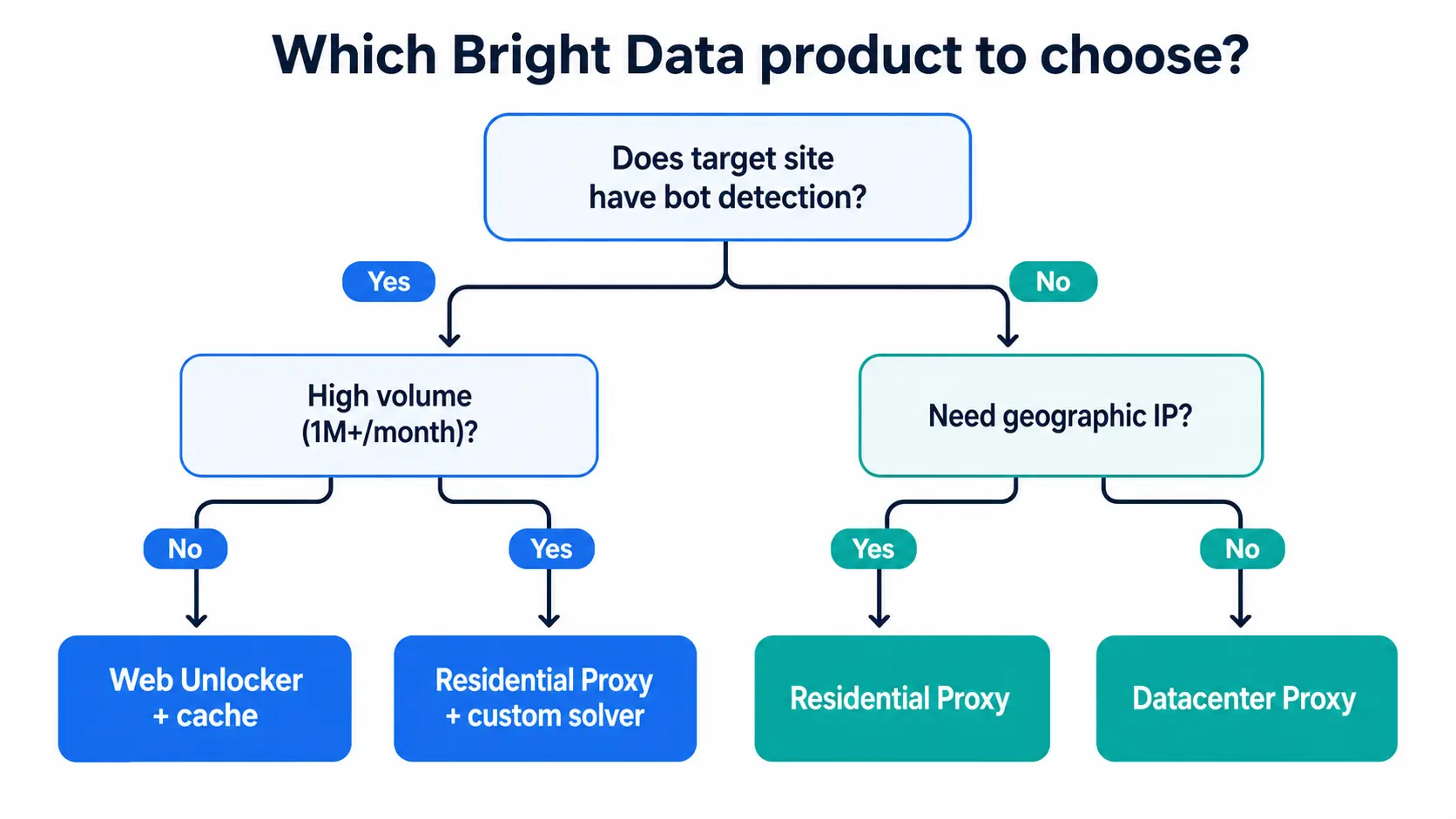
For URLs Bright Data cannot crack alone, extract the sitekey from the CAPTCHA frame in Scraping Browser, send it to the 2Captcha or Capsolver API, get back a token, inject it into g-recaptcha-response, and submit. Bright Data's Auto Solve uses the same flow internally, but writing your own sitekey-based fallback is safer for tougher sites that Auto Solve misses. For deciding when to use Residential versus ISP proxies, the Bright Data Residential vs ISP Proxy 2026: A Practical Selection Guide lays out the trade-offs in detail.
A pattern that works well in production: route 80–90% of traffic through Scraping Browser or Web Unlocker, and reserve the external solver only for a hand-picked list of high-value URLs (login pages, the final submission step in a checkout, paywalled detail pages). This keeps solver costs predictable while still giving you a way out for the URLs that matter most.
The X post above also notes that bot defenses, including CAPTCHAs, are not solved by a single tool; orchestrating several is the realistic answer.
Failure Modes and Operational Pitfalls
Most pipelines clear with the design above, but a few traps come up repeatedly in production.
Common Failures
- Sudden blocks after sustained access from a single IP: more common with ISP proxies or short sessions; add token-bucket rate control
- CAPTCHA HTML billed as a Web Unlocker success: combine Reject settings with body inspection (look for
captchasubstring) - Memory creep in Scraping Browser: long-lived sessions accumulate DOM state; restart the browser every N requests
- Throughput dragged down by 2Captcha latency: raise concurrency or reduce solver usage rate
- sitekey extraction breaks after a CSS change: keep the extractor attribute-based, not DOM-position based
Monitor Success Rates Continuously
CAPTCHA handling is not "set and forget"; success rates drift month-over-month as sites update. As a minimum metric set, track per-URL success rate hourly, per-Zone cost monthly, and the HTTP status distribution of failures, and put them on a dashboard. With this in place you can detect a Cloudflare algorithm update within 24 hours of the drop.
Pair the metrics with an alerting rule that pages when the rolling one-hour success rate falls below your SLO (typically 95% for high-value sources). Without alerts, a slow drift from 99% to 80% can hide inside daily totals for a week before anyone notices, and by then the backfill effort dwarfs the original fix.
Our Scraping Support and the Tra-bell Example
Smile Comfort has run Bright Data Residential, Web Unlocker, and Scraping Browser in production for client and internal workloads, and can help with the design, PoC, and rollout of CAPTCHA handling. Our own product Tra-bell, a hotel price tracking service, runs on a scraping stack built on Bright Data Residential and Web Unlocker, including large OTAs that throw Cloudflare, reCAPTCHA, and custom bot detection at us, and we keep monthly success rates stable through the patterns above.
If your project is stuck on CAPTCHA, or the bill is creeping past your forecast, a review of Zone allocation and the Scraping Browser + external solver hybrid often improves both success rate and unit cost in one pass. We typically start with a one-week diagnostic to map out which URLs are bleeding the most budget, then propose a Zone restructuring and an alerting baseline that the team can run independently.
Summary
CAPTCHA handling boils down to three steps: (1) identify the type and trigger, (2) pick a Bright Data product mix (Web Unlocker, Scraping Browser, Residential), and (3) wire up an external solver as a fallback for the URLs that still fail. Defenses like reCAPTCHA v3 and Cloudflare Turnstile evolve year after year, so the play is not a silver bullet but a maintainable mix of Zone design and monitoring. Anchor on Scraping Browser, layer in 2Captcha or Capsolver as a fallback, run a PoC first to measure the cost-versus-success-rate break-even, then move to production.
Information current as of 2026-05-21. Please check the official sites for the latest updates.
This article contains affiliate links.
Footnotes
-
Bright Data Scraping Browser overview — https://brightdata.com/products/scraping-browser ↩
-
Bright Data Web Unlocker documentation — https://docs.brightdata.com/scraping-automation/web-unlocker ↩
Frequently asked questions
Related articles
Bright Data Web Unlocker Practical Guide 2026: CAPTCHA Bypass and Cost Design
Bright Data Residential vs ISP Proxy 2026: A Practical Selection Guide