Bright Data Residential vs ISP Proxy 2026: A Practical Selection Guide
How to choose between Bright Data Residential and ISP proxies. Compare stealth, speed, and cost, then build a tiered fallback design that keeps success rates high without overspending.
This article contains affiliate links (advertising).
Bright Data offers both Residential and ISP proxies, and the right choice usually comes down to a single trade-off between detection resistance and cost efficiency. The short answer: default to ISP for speed and price, escalate to Residential only when a site is exceptionally hostile. This guide walks through the architectural differences between the two, a 2026 comparison table, and the staged fallback design we run in production so your team can keep success rates high without paying premium rates on every single request. By the end, you will have a clear playbook for which proxy lane to use first and when to escalate.
How Residential and ISP Proxies Are Structured
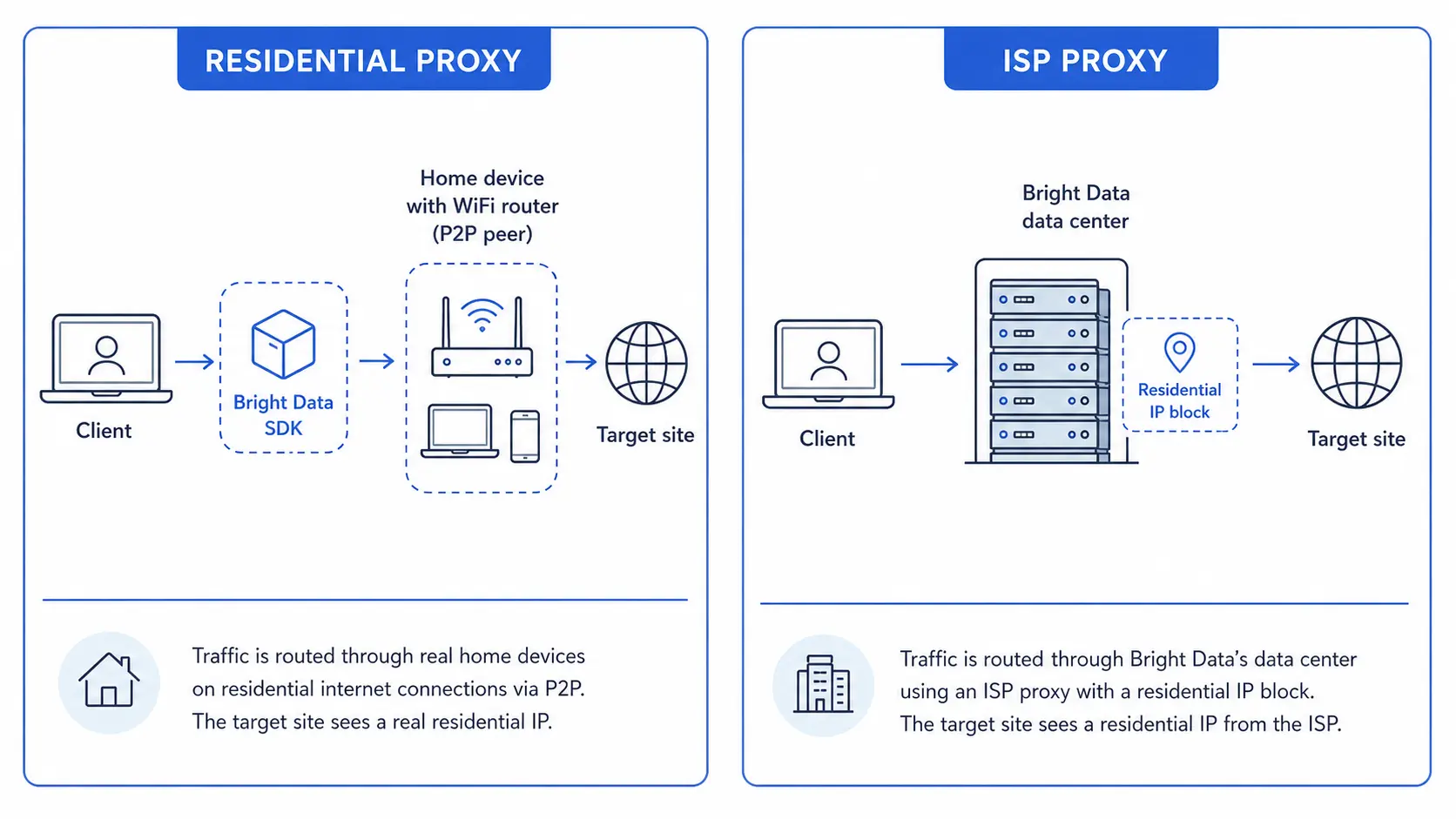
Both proxy types route traffic through residential IP space, but their physical exit points and IP-allocation paths are different.
Residential Proxies Exit Through Home Connections
A Residential proxy sends traffic through the home Wi-Fi or mobile data link of a real consumer device whose owner opted in via the Bright Data SDK. From an ASN, GeoIP, and behavioral-fingerprint perspective, the exit IP is indistinguishable from a regular household connection. The global IP pool exceeds 72 million addresses, with city-level and carrier-level targeting available out of the box1. Because each peer is a real person's device, traffic also inherits the day-to-day usage patterns of that household, which makes the exit footprint look organic to behavioral classifiers.
The trade-off is that bandwidth depends on each peer's home circuit. Latency varies, throughput is generally lower than a server-grade link, and long sticky sessions are harder to guarantee because peers can drop offline at any moment. For workloads that demand consistent throughput per worker, this variability needs to be planned for in retry and timeout policies.
ISP Proxies Are Residential IPs Hosted in Data Centers
ISP proxies use IP blocks that internet service providers allocate for residential customers, but the addresses are bound to servers Bright Data operates inside its own data centers. To the outside world the ASN and allocation still read as a residential ISP, while the server backbone delivers stable bandwidth and low latency. This makes ISP a "Static Residential" option that keeps the same IP across long sessions, ideal when you need to maintain logged-in state or accumulate session cookies across many requests.
Because the underlying hardware is dedicated infrastructure rather than consumer hardware, ISP IPs do not churn the way Residential peers can. Operators get reliable throughput per IP, predictable round-trip time, and the ability to plan capacity per rack rather than per peer. The cost reflects this architecture, with per-GB pricing generally lower than Residential while keeping the same residential-looking ASN classification.
For a deeper look at how we wired a Residential-based monitoring pipeline end to end, see our walkthrough on building a price monitoring stack with Bright Data Residential Proxy.
Stealth, Speed, and Cost Compared
When making a selection decision, four axes matter: stealth, speed, cost, and IP stickiness. The table below blends Bright Data's official product comparison2 with the operational data we have collected from production workloads.
| Axis | Residential | ISP | Winner by Use Case |
|---|---|---|---|
| Detection Resistance (Stealth) | Top class | High, one notch below | Residential |
| Throughput / Speed | Medium (home link) | High (data-center grade) | ISP |
| Connection Stability | Medium (user churn) | High (24/7 servers) | ISP |
| Unit Cost (per GB) | Higher | Clearly cheaper than Residential | ISP |
| Long-running Sticky Sessions | Short windows | Long-running, easy | ISP |
| City- / Carrier-level Targeting | Most granular | Available | Residential |
| Effective Price after Volume Discounts | Kicks in at mid volume | Effective from low volume | ISP |
For the underlying pricing math, including volume-discount tiers and how annual commits compress the per-GB rate, our Bright Data Pricing Cheat Sheet 2026 breaks down each product line so you can model spend before flipping the switch.
Bright Data's ISP Stands Out for IP Freshness
Bright Data's ISP product is widely regarded as one of the cleanest in the market, with fewer spam-history flags compared to other Static Residential offerings. Several factors contribute to this: KYC-vetted customer access, careful pool management to retire flagged IPs, and a relatively young IP allocation history. On X, several operators have shared workflows where ISP is the primary lane and Residential is reserved only for cases the ISP layer cannot handle.
The official product positioning aligns with this split: ISP wins on speed and stickiness, Residential wins on targeting and absolute stealth. In our internal benchmarks, ISP consistently delivers two to three times the throughput per worker compared to Residential while keeping ASN-level classification identical, which is what makes the cost case for an ISP-first design.
A Practical Selection Workflow
Picking the right proxy from scratch on every project wastes time and money. The three-step flow below converges on a cost-effective configuration quickly.
Step 1. Run Everything Through ISP First
When you do not yet know how a target site reacts to proxies, start with ISP. The unit cost is lower, throughput is steadier, and you can iterate quickly without burning Residential bandwidth. This baseline also gives you a measured signal you can refer back to when defending budget decisions later.
- Prepare 100 to 500 sample URLs from the target site, covering the full mix of pages you eventually need
- Create a single ISP Zone in Bright Data and allocate 100-200 IPs from the regions you care about
- Measure success rate, CAPTCHA frequency, response time, and the body-size distribution of responses
If your success rate clears 90% and CAPTCHA appearances stay below 5%, ISP is good enough to keep using in production. Record these numbers so future regressions are easy to spot when target sites change their defenses.
Step 2. Fall Back to Residential on Failure Only
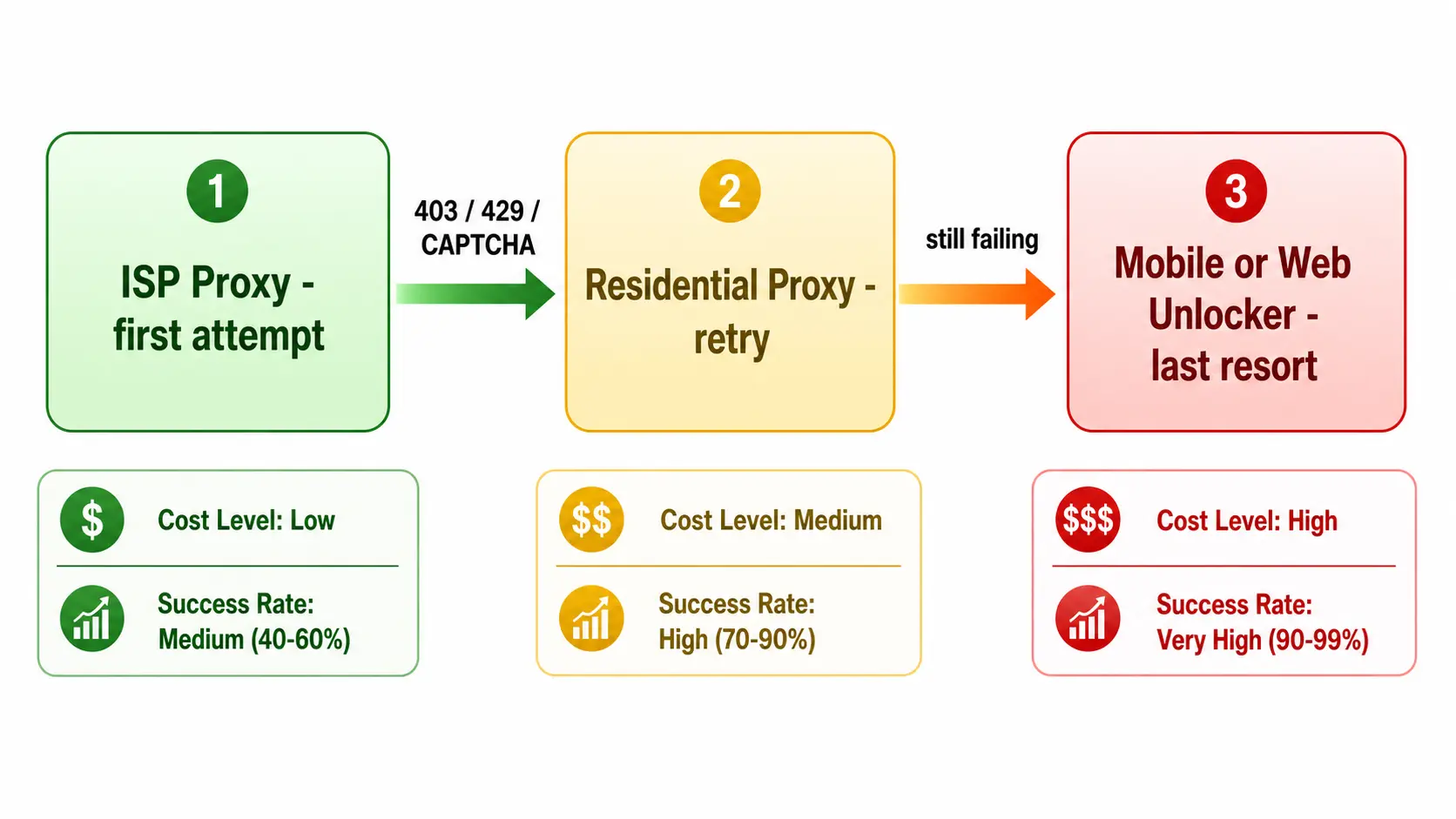
When ISP measurements show specific endpoints or request types failing above the acceptable threshold (typically 10%), route only the failing fraction through Residential as a second-tier retry rather than upgrading all traffic.
- Issue the first request through the ISP Zone
- If you detect HTTP 403/429 or a CAPTCHA HTML body, retry the same URL through a Residential Zone
- If that still fails, escalate to Web Unlocker or Mobile, or skip the job entirely and log it for human review
You can implement this in Bright Data's Proxy Manager or in your own request layer. With 70-80% of monthly traffic served by ISP and the remaining 20-30% by Residential, total proxy spend drops by roughly 30-50% versus a Residential-only setup while preserving success rates. The key is to keep the routing logic explicit so you can revisit the split as target sites evolve.
Step 3. Escalate to Mobile or Web Unlocker Only When Needed
If the ISP-plus-Residential combination still does not meet your success-rate bar, the target site likely runs a high-end bot defense. Move to Mobile Proxy or Web Unlocker selectively, only on the specific endpoints that still fail. Mobile traffic exits via 4G/5G carriers and offers the strongest stealth, but the per-GB price is higher than Residential, so reserve it for the hardest cases. Web Unlocker handles CAPTCHA, JavaScript challenges, and TLS fingerprinting internally, which simplifies retry logic on the client side and is often more cost-effective than building those bypasses by hand.
Operational Considerations and Compliance
While ISP and Residential behave similarly in practice, they need different operational hygiene.
Pool Management and IP Rotation
Because ISP IPs are static, blocked addresses must be parked for cooldown or replaced. Bright Data's dashboard exposes IP list management and rotation policies, and splitting traffic by Zone keeps any single block contained to one workload. In production we typically keep a working pool of several hundred ISP IPs and rotate the active subset on a schedule, so any one address sees only a fraction of the day's traffic. Residential pools are large enough that auto-rotation rarely causes issues, but pay attention to the sticky session setting when you need a consistent IP throughout a logged-in flow.
Terms of Service and Rate Control
Whichever proxy you choose, review the target site's terms of service and robots.txt before scraping. Bright Data itself requires KYC verification for Residential and ISP customers, providing a defensible chain of custody for the exit IPs3. Even so, applying rate control and respecting Crawl-Delay on your side keeps legal exposure low and is generally expected by internal legal reviewers when scraping is part of a larger commercial workflow.
For enterprise rollouts, internal legal teams often ask about how the exit IPs are sourced. Bright Data's compliance documentation describes the Residential opt-in process and the ASN provenance of the ISP product, which makes the review process easier to navigate. Keeping a copy of this documentation alongside your internal data-handling policy speeds up future audits and lets new team members onboard onto the scraping stack with the legal context already in hand.
How We Operate Bright Data and Where We Can Help
We have run Bright Data's Residential, ISP, and Web Unlocker products in production for years. Our hotel price-tracking service Tra-bell uses exactly the three-tier fallback above and processes tens of millions of requests per month. We track success rate, cost per successful request, and CAPTCHA frequency by Zone, then rebalance the split between ISP and Residential whenever the underlying target sites change their defenses.
We help teams design Bright Data Zones, choose the right proxy types per use case, optimize cost, and move from PoC to production. We also support the surrounding stack-AWS or GCP scraping infrastructure and data pipelines into BigQuery or Snowflake-so you can ship the entire path end to end. If you have an existing scraper that is now hitting cost or success-rate ceilings, the same playbook applies for a retrofit.
Summary
The most cost-efficient way to use Bright Data is to default to ISP and fall back to Residential only when measured failure rates demand it. With a two-tier proxy retry chain in the Proxy Manager, you can compress proxy spend by 30-50% versus a Residential-only setup while keeping enterprise-grade success rates. Measure your target site on a small sample before turning on production traffic, keep a running record of success-rate and cost-per-request metrics, and revisit the split whenever target sites change their defenses. That feedback loop is what keeps the stealth-and-cost balance pointed in the right direction over the long run.
Information current as of 2026-05-21. Please check the official sites for the latest updates.
This article contains affiliate links.
Footnotes
-
Bright Data - Proxy Types Overview: https://brightdata.com/proxy-types ↩
-
Bright Data - Residential vs ISP Comparison: https://brightdata.com/proxy-types/residential-vs-isp ↩
-
Bright Data - Trust Center / Compliance: https://brightdata.com/trust-center ↩
Frequently asked questions
Related articles

Bright Data Pricing Cheat Sheet 2026: Product-by-Product Cost Guide
Bright Data Residential Proxy for Price Monitoring: A How-To