Bright Data Geo-Targeting 2026: Country and City-Level IP Control Explained
Set Bright Data geo-targeting by country, state, city, ZIP, and ASN. We map every proxy username parameter, show Tokyo/Osaka examples, and explain when to use each granularity for regional research.

This article contains affiliate links (advertising).
Geo-targeting is how you make Bright Data requests originate from a specific country or city. The short version: most of the work is just appending parameters like -country-jp and -city-tokyo to your proxy username. This guide maps every granularity — country, state, city, ZIP, and ASN — in one cheat sheet, walks through a Tokyo/Osaka example, covers where it pays off for price and local-SERP research, and flags the pitfalls that surface once you run it for real.
Why You Need Region-Specific IPs
What you see on the web depends on where you connect from. Prices, stock, ads, and search results are served differently by region, so an Amazon price seen from a Tokyo home connection differs from one seen in New York. Research from your office connection alone only captures that single vantage point.
That is where region-specific exit IPs come in. Bright Data runs a residential pool of over 400 million IPs across 195 countries, and a single username parameter lets you pick an exit like "a London home line" or "an Osaka home line." When you want to collect regional views programmatically, it is one of the lowest-effort options available.
Which Proxy Types Support Geo-Targeting
Geo-targeting matters most on Residential, Mobile, and ISP proxies, because they assign real home or mobile IPs by region. Datacenter proxies can target by country too, but they trail Residential on city-level precision and detection resistance.
Choosing between detection resistance, speed, and cost is a separate axis from geo-targeting. Our Residential vs ISP proxy guide breaks that down across three axes, so read it alongside this as a precursor to regional research.
The Business Value
Treat region-specific IPs as a "developer toy" and you will undervalue them; in practice they are a marketing and decision-making tool. Competitor regional pricing, local ad placements, regional delivery availability — information you would otherwise need to be on the ground to see — becomes continuously collectable from your desk. It feeds pre-expansion market research and, even domestically, regional campaign measurement.
The cost angle matters too. Sending a staffer abroad to photograph local prices, or maintaining a panel of regional testers, is expensive and slow. Swapping a single username parameter to switch exit regions turns that into a scheduled job that runs every morning, so the marginal cost of adding another city or country to your watchlist is close to zero. That economics is what makes regional monitoring practical to run continuously rather than as a one-off study.
Parameter Cheat Sheet by Granularity
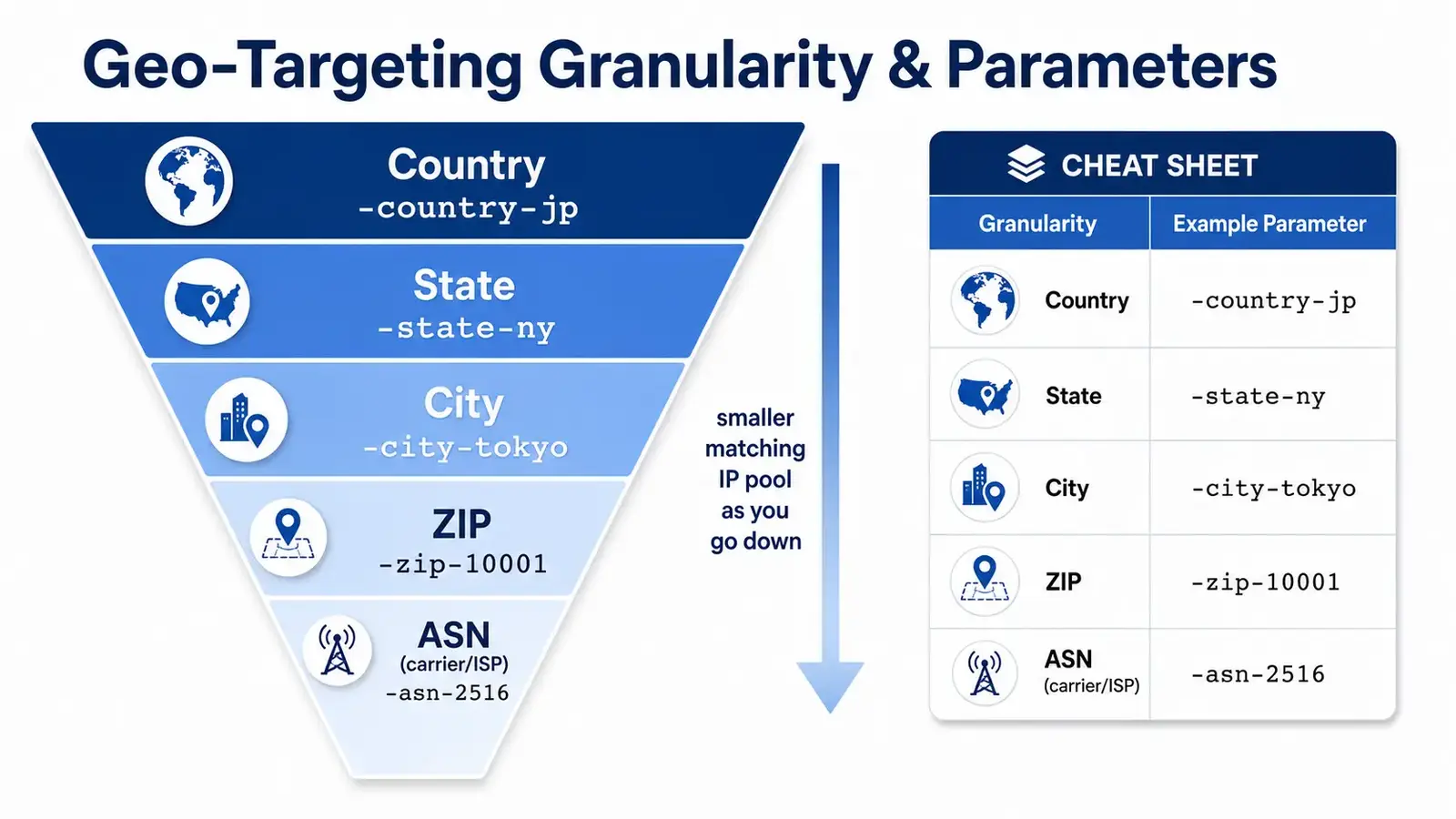
With Bright Data, you set geo-targeting by chaining granularity parameters onto the proxy username with hyphens — no separate console or API call to learn, just edits to the connection string. The base username looks like this:
brd-customer-<CUSTOMER_ID>-zone-<ZONE_NAME>
You append geo parameters from there. Note up front that finer granularity means a smaller matching IP pool.
| Granularity | Parameter | Example | Notes |
|---|---|---|---|
| Country | -country-<ISO2> | -country-jp / -country-us | 2-letter lowercase ISO code |
| State / prefecture | -state-<code> | -state-ny (US NY) | Japanese prefecture support varies; check the dashboard |
| City | -city-<name> | -city-tokyo / -city-osaka | Lowercase, no spaces |
| ZIP | -zip-<code> | -zip-10001 | Confirm availability in the dashboard |
| Carrier (ASN) | -asn-<number> | -asn-2516 | Target a specific ISP / carrier |
| Fixed IP | -ip-<ip> | -ip-1.2.3.4 | Only when available |
| Sticky session | -session-<string> | -session-a1b2c3 | Hold the same IP |
How Parameters Chain
Combine conditions by simply joining them with hyphens. To "crawl from a Tokyo home line while holding the same IP," you would write:
brd-customer-xxxxxxxx-zone-myzone-country-jp-city-tokyo-session-a1b2c3
Pair -country- with -city- as the default. Specifying a city without a country can land you on a same-named city in the wrong country, so write -country-jp-city-osaka with the country set.
Endpoint and Port
The host is brd.superproxy.io, and the port is the value shown under your dashboard's Access parameters tab. Current docs list 33335 as the HTTP port1. Accounts created in older eras may carry a lum-customer- prefix or a different port, so always treat your own dashboard values as authoritative.
A Hands-On Tokyo/Osaka Walkthrough
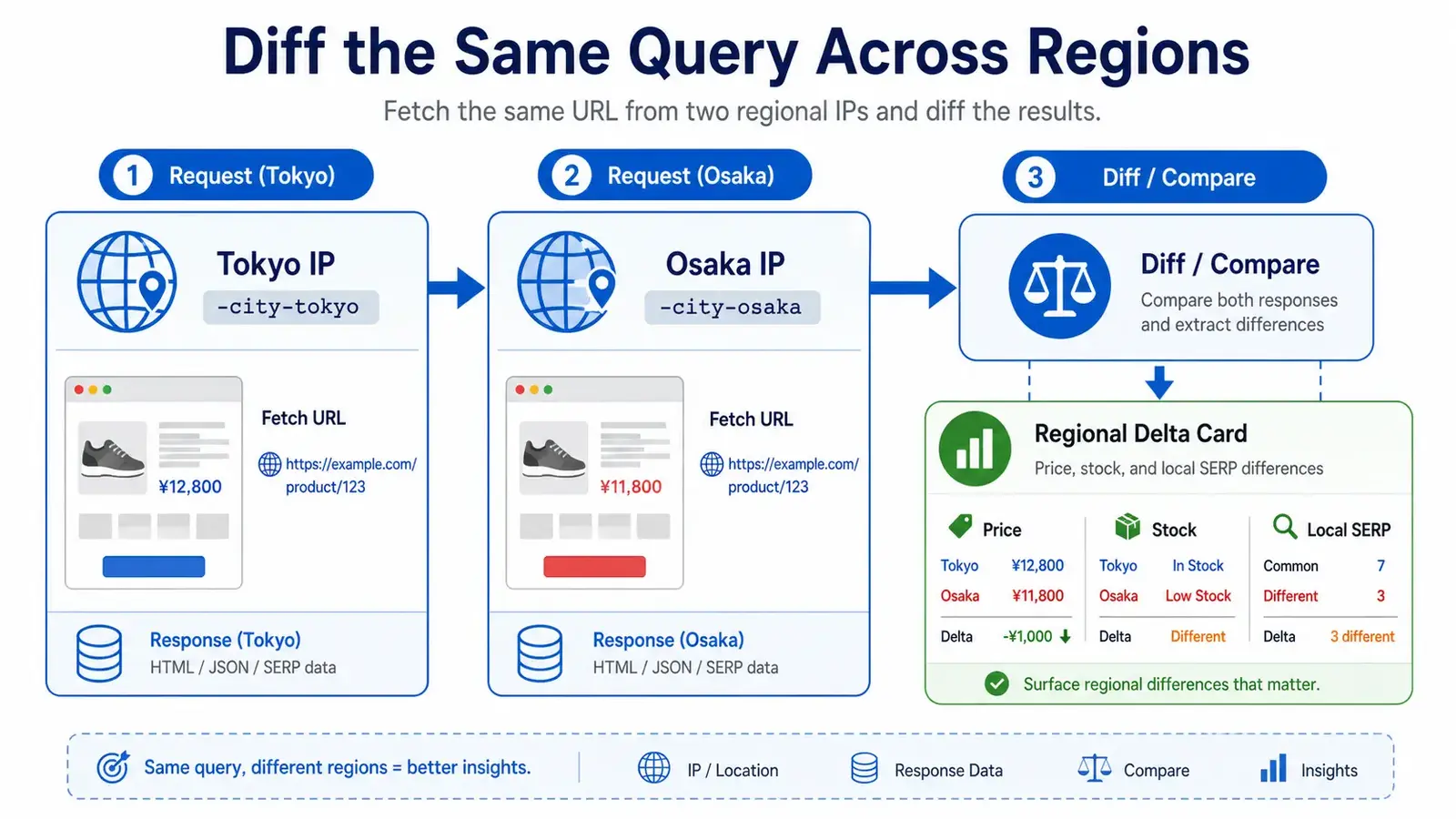
Here is the minimal setup to capture regional differences within Japan. If you do not have a zone yet, create one first. Use-case-based zone splitting and credential handling are covered step by step in our Proxy Zone design and setup guide, so start there on your first run.
- Prepare one Residential zone in the dashboard and note the host, port, and password under Access parameters
- Append
-country-jp-city-tokyoto the username and request from a Tokyo IP - Re-fetch the same URL with
-country-jp-city-osaka - Compare the two responses (price, layout, stock) for differences
Switching Regions With curl
A minimal check is one line of curl. Swapping the city in the username changes the exit.
# Fetch from a Tokyo IP
curl --proxy brd.superproxy.io:33335 \
  --proxy-user "brd-customer-xxxxxxxx-zone-myzone-country-jp-city-tokyo:PASSWORD" \
  "https://example.com/product/123"
Change -city-tokyo to -city-osaka for an Osaka IP. Starting at this level — "does changing the city change the response?" — is the fastest path to understanding.
A Python (requests) Example
To automate repeated fetches and diffs, loop cities with requests. We will not deep-dive the code here; the gist is simply "swap the city segment of the proxy URL and iterate."
import requests

cities = ["tokyo", "osaka"]
for city in cities:
    user = f"brd-customer-xxxxxxxx-zone-myzone-country-jp-city-{city}"
    proxies = {
        "http":  f"http://{user}:PASSWORD@brd.superproxy.io:33335",
        "https": f"http://{user}:PASSWORD@brd.superproxy.io:33335",
    }
    r = requests.get("https://example.com/product/123", proxies=proxies, timeout=30)
    print(city, r.status_code, len(r.text))
Use Cases That Pay Off
These are the scenarios where geo-targeting earns its keep — all sharing the theme of "collect the local view programmatically."
Regional Price and Stock Research
Tracking how a single product's price shifts by region or currency is the canonical use. Fetch the same product page from Tokyo and Osaka, or from Japan and the US, and accumulate the deltas in price, shipping, and stock display. You capture the effect of exchange rates and regional campaigns at a resolution a single vantage point cannot reach. Retailers frequently run city- or region-scoped promotions and dynamic pricing, and without regional IPs those variations are simply invisible to a centralized crawler — you would record one price and assume it is global.
Local SERP and Local Ad Verification
Google's local pack and geo-targeted ads vary by where the search originates. Search the same keyword from Tokyo and Osaka via geo-targeted proxies, and you can capture differences in local-pack rankings and the stores or ads shown. To pull search results as stable structured JSON, the approach in our SERP API with Python guide is easier to operate than parsing raw HTML yourself — and geo-targeting and the SERP API combine cleanly.
Region-Locked Content and Reachability
It also covers delivery availability, stock, region-locked page variants, and reachability checks for geo-blocked content. You can determine regional differences like "deliverable in Tokyo, not in rural areas" from the response itself rather than eyeballing a UI.
We run Tra-bell, a hotel price-tracking service, on Bright Data Residential proxies, so regional price collection is something we handle daily. We can advise on designing, prototyping, and operating similar region-aware data pipelines depending on requirements.
Pitfalls to Watch
Finally, the traps that tend to surface only once you are in production.
Over-Narrowing Raises Failure Rates
Drilling down to city, ASN, or ZIP shrinks the matching IP pool. A smaller pool means more reuse of the same IPs, more retries and failures, and ultimately more bandwidth — which is cost. Geo-targeting itself adds no surcharge; billing stays usage-based on bandwidth (GB)2. If country level achieves the goal, do not use city targeting. Design granularity as the bare minimum you need.
A practical rule of thumb: start at country level, confirm you can reproduce the regional difference you care about, and only then tighten to city or ASN if the data still looks too uniform. Jumping straight to the finest granularity tends to produce flaky runs that are hard to distinguish from a genuine "no regional difference" result, which wastes both bandwidth and debugging time.
Always Verify the Region You Got
Even when you think you set the parameter, an unsupported city name can silently fall back to country level. Before going live, send a few requests to an IP geolocation page and confirm the returned country/city matches what you specified. For price research, also check that the target site's currency and language align with the region to avoid silent misses.
Legal and Ethical Scraping
Collecting regional data assumes you stay within each target site's terms and each country's laws. Concretely:
- Review the target site's terms of service and robots.txt
- Do not exceed rate limits
- When handling personal data, respect APPI / GDPR / CCPA
Data-protection rules also change across borders, so scope foreign targets especially carefully.
Conclusion
Bright Data geo-targeting is a low-effort feature: append parameters like -country-jp and -city-tokyo to the proxy username to target by country and city. Granularity goes country -> state -> city -> ZIP -> ASN, and the finer you go, the smaller the matching IP pool. Start with the country-plus-city combination, confirm supported values in the dashboard, and verify you actually got the region before production. Keep that order, and you can systematize regional price, SERP, and stock research at low cost.
Information current as of 2026-05-31. Please check the official sites for the latest updates.
This article contains affiliate links.
Footnotes
-
Bright Data official - Geolocation targeting / Access parameters: https://docs.brightdata.com/ ↩
-
Bright Data official - Pricing: https://brightdata.com/pricing ↩
Frequently asked questions
Related articles
Bright Data Residential vs ISP Proxy 2026: A Practical Selection Guide
Bright Data Proxy Zone Design and Setup 2026: From Use-Case Zoning to Auth and Operations