Bright Data Proxy Zone Design and Setup 2026: From Use-Case Zoning to Auth and Operations
Design Bright Data Proxy Zones the right way in 2026: use-case splitting, naming conventions, IP whitelisting, and cost tracking — with operating notes from running Tra-bell on Bright Data.
This article contains affiliate links (advertising).
"I signed up for Bright Data and have no idea how to create a Zone," and "I ran multiple use cases through one Zone and now I cannot read the billing," are two of the most common questions we hear lately. This article works through Proxy Zone design philosophy, naming conventions, IP whitelisting, and cost tracking against the May 2026 Bright Data dashboard, drawing on operating experience from Tra-bell on Bright Data and patterns seen in X discussions1.
What a Zone Is — The Core Unit of Billing and Operations
A Bright Data Zone is more than a saved proxy configuration; it is the core abstraction that bundles billing, statistics, and credentials. One Zone holds four elements as a single set:
- Proxy product: Residential, ISP, Datacenter, Mobile, Web Unlocker, or SERP API
- Geographic conditions: country, city, ASN (optional)
- Session settings: Rotating (changes per request) or Sticky Session (held for a window)
- Authentication: Password or IP Whitelist (one or both)
Splitting Zones keeps billing, success rate, and bandwidth visualized independently, so use-case-level P&L surfaces instantly: "price monitoring is $300/month," "SERP API is $80/month," and so on. Running multiple use cases through one Zone makes it hard to attribute failures, and cost allocation devolves into manual spreadsheet work.
How Zones, Products, and Endpoints Fit Together
Three terms tend to blur together: "Zone," "Product," and "Endpoint." The Bright Data mental model is:
| Term | Role |
|---|---|
| Product | The proxy category, such as Residential or Web Unlocker |
| Zone | A product plus geography, session, and authentication, bundled as one operating unit |
| Endpoint | The connection details (host, port, username) issued by a Zone |
In other words, deciding to "use Residential" is not enough to connect. You select Residential as a product, create a Zone, and only then are Endpoints issued for your application to call. This Zone-creation step is the first real hurdle in Bright Data setup; the upstream account creation and KYC flow is covered in Bright Data Account Setup 2026: KYC to Your First Zone.
Designing Zones by Use Case — Four Axes
You can split Zones along countless axes, but operationally durable splits land on four: environment, use case, region, and product type. Avoid over-splitting up front; add an axis only when operations make a case for it.
Axis 1: Environment (dev / staging / prod)
Always keep dev and prod Zones separate. Dev Zones cap concurrency at ten or fewer and enable Sticky Sessions for easier debugging; prod Zones use Rotating with concurrency tuned to real traffic. Prefixing Zone names with dev_ or prod_ makes the dashboard easier to navigate and reduces the chance of accidental production changes.
Axis 2: Use Case (price-monitoring / seo / data-ingestion, etc.)
When one account runs multiple business workloads, split by use case. The reason is direct: monthly spend on each Zone maps to departmental or project budgets. Naming Zones after concrete business actions ("price monitoring," "SEO tracking," "academic research") makes the breakdown explainable to non-engineers later.
Axis 3: Region (jp / us / eu)
If targets span multiple regions, splitting Zones by region simplifies IP-pool tuning and bandwidth monitoring. For example, separating a Zone that scrapes Japanese e-commerce (Residential country=JP) from one that fetches European news (Residential country=DE) makes it easy to tell whether a success-rate drop is due to regional IP supply or a site-side change.
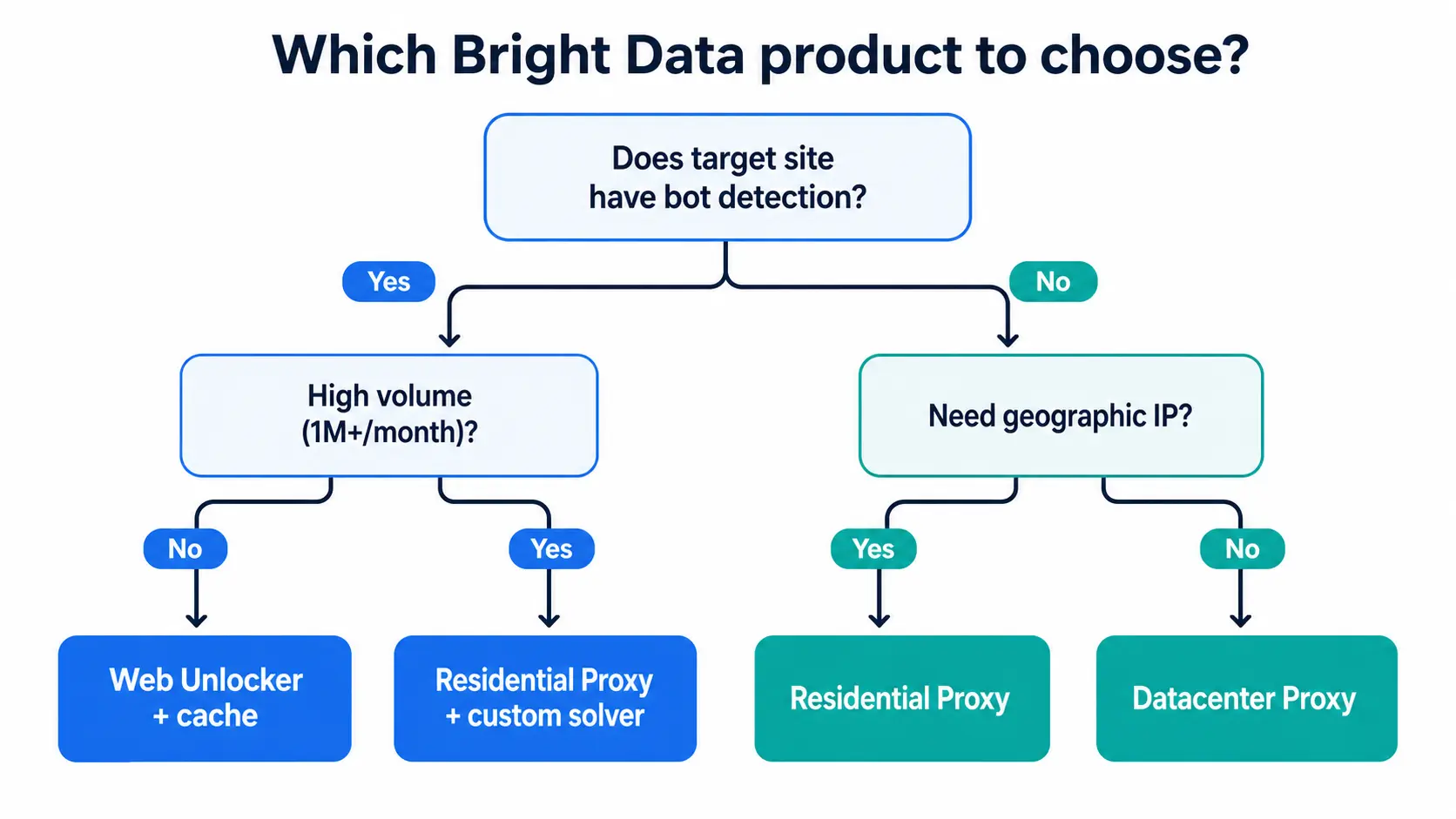
Axis 4: Product Type (residential / datacenter / web-unlocker)
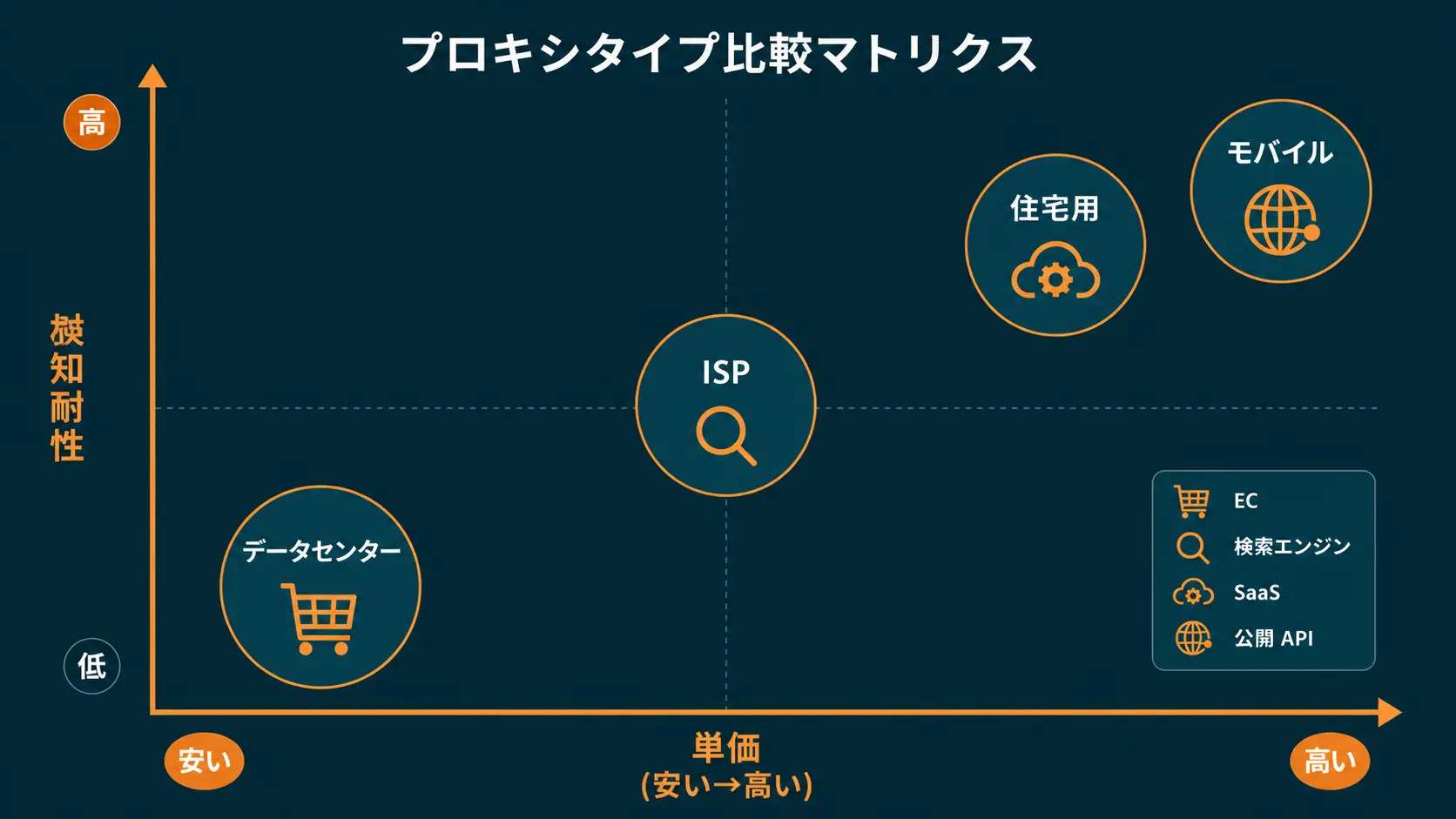
Combining Residential and Datacenter Zones is the standard cost-optimization play. Use Residential for endpoints protected by CAPTCHA or Cloudflare, and Datacenter for endpoints that simply serve static HTML. For deciding between Residential and ISP specifically, Bright Data Residential vs ISP Proxy 2026: A Practical Selection Guide breaks down the use cases.
"Always split Bright Data zones by use case; mixing use cases makes billing impossible to read." (Original: Always split Bright Data zones by use case; mixing use cases makes billing impossible to read.)
Zone Creation in Practice — From Naming to Endpoint
Here is the practical Zone-creation flow in dashboard order. A new Zone takes five to ten minutes the first time and roughly three minutes once you are comfortable.
Step 1: Create a Zone in the dashboard
Log in to control.brightdata.com, open "Proxies & Scraping Infrastructure" (or "Proxies → Zones") from the left menu, and choose "Add" or "Create Zone." The product picker appears; pick the single product closest to the use case for your first Zone.
Step 2: Standardize naming up front
Zone names are awkward to change later, so decide on a naming convention before you create the first Zone. The convention we use:
<env>_<usecase>_<region>_<product>
Concrete examples:
prod_pricewatch_jp_residential(production / price monitoring / Japan / Residential)dev_seo_us_serp(dev / SEO monitoring / US / SERP API)staging_dataingest_eu_dc(staging / data ingestion / EU / Datacenter)
This convention makes filtering in the Zone list straightforward and lets cost roll-ups aggregate by the prod_ prefix.
Step 3: Set geography and session
Below the product picker you select Country / City and Session Type (Rotating or Sticky). When choosing Sticky, set Session Duration in seconds; common ranges are 1-10 minutes for Residential and 10-60 minutes for ISP. Start concurrency at 10-50 and ramp up only after operations stabilize.
Step 4: Pick authentication (Password or IP Whitelist)
The Authentication or Access Method section lets you choose Password or IP Whitelist. For production calls from a VPS, IP Whitelist is recommended — click "Add my current IP" or add IPs manually, one per line. Multi-server fleets can register up to a few hundred IPs depending on plan. A pragmatic split is Password for dev Zones and IP Whitelist for prod Zones.
Step 5: Retrieve the Endpoint and run a smoke test
Saving the Zone issues an Endpoint (host, port, username, password). The "Access parameters" or "Integrate" tab in the dashboard shows language-specific samples (Python, Node.js, curl), and the passwordless string for IP-Whitelist mode appears there as well. Start by sending one request from the Playground tab and confirming that the IP comes from the expected region and that success rates look right before wiring it into a production app.
IP Whitelist Authentication — The Production Default
For production callers on a VPS, AWS EC2, or any host with a static IP, IP Whitelist authentication is the de facto standard. The benefits and constraints versus Password authentication are worth being explicit about.
Benefits of IP Whitelist Authentication
- No credentials in every request: avoids transmitting username/password each call, removing one common leakage path
- Contained blast radius if credentials leak: even if the auth string ends up in a code repository, calls from unregistered IPs are rejected, so the attack surface stays narrow
- One Zone shared across multiple servers: register several production server IPs on the same Zone and share credentials safely
Checklist for IP Whitelist Design
- Single IPs, not CIDR ranges: Bright Data accepts individual IPs (
xxx.xxx.xxx.xxx); subnets are not supported, so Auto Scaling fleets need architectural workarounds - NAT Gateway or VPC Endpoint patterns: For AWS Lambda, consolidate egress through a NAT Gateway with a fixed IP so the exit address is stable
- Plan-based registration limits: registration caps vary by plan; typically a few hundred IPs are allowed
- Avoid ephemeral IP rotation: relying on cloud-issued ephemeral IPs forces frequent Whitelist updates and breaks operations
Common Issues and Fixes
| Symptom | Likely cause | Action |
|---|---|---|
| Rejected with 407 Authentication Required | Caller IP not on the Whitelist | Confirm current egress IP and add it |
| Lambda calls fail to connect | Dynamic IPs without Whitelist support | Route through a NAT Gateway with a static IP |
| Some requests pass, others fail | Multi-NIC or Multi-AZ exit IPs intermixed | Register every egress IP on the Whitelist |
| Works on day one, fails the next | Cloud IP lease change | Switch to an Elastic IP or dedicated static IP service |
"IP Whitelisting is convenient, but on Lambda you need a NAT Gateway with a static IP, or you will spend your day chasing 407 errors." (Original: IP Whitelisting is convenient, but on Lambda you need a NAT Gateway with a static IP, or you will spend your day chasing 407 errors.)
Cost Tracking and Per-Zone Monitoring
The biggest payoff of use-case-based Zone splitting is that cost tracking and anomaly detection become Zone-level questions. The monitoring set you should wire into production:
Four Metrics to Track per Zone
- Bandwidth (GB): Residential bills primarily by GB, so per-Zone daily bandwidth graphs are essential
- Success rate (%): share of 2xx responses; below 70% suggests a target-site change or stronger CAPTCHA
- Average latency (ms): a sudden jump signals IP-pool exhaustion or bandwidth pressure
- Cost trend: trigger alerts on week-over-week or month-over-month increases of 20% or more
The Bright Data dashboard surfaces these metrics, but production runs typically pipe Bright Data Usage Logs into BigQuery or Snowflake and visualize through Looker Studio or Tableau.
Deciding When to Move to a Commitment Contract
Once you can see per-Zone monthly spend on PAYG, evaluate commitment contracts. Residential usage above ~50 GB/month commonly unlocks 20-40% unit-price discounts. Splitting Zones lets you optimize the contract per product: "the Residential Zone definitely consumes its committed allotment, but SERP API stays PAYG due to volume swings," for example. For deeper cost levers (retry strategy, bandwidth compression, and more), Bright Data Cost Optimization 2026 lays out the playbook.
"Splitting Bright Data zones by project turned monthly cost reports from a 30-minute chore into a 3-minute task." (Original: Splitting Bright Data zones by project turned monthly cost reports from a 30-minute chore into a 3-minute task.)
Lessons From Our Own Zone Setup
We operate Tra-bell, a hotel price tracking service running on Bright Data Residential and Web Unlocker, in production. From naming conventions and use-case-based Zone splitting to IP Whitelist ledger management and BigQuery-backed cost dashboards, we can lead the design from PoC through production rollout. Tra-bell's price-tracking ingest stack is built on the same Bright Data foundations described in this article — the design choices here are not theory but the operating playbook we actually use.
Wrap-up — Prioritizing Zone Design
Bright Data Zone design depends less on "what to create first" than on "which axis to split next." The priorities to lock down in the first week:
- Start with one Zone focused on a single use case and validate via the Playground
- Define the naming convention
<env>_<usecase>_<region>_<product>before creating any production Zone - Switch to IP Whitelist authentication before production cutover to shrink the credential leakage surface
- Once monthly spend is visible, split Zones by product and use case and evaluate commitment contracts
Zones are the center of Bright Data's billing, statistics, and operations, and the quality of the design decisions translates directly into cost and operational overhead. Start small, then split along the axes that operations reveal — that pattern stays healthy over long-running production deployments.
Information current as of 2026-05-21. Please check the official sites for the latest updates.
This article contains affiliate links.
Footnotes
-
Bright Data official documentation https://docs.brightdata.com/ ↩
Frequently asked questions
Related articles
Bright Data Account Setup 2026: KYC to Your First Zone
Bright Data Residential vs ISP Proxy 2026: A Practical Selection Guide