Bright Data SERP API With Python: Complete 2026 Guide to Auth, Params, and Cost Design
How to implement Bright Data SERP API in Python: authentication, parameters, error handling, and cost optimization patterns from production operations.

This article contains affiliate links (advertising).
Bright Data SERP API is an enterprise-grade API that returns Google and Bing search results as structured JSON. Drawing on our experience operating Tra-bell on Bright Data, this guide covers how to call the API from Python, with authentication, parameter design, error handling, and cost optimization patterns from production. The short version: use SERP API "for SERP retrieval only," and combine it with Residential Proxy and Web Unlocker in a tiered topology for the best cost/reliability trade-off. We walk through each of those choices with the trade-offs we hit in production so you can ship a pipeline that holds up under real volume.
What Bright Data SERP API Is and How It Differs From a Plain Scraper
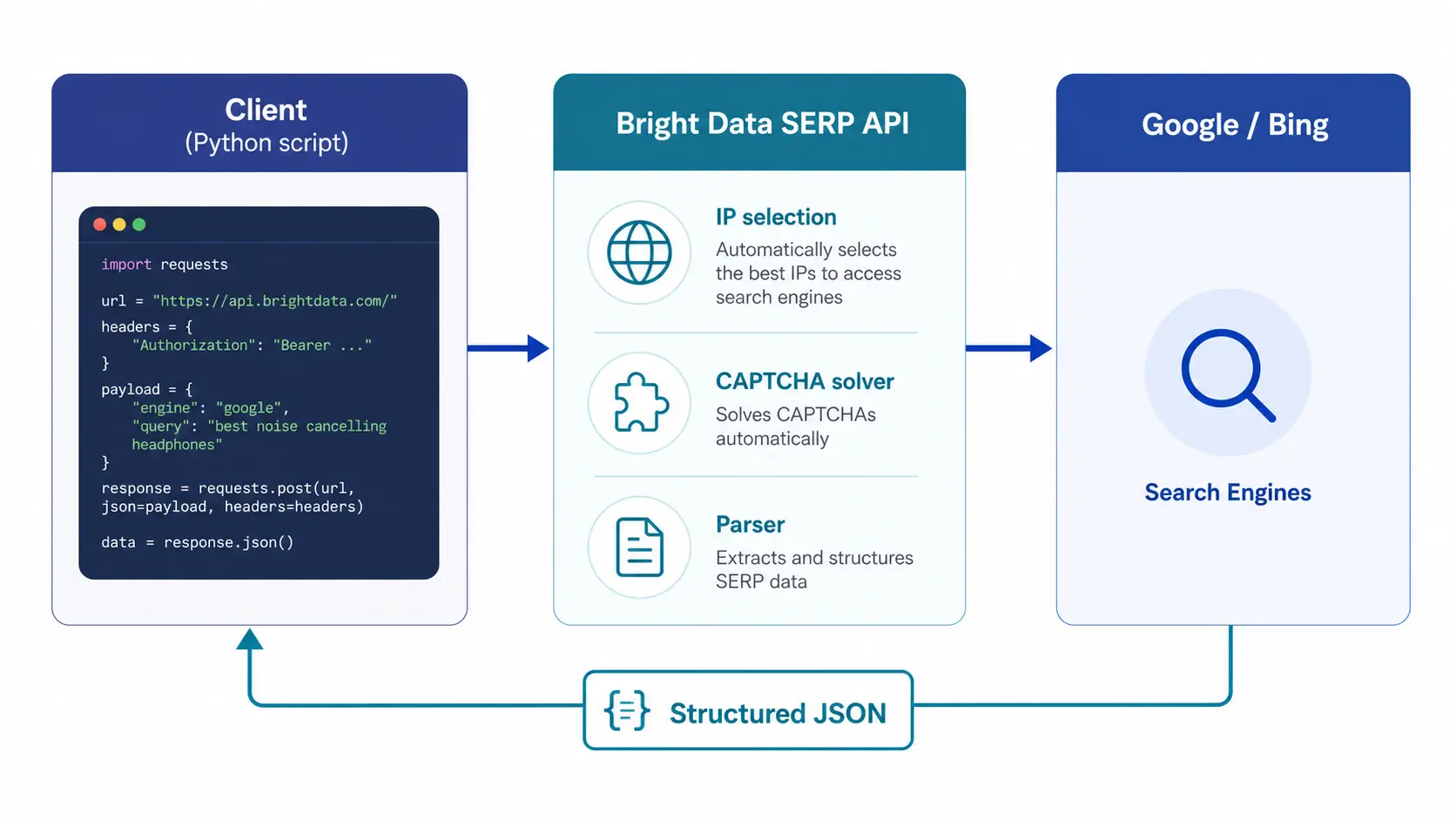
Bright Data SERP API is a managed API that returns search engine results pages (SERP) as structured JSON. You send a query plus parameters such as country, language, and device, and the service handles the following internally before returning a response:
- Search engine access: Supports multiple engines, including Google, Bing, Yandex, and DuckDuckGo
- Bot detection bypass: Selects appropriate IPs from a large pool to evade detection on protected pages
- Automatic CAPTCHA handling: Solves Google reCAPTCHA and Bing bot guards internally
- Structured parsing: Returns results keyed by organic, ads, featured snippet, People Also Ask, and more
- Region and language control: Tightly controls results through country, language, device, and location parameters
Direct scraping of Google SERPs with a plain HTTP client is practically infeasible in 2025–2026. Bot detection has matured, Cloudflare-equivalent layers are now standard, and homegrown requests + BeautifulSoup or Playwright stacks get blocked within hundreds of requests. If you need SERP retrieval in production, a SERP-specific API is essentially the only realistic option.
Common Use Cases
- Keyword rank tracking: Track first-party and competitor rankings on a daily cadence
- Competitive SEO analysis: Identify keywords competitors rank for, and analyze the organic-to-ads ratio
- LLM RAG pre-processing: Pull fresh search results for a user query and pass them to an LLM as context
- Lead generation: Extract candidate domains from search results and run downstream LLM enrichment and personalization
- Market research: Pull regional search results for product or brand names and analyze awareness and messaging context
References to Bright Data SERP API in B2B lead generation and RAG pipeline contexts have grown noticeably on X over the past year.
As direct scraping gets harder, more teams are moving to SERP-specific APIs in 2026.
Comparison With Competitors
| Tool | Approach | Difference vs Bright Data SERP API |
|---|---|---|
| SerpApi | SERP-focused SaaS, Python SDK | Better DX on SerpApi; enterprise SLA goes to Bright Data |
| Scrapingdog | General-purpose scraping API with a SERP module | Cheaper on Scrapingdog; larger IP pool on Bright Data |
| Oxylabs SERP Scraper API | Enterprise, direct Bright Data competitor | Feature parity; Bright Data leads on IP pool |
| DIY Playwright + Residential | Build every layer yourself | High engineering cost, no SERP-specific optimization |
SERP API positions the infrastructure layer to Bright Data while exposing an app-layer API. Compared to a DIY build, development and maintenance effort typically compresses to roughly one-fifth of the original. For a cross-product cost view, see our Bright Data Pricing Cheat Sheet 2026, which covers SERP API alongside the rest of the lineup.
Pricing Model and the Reality of Unit Costs
SERP API pricing is expressed per 1,000 requests as of May 2026.
Unit Cost Range
| Item | Cost guideline |
|---|---|
| SERP API standard | $3 per 1,000 requests (~¥450/1k) |
| Volume discount | 30–50% off above 1M requests/month |
| Annual contract discount | 10–20% off on monthly equivalent |
| Failed requests | Not billed (success-based pricing model) |
Because billing is success-based, requests that fail to return a SERP (for example, queries that are too long, or country values an engine does not support) do not generate charges. However, "success" is judged by status code plus parse result, so you need to monitor the share of requests that actually hit the billing condition on a continuous basis.
Three Cost Optimization Patterns
- Always add a cache layer: For the same (query, country, language) tuple, a 24-hour cache often halves the bill. Redis or DynamoDB with TTL is enough
- Normalize queries: Standardize case, full-width/half-width characters, and excess whitespace before calling the API. This significantly improves cache hit rate
- Tighten num_results: If top 10 is enough, set it to 10. "Just in case" 100 results means wasted transfer and parsing time
Monthly Budget Snapshots
| Use case | Monthly requests | Approx. cost |
|---|---|---|
| First-party SEO rank tracking (500 KWs × daily) | ~15,000 | |
| Competitive SEO analysis (5,000 KWs × weekly) | ~100,000 | |
| LLM RAG pipeline (mid-size SaaS) | ~500,000 | |
| Enterprise B2B lead generation | ~5,000,000 |
Newer alternatives keep appearing, but when you compare IP pool size and SLA, most teams we observe end up settling on Bright Data for production workloads.
Python Implementation: From Authentication to Response Handling
We walk through the minimum viable Python integration and the production extensions you will need on top.
Authentication and Endpoint
SERP API uses Bearer token authentication (API key). Create a SERP API zone in the dashboard, then store the issued token in an environment variable.
# .env (example)
BRIGHT_DATA_API_TOKEN=your_api_token_here
BRIGHT_DATA_SERP_ZONE=serp_api_zone_name
Minimum Implementation (requests-based)
The minimum code to fetch organic results for a single query looks like this:
import os
import requests

def fetch_serp(query: str, country: str = "us", language: str = "en") -> dict:
    """Fetch Google search results via Bright Data SERP API."""
    api_token = os.environ["BRIGHT_DATA_API_TOKEN"]
    zone = os.environ["BRIGHT_DATA_SERP_ZONE"]

    # Confirm the exact endpoint in your dashboard (zone-specific URL)
    url = "https://api.brightdata.com/serp/v1/search"

    headers = {
        "Authorization": f"Bearer {api_token}",
        "Content-Type": "application/json",
    }

    payload = {
        "zone": zone,
        "engine": "google",
        "query": query,
        "country": country,
        "language": language,
        "num_results": 10,
        "device": "desktop",
        "format": "json",
    }

    response = requests.post(url, headers=headers, json=payload, timeout=30)
    response.raise_for_status()
    return response.json()


if __name__ == "__main__":
    result = fetch_serp("best proxy provider 2026", country="us", language="en")
    for item in result.get("organic_results", []):
        print(f"{item['position']}. {item['title']}")
        print(f"  {item['link']}")
Do not hardcode the endpoint URL; pull it from the dashboard, because the precise URL is zone-specific.
Key Response Keys
The SERP API response is structured JSON, split by use case across keys:
organic_results: Standard search results. Includesposition,title,link,snippet,displayed_link, and moreads: Paid ads. Title, link, advertiser domainfeatured_snippet: Highlighted answer blockpeople_also_ask: Related question clustersrelated_searches: Related search queriesknowledge_graph: Knowledge panel (for people, companies, etc.)search_metadata: Retrieval timestamp, processing time, total hits
Not every key is always present. Some appear only on specific queries or engines, so write defensive code with .get(key, default).
Async for High-Volume Workloads
For LLM RAG or rank tracking that fires thousands to tens of thousands of requests per day, synchronous requests is too slow. Switching to httpx + asyncio typically delivers 5–10x throughput.
import asyncio
import os
from typing import Iterable

import httpx
from tenacity import retry, stop_after_attempt, wait_exponential


@retry(stop=stop_after_attempt(3), wait=wait_exponential(min=1, max=10))
async def fetch_one(client: httpx.AsyncClient, query: str, country: str = "us") -> dict:
    payload = {
        "zone": os.environ["BRIGHT_DATA_SERP_ZONE"],
        "engine": "google",
        "query": query,
        "country": country,
        "language": "en",
        "num_results": 10,
        "format": "json",
    }
    headers = {
        "Authorization": f"Bearer {os.environ['BRIGHT_DATA_API_TOKEN']}",
        "Content-Type": "application/json",
    }
    response = await client.post(
        "https://api.brightdata.com/serp/v1/search",
        headers=headers,
        json=payload,
        timeout=30,
    )
    response.raise_for_status()
    return response.json()


async def fetch_many(queries: Iterable[str], concurrency: int = 10) -> list[dict]:
    limits = httpx.Limits(max_connections=concurrency)
    async with httpx.AsyncClient(limits=limits) as client:
        tasks = [fetch_one(client, q) for q in queries]
        return await asyncio.gather(*tasks, return_exceptions=True)


if __name__ == "__main__":
    queries = ["proxy comparison", "SERP API Python", "Bright Data pricing"]
    results = asyncio.run(fetch_many(queries, concurrency=5))
    for q, r in zip(queries, results):
        if isinstance(r, Exception):
            print(f"FAIL: {q} -> {r}")
        else:
            print(f"OK: {q} -> {len(r.get('organic_results', []))} hits")
We cap max_connections at 5–10 in production. Pushing concurrency higher tends to hit Bright Data's rate limits, so start low and scale up incrementally.
Parameter Design: country, language, and device
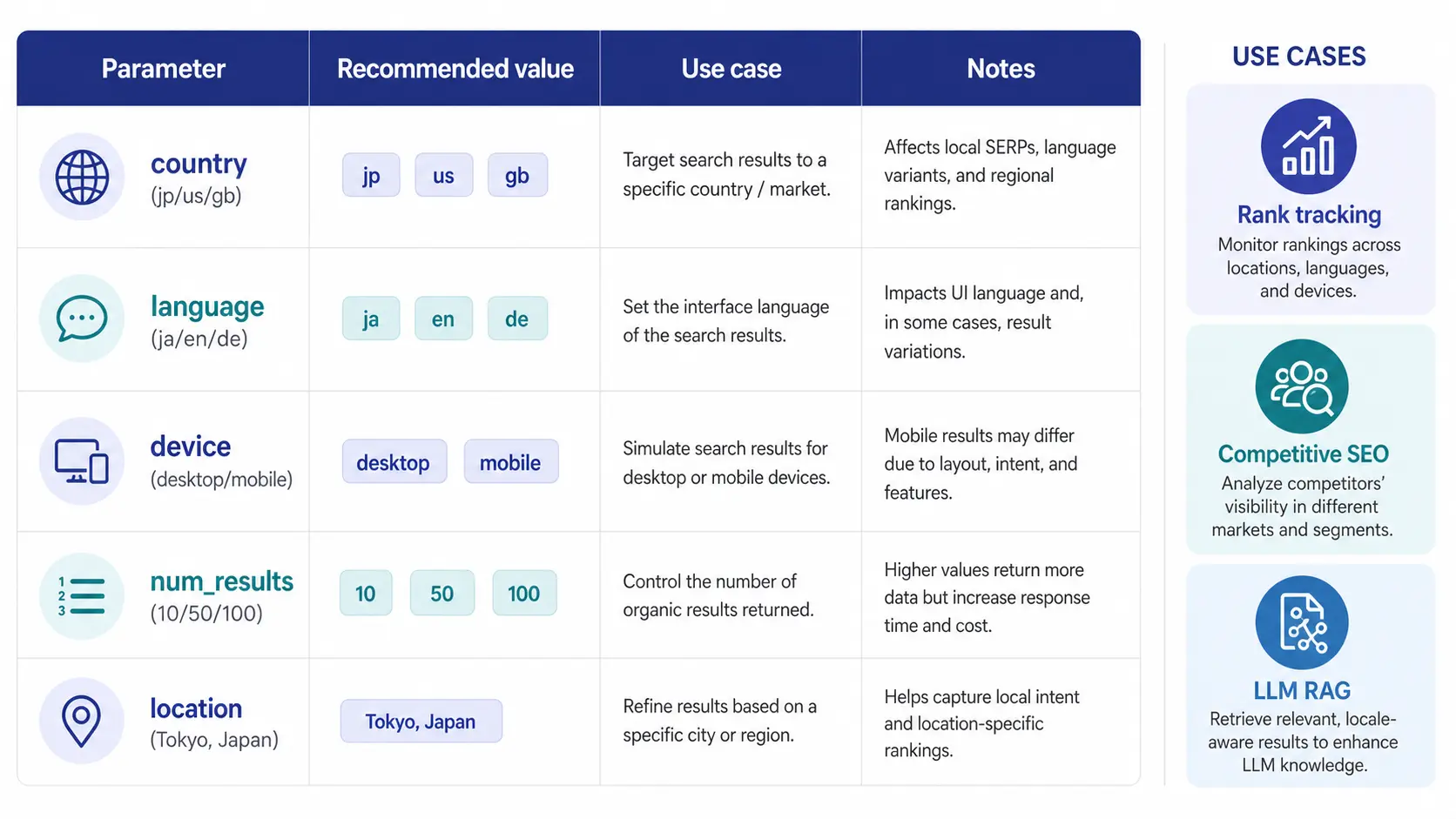
SERP API exposes flexible parameters, but a wrong design can make the same query produce wildly different results. Here are the parameters that matter most in production.
Required Parameters
| Parameter | Purpose | Recommended value example |
|---|---|---|
engine | Search engine selector | google (default), bing, yandex, duckduckgo |
query | Search query | Normalized string (trimmed, case-folded, width-normalized) |
country | Target country (overrides IP-based detection) | ISO codes such as jp, us, gb, de |
language | Language (equivalent to hl) | ja, en, de |
num_results | Result count | Default 10; 50–100 for deep SEO analysis |
device | Device type | desktop or mobile; fix per use case |
Common Design Mistakes
- Omitting country: IP-based geo detection makes results drift, mixing US results into JP-targeted queries
- Mismatched country and language: For example, country=jp + language=en diverges from actual user behavior. Match country and language to the same region
- Switching device every call: Mobile and desktop rankings differ on many sites. For rank tracking, freeze the device value
- Fixing num_results at 100: Generates unnecessary transfer cost. If top 10 is enough, set it to 10
Using the Location Parameter
When you need city-level rather than country-level granularity, the location parameter accepts strings like "Tokyo, Japan". Local SEO and store traffic analysis are sensitive to location; specify it whenever the target keyword has a local component.
Error Handling, Retries, and Cost Optimization
Production runs need both error-handling logic and active cost control.
Typical Errors and Mitigations
- 429 Too Many Requests: Rate-limited. Lower concurrency and retry with exponential backoff
- 5xx series: Transient Bright Data issue. Retry 3–5 times; if still failing, fall back to a different zone or engine
- Empty
organic_results: Either zero results for that query on that engine, or a parse failure. Recheck query normalization - Timeout (over 30s): Likely caused by oversized
locationornum_results. Revisit the parameters
Retry Strategy
Exponential backoff with tenacity is our default.
from tenacity import retry, stop_after_attempt, wait_exponential, retry_if_exception_type
import httpx

@retry(
    stop=stop_after_attempt(5),
    wait=wait_exponential(multiplier=1, min=2, max=30),
    retry=retry_if_exception_type((httpx.HTTPStatusError, httpx.TimeoutException)),
)
async def safe_fetch(client, query):
    # ...
    pass
Cap retries at 5 and route persistently failing queries to a dead-letter queue for manual review later. This pattern keeps the main loop healthy without hiding systemic issues.
Cost Optimization Checklist
- Always cache: 24-hour cache on (query, country, language). Implement with Redis TTL
- Normalize queries: Trim, case-fold, and width-normalize to lift cache hit rate
- Minimize num_results: If top 10 is enough, lock it at 10
- Cap retries: Stop at 5 to prevent infinite loops
- Observability: Track success rate, average latency, and billed request count in Datadog or Grafana
For tight handling of sites that frequently surface CAPTCHA challenges when accessed via SERP API-adjacent paths, pair this article with Bright Data Web Unlocker Practical Guide 2026: CAPTCHA Bypass and Cost Design to sharpen the detection-resilient architecture design.
Lessons From Operating Tra-bell and Wrap-Up: Use SERP API "Where It Pays Off"
At Smile Comfort, we run Tra-bell, a hotel price tracking service, on a combination of Bright Data Residential Proxy, Web Unlocker, and SERP API. In Tra-bell we use SERP API to track competitor OTA keyword rankings and search UI changes on a daily cadence, then feed those signals into the main scraping flow over Residential to generate alerts.
From production experience, here is what worked, what required adjustment, and what was a missed call:
- What worked: Replacing in-house Playwright SERP scraping with SERP API cut maintenance from 15 hours per month to 2, and lifted the bot-detection operational stress off the team entirely
- Where we adjusted: Early query normalization was sloppy, so semantically identical queries missed cache. Adding trim + case folding + width normalization cut cost by 40%
- What we missed: We had num_results locked at 100, generating wasted transfer cost. Most use cases only needed top 20, so we tightened it to 20
We can help with the design, PoC, and operation of similar SERP retrieval platforms, scoped to the routing and cost-control patterns above.
You can find the Tra-bell architecture and our reference setup for Bright Data scraping platforms combining SERP API and Residential below.
Wrap-Up
Bright Data SERP API is a SERP-specific API that returns Google and Bing search results as structured JSON. From Python, the standard pattern is Bearer token authentication, a minimum implementation with requests plus a JSON payload, and httpx + asyncio + tenacity for high-volume async workloads. Cache layer, query normalization, and tight num_results cover most of the cost optimization opportunity. On the legal side, "search results are public information, but reuse is a separate question" should be your anchor, and a one-pass legal review before production is strongly recommended. For a head-to-head view of category leaders, Bright Data vs Oxylabs 2026: Pricing, Features, and Success Rates Compared accelerates platform selection.
Information current as of 2026-05-21. Please check the official sites for the latest updates.
This article contains affiliate links.
Frequently asked questions
Related articles

Bright Data Pricing Cheat Sheet 2026: Product-by-Product Cost Guide
Bright Data Web Unlocker Practical Guide 2026: CAPTCHA Bypass and Cost Design