Bright Data Proxy Manager Complete Guide 2026: Role, Setup, and Current Status of the Local Management Tool
What Bright Data Proxy Manager (luminati-proxy) does, how to deploy it, and how to design routing, framed against its May 2026 status. We cover its maintenance-mode positioning and when to migrate to the SDK or Web Unlocker from an operator's view.
This article contains affiliate links (advertising).
"We signed up for Bright Data, but we want to manage multiple Zones and rotation outside our code, in one place." "Is Proxy Manager still safe to use, or should we move to the SDK?" These questions keep coming up. This guide uses facts as of May 2026 to lay out the role, setup, and routing design of Bright Data Proxy Manager, along with its current maintenance-mode positioning, drawing on our experience running Tra-bell on Bright Data.1 The short version: new builds go managed, existing complex setups keep Proxy Manager.
What Bright Data Proxy Manager Is
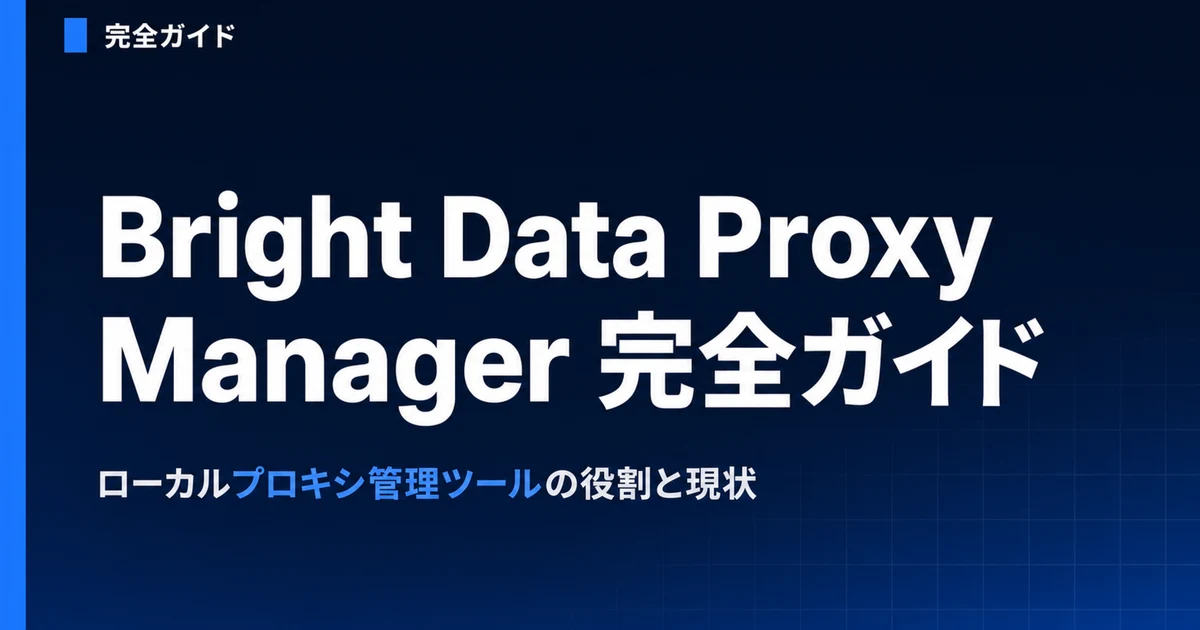
Bright Data Proxy Manager is a local HTTP/SOCKS proxy server that sits "between" your scraper or browser and Bright Data's backend proxy network. It is written in Node.js and runs as a daemon locally, on a VPS, or in Docker. Your application does not connect to Bright Data directly; it first connects to a local port on your own Proxy Manager, and routing is centralized on the Proxy Manager side.
Historically it shipped as Luminati Proxy Manager, and even after the rebrand to Bright Data the legacy names persist: the npm package is @luminati-io/luminati-proxy and the Docker image is luminati/luminati-proxy. If you go looking for it and only find "Luminati" references, that is expected rather than a sign of an abandoned fork. Its source is published as open source, so you can self-host it inside a corporate network or an air-gapped environment, which is a major difference from a managed API. For teams with strict data-residency requirements, that ability to keep the routing layer entirely inside their own perimeter is often the deciding factor.
The Problem a "Local Proxy" Solves
Why stand up a proxy server on your own machine at all? The reason comes down to decoupling proxy-routing logic from your application code. Concretely, the following patterns become possible with zero code changes.
- Centralized multi-Zone management: Handle several Zones such as Residential / ISP / Datacenter / Web Unlocker together in a single admin UI
- Abstraction via local ports: Assign a local port per use case, like "24000 is US Residential sticky" and "24001 is EU rotation"
- Separation from code: Your scraper only points at
http://127.0.0.1:24000, delegating Zone switching and credential-string management to Proxy Manager
The design philosophy and naming conventions for Zones themselves are covered in Bright Data Proxy Zone Design and Setup 2026, which walks through use-case-based Zone splitting. It is easier to grasp Proxy Manager's role once you see it as the layer that "bundles and distributes" those Zones.
Core Concepts: Zones, Settings, and the Rule Engine
The key to understanding Proxy Manager is three concepts: Zones, proxy settings, and the rule engine. Layered together, they form the mechanism that controls proxy behavior without touching code.
Zones and Proxy Settings
A Zone is a named proxy pool defined on the Bright Data account side (for example, residential_us, isp_eu, web_unlocker, serp), each with independent billing, geo-targeting, and performance characteristics. Inside Proxy Manager, you bind settings such as rotation policy, geolocation, and session behavior to a Zone to create several "proxy settings," then assign each setting its own local port.
Session management is the feature you reach for most in production. A sticky session, which reuses the same IP for a set window, is expressed by including a session identifier in the username. For example, a group of requests sharing session-abc123 in brd-customer-XXXX-zone-myzone-country-us-session-abc123 keeps using the same IP. However, if requests are spaced too far apart (the official default idle window is around 5 minutes), the session drops and you get a new IP, so to hold a session you keep requests flowing at short intervals (the docs suggest a keep-alive every few minutes).2 This matters whenever a target expects continuity across requests, such as a multi-step checkout flow or a paginated listing where switching IPs mid-crawl looks suspicious. On top of this, Proxy Manager adds logic like automatic retry on ban detection, success-rate tracking, and blacklisting of bad IPs. Each of those would otherwise be bespoke code you maintain in every scraper, so consolidating it into one layer is a meaningful reduction in surface area.
Rule Engine: Routing Without Editing Code
Proxy Manager's real value lives in the rule engine. You can define routing keyed on URL patterns, domains, headers, response codes, and more, without changing a single line of scraper code. Representative rules look like this.
- Requests to
*.amazon.comuse the Residential US Zone - Image CDN fetches shift to cheaper Datacenter / ISP proxies
- If a response contains a CAPTCHA or block signature, automatically rotate the IP or fail over to a different Zone
- Sites on
.co.ukautomatically use a UK proxy
These can be written in the web UI or as JSON config. Being able to declaratively express "requests that can get by on a cheap proxy go to the cheap one," which directly affects cost, is what pays off in real operations. Because the rules live outside your scraper, a non-engineer on the operations side can adjust which target maps to which Zone without a code deploy, which shortens the feedback loop when a site tightens its bot defenses overnight. We cover unit-price intuition per proxy type and the cost-optimization mindset in detail in Bright Data Cost Optimization 2026.
Real-world operators also speak well of the rule engine and monitoring UI.
The Proxy Manager's routing rules and monitoring dashboard are still incredibly convenient for complex scraping setups.
Setup Steps and Tool Integration
From here we lay out the actual deployment flow. The code itself is minimal, and most configuration is done entirely in the web UI.
- Install: Install globally with npm in a Node.js environment, or use the Docker image
- Launch and admin UI: After launching, open the web UI in a browser at the default
http://localhost:22999 - Bind Zones: Load your Bright Data account Zones and create proxy settings and local ports per use case
- Connect scrapers: Point each tool's proxy setting at a local port
An install and local-port connection example follows.
# Global install (npm)
npm install -g @luminati-io/luminati-proxy
luminati-proxy
# Admin UI: http://localhost:22999

# Running under Docker (22999 = admin UI, 24000 = an arbitrary setting port)
docker run -p 22999:22999 -p 24000:24000 luminati/luminati-proxy proxy-manager
Tool integration also wraps up with standard HTTP proxy settings. Axios / Fetch / Node point at http://127.0.0.1:PORT, while Puppeteer / Playwright receive something like --proxy-server=http://127.0.0.1:24000. Scrapy and Selenium connect through ordinary proxy settings pointed at localhost as well. Many users publish several ports under Docker and split duties, for example 24000 for US Residential sticky, 24001 for EU rotation, and 24002 for Web Unlocker.
Note that before an account exists, no Zones exist either, so there is nothing for Proxy Manager to bind. It goes more smoothly to first complete the initial setup flow, including KYC review, covered in Bright Data Account Setup 2026.
Current Status in 2026: Maintenance Mode and the Migration Decision
This is the point in the article that requires the most judgment. As of May 2026, Bright Data Proxy Manager is positioned not as fully deprecated but as effectively in maintenance mode. It helps to separate the facts.
Tell Apart "Still Usable" From "No Longer Actively Developed"
The GitHub repository stays public, and security fixes and bug patches still ship. Many developers and companies keep running it in production, especially for complex scraping setups. At the same time, no direct successor like a full-featured "Proxy Manager v2" with a local UI has appeared, and large new features have stopped. For several years, Bright Data has been steering new users toward the following managed options.
- Official SDK (Node.js / Python, etc.): Lightweight, with no long-running local process required
- Direct use of parameterized proxy strings: Specify Zone, country, and session in the string
- Web Unlocker / Scraping Browser / SERP API: Higher-level managed services
When you evaluate a migration, consulting Bright Data support can surface migration credits or guidance. Because replacing an existing complex rule engine directly with the SDK requires reimplementing the logic, it is safer to do an inventory first: list every active rule, the target it covers, and whether that target still needs the expensive Zone it currently maps to. In our experience, a meaningful share of rules in a long-lived setup are stale, so the inventory often doubles as a cost-reduction pass before any code is rewritten. As the following voice shows, there is a real trend toward leaning on direct SDK calls for greenfield builds.
For new projects we moved off the Proxy Manager to the SDK and direct proxy strings; fewer moving parts to operate.
Our Experience and Operational Caveats
Proxy Manager is convenient, but because it adds a long-running process on your local side, there are operational caveats. We summarize the key points.
Points to Nail in Operations
- Easily becomes a single point of failure: If the Proxy Manager process dies, every scraper stops, so add process monitoring and auto-restart (Docker restart policy, etc.)
- Credential concentration: Authentication strings for multiple Zones gather in one place, so enforce strict host access permissions and secret management
- Version tracking: Even in maintenance mode, security patches ship, so check GitHub releases regularly and keep up
- Scraping compliance: Respect the target site's terms of service, robots.txt, and Crawl-Delay, and avoid excessive load. Also mind data-protection laws such as Japan's APPI, GDPR, and CCPA
We support the design, PoC, and production migration of scraping infrastructure including Proxy Manager. We can also handle rule inventories and cost-optimization estimates when moving from an existing Proxy Manager setup to the SDK / Web Unlocker, as your requirements dictate.
Production Use on Our Product, Tra-bell
We run Tra-bell, a hotel price tracking service built on Bright Data's Residential proxies and Web Unlocker, in our own production. Its design switches proxy type and session strategy per site, and the idea of absorbing that routing in a management layer rather than hardcoding it into code is the same thinking behind Proxy Manager's rule engine. We can advise on similar scraping infrastructure design, PoCs, and operations as needed.
Wrap-Up: Understand the Role and Choose Accordingly
Bright Data Proxy Manager is a local management tool that centralizes proxy routing, rotation, and monitoring without editing your code. As of May 2026 it is effectively in maintenance mode, and although new features have stopped, it remains practical for complex setups. For new, simple use cases, favor managed products like the Bright Data SDK or Web Unlocker; when you need an existing large setup or advanced routing, keep Proxy Manager. That split is the realistic landing point. Always confirm the latest state in the official GitHub and your own account dashboard.
Information current as of 2026-05-31. Please check the official sites for the latest updates.
This article contains affiliate links.
Footnotes
-
Bright Data Official Documentation. https://docs.brightdata.com/ ↩
-
Bright Data Proxy Rotation / IP rotation Official Documentation. https://docs.brightdata.com/api-reference/proxy/rotate_ips ↩
Frequently asked questions
Related articles
Bright Data Proxy Zone Design and Setup 2026: From Use-Case Zoning to Auth and Operations
Bright Data Account Setup 2026: KYC to Your First Zone