Bright Data Residential Proxy for Price Monitoring: A How-To
How to build a price monitoring pipeline on Bright Data Residential Proxy, with architecture, code, and cost tips from our Tra-bell production experience.
This article contains affiliate links (advertising).
You want to track competitor prices on Japanese e-commerce sites every day, but Datacenter IPs get blocked within days. Bright Data Residential Proxy solves that bottleneck. This article walks through how to build a price monitoring pipeline on Bright Data Residential, when to choose Web Unlocker or Scraping Browser, and how to keep the bill in the low-hundreds of dollars per month, all based on our experience running Tra-bell on Bright Data.
Why Residential Proxy Is the Right Default for Price Monitoring
Price monitoring is the textbook bot pattern: hit the same product page every day with the same shape of request. Large marketplaces such as Rakuten, Amazon.co.jp, and Yahoo! Shopping detect Datacenter IPs with high accuracy and respond with CAPTCHAs or 403s. Even at modest scale (1,000 SKUs once a day), we have seen 30 to 50% data loss within a week when running on Datacenter Proxy alone. The cheaper the proxy, the more engineering hours you burn babysitting fallbacks, rotating headers, and rerunning failed jobs.
Residential traffic flips that math. Real consumer IPs distributed across thousands of ISPs look indistinguishable from organic shoppers, so the same workload that was hitting 50% failure on Datacenter typically settles around 1 to 3% failure on Residential. Once your success rate stops being the limiting factor, you can focus engineering time on schema design and alerting instead of evasion tactics.
Quick Comparison: Residential vs Datacenter vs ISP
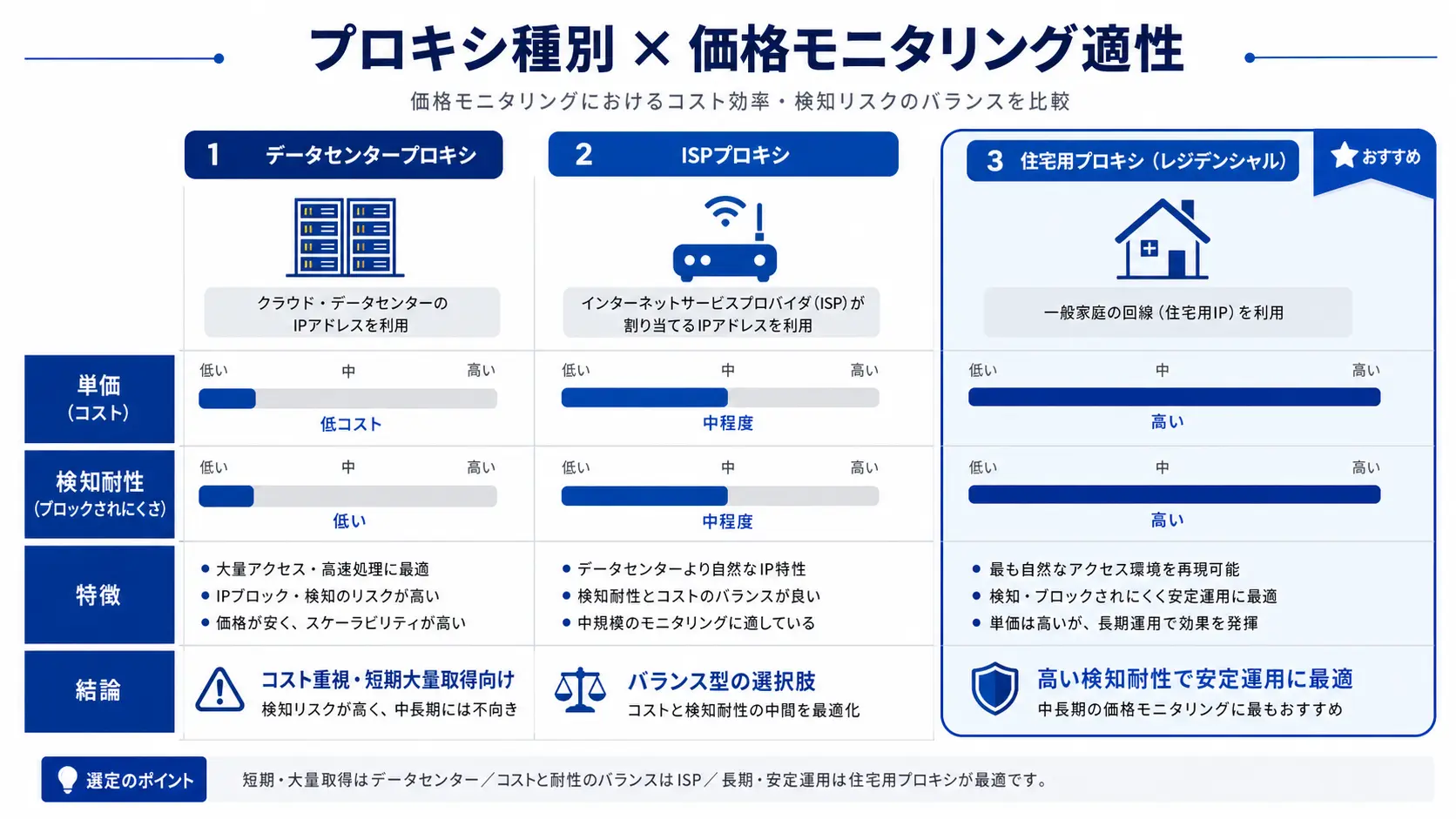
| Proxy type | Unit price | Detection resistance | Fit for price monitoring |
|---|---|---|---|
| Datacenter Proxy | from $0.5/GB | Low | General info sites only |
| ISP Proxy | from $11/IP per month | Mid to high | Mid scale, stability focus |
| Residential Proxy | from $8.4/GB | High | Recommended for large EC |
| Mobile Proxy | from $40/GB | Highest | App-only marketplaces |
Residential should be your first option. Bright Data operates a residential IP pool of over 150 million IPs across 195 countries, with targeting down to city and ISP level1. Filters like "JP IPs only" or "specific prefecture" can be flipped in the dashboard, which matters when a marketplace serves different prices to different regions. KYC on the IP supply side also helps when your legal team asks where the traffic actually comes from.
What Each Marketplace Requires
- Rakuten: product pages are relatively forgiving; search and RMS pages are stricter. Residential plus Web Unlocker is recommended.
- Amazon.co.jp: both search and product detail pages are strict. Scraping Browser or Web Unlocker is effectively required.
- Yahoo! Shopping: product pages are fairly stable. Plain Residential can carry most workloads.
Treat these defaults as starting points, not as rules. Marketplaces update their bot defenses every few months, and the right tier for "today" often shifts. A useful operating habit is to keep a small monitoring job that records success rate per domain per tier, so when a Rakuten policy change shows up you can see it in your own dashboard before it shows up in your CFO's inbox.
Reference Architecture for a Price Monitoring Pipeline
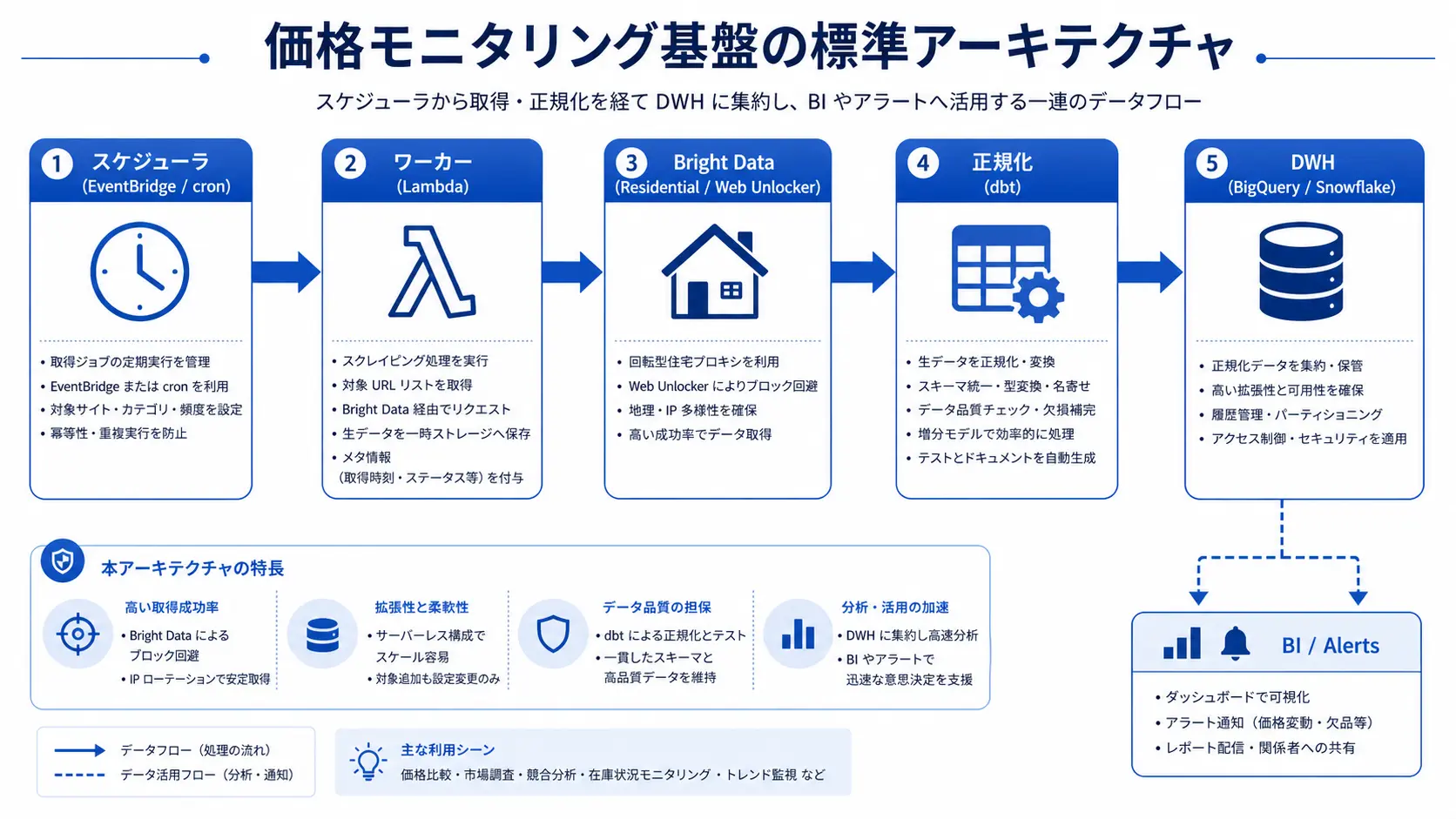
A typical pipeline has five layers: scheduler, worker, proxy, normalization, and warehouse. The structure below mirrors what we run for Tra-bell and is the smallest production-grade shape we recommend. It is deliberately boring: every layer is a small, well-understood component you can swap, and there is no place where a single failure brings down the whole run.
Five Components in the Minimum Stack
- Scheduler: Amazon EventBridge or GitHub Actions cron. Trigger once or twice per day.
- Worker: AWS Lambda or Cloud Run, in Python (httpx, playwright) or Node.js.
- Proxy layer: Bright Data Residential Proxy or Web Unlocker.
- Normalization: Reshape to a common SKU, price, currency, and stock schema. Done in dbt or inside the worker.
- Data warehouse: BigQuery, Snowflake, or RDS. Feed delta detection and BI on top.
This is also the place to decide how raw your warehouse will be. We recommend keeping a raw HTML or JSON snapshot in cheap object storage (S3 or GCS) for at least 30 days, plus a normalized table in the warehouse for daily use. Snapshots cost almost nothing and save you the pain of re-scraping when a normalization bug turns out to have silently lost a field two weeks ago.
Python Sample (via Web Unlocker)
import os
import httpx

PROXY = f"http://{os.environ['BD_USER']}:{os.environ['BD_PASS']}@brd.superproxy.io:33335"

def fetch_price(url: str) -> str:
    with httpx.Client(
        proxies={"http://": PROXY, "https://": PROXY},
        timeout=30.0,
        headers={"User-Agent": "Mozilla/5.0"},
    ) as client:
        r = client.get(url)
        r.raise_for_status()
        return r.text
Web Unlocker handles CAPTCHAs, Cloudflare, and Akamai for you, so you can skip building your own retry and header-spoofing logic2. The trade-off is per-request pricing on top of bandwidth, so it is best reserved for endpoints that actually fight you. Start with plain Residential, see which domains keep failing, and only point those at Web Unlocker.
Public data suggests Bright Data Residential is around $8.4/GB (~¥1,300/GB) in 20263. Real-world contracts can land lower with volume; once monthly usage stabilizes, it is worth asking your account manager for a quote. Many plans also have a monthly minimum spend of $300 to $500, so plan for that floor when comparing against pay-as-you-go alternatives. A small but steady workload often comes out cheaper on Bright Data than on a cheaper provider once you include retry and failure overhead.
Five Steps to Launch Your Pipeline
The fastest path from PoC to production. Steps 1 to 4 fit in roughly one week; step 5 is the ongoing operations phase.
- Lock the SKU list and frequency: list the target marketplaces, SKU count (for example 1,000), and frequency (once per day).
- Create the Bright Data account and zone: set
country=jpon a Residential zone and confirm access on a test URL. - Build the worker and run a 100-SKU PoC: deploy the Python sample above to Lambda and watch error rate in CloudWatch.
- Wire up normalization and the warehouse: shape price, currency, and stock into a shared schema and load into BigQuery or similar.
- Go to production: build delta alerts and a cost dashboard in Looker Studio or Metabase.
During PoC, start with one marketplace, 100 SKUs, and once-a-day cadence. That tier typically costs $20 to $50 (~¥3,000 to ¥8,000) per month and gives you real data to make decisions on. Once success rate clears 95%, expand SKU count and marketplaces in steps. Resist the temptation to scale to thousands of SKUs in week one; the cost spike and the operational complexity hit at the same time, and you lose the clear baseline you built during PoC.
Avoiding Runaway Costs in Production
Bright Data quality is high, but running price monitoring as "all SKUs at high frequency" blows past budget quickly. Users on X have flagged that Web Unlocker bills can come in higher than expected, and the same warning applies to Scraping Browser when teams render full pages without need.
The price you actually pay depends heavily on how the pipeline is built. Two teams running "price monitoring on Bright Data" can easily see monthly bills that differ by a factor of ten. The biggest lever is not the proxy itself but the cadence and the scope of each request: monitoring smarter beats throwing more bandwidth at the problem.
Five Practical Levers to Cut Cost by Two Thirds
- Switch to delta monitoring: re-scrape only SKUs whose price or stock changed on the previous run.
- Long sessions: reuse the same IP for 30 minutes to a few hours to amortize handshake bandwidth.
- Block static assets: skip images, CSS, and analytics. This typically saves 50 to 70% of bandwidth.
- Spread requests across the day: off-peak hours have lower site load and higher success rate, so fewer retries are needed.
- Use Web Unlocker only where needed: keep regular SKUs on plain Residential and reserve Web Unlocker for Cloudflare-protected endpoints.
Each of these is independently worth pursuing, but the compounding effect is the real point. A team that adopts all five typically lands at about one third of the bandwidth a naive "scrape everything daily through Web Unlocker" implementation would burn. Build a small cost dashboard early; "how much did each marketplace cost yesterday" is a question you want to be able to answer in under a minute.
What Users Say and How Smile Comfort Helps
The most common verdict on X is "Bright Data quality, success rate, and support are top tier, but cost can spiral if you design poorly." The signal here is not that the product is overpriced; it is that teams adopt the most expensive product (Web Unlocker) before exhausting cheaper levers like delta monitoring or long sessions.
At Smile Comfort, our first Bright Data project also overran by roughly 3x in the early weeks because we leaned on Web Unlocker too aggressively. We now use a staged fallback (plain Residential then Web Unlocker then Scraping Browser) that keeps both cost and success rate in line. A simple per-domain config that maps each target marketplace to the cheapest tier that still clears 95% success rate is, in our experience, the single highest-leverage piece of operational tuning you can add.
A price monitoring pipeline typically takes one week to launch plus one to two months to stabilize. If you do not have a dedicated Python or infrastructure engineer in-house, working with a partner who knows Bright Data contract shapes, zone design, and cost optimization can cut that time in half.
The stabilization phase is where most of the value gets locked in. Week one gives you data; weeks two through eight give you alerting that you trust, a cost dashboard the business actually opens, and a runbook for the inevitable day a marketplace changes its bot defenses. Budget for that work upfront, otherwise the pipeline ends up as a one-off script nobody dares to touch.
We operate Tra-bell, a hotel price tracking service, on top of Bright Data Residential and Web Unlocker. That production experience feeds directly into how we help clients pick between Residential, Datacenter, and Web Unlocker, tune delta monitoring, and connect everything to a data warehouse. The same patterns we use for hotel rates translate cleanly to e-commerce price monitoring, since the underlying problem (high-frequency reads on a hostile target) is essentially the same shape.
Wrap-up
Bright Data Residential Proxy is the default for price monitoring on tough marketplaces like Rakuten, Amazon, and Yahoo! Shopping. Start with a 100-SKU PoC, lean on delta monitoring and long sessions, and your monthly bill can stay in the low tens of thousands of yen. Use Web Unlocker and Scraping Browser progressively to balance detection resistance and cost, and design the pipeline so that the cheapest tier always runs first. If you are unsure where to begin, the shortest path is a free trial that confirms you can reach your target marketplaces, followed by a small, boring weekly run that you actually maintain.
Information current as of 2026-05-21. Please check the official sites for the latest updates.
This article contains affiliate links.
Footnotes
-
Bright Data Official Proxy Networks https://brightdata.com/proxy-types ↩
-
Bright Data Web Unlocker Documentation https://docs.brightdata.com/scraping-automation/web-unlocker/introduction ↩
-
Bright Data Official Pricing https://brightdata.com/pricing ↩
Frequently asked questions
Related articles

Bright Data Geo-Targeting 2026: Country and City-Level IP Control Explained
n8n x Bright Data 2026: No-Code Automated Data Collection Guide