AWS Lambda x Bright Data: Serverless Scraping Pipeline 2026
Build a serverless scraping pipeline on AWS Lambda and Bright Data: reference architecture, Python code, and cost design from our Tra-bell experience.

This article contains affiliate links (advertising).
Combining AWS Lambda with Bright Data gives you a serverless scraping pipeline without owning browsers, IP pools, or bot-defense bypass logic. This article walks through the reference architecture, a minimal Python implementation, integration with Secrets Manager and Step Functions, and the cost design we use to keep production workloads in the low-hundreds of dollars per month on our own product Tra-bell. Everything below has been refreshed for 2026 against the pricing, products, and AI-agent use cases that have shifted the way teams build scraping pipelines on AWS this year.
Why Lambda Plus Bright Data Is the Right Default for Serverless Scraping
If you have ever tried to ship a scraping pipeline by hand on EC2, you already know the unspoken time tax: fingerprint rotation that drifts the moment a target site tightens its bot defenses, Chromium upgrades that break in production every few months, IP block lists that grow faster than you can swap pools. The Lambda plus Bright Data pattern is interesting because it surgically removes that time tax without forcing you off AWS or into a heavyweight managed scraping platform.
Building a scraping pipeline in-house piles up work that has nothing to do with your product: bot detection bypass, IP rotation, CAPTCHA solving, browser fleet ops. Bright Data absorbs exactly that layer, leaving Lambda to act as a lightweight orchestrator. Cold starts stay fast, memory stays low, and the only code in Lambda is what you actually want to own: extraction logic and normalization.
Four Pain Points When Lambda Goes It Alone
- Chromium is heavy: Bundling Playwright or Selenium into a Lambda Layer collides with the 250 MB limit and inflates cold-start time
- Datacenter IPs are flagged: AWS Elastic IPs sit on most bot block lists for major marketplaces
- CAPTCHA bypass is a moving target: Bot defenses update every few months; chasing them needs dedicated engineers
- 15-minute execution cap: Long-lived browser sessions are hard to keep inside Lambda
Slotting in Bright Data Residential Proxy, Web Unlocker, or Scraping Browser outsources all four. Lambda code shrinks to a few dozen lines: take a URL, fire an HTTP request, normalize the response, write to S3. If you are still deciding which proxy tier to start from, Bright Data Residential vs ISP Proxy is a useful companion read.
A useful mental model is to draw a line between the "transport" tier and the "logic" tier. The transport tier is everything that has nothing to do with what data you actually want: getting past Cloudflare, choosing residential vs datacenter IPs by country, retrying on 429 with backoff, rendering JavaScript-heavy pages. The logic tier is what your team is paid to build: which fields to extract, how to deduplicate by canonical URL, how to reconcile a price change to a SKU master. Bright Data owns the transport tier so you can keep Lambda code restricted to the logic tier.
The 2025 to 2026 Adoption Wave
Demand for "structured web data in real time" has spiked thanks to AI agents and RAG pipelines, and Bright Data is increasingly the backend powering it. Agent frameworks such as Mastra are shipping native Bright Data integrations for "search the web while bypassing bot detection," which is exactly the workload Lambda was waiting for.
When an agent inside Lambda needs to query the live web behind bot defenses, calling the Bright Data API via Mastra, LangChain, or your own runner is the path of least resistance. The shift matters because batch scraping and AI-agent scraping have very different demand curves: batch jobs are predictable and run on a cron, while agent workloads are spiky and triggered by user prompts. Lambda's auto-scaling and per-millisecond billing fit the second pattern far better than EC2, and outsourcing the proxy and unlocking layer to Bright Data means the scale-out tax is paid per request, not per always-on instance.
Reference Architecture for a Serverless Scraping Pipeline
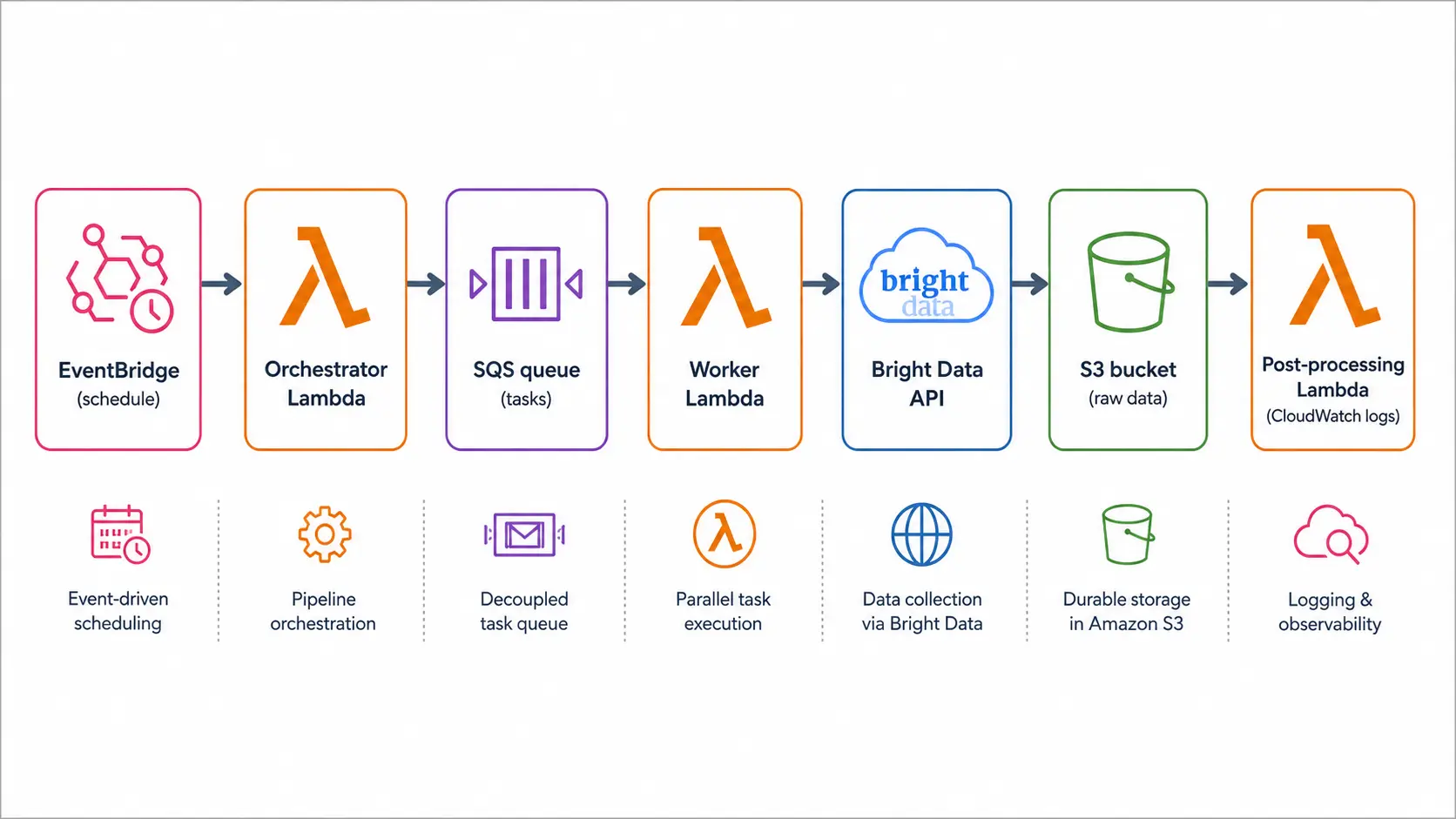
The five-component layout below is what we have been running on Tra-bell for over a year. The flow is trigger to orchestrator Lambda to worker Lambda to Bright Data to S3, and it scales linearly with parallelism on the worker tier. We chose this shape because every box can be replaced independently: you can swap Bright Data for a self-managed proxy later, or replace S3 with an OpenSearch sink without touching the orchestration code.
Responsibilities of Each Component
- Trigger: EventBridge schedule, SQS, API Gateway, or S3 event. Typically once or twice a day
- Orchestrator Lambda: Generates the URL list and enqueues SQS messages. Persists run state in DynamoDB if you need restartability
- Worker Lambda (parallel): Pulls a URL from SQS, calls Bright Data, writes the extracted JSON or Parquet to S3
- Post-processing: S3 event fires another Lambda, Glue ETL, or Step Functions for cleaning, deduplication, and loading into the warehouse
- Delivery and alerts: Bright Data webhooks land on EventBridge to a notifier Lambda. CloudWatch and X-Ray give you observability
Keep the AWS Surface Area Small
- You probably do not need DynamoDB: For "queue of URLs plus stored results," S3 plus SQS is usually enough
- Use Step Functions only for non-trivial branching: A simple scrape-then-normalize flow can run on EventBridge plus Lambda
- Secrets Manager is non-negotiable: Never carry Bright Data zone credentials in environment variables
Python Sample: Web Unlocker Worker
import os
import json
import httpx
import boto3
from botocore.exceptions import ClientError

SECRET_ID = os.environ["BD_SECRET_ID"]
S3_BUCKET = os.environ["S3_BUCKET"]
_cached = {}

def get_proxy() -> str:
    if "proxy" in _cached:
        return _cached["proxy"]
    sm = boto3.client("secretsmanager")
    secret = json.loads(sm.get_secret_value(SecretId=SECRET_ID)["SecretString"])
    _cached["proxy"] = (
        f"http://{secret['user']}:{secret['pass']}"
        f"@brd.superproxy.io:33335"
    )
    return _cached["proxy"]

def handler(event, _ctx):
    s3 = boto3.client("s3")
    proxy = get_proxy()
    for record in event["Records"]:
        url = record["body"]
        with httpx.Client(
            proxies={"http://": proxy, "https://": proxy},
            timeout=30.0,
            headers={"User-Agent": "Mozilla/5.0"},
        ) as client:
            r = client.get(url)
            r.raise_for_status()
        key = f"raw/{url.replace('://', '_').replace('/', '_')}.html"
        s3.put_object(Bucket=S3_BUCKET, Key=key, Body=r.content)
    return {"ok": True}
This worker assumes an SQS trigger with one URL per message. Web Unlocker handles CAPTCHA, Cloudflare, and Akamai automatically, so the worker rarely has to retry or rotate headers by hand. For deeper patterns around Web Unlocker, see Bright Data Web Unlocker Practical Guide.
A few details in this code matter more than they look. The _cached dict reuses the resolved proxy URL across invocations on the same Lambda container, which avoids paying for a Secrets Manager API call on every warm invocation. The 30-second httpx timeout is deliberately wider than a typical HTTP timeout, because Web Unlocker may stall while it negotiates a CAPTCHA on the target side. Writing each raw response to S3 with a deterministic key built from the URL gives you idempotency for free: re-running the same SQS message just overwrites the same object, which makes restartability trivial in production.
Five Production Pitfalls Worth Avoiding
PoCs that worked beautifully on a laptop tend to break in the same five places when you push to production. We hit all of them at one point or another on Tra-bell, so these read like a checklist.
1. Hardcoded Credentials
Storing zone username and password in environment variables or in a Lambda Layer leaks them through commit history and container images. Keep them in AWS Secrets Manager with rotation enabled, fetch once on container init, and reuse the value across invocations.
2. Runaway Retries
Infinite retry on a 5xx from Web Unlocker is a fast way to triple your Bright Data bill in an afternoon. Cap retries at three with exponential backoff, and add a circuit breaker that pauses calls when consecutive 5xx exceed a threshold.
3. Tight HTTP Timeouts
The default httpx timeout is five seconds, but Web Unlocker can take 20 to 30 seconds when it has to solve a CAPTCHA. Set the httpx timeout to five seconds less than the Lambda timeout so the request fails cleanly with an exception instead of being killed by the runtime.
4. Missing Monitoring and Billing Alarms
Watch worker success rate and duration in CloudWatch, and watch daily bandwidth and requests in the Bright Data dashboard. Set thresholds on both sides: a single hot loop can push month-end billing to three times the plan if neither alarm fires.
Reading practitioner write-ups alongside official docs surfaces the gotchas you only learn after a week in production. The AI-agent corner of X is especially active around Bright Data right now, with engineers comparing Web Unlocker against alternatives like Browserbase and discussing how they wire results back into vector stores. Treat those threads as a free monitoring signal: when several independent people start mentioning the same failure mode, it usually surfaces in your own dashboard a few weeks later.
5. Ignoring TOS and Compliance
Always read the target site's terms of service, robots.txt, and Crawl-Delay. Bright Data also runs KYC on the demand side and requires you to declare the purpose of your zone, and they will refuse to approve zones that obviously target PII or sites with explicit anti-scraping clauses.
Five Design Patterns That Compress Cost
Lambda is cheap; Bright Data is where almost all of the cost lands, and casual use of Web Unlocker or Scraping Browser can balloon the bill. For a workload of 1,000 SKUs once a day, the five patterns below typically take a $200 monthly bill down to around $60 (~¥9,000). For a more granular unit-price breakdown, Bright Data Pricing Cheat Sheet 2026 is the right companion.
The framing that helps most when reviewing a Bright Data bill is "every byte you fetch is money, every CAPTCHA you avoid is money, every duplicate request is money." Optimization is not about finding one big lever; it is about applying four or five small levers together. A workload that diff-monitors only changed SKUs, reuses long sessions, blocks images, and falls back to Web Unlocker only on hostile pages typically lands at one third of the cost of the naive implementation, with no measurable hit to data quality.
- Tiered fallback: Try plain Residential first, escalate to Web Unlocker only for URLs that return 403 or hit CAPTCHA
- Long sessions: Reuse the same IP for 30 minutes to a few hours to cut handshake bandwidth (20 to 40% savings on Residential)
- Diff-only monitoring: Re-scrape only SKUs whose price or stock changed yesterday; skip full re-pulls
- Block static assets: Skip images, CSS, and analytics tags to cut 50 to 70% of bandwidth
- Time-of-day spread: Run at off-peak hours when target sites are less loaded; success rates rise and retries drop
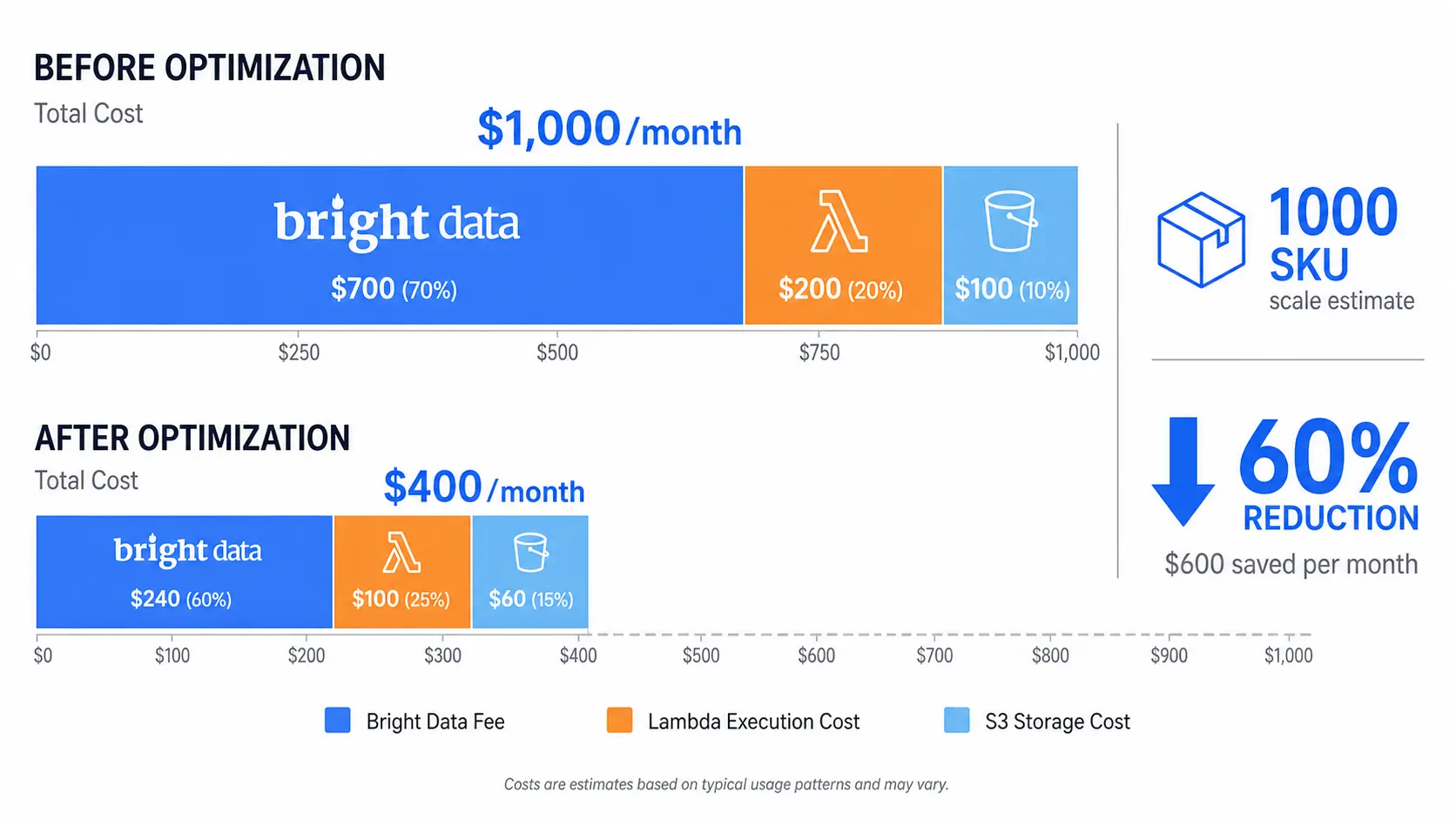
"Bright Data is powerful but cost control is the hard part" is a recurring theme on X, and it matches our experience: pipeline quality is decided by design choices far more than by which proxy you pick. A team that picks the cheapest proxy but skips diff monitoring and long sessions will spend more than a team that picks the most expensive proxy and instruments cost-per-SKU from day one.
When to Bring in a Partner
A serverless scraping pipeline is typically one week to PoC plus one to two months to stable production. If you do not have a dedicated Python or infra engineer who has run Bright Data before, working with a partner on zone design, contract sizing, and cost optimization tends to cut the runway in half. The places where a partner pays for itself fastest are zone selection (matching Residential, Web Unlocker, or Scraping Browser to each domain), retry policy design (which is where most cost overruns originate), and connecting raw S3 output to the downstream warehouse without bolting on a custom ETL layer that becomes a maintenance burden six months later.
Smile Comfort runs Tra-bell, a hotel price tracking service, on AWS Lambda with Bright Data Residential and Web Unlocker. We can share what we have learned about Lambda concurrency sizing, SQS batch sizing, Secrets Manager caching, and connecting S3 to Athena or BigQuery, all from one of our own production workloads.
Wrap-Up
AWS Lambda paired with Bright Data is the most realistic way to stand up a scraping pipeline without owning Chromium or fighting bot defenses yourself. Build around five components (EventBridge, SQS, Lambda, Bright Data, S3), wire Secrets Manager, retry strategy, and cost alarms in from day one, and you can run a 1,000-URL workload at low-hundreds of dollars per month. Start with a 100-URL PoC, add tiered fallback and diff monitoring, and graduate to full production once success rates are stable.
The one rule of thumb that has saved us the most operational pain is this: instrument cost and success rate per domain before you scale parallelism. The temptation is to crank Lambda concurrency to 100 the moment the PoC works, but you will learn far more from running 10 concurrent workers for a week with full dashboards than from running 100 for a day with none. Once you can see which domains are cheap and reliable and which are expensive and brittle, every other design decision (proxy tier, retry budget, schedule) falls out naturally from the data.
Information current as of 2026-05-21. Please check the official sites for the latest updates.
This article contains affiliate links.
Frequently asked questions
Related articles
Bright Data Residential vs ISP Proxy 2026: A Practical Selection Guide

Bright Data Pricing Cheat Sheet 2026: Product-by-Product Cost Guide