Bright Data Web Scraper IDE Tutorial 2026 — Collector Design, Code Templates, and Operational Pitfalls
A practical 2026 walkthrough of Bright Data Web Scraper IDE — its current positioning, navigate/parse/next_stage primitives, Webhook delivery, and how to use it alongside OSS scrapers.
This article contains affiliate links (advertising).
Bright Data's Web Scraper IDE is a browser-hosted environment that lets you author collectors with declarative primitives like navigate, parse, and next_stage. The IDE is still alive and well in 2026, but Bright Data's main investment has shifted toward the Scraping Browser and the Web Discovery Platform. The key skill in 2026 is knowing when to reach for which. This guide walks through the IDE's positioning, initial setup, collector templates, and operational pitfalls based on our team's production experience.
Where the Web Scraper IDE Fits in 2026
The Bright Data Web Scraper IDE was originally introduced as a browser-only scraper development environment. By 2026 the Scraping Browser and the Web Discovery Platform have become more prominent, but the IDE survives as "a quick way to stand up a recurring collector with delivery built in."
When the IDE is a Good Fit (and When It Isn't)
| Good fit | Poor fit |
|---|---|
| Repeatable multi-stage crawls (list -> detail -> reviews) | One-off exploratory pulls |
| You want Bright Data to handle delivery (Webhook / S3 / Snowflake) | You want tight integration with an in-house pipeline |
| Non-developers should be able to maintain it later | The scraper needs deep app integration |
| Target sites have relatively stable structure | Targets change layout frequently |
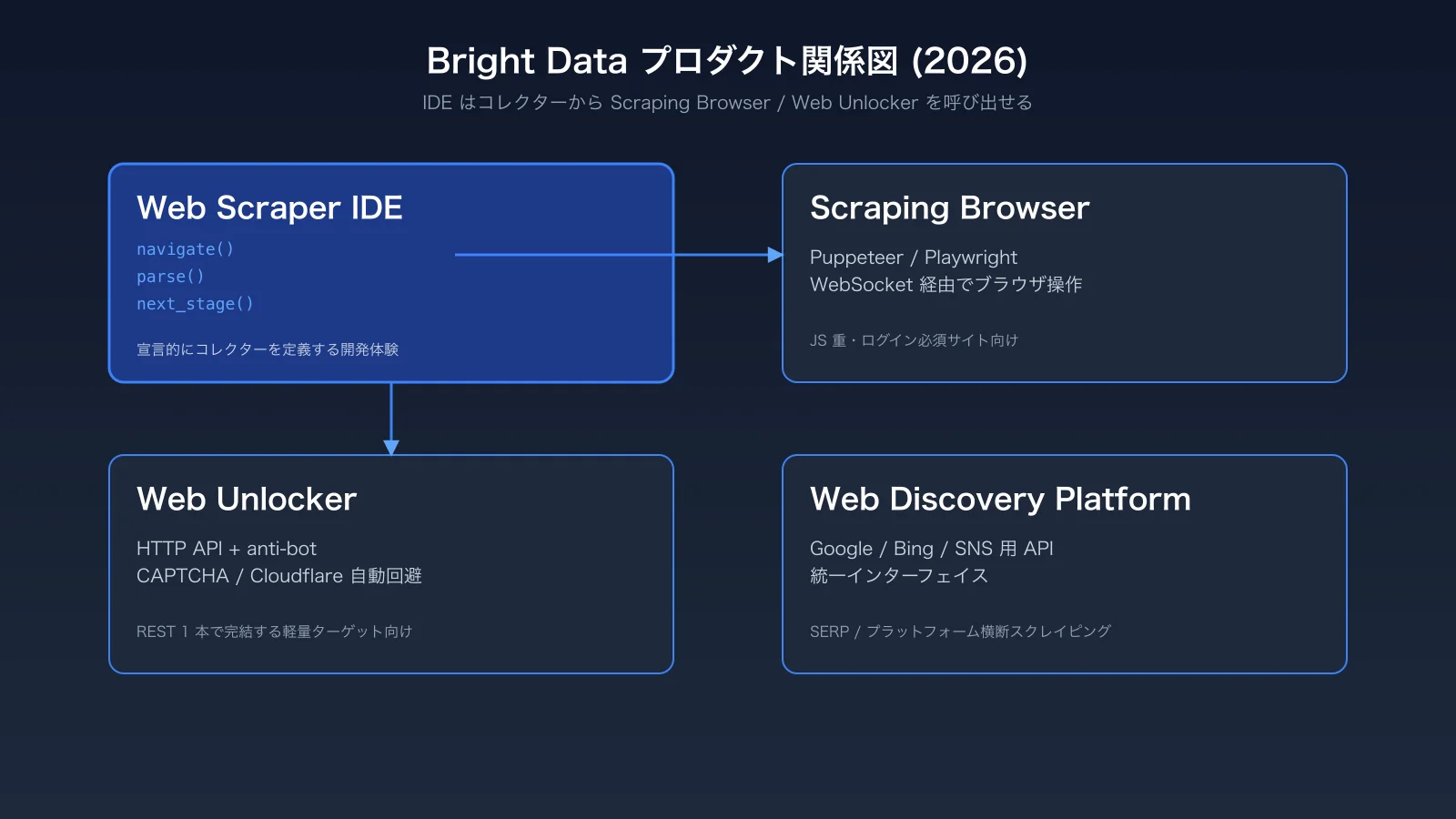
Bright Data's "Web Discovery Platform" wraps the IDE-style developer experience around a unified API for Google, Bing, and social networks, and is growing fast in AI-agent contexts. Teams building Retrieval-Augmented Generation pipelines often start with one or two preset collectors, then graduate to the unified API as their use cases broaden. The IDE itself stays in the toolkit as a reliable way to keep narrow, business-critical jobs running without rewriting them into a general framework.
In short, the IDE is the on-ramp for moving recurring collection jobs onto Bright Data quickly. Before opening the IDE itself, make sure your account and Zones are set up properly — the Bright Data Account Setup Guide 2026 covers the prerequisites.
Relationship to the Scraping Browser and Web Unlocker
While the IDE provides navigate / parse / next_stage semantics, the Scraping Browser is an actual headless browser you drive over WebSocket with Puppeteer / Playwright, and the Web Unlocker is an HTTP-level API for sites where you only need raw HTML behind anti-bot defenses. All three share Bright Data's anti-bot stack and KYC-validated IP pool, which is the shared layer that makes the products feel like a single platform rather than three independent SKUs. Collectors in the IDE can call into the Scraping Browser or Web Unlocker internally when a target needs heavier handling, so you rarely have to "switch products" mid-design — you start in the IDE and reach for the heavier surfaces only where the page demands them. The Scraping Browser side is covered in depth in our Bright Data Scraping Browser Practical Guide 2026.
First-Time Setup and Building a Collector
You can open the Web Scraper IDE in a few clicks from the dashboard, but it's safer to confirm the billing model before you start clicking.
Account Prerequisites and Pricing Feel
The IDE itself is free; you are billed for Scraping Browser, Web Unlocker, or Residential Proxy usage at runtime. You can start on pure usage-based pricing without committing to a monthly minimum (~$500/mo and up), but committed contracts unlock lower per-unit rates that matter at production scale. Make sure your account, KYC, and payment method are in place first — KYC review can take one to three business days depending on the documents you submit, and starting the paperwork in parallel with collector design saves a surprising amount of total lead time.
Opening a New Collector
- Log in to the Bright Data dashboard and open "Web Scrapers -> Web Scraper IDE" from the left nav
- Click "New collector" and pick either a preset (Amazon, Walmart, LinkedIn, etc.) or "Custom"
- Choose your output format (CSV / JSON / NDJSON) and delivery target (API / Webhook / S3)
- In the IDE, write your
navigate/parse/collect/next_stageblocks
Presets ship with reasonable defaults for product listings, detail pages, and reviews, so the quickest path is to tweak the preset for site-specific quirks. With "Custom" you get the same primitives plus a snippet library — the rough flow is: navigate to step the browser to a URL, parse to extract via CSS / XPath, and next_stage to advance to the next phase.
A Minimal Collector Template
A typical product list -> detail flow ends up looking like the following pseudo-flow.
navigate('https://example.com/list')to open the listing pageparseto extract each product URL using a few CSS selectorscollectto pass URLs into the next stage as an array of itemsnext_stage('detail')to switch to the detail-page stage with one URL per record- In the detail stage,
collectprice, stock, review counts, and any structured attributes you need - Send the merged results to your delivery target as CSV / JSON / NDJSON
The whole flow stays inside the four primitives navigate / parse / collect / next_stage, which is part of why the IDE is easy to onboard non-developers onto. If you call into the Scraping Browser from inside the IDE, you can also handle CAPTCHA bypass and full JavaScript rendering, which lets you cover SPAs and infinite-scroll pages without changing the overall collector shape. If you plan to lean on the Scraping Browser heavily, combine these docs with the dedicated Bright Data Scraping Browser guide for the WebSocket setup details.
Designing Code-First Collectors and Operating Them
The IDE runs in the browser, but for any long-lived collector our standard practice is to export the source locally and version-control it in Git. Once you have history and PR-style diff review in CI, you respond much faster the first time a site changes layout under you.
Step-by-Step: A Price-Monitoring Collector
- Manage the target URL list in Google Sheets or similar
- In the IDE, create a collector that takes URLs as
input.url navigate(input.url)->parsefor price, stock, and product URLcollecta schema ofprice,currency,stock,url,timestamp- Set delivery to a Webhook (internal API or Cloud Run)
- Schedule four runs per day (IDE's built-in scheduler or external Airflow)
Once you go live, ship a dashboard for failure count, bytes-per-record, and runtime — these three are the minimum you need to detect drift quickly. A failure spike usually points to an anti-bot change, a sudden jump in bytes-per-record often means the site started lazy-loading more assets, and a runtime regression typically traces back to a new redirect or interstitial. For Webhook receivers landing data in BigQuery or Snowflake, the Bright Data Webhook and Data Delivery Design 2026 write-up pairs nicely with this guide.
Cost Optimization and Our Own Use Case
The most effective lever for bandwidth costs is blocking images, fonts, and third-party JS via the IDE's block_resources parameter. The second-most-effective lever is treating retries as an explicit cost line: most sites that fail on the first attempt also fail on the second under the same fingerprint, so capping retries at two and rotating the session is usually cheaper than chasing the same broken request five times. We run our own hotel-price tracking service Tra-bell on top of Bright Data's Residential Proxy and Scraping Browser, and resource-blocking alone has cut our monthly bandwidth by 30-40%. Smile Comfort can support similar deployments from PoC through production where the scope fits the team's bandwidth.
Paraphrased: "Adaptive scrapers like Scrapling track structural changes on the site, dramatically reducing maintenance overhead." (原文要旨: Scrapling は構造変化に追従するため保守工数を劇的に下げる)。The Web Scraper IDE still wins on declarative authoring, but for targets that drift heavily, pairing it with an OSS adaptive tool can be the right call.
Troubleshooting and Anti-Patterns
The IDE is friendly, but recurring jobs break the moment a site redesigns or an anti-bot vendor ships an update. The most common failure modes and remedies are below.
Brittle parse Selectors
If you hard-code CSS or XPath selectors, a single site redesign can stop every collector at once. Three remedies:
- Variabilize selectors at the top of the collector
- Set a per-stage success-rate threshold (e.g. 95%) inside the IDE and alert on dips
- Run a separate structural-diff job (Scrapling or a custom diff script)
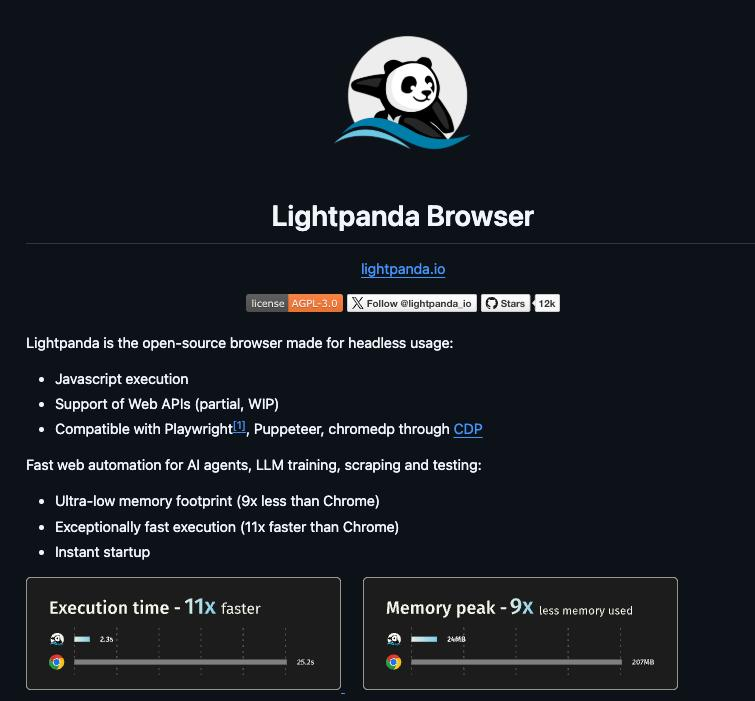
Paraphrased: "Lightpanda is a from-scratch headless browser written in Zig — about 11x faster than Chromium-based stacks." (原文要旨: Lightpanda は Zig 製でクロームの 11 倍速)。For workloads that demand massive parallelism, fronting Bright Data's Scraping Browser with a lighter browser like this has become a viable hybrid in 2026.
Delivery-Side Failures
Webhook / S3 / Snowflake delivery is retried by Bright Data, but real-world outages often come from expired credentials on your side or missing Snowflake stage permissions rather than from Bright Data itself. Always return 2xx from your Webhook receiver as fast as possible (queue the heavy work asynchronously) and treat "delivery failure" as a separate metric from "collection failure" — that split makes triage much faster, especially during the first month when teams tend to conflate the two and chase the wrong root cause.
When to Use OSS Instead
If a target's defenses are light and your team can absorb maintenance, an OSS stack with Scrapling, Lightpanda, or Playwright + stealth plugins is a fine choice. For Cloudflare, DataDome, or Akamai-protected targets that must keep running, leaning straight on the IDE plus Scraping Browser tends to be the lower-TCO outcome.
Wrap-Up — Treat the IDE as Your Quick On-Ramp
The Bright Data Web Scraper IDE lets you express multi-stage crawls concisely with declarative primitives, and pairs delivery into the same surface. It is still very much alive in 2026, but the right model is to lean on the IDE as a quick on-ramp for recurring collectors, push heavy anti-bot workloads onto the Scraping Browser, and use the Web Discovery Platform for SERP and social.
If you weigh target stability, defense strength, and your team's tolerance for ops, the choice between the IDE and OSS becomes much simpler. For a near-production PoC scoped to 2-4 weeks, the IDE remains a strong starting point.
Information current as of 2026-05-24. Please check the official sites for the latest updates.
This article contains affiliate links.
Frequently asked questions
Related articles
Bright Data Scraping Browser 2026: Puppeteer/Playwright Setup and Cost Design

Bright Data Account Setup 2026: KYC to Your First Zone