Automating SEO Rank Tracking With Bright Data: A 2026 Implementation Guide for Daily SERP Rankings
How to automate SEO rank tracking with Bright Data SERP API: extraction logic, storage design, schedulers, alerts, and monthly cost estimates from production.

This article contains affiliate links (advertising).
The practical recipe for automating daily SEO rank tracking is Bright Data SERP API plus a scheduler plus a data warehouse. This guide walks through two patterns we run in production — a one-day setup with GitHub Actions + Sheets + Slack, and a 1,000-keyword production stack on Cloud Scheduler + BigQuery + Looker Studio — covering extraction logic, storage choice, schedulers, alerts, and monthly cost.
The 5-Layer Architecture and Where Bright Data SERP API Fits
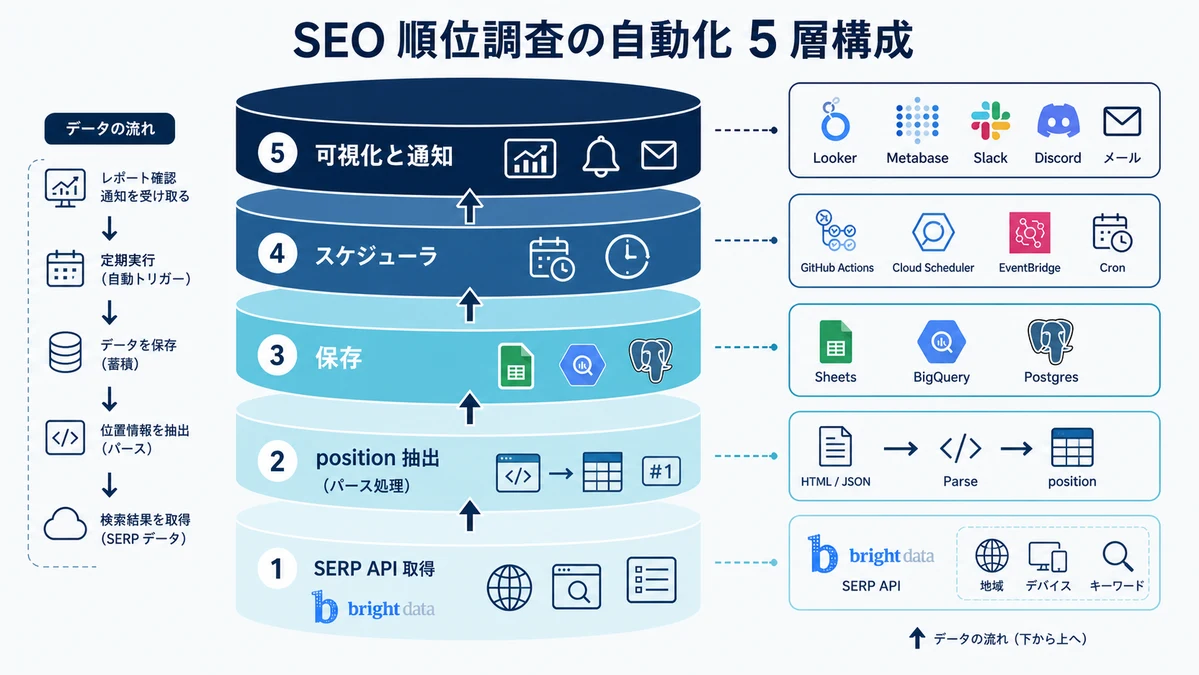
SEO rank tracking automation maps cleanly to five layers:
- SERP retrieval: Get search results pages as structured JSON
- Extraction: Pull
organic_positionfor target domains from responses - Storage: Persist daily, keyword-level history
- Scheduling: Trigger the fetch job at a fixed time every day
- Visualization and alerting: Dashboards plus Slack / Email notifications for rank changes
Bright Data SERP API covers (1), returning Google, Bing, Yandex, and DuckDuckGo results with fine-grained country, language, device, and location parameters. For the API itself — authentication, parameter design, and cost design — we covered the foundation in Bright Data SERP API With Python: Complete 2026 Guide. This guide focuses on layers (2) through (5).
Why Pick Bright Data SERP API for Rank Tracking
Three points matter when choosing a SERP API specifically for rank tracking:
- Granular geo and device control: You can specify location at the city level, not just country, which makes results reproducible for local SEO and multi-location commerce
- SERP feature coverage: Beyond
organic_results, you getfeatured_snippet,people_also_ask,knowledge_graph, andads. In 2026, the ability to flag AI Overview appearances from the structured response is increasingly important - Enterprise SLA: When SEO reports flow into board-level dashboards, having an SLA on the data source matters
DataForSEO and SerpApi live in the same layer; the typical decision comes down to cost and data quality on both axes. Bright Data leads on IP pool size and KYC-verified compliance, while newer providers like DataForSEO and Serper.dev can be cheaper per request. For a deeper look at Bright Data's overall price positioning, see the Bright Data Pricing Cheat Sheet 2026.
The community echoes the same takeaway — Bright Data SERP API is praised for high success rates on competitive keywords and accurate localized results, which is exactly what rank trackers depend on.
Extracting organic_position From SERP API Responses
We covered authentication, parameters, and the broader response structure in Bright Data SERP API With Python: Complete 2026 Guide, so here we focus on what to do once a response is in hand — extracting the rank and keeping the data clean. In practice, normalization and the "no rank" handling matter far more than the call itself when you accumulate data daily.
Minimum Implementation: Python
The helper below takes a SERP API response and returns the target domain's rank if it exists in the top 20. Refer to the linked guide above for the API call itself.
import urllib.parse
from typing import Optional


def extract_rank(serp_response: dict, target_domain: str) -> Optional[dict]:
    """Extract the target domain's rank from a SERP API response."""
    target_host = urllib.parse.urlparse(f"https://{target_domain}").netloc.lower()

    for item in serp_response.get("organic_results", []):
        item_host = urllib.parse.urlparse(item.get("link", "")).netloc.lower()
        if item_host.endswith(target_host):
            return {
                "position": item.get("position"),
                "matched_url": item.get("link"),
                "featured_snippet": bool(serp_response.get("featured_snippet")),
                "people_also_ask_count": len(serp_response.get("people_also_ask", []) or []),
            }
    return {"position": None, "matched_url": None,
            "featured_snippet": bool(serp_response.get("featured_snippet")),
            "people_also_ask_count": len(serp_response.get("people_also_ask", []) or [])}
Comparing hostnames with endswith lets subdomains like blog.example.com match, and we capture featured_snippet and people_also_ask flags so we can re-analyze SERP feature impact later. Because Bright Data SERP API rides on Web Unlocker's high success rate, the extraction side stays simple — heavy exception handling is rarely needed.
Normalization and the "No Rank" Case
The handful of rules we apply on every production pipeline:
- Query normalization:
strip()→ unify full-width / half-width characters → lowercase. This eliminates day-to-day rank wobble caused by identical-meaning queries - No rank in top 20: Store
position = None. SQLIS NULLaggregations stay clean - Multiple URLs ranking: When several of your URLs appear in the top 20, store only the top one as
positionand keep the rest in a separatesecondary_positions JSONcolumn - SERP feature flags: Capture AI Overview presence and People Also Ask counts as
bool/int. In 2026, even a #1 organic rank can lose clicks to AI Overview, so flag them alongside ranks
Storage Design: Google Sheets, BigQuery, and Postgres
Pick storage based on the scale you expect to operate. Three patterns cover the field, with implementation samples.
Pick by Scale
| Scale | Recommended storage | Recommended scheduler | Dashboard |
|---|---|---|---|
| ≤ 100 KW, 1–2 regions | Google Sheets | GitHub Actions | Looker Studio (Sheets connector) |
| ~1,000 KW, multi-region, > 1 yr history | BigQuery | Cloud Scheduler + Cloud Functions | Looker Studio (BigQuery connector) |
| 10,000+ KW, internal app integration | Postgres (Cloud SQL / Supabase) | EventBridge + Lambda or in-house Cron | Metabase / Redash |
Under 100 KW, Sheets wins on simplicity. Past 1,000 KW, Sheets cell limits and query performance push you to BigQuery. Beyond 10,000 KW with internal app integration, Postgres + Metabase fits team operations better.
On the operations side, we run Tra-bell — a hotel price tracking service — on Bright Data's Residential proxy, and that experience has shown us that co-locating SERP API workloads on the same Bright Data foundation simplifies credential management and keeps operational overhead consolidated.
Sample A: Python → Google Sheets
The minimum pattern is to append extracted rank rows into a Google Sheet. The example assumes a service account JSON key for authentication.
import datetime as dt
import os

import gspread
from google.oauth2.service_account import Credentials

SCOPES = ["https://www.googleapis.com/auth/spreadsheets"]
SHEET_ID = os.environ["RANK_SHEET_ID"]
SHEET_TAB = "rank_history"


def get_sheet():
    creds = Credentials.from_service_account_file(
        os.environ["GOOGLE_APPLICATION_CREDENTIALS"], scopes=SCOPES
    )
    client = gspread.authorize(creds)
    return client.open_by_key(SHEET_ID).worksheet(SHEET_TAB)


def append_rank(row: dict) -> None:
    sheet = get_sheet()
    sheet.append_row(
        [
            dt.date.today().isoformat(),
            row["query"],
            row["target_domain"],
            row["country"],
            row["device"],
            row["location"] or "",
            row["position"] if row["position"] is not None else "",
            "Y" if row["featured_snippet"] else "",
            row["people_also_ask_count"],
            row["matched_url"] or "",
        ],
        value_input_option="USER_ENTERED",
    )
Sheets keeps column order on append, and the Looker Studio connector takes one click. 100 KW × 30 days = ~3,000 rows fits comfortably in a single tab.
Sample B: Python → BigQuery (Cloud Scheduler-Friendly)
For production, BigQuery is the easiest backbone. Use google-cloud-bigquery to insert rows.
import datetime as dt
import os

from google.cloud import bigquery

PROJECT = os.environ["GCP_PROJECT"]
DATASET = "seo_rank"
TABLE = "rank_history"

client = bigquery.Client(project=PROJECT)
table_ref = f"{PROJECT}.{DATASET}.{TABLE}"


def insert_rank(rows: list[dict]) -> None:
    payload = []
    for row in rows:
        payload.append(
            {
                "date": dt.date.today().isoformat(),
                "query": row["query"],
                "target_domain": row["target_domain"],
                "country": row["country"],
                "device": row["device"],
                "location": row["location"],
                "position": row["position"],
                "featured_snippet": row["featured_snippet"],
                "people_also_ask_count": row["people_also_ask_count"],
                "matched_url": row["matched_url"],
            }
        )
    errors = client.insert_rows_json(table_ref, payload)
    if errors:
        raise RuntimeError(f"BigQuery insert errors: {errors}")


# DDL (create once in the BigQuery console)
# CREATE TABLE seo_rank.rank_history (
#   date DATE NOT NULL,
#   query STRING NOT NULL,
#   target_domain STRING NOT NULL,
#   country STRING NOT NULL,
#   device STRING NOT NULL,
#   location STRING,
#   position INT64,
#   featured_snippet BOOL,
#   people_also_ask_count INT64,
#   matched_url STRING
# )
# PARTITION BY date
# CLUSTER BY query, country, device;
PARTITION BY date plus CLUSTER BY query, country, device makes downstream aggregations (day-over-day delta, moving averages, regional comparisons) far faster, and partition pruning on WHERE date BETWEEN ... keeps BigQuery costs in the low USD per month range.
Sample C: Node.js → Postgres + Slack Webhook
Node.js with Postgres and a Slack Webhook notification when a keyword drops 5+ positions day over day.
import axios from "axios";
import pg from "pg";

const { Client } = pg;
const SLACK_WEBHOOK_URL = process.env.SLACK_WEBHOOK_URL;

const pgClient = new Client({ connectionString: process.env.DATABASE_URL });
await pgClient.connect();

async function saveAndNotify(row) {
  const previous = await pgClient.query(
    `SELECT position FROM rank_history
     WHERE query = $1 AND target_domain = $2 AND country = $3 AND device = $4
     ORDER BY date DESC LIMIT 1`,
    [row.query, row.target_domain, row.country, row.device],
  );

  await pgClient.query(
    `INSERT INTO rank_history
     (date, query, target_domain, country, device, location, position,
      featured_snippet, people_also_ask_count, matched_url)
     VALUES (CURRENT_DATE, $1, $2, $3, $4, $5, $6, $7, $8, $9)`,
    [
      row.query,
      row.target_domain,
      row.country,
      row.device,
      row.location,
      row.position,
      row.featured_snippet,
      row.people_also_ask_count,
      row.matched_url,
    ],
  );

  const prevPos = previous.rows[0]?.position;
  const currPos = row.position;
  if (prevPos != null && currPos != null && currPos - prevPos >= 5) {
    await axios.post(SLACK_WEBHOOK_URL, {
      text:
        `:warning: "${row.query}" (${row.country}/${row.device}) ` +
        `dropped from #${prevPos} to #${currPos}`,
    });
  }
}
Postgres plus a Slack Webhook can be stood up in a single day. For AWS Lambda deployments, the broader Bright Data + Lambda operating pattern is covered in AWS Lambda x Bright Data: Serverless Scraping Pipeline 2026; the SERP API call slots into roughly the same architecture.
Scheduling Daily Jobs
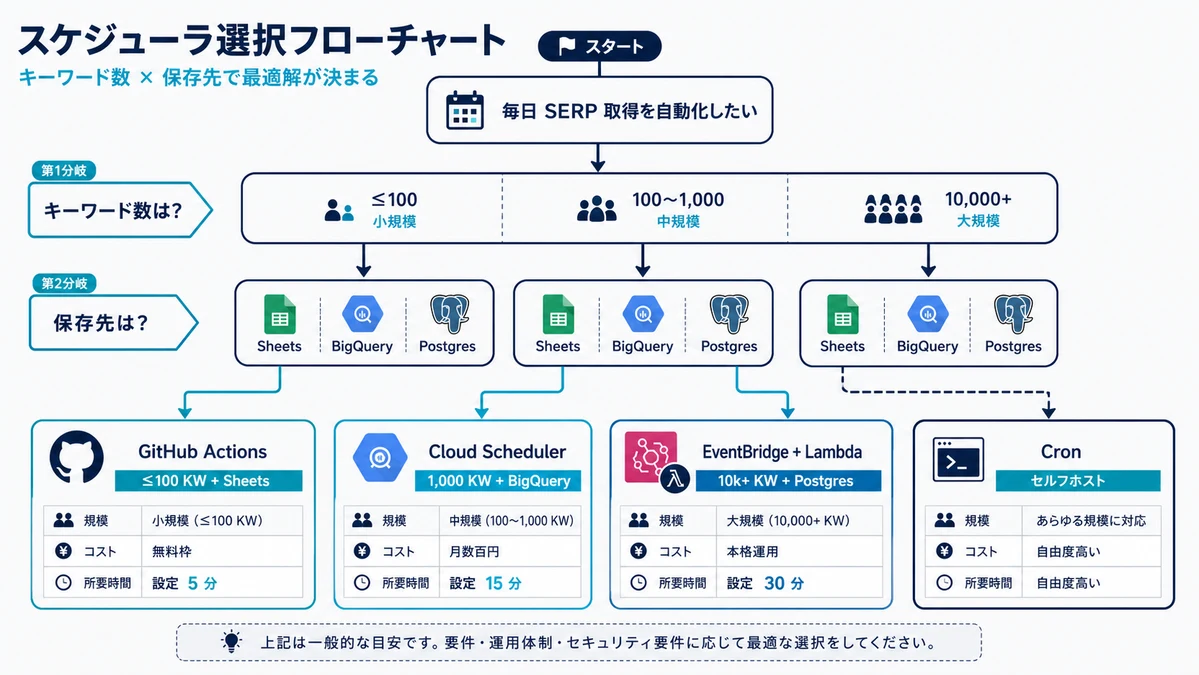
The value of rank tracking comes from "running reliably every single day." Four schedulers cover most needs.
Pick a Scheduler by Scale
| Scale | Scheduler | Execution | Setup time |
|---|---|---|---|
| Small (≤ 100 KW) | GitHub Actions | Scripts in the repo | 1–2 hours |
| Medium (~1,000 KW) | Cloud Scheduler | Cloud Functions / Cloud Run Jobs | Half a day |
| Large (10,000+ KW) | EventBridge | Lambda + SQS | 1–2 days |
| Self-hosted | Cron | EC2 / on-prem machine | 30 minutes |
GitHub Actions wins on co-locating the schedule and the script in the same repo, plus 2,000 free minutes per month. Cloud Scheduler costs GCP money but pairs naturally with Cloud Functions for ~99.9% reliability.
Developers across X also share the same starting-point pattern — SERP API + scheduler + data warehouse — and grow it incrementally as keyword counts and locations expand.
GitHub Actions Example
The simplest example. Runs daily at 09:00 JST.
# .github/workflows/rank-tracker.yml
name: SEO Rank Tracker

on:
  schedule:
    - cron: "0 0 * * *"   # Daily at UTC 00:00 = JST 09:00
  workflow_dispatch:

jobs:
  fetch-rank:
    runs-on: ubuntu-latest
    steps:
      - uses: actions/checkout@v4
      - uses: actions/setup-python@v5
        with:
          python-version: "3.12"
      - name: Install dependencies
        run: pip install httpx gspread google-auth
      - name: Run rank fetcher
        env:
          BRIGHT_DATA_API_TOKEN: ${{ secrets.BRIGHT_DATA_API_TOKEN }}
          BRIGHT_DATA_SERP_ZONE: ${{ secrets.BRIGHT_DATA_SERP_ZONE }}
          GOOGLE_APPLICATION_CREDENTIALS: ${{ secrets.GCP_SA_JSON_PATH }}
          RANK_SHEET_ID: ${{ secrets.RANK_SHEET_ID }}
        run: python scripts/fetch_rank.py
Configure four secrets in the GitHub repository and you are running. GitHub Actions keeps running through weekends and holidays, and failures show up as notifications in GitHub, which keeps operational overhead minimal.
Cloud Scheduler + Cloud Functions Example
For GCP-based stacks with BigQuery, Cloud Scheduler is the shortest path. Terraform keeps deployments reproducible.
resource "google_cloud_scheduler_job" "rank_tracker" {
  name             = "seo-rank-tracker"
  description      = "Trigger SEO rank tracker every day at 09:00 JST"
  schedule         = "0 0 * * *"
  time_zone        = "Etc/UTC"
  attempt_deadline = "320s"

  http_target {
    http_method = "POST"
    uri         = google_cloudfunctions2_function.rank_tracker.service_config[0].uri

    oidc_token {
      service_account_email = google_service_account.scheduler_invoker.email
    }
  }
}
The Cloud Functions handler simply calls the SERP API and insert_rank(). If a 9-minute execution window is not enough (10,000+ KW), switch to Cloud Run Jobs and fan out work through Pub/Sub or SQS.
EventBridge + Lambda Example
In AWS, EventBridge is the default.
{
  "Source": "aws.events",
  "DetailType": "Scheduled Event",
  "ScheduleExpression": "cron(0 0 * * ? *)"
}
Set Lambda concurrency to 10–20, fan out keywords through SQS, and 10,000 KW finishes in 10–15 minutes end-to-end. Use Reserved Concurrency to make sure you never overrun Bright Data SERP API rate limits.
Alerts and Dashboards: Slack / Discord / Email + Looker Studio / Metabase
Fetching ranks is useless if no one sees the change. This is how we structure alerts and dashboards.
Alert Design Rules
- Threshold-based: Trigger on day-over-day -5 positions or larger, or top 10 → out of top 20 transitions
- Rate limiting: Cap to one alert per keyword per 24 hours
- Channel-separated: Critical drops go to
#seo-alertson Slack; minor wobble accumulates into a weekly email summary - AI Overview alerts: Even a #1 organic rank can lose clicks to AI Overview, so alert on AI Overview appearance changes separately
Minimum Slack Notification Sample
Our standard pattern is to compute the delta in a BigQuery scheduled query, then have a Cloud Functions handler read it and post to Slack.
import os

import httpx
from google.cloud import bigquery

SLACK_WEBHOOK_URL = os.environ["SLACK_WEBHOOK_URL"]
client = bigquery.Client()

SQL = """
WITH today_rank AS (
  SELECT query, country, device, position
  FROM `seo_rank.rank_history`
  WHERE date = CURRENT_DATE()
),
yesterday_rank AS (
  SELECT query, country, device, position
  FROM `seo_rank.rank_history`
  WHERE date = DATE_SUB(CURRENT_DATE(), INTERVAL 1 DAY)
)
SELECT
  t.query,
  t.country,
  t.device,
  y.position AS prev_position,
  t.position AS curr_position,
  t.position - y.position AS delta
FROM today_rank t
JOIN yesterday_rank y USING (query, country, device)
WHERE y.position IS NOT NULL
  AND t.position IS NOT NULL
  AND t.position - y.position >= 5
"""

for row in client.query(SQL).result():
    text = (
        f":warning: '{row.query}' ({row.country}/{row.device}) "
        f"dropped from #{row.prev_position} to #{row.curr_position} (delta={row.delta})"
    )
    httpx.post(SLACK_WEBHOOK_URL, json={"text": text}, timeout=10)
Discord uses the same Incoming Webhook shape. Email via SendGrid or SES works for templated notifications, but consolidating on Slack tends to win on operational simplicity.
Dashboard Patterns
The four reasonable choices:
- Google Sheets + Looker Studio: Small-scale (≤ 100 KW). One-click connector. Half-day setup
- BigQuery + Looker Studio: Standard for 1,000+ KW. Materialize daily aggregates via BigQuery scheduled queries and connect Looker Studio for fast response
- Postgres + Metabase: When you want to merge SEO data into internal apps, or write SQL directly. Engineer-friendly
- Postgres + Redash: A shared dashboard layer for midsize teams
Four panels cover most morning standups: average position trend, count of keywords outside top 20, count of keywords with AI Overview appearance, and the top movers (gainers and decliners) by day-over-day delta. Wrapping all four onto one page makes the daily SEO review a 5-minute walkthrough.
Cost Estimation and Wrap-Up
Final piece: how to model the monthly cost, and what each implementation pattern actually costs.
The Cost Formula
Monthly requests
= keywords × regions × devices × frequency × 30 days
For example, 1,000 KW × 3 regions × 2 devices × daily = 180,000 requests per month, at $3/1k = roughly $540 (~¥81,000) per month. Volume discounts apply once you cross 1M requests per month, knocking 30–50% off.
Cost by Implementation Pattern
| Pattern | Keywords | Regions × devices | Monthly requests | SERP API monthly cost |
|---|---|---|---|---|
| Smallest: GitHub Actions + Sheets | 50 | 1 × 1 | 1,500 | |
| Small: GitHub Actions + BigQuery | 200 | 2 × 2 | 24,000 | |
| Medium: Cloud Scheduler + BigQuery | 1,000 | 3 × 2 | 180,000 | |
| Large: EventBridge + Lambda + Postgres | 5,000 | 5 × 2 | 1,500,000 |
Infrastructure costs other than SERP API are typically rounding errors (GitHub Actions free tier, BigQuery storage at $0.02/GB/month, Cloud Functions execution under $5/month). Once your monthly SERP API spend crosses $1,000, you generally have room to negotiate annual commitment pricing.
Four-Step Cost Optimization Checklist
- Always cache: Cache identical (query, country, language, device) tuples for 24 hours
- Tighten
num_results: If top 20 covers your needs, fix it to 20.num_results=100wastes bandwidth - Cap retries at 3–5: Avoid infinite retry loops on permanent failures
- Monitor: Track "billable requests / total requests" monthly and surface deviation early
We also run Tra-bell, a hotel price tracking service, on Bright Data's Residential proxy network. That experience gives us hands-on patterns for combining SERP API and Residential proxies under a single Bright Data contract. If you also want to track Japanese EC prices on the same stack, see our companion guide Designing a Japanese EC Dataset Pipeline With Bright Data 2026.
Wrap-Up
Automating SEO rank tracking with Bright Data SERP API maps cleanly to the five layers — SERP retrieval, extraction, storage, scheduling, and visualization/alerting. A minimum stack of GitHub Actions + Google Sheets + Slack Webhook stands up in a day, while production-scale runs cost about $540 per month for 1,000 keywords on Cloud Scheduler + BigQuery + Looker Studio. For SERP API fundamentals — authentication, parameter design, and cost mechanics — pair this guide with Bright Data SERP API With Python: Complete 2026 Guide. Rank data is content-strategy decision-making material itself, so start small, plan a 3–6 month runway to BigQuery, and treat the first stack as a stepping stone, not a destination.
Information current as of 2026-05-22. Please check the official sites for the latest updates.
This article contains affiliate links.
Frequently asked questions
Related articles

Bright Data SERP API With Python: Complete 2026 Guide to Auth, Params, and Cost Design

Bright Data Pricing Cheat Sheet 2026: Product-by-Product Cost Guide