Zero Trust With 1Password 2026: Beyond SSO via Unified Access & Device Trust
Implement Zero Trust with 1Password: close the post-login and non-SSO app gaps SSO leaves open using Unified Access, Device Trust, passkeys, and Secrets Automation.
This article contains affiliate links (advertising).
Zero Trust drops the assumption that traffic inside the corporate network is trustworthy and verifies every access request instead. Hardening the perimeter alone cannot protect the inner keys — the credentials behind in-session activity and the SaaS apps that never made it onto SSO.
This guide grounds the design in Zero Trust's three principles (verify explicitly, least privilege, assume breach) and walks an IT lead through the credential and secrets protection layer that 1Password Business owns — combining Unified Access, Device Trust, passkeys/MFA, and Secrets Automation.
Zero Trust's Three Principles and the Credential Layer 1Password Owns
Zero Trust Architecture is defined in NIST SP 800-207. It refuses to treat network location as a basis for trust and authorizes by context on every request.
In practice that approach is commonly summarized as three principles, and this article uses that framing throughout.
- Verify explicitly: authenticate and authorize on every request by context — user, device, and target. "I'm on the LAN, so I'm fine" does not count.
- Least privilege: grant access to only the resources needed, for only as long as needed. Just-in-time and just-enough access are the defaults.
- Assume breach: expect compromise eventually, minimize blast radius via microsegmentation, and monitor and audit continuously.
Credentials Are the Most Targeted Key
Zero Trust conversations lean toward networks and devices, but what attackers actually go after is credentials. One leaked password or reused API key gets them inside regardless of how hard the perimeter is.
1Password uses a two-layer Secret Key plus account password design and a zero-knowledge architecture, so data stays unrecoverable even if the server side is breached. As a Zero Trust component, 1Password owns the layer that safely stores, distributes, and revokes the keys to access itself.
Where 1Password Sits in the Bigger Picture
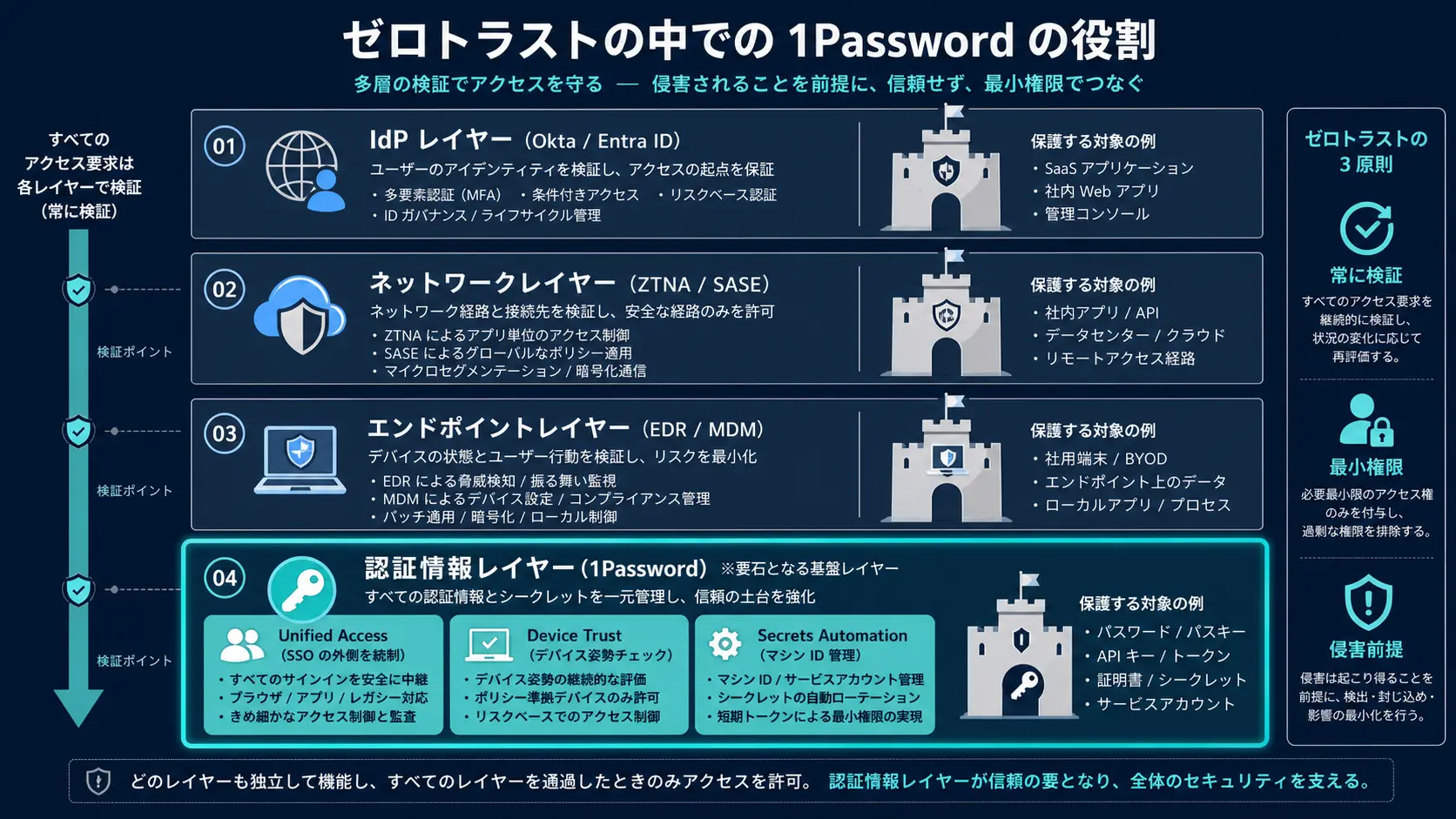
Zero Trust is never one product. An IdP (Okta, Microsoft Entra ID), the network (ZTNA/SASE), endpoints (EDR/MDM), and the credential layer combine into a single posture.
1Password takes the credentials and secrets layer, then extends into device posture verification via Device Trust and non-SSO app governance via Unified Access. As of 2026, 1Password positions itself not as a mere password manager but as an Extended Access Management (XAM) platform.
For context, the announcement: 1Password introduced Unified Access to apply Zero Trust governance to every login — not just those behind SSO — with discovery of shared and sensitive accounts outside SSO, contextual just-in-time access, instant credential rotation or revocation, and a single employee portal for all apps.
The Post-Login and Non-SSO Gaps SSO Cannot Close
Most companies take SSO (SAML/OIDC) as their first Zero Trust step, consolidating logins into one path and enforcing MFA and conditional access at the IdP. That is the right foundation, but SSO alone does not complete Zero Trust.
Three Areas SSO Leaves Exposed
SSO governs sign-ins to apps connected to SSO, but it does not cover the following.
- The long tail of SaaS without SSO: smaller-vendor tools and legacy services often lack SAML/SCIM, leaving direct ID/password logins in place.
- Shared accounts and developer secrets: accounts a team shares, and API keys or tokens developers keep locally, sit outside SSO's control.
- In-session behavior after sign-in: SSO verifies the moment of login, but it does not watch a session that keeps accessing sensitive data from an unmanaged device.
In other words, SSO is an excellent lock for the front door, yet it cannot seal the back doors and spare keys — non-SSO apps, shared accounts, and local secrets. That blind spot directly contradicts Zero Trust's verify-explicitly and least-privilege goals.
In practice, the long tail is where most real incidents start. Auditors and security teams routinely find that the riskiest credentials are not the ones behind SSO at all, but the spreadsheet of shared logins, the legacy admin panel without SAML, and the personal access tokens scattered across developer laptops. A Zero Trust program that stops at SSO declares victory while leaving its softest targets untouched.
Unified Access Closes "SSO + Beyond"
The Unified Access product 1Password made generally available in March 2026 is the Extended Access Management feature built to close that blind spot. It applies Zero Trust governance to every login, not only the ones riding on SSO. According to 1Password's announcement, its capabilities map out as follows.
| Control surface | SSO only | With Unified Access |
|---|---|---|
| Logins to SSO-connected apps | Yes | Yes |
| One-click offboarding of all access | Yes | Yes |
| Discovery of shared/sensitive accounts outside SSO | No | Yes |
| Contextual just-in-time access | Partial | Yes |
| Instant credential rotation/revocation | No | Yes |
| Single employee portal for all apps | Partial | Yes |
This "SSO + beyond" approach is a recurring theme in Zero Trust rollouts. Unsanctioned generative AI usage (Shadow AI) lives in the same non-SSO territory, so reading this alongside building Shadow AI governance with 1Password Business gives you the full picture of how to govern what sits outside SSO.
Verifying Device Posture With Device Trust (Formerly Kolide)
Zero Trust's verify-explicitly principle extends past the user to the device. No matter how strong the authentication, allowing access from a malware-infected machine or an unencrypted personal laptop violates the assume-breach principle.
1Password Device Trust integrates the Kolide technology it acquired to verify device health before granting access.
What Device Posture Checks Cover
Device Trust inspects posture early in the login flow.
- OS and patch state: detects endpoints with unaddressed critical vulnerabilities.
- Disk encryption: blocks machines where disk encryption (such as FileVault or BitLocker) is disabled.
- Screen lock and management status: confirms the device locks on a timeout and is under MDM.
- Early blocking of unmanaged devices: stops endpoints the company does not know about before they reach a resource.
What makes it distinctive is the design philosophy: rather than starting with a hard lockdown, it favors visibility, then clear rules, then employee self-remediation. That inherits Kolide's original "visibility and hygiene before lockdown" stance. Because employees fix issues themselves, you cut IT tickets while still enforcing least privilege.
Translation note for the quoted post: 1Password Device Trust (formerly Kolide) checks device health, compliance, and management status before granting access, and emphasizes visibility, clear rules, and developer-friendly security hygiene rather than starting from a strict lockdown (@frank_be).
Pre-Login Blocking via the Zscaler Integration
Device Trust also pays off when paired with ZTNA products. The Zscaler integration, for example, enforces Zero Trust policy so that only known, healthy devices running Zscaler can reach resources, blocking risky devices pre-login with minimal user friction.
Because the device layer and the credential layer live inside the same 1Password framework, you can verify who is accessing what from which device without fragmenting the controls — the core benefit of Extended Access Management.
Layering Verification With Passkeys, MFA, and Secrets Automation
Zero Trust has to enforce verify-explicitly both at the entrance (authentication) and on the inside (secret usage). 1Password covers both ends.
Raising Phishing Resistance With Passkeys and MFA
1Password stores and syncs passkeys (FIDO2/WebAuthn) natively, letting you run phishing-resistant passwordless authentication alongside passwords and MFA. In Zero Trust terms, stacking strong identity proofing (passkeys), device verification (Device Trust), and non-SSO governance (Unified Access) yields multi-layer verification that a single factor cannot break.
That said, not every service supports passkeys — adoption depends on the destination site. Roll them out progressively, starting with services that already support them. The passkey-plus-Watchtower defense design is covered in depth in 1Password AI phishing defense.
Extending Least Privilege to Machine Identities With Secrets Automation
Zero Trust's least-privilege principle applies to machine identities too — CI/CD pipelines and AI agents, not just humans. Embedding API keys in code or a plaintext .env runs directly counter to the assume-breach principle.
With 1Password Secrets Automation, applications and agents hold only an op://vault/item/field reference and resolve the real value just before execution. Just-in-time delivery that keeps secrets out of prompts, logs, and repositories enforces least privilege on the machine side as well. For the concrete CI and MCP server implementations, 1Password Secrets Automation in CI walks through the steps.
A Phased Rollout Roadmap
When you build Zero Trust authentication on 1Password, the standard play is to stack from the foundation up rather than flipping on every feature at once. Here is the implementation order from an IT lead's point of view.
Steps 1 Through 6
- Complete the SSO connection: SAML-connect Okta, Microsoft Entra ID, or Google Workspace and consolidate logins onto one path.
- Enable SCIM provisioning: automatically grant and revoke vault permissions on joins, moves, and leaves, and cut off departed employees instantly.
- Organize shared vaults and permissions: split vaults by department or project and scope access with least privilege.
- Introduce Device Trust posture checks: verify OS patch level, disk encryption, and management status, block unmanaged devices pre-login, and prompt self-remediation.
- Drive passkey/MFA migration: enable passkeys service by service, starting with supported ones, to raise phishing resistance.
- Govern non-SSO and machine identities with Secrets Automation: move CI/CD and AI agent secrets to just-in-time delivery to cover the SSO long tail and the machine side.
If you want to go deeper on safely handing secrets to AI agents, AI agent secrets management lays out practical patterns using Service Accounts and MCP.
Rough Initial Cost by Headcount
The foundation for a Zero Trust rollout, 1Password Business, is the business plan that includes SSO/SCIM. Monthly estimates by headcount:
| Headcount | Recommended plan | Monthly (USD) | Monthly (JPY approx.) |
|---|---|---|---|
| Up to 10 | Teams Starter Pack | $19.95 flat | ~¥3,000 |
| 10–50 | Business | $7.99 × users | ~¥1,200 × users |
| 50–200 | Business | $7.99 × users | ~¥1,200 × users |
| 200+ | Enterprise | Contact sales | Contact sales |
At 50 employees the base cost is $399.50/month (¥60,000); at 200, $1,598 (¥240,000). Extended Access Management features like Device Trust and Unified Access are packaged separately, so confirm the latest combination and pricing with 1Password. For per-headcount break-even, 1Password Business pricing 2026 models the 5-, 20-, 50-, and 150-user cases.
Summary: Anchor the Zero Trust Credential Layer on 1Password
1Password owns the most-targeted layer in Zero Trust — credentials and secrets — under the verify-explicitly, least-privilege, assume-breach model. It closes the post-login and non-SSO gaps SSO leaves open by combining Unified Access, Device Trust, passkeys/MFA, and Secrets Automation.
- Zero Trust is the sum of the IdP, network, endpoint, and credential layers; 1Password owns the credential layer.
- SSO is the foundation but cannot protect non-SSO apps, shared accounts, or local secrets — Unified Access fills that in.
- Device Trust (formerly Kolide) verifies device posture and enforces least privilege through visibility and self-remediation.
- Passkeys/MFA work at the entrance; Secrets Automation enforces verify-explicitly and least privilege on the machine side.
- Roll out in order: SSO, then SCIM, Device Trust, passkeys, and Secrets Automation.
Because Zero Trust is never complete with a single product, the 2026 reality is to anchor the credential layer on 1Password and design it to combine with IdP- and network-side controls. Start where the leverage is highest — the credentials and the non-SSO long tail attackers actually exploit — then expand coverage outward as your IdP, network, and endpoint controls mature.
Information current as of 2026-05-31. Please check the official sites for the latest updates.
This article contains affiliate links.
Frequently asked questions
Related articles
Shadow AI Governance With 1Password Business 2026: SSO/SCIM + Unified Access
1Password Secrets Automation in CI 2026 — Service Accounts, Connect, and the New MCP Server