Scrapy x Bright Data Integration Guide 2026: Proxy Setup, Zone Selection, and Large-Scale Crawling
Integrate Bright Data into a Scrapy project: settings.py proxy config, custom DownloaderMiddleware, Residential vs Datacenter zones, IP rotation, and Web Unlocker. Working code and cost design included.

This article contains affiliate links (advertising).
Scrapy is a powerful crawling framework, but run it at scale on its own and you will hit a wall of IP bans, CAPTCHAs, and rate limits. This guide shows how to integrate Bright Data into a Scrapy project to clear those walls. We move step by step from the settings.py proxy config to a custom DownloaderMiddleware, Residential vs Datacenter zone selection, IP rotation, Web Unlocker, and large-scale parallel crawling, with minimal working code and cost design at each stage.
Scrapy's Limits and What Bright Data Solves
Scrapy is a Twisted-based async crawler that handles thousands of concurrent fetches in a single process. But from the target server's point of view, it looks like a flood of requests from one IP in a short window, which is the direct trigger for an IP ban.
Three Walls When You Run Scrapy As-Is
- IP bans: continuous requests from one IP hit rate limits, and 403 / 429 responses start coming back
- CAPTCHA / anti-bot: defense layers like Cloudflare, DataDome, and PerimeterX intervene and return a challenge page instead of HTML
- Geo-blocking: you want regional pricing or stock, but the origin country is fixed and the target content never appears
You cannot fix these at the root with Scrapy's DOWNLOAD_DELAY or AUTOTHROTTLE alone. Those settings only slow a single IP down; they do nothing about the fact that every request still originates from the same address and the same geography. To clear the walls you have to distribute and control the origin IP itself, and that is exactly the layer a proxy network supplies.
The Layer Bright Data Adds
Bright Data provides a Residential network of 400M+ IPs across 195 countries plus Datacenter Proxy, Web Unlocker, Scraping Browser, and SERP API as one data-collection stack. Scrapy owns the application layer (which URLs to follow and how), and Bright Data owns the infrastructure layer (which IP to appear from and how).
| Scrapy-only wall | Bright Data's fix |
|---|---|
| IP bans / 403, 429 | Distribute and rotate IPs via Residential / Datacenter proxies |
| CAPTCHA / anti-bot | Web Unlocker auto-bypasses CAPTCHA, Cloudflare, etc. |
| Missing JavaScript rendering | Scraping Browser (CDP) renders in a real browser |
| Geo-blocking | Zone params like country-jp get region-locked IPs |
If you want a cross-framework view of integration patterns, our Bright Data x Playwright Integration Guide 2026 covers the setup for JavaScript-heavy sites, so pick the right tool for your target's nature.
Wiring the Proxy via settings.py and DownloaderMiddleware
The first step is routing every Scrapy request through a Bright Data proxy. A minimal setup works with just a settings.py addition, but for production you consolidate into a custom DownloaderMiddleware.
Minimal: Authenticated Proxy in settings.py
The fastest setup reads Bright Data's authenticated proxy URL from an environment variable and feeds it to HttpProxyMiddleware.
# settings.py
import os

# Username in brd-customer-<id>-zone-<zone> format + Zone password
BRIGHTDATA_USER = os.environ["BRD_USER"]      # e.g. brd-customer-xxx-zone-residential_jp
BRIGHTDATA_PASS = os.environ["BRD_PASS"]
BRIGHTDATA_HOST = "brd.superproxy.io:33335"

HTTPPROXY_ENABLED = True

CONCURRENT_REQUESTS = 16
DOWNLOAD_DELAY = 0.5
AUTOTHROTTLE_ENABLED = True
AUTOTHROTTLE_TARGET_CONCURRENCY = 4
RETRY_ENABLED = True
RETRY_TIMES = 3
ROBOTSTXT_OBEY = True
In the spider, pass the credentialed URL through request.meta['proxy'].
proxy = f"http://{BRIGHTDATA_USER}:{BRIGHTDATA_PASS}@{BRIGHTDATA_HOST}"
yield scrapy.Request(url, meta={"proxy": proxy}, callback=self.parse)
This is fine for a PoC or lightly protected sites. It reaches its limit the moment you want to change zones or session control per request. Because the proxy URL is fixed in settings, every spider shares one zone and one session policy, and there is no clean place to add failover when a particular IP starts returning challenges. That is the signal to move the logic into a middleware you own.
Production: Custom DownloaderMiddleware
To manage zone selection, country targeting, and sticky sessions in one place, consolidate into custom middleware.
# middlewares.py
import os
import uuid
from scrapy.exceptions import NotConfigured


class BrightDataProxyMiddleware:
    def __init__(self, user, password, host):
        self.user = user
        self.password = password
        self.host = host

    @classmethod
    def from_crawler(cls, crawler):
        user = crawler.settings.get("BRIGHTDATA_USER")
        password = crawler.settings.get("BRIGHTDATA_PASS")
        host = crawler.settings.get("BRIGHTDATA_HOST")
        if not user or not password:
            raise NotConfigured
        return cls(user, password, host)

    def process_request(self, request, spider):
        # Allow request.meta to override country and session
        country = request.meta.get("brd_country", "jp")
        session = request.meta.get("brd_session", uuid.uuid4().hex[:10])
        username = f"{self.user}-country-{country}-session-{session}"
        request.meta["proxy"] = f"http://{username}:{self.password}@{self.host}"
        request.headers.setdefault(
            "User-Agent",
            "Mozilla/5.0 (Macintosh; Intel Mac OS X 10_15_7) "
            "AppleWebKit/537.36 (KHTML, like Gecko) Chrome/134.0.0.0 Safari/537.36",
        )
        return None
Disable the stock proxy middleware in settings.py and slot in your own.
DOWNLOADER_MIDDLEWARES = {
    "yourproject.middlewares.BrightDataProxyMiddleware": 543,
    "scrapy.downloadermiddlewares.httpproxy.HttpProxyMiddleware": None,
}
Three things matter here.
request.meta["brd_country"]switches the country per target domain- Fixing
session-<id>keeps the same IP, useful for logins and pagination - Filling the User-Agent in the middleware keeps spider code lean
Centralizing this also means your spiders stay focused on parsing logic. When the proxy host, credential format, or default country changes, you edit one file instead of hunting through every spider. That single-source-of-truth design pays off the most once you are running more than a handful of crawlers in parallel.

Zone Selection and IP Rotation Design
In a Bright Data integration, zone choice and rotation strategy drive both cost and success rate more than anything else. Get this sloppy and you swing toward either a ballooning bill or a rising block rate.
Residential or Datacenter
Zones split broadly into Residential (home IPs) and Datacenter (data-center IPs).
| Dimension | Residential | Datacenter |
|---|---|---|
| Pricing (2026) | from $4/GB (~¥640) | $0.4-0.6/GB (~¥64-96) |
| Detection resistance | High | Lower |
| Speed | Medium | Fast |
| Best for | Large e-commerce, social, strict sites | Public APIs, loose static sites, bulk |
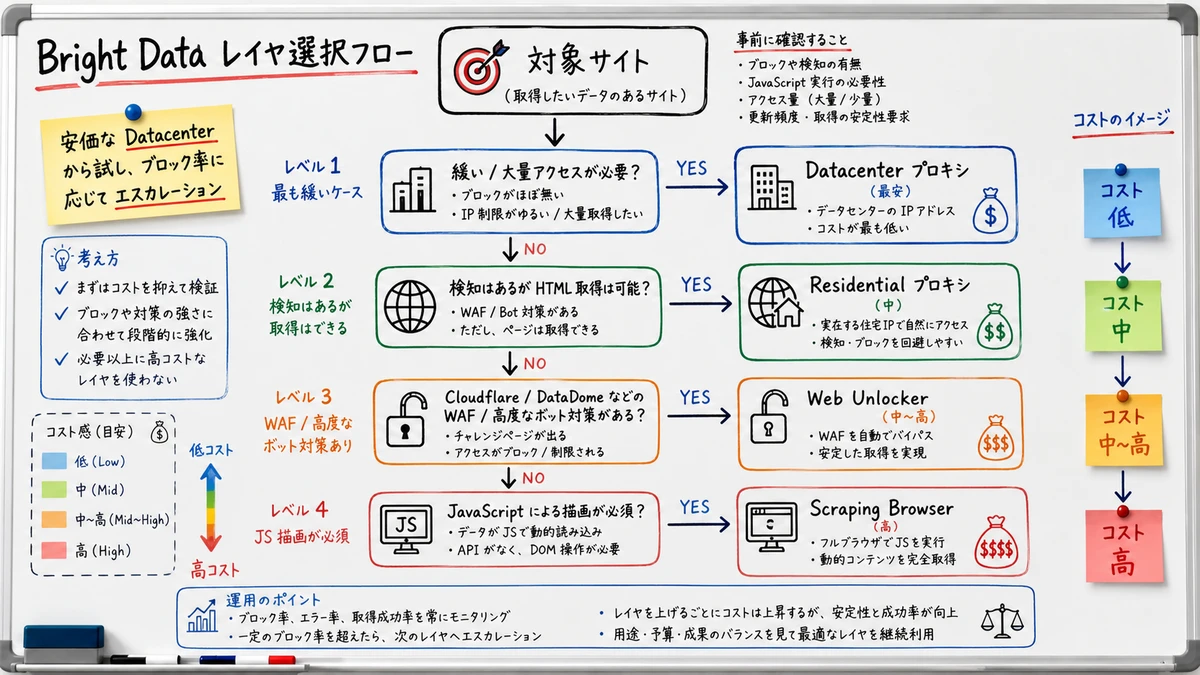
In production, the standard move is to start on Datacenter and promote to Residential when 403 / 429 responses or challenges rise. With a several-fold (~6-7x) price gap, going all-Residential from the start is wasteful: you would be paying premium rates on the many targets that a cheap data-center IP handles perfectly well.
The practical workflow is to benchmark each target domain individually, measure its block rate on Datacenter over a short trial run, and only escalate the domains that actually need it. That keeps the expensive Residential traffic scoped to the sites that justify it. For the concurrency, bandwidth, and cost trade-offs of Datacenter zones, see our Bright Data Datacenter Proxy design guide for 2026.
Routing Zones from Scrapy
Switching zones is just a matter of swapping the zone portion of the username your middleware reads. The clearest design uses a different zone per spider.
class PriceSpider(scrapy.Spider):
    name = "price"
    custom_settings = {
        # Strict e-commerce uses a Residential zone
        "BRIGHTDATA_USER": "brd-customer-xxx-zone-residential_jp",
    }


class ApiSpider(scrapy.Spider):
    name = "public_api"
    custom_settings = {
        # Public APIs use a cheaper Datacenter zone
        "BRIGHTDATA_USER": "brd-customer-xxx-zone-datacenter_jp",
    }
Two IP Rotation Patterns
- Per-request rotation: generate a fresh
session-<id>every time. Good for pagination and independent listing fetches - Sticky session: keep the same
session-<id>. Required for post-login flows, carts, and multi-step sequences
The maximum session lifetime is set in the Bright Data zone config and the IP rotates after an idle window (on the order of a few minutes, depending on product and settings), so for long flows, build retry-and-relogin paths assuming the IP will rotate. A practical rule of thumb: use per-request rotation as the default, and reach for sticky sessions only where state on the server side (a logged-in session, a cart, a multi-page wizard) genuinely requires the same IP. Sticky sessions consume IPs less efficiently, so treating them as the exception rather than the norm keeps both your block rate and your bill in check.
A practitioner note that once you wire proxy rotation and retries into Scrapy, crawls that fail at a given scale on their own start running reliably. (Original is an English implementation-sharing post.)
Combining Web Unlocker and Scraping Browser
When you hit sites that proxies alone cannot crack, layer Bright Data's higher tiers onto Scrapy. Escalating per domain from plain proxy to Web Unlocker to Scraping Browser keeps the cost-to-success-rate balance favorable.
Web Unlocker (Auto Anti-Bot Bypass)
Bright Data Web Unlocker is an API that auto-bypasses CAPTCHA, Cloudflare, DataDome, and more. From Scrapy, the lowest-effort approach is routing only the target domains through the Web Unlocker proxy endpoint.
def process_request(self, request, spider):
    if request.meta.get("use_unlocker"):
        # Switch to the Web Unlocker zone endpoint
        user = "brd-customer-xxx-zone-web_unlocker"
        request.meta["proxy"] = f"http://{user}:{self.password}@{self.host}"
    return None
Web Unlocker bills only on successful requests (from $1.5 per 1,000 successful requests, down to $1 on monthly tiers), so scoping it to the hardest sites keeps it cost-efficient. The billing model matters here: because you pay per successful unlock rather than per GB, the right pattern is to let plain proxies handle the bulk of traffic and fall back to Web Unlocker only when a domain returns a challenge. Wiring that fallback into the same middleware, gated by a request.meta flag, means a single retry can switch a blocked request onto the unlocker without touching spider code.
For per-challenge-type handling and tips on raising success rates, see our Bright Data Web Unlocker practical guide for 2026.
Scraping Browser (JavaScript Rendering)
For JS-rendered SPAs or sites that require real browser behavior, use Scraping Browser. Scrapy cannot execute JS alone, so the standard setup connects to the Bright Data Scraping Browser via CDP through scrapy-playwright.
# settings.py
DOWNLOAD_HANDLERS = {
    "https": "scrapy_playwright.handler.ScrapyPlaywrightDownloadHandler",
}
PLAYWRIGHT_CDP_URL = "wss://USER:PASS@brd.superproxy.io:9222"
This leaves fingerprint control and automatic CAPTCHA solving entirely on Bright Data's side while you keep your Scrapy spider code, pipelines, and item definitions. The advantage is that you do not have to maintain a separate browser-automation codebase: the same parse callbacks, item loaders, and export pipelines you already wrote keep working, and only the download handler changes. Because Scraping Browser is the most expensive layer, reserve it for the subset of domains that truly need a rendered DOM, and let the proxy zones carry everything else.
For the cost design of Scraping Browser, see our Bright Data Scraping Browser practical guide for 2026.
Three-Layer Cheat Sheet
| Target site nature | Recommended layer | Cost level |
|---|---|---|
| Loose structure, bulk fetch | Datacenter proxy | Lowest |
| Detection present, HTML available | Residential proxy | Medium |
| Protected by Cloudflare / DataDome | Web Unlocker | Medium-High |
| JavaScript rendering required | Scraping Browser | High |
Retries, Error Handling, and Large-Scale Crawling
Even with Bright Data in the path, scraping is a failure-prone process. How you catch failures, retry, and parallelize decides production stability.
Retry Design by Status Code
On top of Scrapy's stock RetryMiddleware, design smarter handling for proxy-origin errors.
- 403 / 429 (block, rate limit): rotate the
session-<id>and retry on a different IP - 407 (proxy auth error): a username format or Zone password bug. Do not retry; detect and stop immediately
- 5xx / timeout: retry 3-5 times with exponential backoff plus jitter
# settings.py
RETRY_HTTP_CODES = [403, 429, 500, 502, 503, 504, 522, 524]
RETRY_TIMES = 4
Rotating the session ID on each retry lets you avoid blocked IPs, because the next attempt comes from a fresh address rather than the one that just got challenged. The key distinction is treating 407 differently from 403 and 429: a 407 is a configuration bug that retries will never resolve, so failing fast there saves both time and proxy spend, while 403 and 429 are transient block signals that a new IP usually clears.
For implementation patterns of exponential backoff, jitter, and circuit breakers, our Bright Data retry strategy and rate limit design guide for 2026 covers the concrete code.
Tuning Large-Scale Parallel Crawls
At the scale of hundreds of thousands of URLs, you have to watch both Scrapy's concurrency and Bright Data's bandwidth and concurrent connections. The two limits interact: pushing Scrapy concurrency higher than the proxy zone can sustain just trades local throughput for a wave of timeouts and retries, which inflates both bandwidth and cost. Tune them together, and let AutoThrottle find the sustainable ceiling rather than hard-coding an aggressive number.
- Control concurrency with
CONCURRENT_REQUESTSandCONCURRENT_REQUESTS_PER_DOMAIN - Let
AUTOTHROTTLE_ENABLEDauto-adjust to server load - Skip images and CSS (Scrapy is easy to keep HTML-only) to save GB
- Persist failed URLs to a queue like SQS or Redis and re-inject them in a separate batch
A point that in large-scale crawls, proxy quality and retry design map directly onto success rate. (Original is an English post on scraping operations.)
Finishing It as a Real Pipeline
A Scrapy x Bright Data setup is plenty for standing up a PoC fast. But production means finishing it as a data-collection pipeline: per-zone cost monitoring, a re-injection queue for failed URLs, and normalization and loading of collected data into Snowflake or BigQuery.
We run Tra-bell, a hotel price tracker, on Bright Data Residential and Web Unlocker. We have moved the same stack through every stage from PoC to production, including parallel crawling with Scrapy and Playwright, zone design, error handling, and the Snowflake load. If you need a hand moving an existing Scrapy project onto Bright Data (proxy adoption, or Web Unlocker / Scraping Browser migration), we can help.
Wrap-Up
Integrating Bright Data into Scrapy clears the IP-ban, CAPTCHA, and geo-block walls of Scrapy-on-its-own at the infrastructure layer. Build it up in stages: authenticated proxy in settings.py, then a custom DownloaderMiddleware, zone selection, IP rotation, Web Unlocker / Scraping Browser, and finally retry design. Run your PoC on the cheap Datacenter zone first, then promote to Residential or Web Unlocker as the block rate demands. That keeps the cost-to-success-rate balance realistic. The code snippets above are production-grade enough to fork, so try them on your own Scrapy project.
Information current as of 2026-06-01. Please check the official sites for the latest updates.
This article contains affiliate links.
Frequently asked questions
Related articles

Bright Data x Playwright Integration Guide 2026: From Proxy Setup to Scraping Implementation
Bright Data Web Unlocker Practical Guide 2026: CAPTCHA Bypass and Cost Design